

調査目的
最近マネージドサービスであるSageMaker AIを使うことが出てきたため、調査をしてみた
SageMakerについて
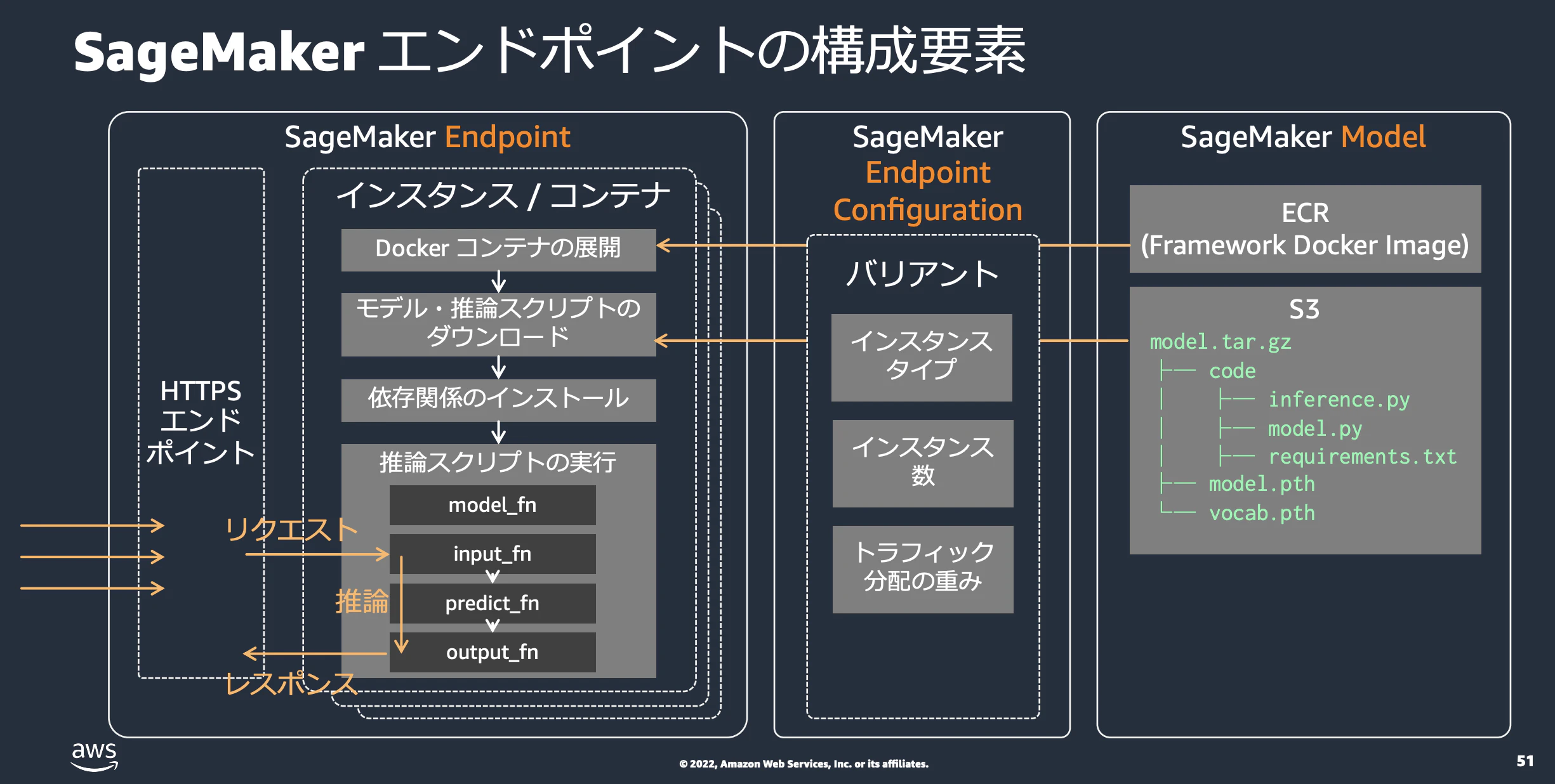
SageMakerを構築するうえで必要なリソースは以下の3つ
- SageMaker Endpoint: 実際にリクエストを処理するインスタンス + ALB等のリソース
- SageMaker Endpoint Configuration: SageMaker Endpointを構成するうえでの設定リソース
- SageMaker Model: SageMakerで利用するモデル
なので基本的にSageMaker Endpointというリソースがコンテナ起動やALBなども含めてリソースを作ってくれる
SageMakerの推論オプション
SageMakerは様々な推論オプションがある
- バッチ変換
- リアルタイム推論
- 非同期推論
- サーバーレス推論
調査対象
- モデルのアップロード
- コンテナイメージ
- 自動スケール
- カナリアリリースができるか
- リリース方法
- コスト
モデルアップロード
s3にモデルの圧縮ファイルをアップロードしてModelDataUrlを指定する感じ。
  TritonSageMakerModel:
      Type: AWS::SageMaker::Model
      Properties:
        ExecutionRoleArn: !GetAtt SageMakerExecutionRole.Arn
        ModelName: !Sub "model-${AWS::Region}"
        PrimaryContainer:
          Image: "111111111.dkr.ecr.ap-northeast-1.amazonaws.com/sagemaker-tritonserver:22.09-py3"
          ModelDataUrl: !Sub "s3://test-model/artifacts/model_6.tar.gz"
ただマルチモデルもサポートしているようなので複数モデルをアップロードも出来る(コストとの兼ね合いかも…?)
コンテナイメージ
Triton Inference Serverを使いたい場合、AWSのECR側が用意してくれている。
これはデフォルトでCloudWatchアラームを有効化してくれている。
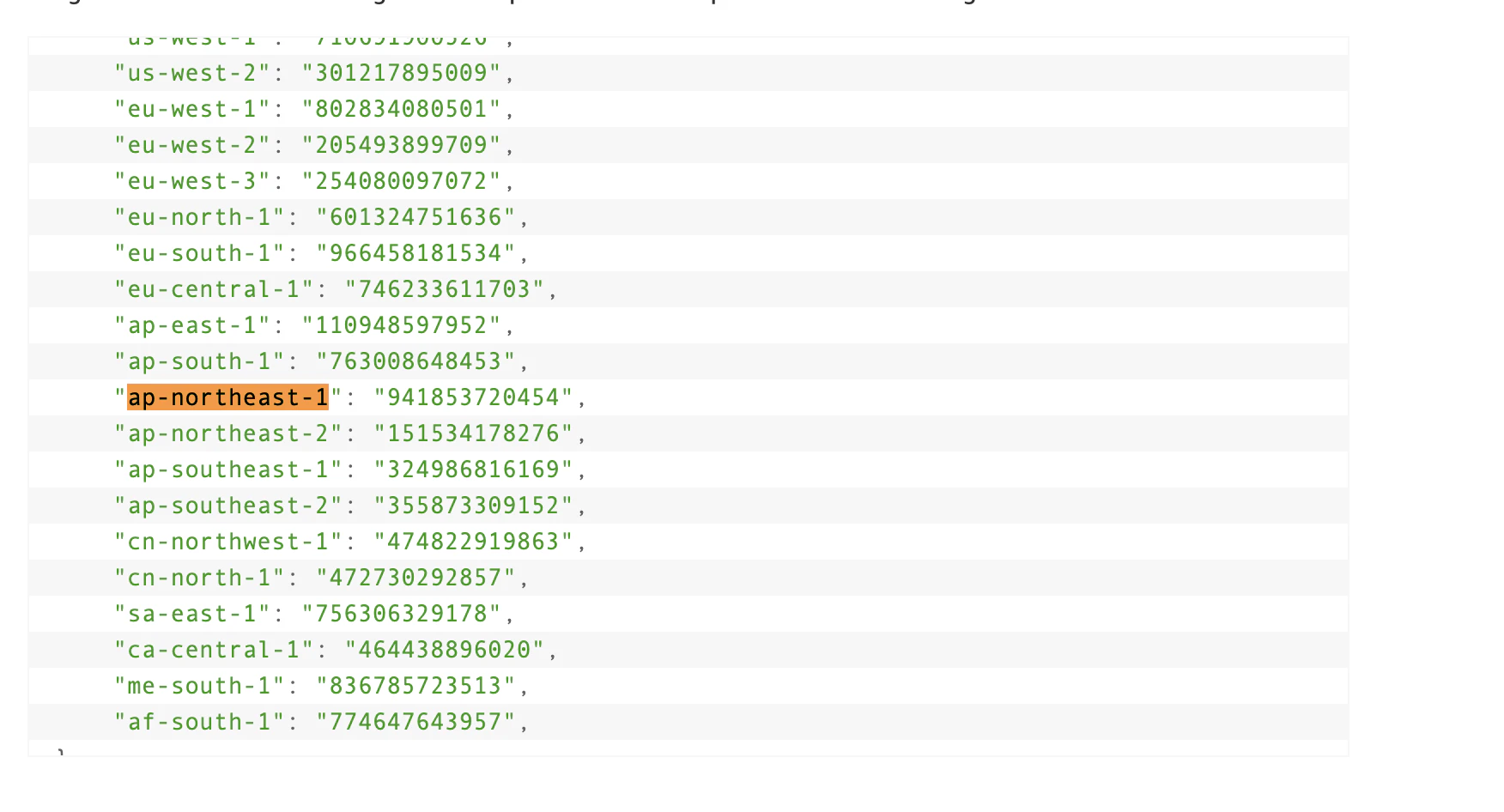
ちなみに自アカウントにimageを持ってきたい場合だと以下の手順になる
もうちょっと良いやり方があれば知りたい
$ aws ecr get-login-password --region ap-northeast-1 | docker login --username AWS --password-stdin 941853720454.dkr.ecr.ap-northeast-1.amazonaws.com

$ docker pull 941853720454.dkr.ecr.ap-northeast-1.amazonaws.com/sagemaker-tritonserver:22.09-py3

$ docker tag 941853720454.dkr.ecr.ap-northeast-1.amazonaws.com/sagemaker-tritonserver:22.09-py3 717397055837.dkr.ecr.ap-northeast-1.amazonaws.com/sagemaker-tritonserver:22.09-py3

$ docker push 111111111.dkr.ecr.ap-northeast-1.amazonaws.com/sagemaker-tritonserver:22.09-py3
ちなみに、AWS公式のやつはamdイメージしかないため、armイメージを作りたい場合は自分で作る必要がある。
https://github.com/aws/deep-learning-containers/issues/3592
インスタンス指定
以下のInstanceTypeから指定できる。GPUインスタンスも指定可能
  TritonEndpointConfig:
    Type: AWS::SageMaker::EndpointConfig
    Properties:
      EndpointConfigName: !Sub "triton-config-tokyo-${AWS::StackName}-6"
      ProductionVariants:
        - ModelName: !GetAtt TritonSageMakerModel.ModelName
          VariantName: AllTraffic
          InstanceType: ml.c5.xlarge
          InitialInstanceCount: 1
          InitialVariantWeight: 1.0
          ContainerStartupHealthCheckTimeoutInSeconds: 60
ちなみにProductionVariantsはホストするモデルごとに定義できるため、ここでモデルに応じたインスタンスの設定を定義できる。
スケール
どうやらSageMakerは自動スケールをサポートしているらしい
ドキュメントを読んだ感じだと、事前に定義したCloudWatchのメトリクスを元にスケールポリシーを定義できるらしい。
CFnの設定だと以下のイメージ
  Endpoint:
    Type: "AWS::SageMaker::Endpoint"
    Properties:
      EndpointName: yourEndpointName
      EndpointConfigName: yourEndpointConfigName

  ScalingTarget:
    Type: "AWS::ApplicationAutoScaling::ScalableTarget"
    Properties:
      MaxCapacity: 10
      MinCapacity: 2
      ResourceId: endpoint/my-endpoint/variant/my-variant
      RoleARN: arn
      ScalableDimension: sagemaker:variant:DesiredInstanceCount
      ServiceNamespace: sagemaker

  ScalingPolicy:
    Type: "AWS::ApplicationAutoScaling::ScalingPolicy"
    Properties:
      PolicyName: my-scaling-policy
      PolicyType: TargetTrackingScaling
      ScalingTargetId:
        Ref: ScalingTarget
      TargetTrackingScalingPolicyConfiguration:
        TargetValue: 70.0
        ScaleInCooldown: 600
        ScaleOutCooldown: 30
        PredefinedMetricSpecification:
          PredefinedMetricType: SageMakerVariantInvocationsPerInstance
リリース
RollingUpdateやBlueGreenDeploymentだけでなく、RollBackも対応している
  AutoRollbackConfiguration:
    AutoRollbackConfig
  BlueGreenUpdatePolicy:
    BlueGreenUpdatePolicy
  RollingUpdatePolicy:
    RollingUpdatePolicy
AutoRollback
RollBackはCloudWatch alarmsを見てレイテンシ悪化やエラーが増加したらロールバックする仕組み
BlueGreen
仕組み自体も弊社で使っているFlaggerと同じ感じ。Datadogの部分がCloudWatch alermsになる感じ
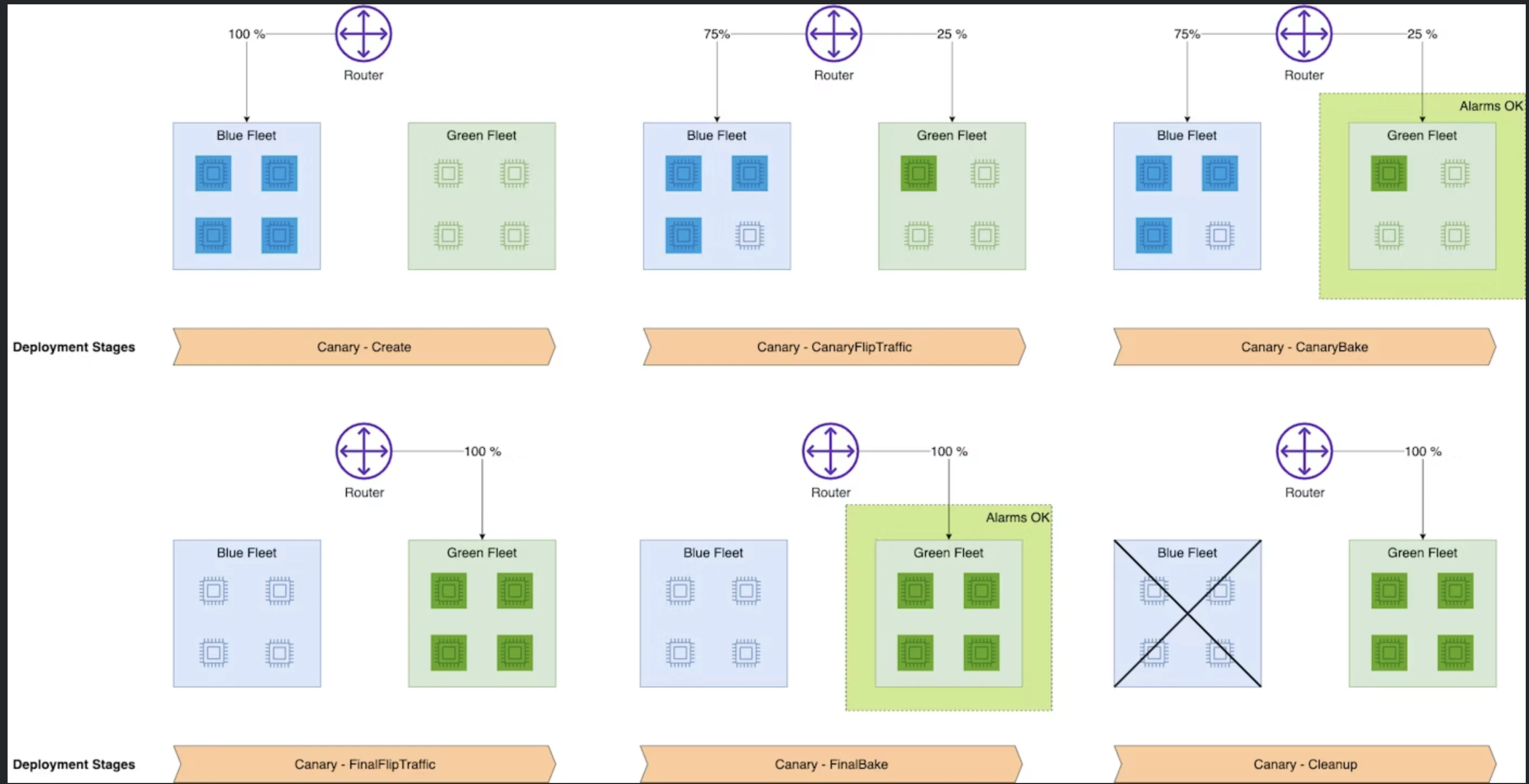
細かい設定もできそうなので、今度実際に動かしてみる。
監視・メトリクス
Datadogでメトリクスを取ることができる。
ただ、カナリアリリースをやる都合上CloudWatch Alermsを定義する必要はあるので
メトリクス監視: Datadog
アラート: CloudWatch Alerms
とかになるかも...?
コスト
リアルタイム推論の場合は、主に以下のコストがかかる
- インスタンス: モデルを常時稼働させるため
- ストレージ: モデルを格納するため
大きくかかるのはインスタンスであり、インスタンスによってコストは大きく異なる。(これはEC2のインスタンスと全く同じ)、EC2インスタンスに + サービス料が乗っている感じ。
https://aws.amazon.com/jp/sagemaker-ai/pricing/
注意点
SageMaker Model, SageMakerEndpointConfigは同一名だとエラーになる。なのでリリースするたびに毎回名前を変える必要があるらしい
CloudFormation cannot update a stack when a custom-named resource requires replacing. Rename triton-model-ap-northeast-1 and update the stack again.
どうやらuniqueな名前が必須であるため、ModelNameを定義するとCustom名となるため、毎回CFnをリリースするときは名前を変える必要がある。めんどくさい。
  TritonSageMakerModel:
      Type: AWS::SageMaker::Model
      Properties:
        ExecutionRoleArn: !GetAtt SageMakerExecutionRole.Arn
        ModelName: !Sub "model-${AWS::Region}-6"
        PrimaryContainer:
          Image: "11111111.dkr.ecr.ap-northeast-1.amazonaws.com/sagemaker-tritonserver:22.09-py3"
          ModelDataUrl: !Sub "s3://test-model/artifacts/model_6.tar.gz"
ただし、Custom名だけのようなので、CFn側で定義しなければ良さそう
参考文献