
はじめに
タイトルだけ見てさっそくやってみようと思ったのですが、WinUI3公式のTableViewがmainリポジトリにコミットされたという話。
※2026/09/30時点
対応しているWinApp SDK/NugetパッケージはPreview版も未リリースです。
メインブランチのビルドは断念したので、TableView-spec.mdでも見てみます。
※2026/10/29時点
動作確認できたので追記
XAMLの例
一見は、DataGridと変わりません。
namespaceはxmlns:tabular="using:Microsoft.UI.Xaml.Controls.Tabular"
sample.xaml
<tabular:TableView
    x:Name="PeopleTable"
    ItemsSource="{x:Bind People}"
    HeadersVisibility="Column"
    GridLinesVisibility="All"
    Density="Standard"
    IsReadOnly="True">
    <tabular:TableView.Columns>
        <tabular:TableViewTextColumn Header="Name" Binding="{Binding Name}" />
        <tabular:TableViewTextColumn Header="Role" Binding="{Binding Role}" />
        <tabular:TableViewTextColumn Header="Location"
          HeaderToolTip="Header Tool Tip"
          Binding="{Binding Location}"
          CellToolTipBinding="{Binding Notes}" />
    </tabular:TableView.Columns>
</tabular:TableView>
クラス
TableView
| プロパティ | タイプ | デフォルト | 説明 |
|---|---|---|---|
| ItemsSource | Object | null | ソースコレクション。 |
| Columns | IVector | 空のベクトル | 列の定義コレクション。これはContentsプロパティです。 |
| HeadersVisibility | TableViewHeadersVisibility | Column | 列ヘッダーの表示/非表示を制御します。 |
| GridLinesVisibility | TableViewGridLinesVisibility | All | 水平方向および垂直方向のグリッド線を制御します。 |
| Density | TableViewDensity | Standard | 行/セル間隔を制御します。 |
| RowBackground | Brush | null | 行の背景用ブラシ。 |
| AlternatingRowBackground | Brush | null | 交互行色の背景用ブラシ。(設定した場合、偶数行の背景色) |
| EmptyTemplate | DataTemplate | null | 行がない場合に表示されるテンプレート。 |
| IsReadOnly | Boolean | true | コントロール全体の編集を制御します。編集はオプトイン方式です。つまり、この設定が true の場合、列ごとの IsReadOnly 設定にかかわらず、ユーザーのジェスチャーによってエディタが開くことはありません。セルが開いている状態でこの設定を true にすると、その編集が閉じられます。 |
| IsEditing | Boolean | false | セルエディタが開いている間、対応する「コミット」または「キャンセル」による閉じ操作が行われるまでtrueです。読み取り専用です。 |
| SelectionMode | TableViewSelectionMode | Single | コントロール全体のゲート行の選択設定です。デフォルトでは選択が有効になっており、ItemsView、ListView、およびWPFのDataGridと一致しています。表示専用のテーブルにする場合は「None」に設定してください。この設定にすると、選択状態もすべてクリアされます。 |
| SelectedItem | Object | null | 選択されたデータ項目。読み取り専用 |
| SelectedIndex | Int32 | -1 | 選択された項目のItemsSourceインデックス空間におけるインデックス。-1「何も選択されていません」。読み取り専用 |
TableViewColumn
| プロパティ | タイプ | デフォルト | 説明 |
|---|---|---|---|
| Header | Object | null | 列のヘッダーコンテンツ。 |
| HeaderTemplate | DataTemplate | null | ヘッダーを表示するために使用されるテンプレート。 |
| HeaderTemplateSelector | DataTemplateSelector | null | ヘッダーを表示するために使用されるテンプレートセレクタ。HeaderTemplate両方が設定されている場合は、優先されます。 |
| Width | GridLength | デフォルトの列幅 | 前方互換性のため、Pixel/Auto/* (GridLength) を受け付けます。v1 では、明示的なピクセル幅のみが実装されており、「Auto」および「」はデフォルトの列幅にフォールバックします。真の「Auto」および「」によるサイズ設定は、今後の実装に先送りされています。 |
| MinWidth | Double | 20 | 最小列幅。 |
| MaxWidth | Double | 無限 | 最大列幅。 |
| ActualWidth | Double | 120 | 実際の幅。読み取り専用 |
| FrozenEdge | TableViewFrozenEdge | None | 列が連続した先頭プレフィックス内にある場合にのみピン留めされます。それ以降の Leading 列は無視されます。Trailing は予約済みです。 |
| Visibility | Visibility | Visible | 列の表示/非表示。 |
| IsReadOnly | Boolean | false | 列ごとの除外設定。読み取り専用の列は、キーボードによるナビゲーションにおいては有効な現在のセルとして扱われますが、編集することはできません。 |
| CellEditingTemplate | DataTemplate | null | どの列タイプでも、表示の編集が可能です。CellEditingTemplate も組み込みエディタも設定されていない列は、編集できません。 |
| CellToolTipBinding | Binding | null | セルごとのツールチップ(オプトイン)。バインディングは各行のデータ項目に対して評価され、その値がセルのツールチップの内容(文字列、またはToolTipで表示可能な任意のコンテンツ)となります。nullまたは空の文字列の場合、そのセルにはツールチップが表示されません。計算されたコンテンツにはIValueConverterを使用してください。これは DP ではなく CLR プロパティであるため、XAML は列に対してバインディングを評価するのではなく、Binding オブジェクトそのものを渡します(TableViewTextColumn.Binding と同じ形式です)。 |
| HeaderToolTip | Object | null | この列のヘッダー用のオプトイン型ツールチップ。この値はツールチップの内容(文字列、またはToolTipが保持できる任意の値)ですが、ToolTipそのものは指定できません。ToolTipとその配置はコントロールが管理するため、ToolTipの値が指定されると拒否され、ヘッダーにはツールチップが表示されません。nullまたは空の文字列を指定すると、ヘッダーのツールチップは表示されません。UIElementは当該ヘッダーのToolTipの子要素となるため、各列ごとに独自のインスタンスが必要です。これはバインディングではなく依存プロパティです。ヘッダーは行に対してバインドされていないため、遅延処理の対象となるものはありません。 |
TableViewTextColumn
テキスト形式
| プロパティ | タイプ | 説明 |
|---|---|---|
| Binding | Microsoft.UI.Xaml.Data.Binding | 生成されたセルのテキストをバインドするために使用されるCLRプロパティ。これは依存プロパティではありません。 |
TableViewTemplateColumn
テキスト形式以外。現状ではCombo/Radio/Check等はこちらで実装する必要がありそう。
| プロパティ | タイプ | 説明 |
|---|---|---|
| CellTemplate | DataTemplate | 各セルを表示するために使用されるテンプレート。nullの場合、生成されるセルは空になります。 |
TableViewRow
TableViewで生成された行を表します。
| プロパティ | タイプ | 説明 |
|---|---|---|
| IsSelected | Boolean | その行が選択されているかどうか。読み取り専用:選択操作は TableView が管理しているため、行が自分自身を選択することはできません。アプリ側では Select(Int32) / Deselect(Int32) / DeselectAll() を通じて操作を行います。行は再利用されるため、このプロパティは常に再導出されます。 |
列挙型
TableViewFrozenEdge
| 値 | 数値 | 説明 |
|---|---|---|
| None | 0 | 列は固定されていません。 |
| Leading | 1 | 列は先頭端に固定されています。v1で実装されました。 |
| Trailing | 2 | 将来的な末尾端の固定用に予約されています。 |
TableViewHeadersVisibility
| 値 | 数値 | 説明 |
|---|---|---|
| None | 0 | ヘッダーなし。 |
| Column | 1 | 列ヘッダー帯。 |
TableViewGridLinesVisibility
| 値 | 数値 | 説明 |
|---|---|---|
| All | 0 | 水平および垂直のグリッド線を表示する。 |
| Horizontal | 1 | 水平グリッド線を表示。 |
| None | 2 | グリッド線を表示しない。 |
| Vertical | 3 | 垂直グリッド線を表示。 |
TableViewDensity
| 値 | 数値 | 説明 |
|---|---|---|
| Compact | 0 | コンパクトな間隔。 |
| Standard | 1 | 標準的な間隔。 |
| 快適 | 2 | 快適な間隔。 |
TableViewSelectionMode
| 値 | 数値 | 説明 |
|---|---|---|
| なし | 0 | 選択機能は無効。表示専用のテーブル。 |
| Single | 1 | 最大1行が選択されます。デフォルトです。 |
TableViewEditAction
| 値 | 数値 | 説明 |
|---|---|---|
| Commit | 0 | 編集された値がソースに書き込まれています。 |
| Cancel | 1 | 編集がキャンセルされ、エディタが破棄されています。 |
単一選択後の延期(バージョン1のまま)
これらは後々の変更で追加的に提供されるものであり、v1の一部であって、目標ではないものではありません。
- 行選択:複数行/拡張行選択(Ctrl/Shiftキーを押しながら範囲選択)。単一行選択はこちらでご利用いただけます。
- 単一列のソートとフィルタリング。
- グループ分けと2段階階層構造。
- 列のサイズ変更と並べ替え。
目標以外の事項(v1の範囲外)
- DataGridを置き換えます。
- 注目のセレクション。
- 複数列ソート。
- カラム仮想化。
- 行ヘッダー。
- 階層構造は2レベル以上。行のドラッグ&ドロップが可能。
- スプレッドシートのような操作性。
- スプレッドシート規模の列数(100以上)—TableView行ごとに表示される列ごとに1つのセルを実現し、約5~50列を対象とします。
動作確認 ※2026/10/29追記
2026/10/29時点で対応しているWinApp SDK 2.5.4-experimental がリリースされていましたので、動作を確認してみます。
WinApp SDK 2.5.4-experimental を適用する
Project.csproj
<PackageReference Include="Microsoft.WindowsAppSDK" Version="2.5.4-experimental" />
TabularControlsResources を追加する
App.xaml
<Application.Resources>
    <ResourceDictionary>
        <ResourceDictionary.MergedDictionaries>
            <XamlControlsResources xmlns="using:Microsoft.UI.Xaml.Controls" />
            <TabularControlsResources xmlns="using:Microsoft.UI.Xaml.Controls.Tabular" />
        </ResourceDictionary.MergedDictionaries>
    </ResourceDictionary>
</Application.Resources>
XAMLを修正する
ネームスペースは xmlns:tabular="using:Microsoft.UI.Xaml.Controls.Tabular"
MainWindow.cs.xaml
<tabular:TableView
    Grid.Column="0"
    Grid.Row="1"
    Margin="0,0,0,8"
    ItemsSource="{x:Bind ViewModel.TeamResultsGroupByMatchDay}"
    GridLinesVisibility="None"
    Density="Compact"
    AlternatingRowBackground="#05FFFFFF"
    IsReadOnly="True"
    SelectionMode="Single">
    <tabular:TableView.Columns>
        <tabular:TableViewTextColumn
            FrozenEdge="Leading"
            Binding="{Binding Rank}"
            Header="Rank"
            Width="Auto" />
        <tabular:TableViewTextColumn
            FrozenEdge="Leading"
            Binding="{Binding Team.Name}"
            Header="Squad"
            Width="Auto" />
        <tabular:TableViewTextColumn
            Binding="{Binding TotalCount}"
            Header="MP"
            Width="Auto" />
        <tabular:TableViewTextColumn
            Binding="{Binding Points}"
            Header="Pt"
            Width="Auto" />
        <tabular:TableViewTextColumn
            Binding="{Binding WinCount}"
            Header="W"
            Width="Auto" />
        <tabular:TableViewTextColumn
            Binding="{Binding DrawCount}"
            Header="D"
            Width="Auto" />
        <tabular:TableViewTextColumn
            Binding="{Binding LoseCount}"
            Header="L"
            Width="Auto" />
        <tabular:TableViewTextColumn
            Binding="{Binding GoalsDiff}"
            Header="GD"
            Width="Auto" />
        <tabular:TableViewTextColumn
            Binding="{Binding GoalsFor}"
            Header="GF"
            Width="Auto" />
        <tabular:TableViewTextColumn
            Binding="{Binding GoalsAgainst}"
            Header="GA"
            Width="Auto" />
        <tabular:TableViewTextColumn
            Binding="{Binding PointsAverage}"
            Header="PpM"
            Width="Auto" />
        <tabular:TableViewTextColumn
            Binding="{Binding GoalsForAverage}"
            Header="GFpM"
            Width="Auto" />
        <tabular:TableViewTextColumn
            Binding="{Binding GoalsAgainstAverage}"
            Header="GApM"
            Width="Auto" />
        <tabular:TableViewTextColumn
            Binding="{Binding ExpectedPoints}"
            Header="Pt(Exp)"
            Width="Auto" />
        <tabular:TableViewTextColumn
            Binding="{Binding UpCommingOpponentPpM}"
            Header="PpM(Op)"
            Width="Auto" />
        <tabular:TableViewTemplateColumn
            Header="Results"
            Width="Auto">
            <tabular:TableViewTemplateColumn.CellTemplate>
                <DataTemplate
                    x:DataType="localModel:TeamResultBase">
                    <ItemsRepeater
                        Margin="5"
                        ItemsSource="{x:Bind Matches}"
                        ElementClearing="ItemsRepeater_ElementClearing"
                        ElementPrepared="ItemsRepeater_ElementPrepared">
                        <ItemsRepeater.ItemTemplate>
                            <DataTemplate
                                x:DataType="localView:TeamMatchViewModel">
                                <Ellipse
                                    Width="8"
                                    Height="8"
                                    Margin="0,5.5,3,5.5"
                                    Fill="{x:Bind localView:ResultToColorConverter.Convert(Result)}"
                                    Stroke="{x:Bind localView:ResultToColorConverter.Convert(Result)}"
                                    StrokeThickness="1"
                                    ToolTipService.ToolTip="{x:Bind Summary}">
                                </Ellipse>
                            </DataTemplate>
                        </ItemsRepeater.ItemTemplate>
                        <ItemsRepeater.Layout>
                            <StackLayout
                                Orientation="Horizontal" />
                        </ItemsRepeater.Layout>
                    </ItemsRepeater>
                </DataTemplate>
            </tabular:TableViewTemplateColumn.CellTemplate>
        </tabular:TableViewTemplateColumn>
    </tabular:TableView.Columns>
</tabular:TableView>
実行結果
単純なテーブルを表示することができました。
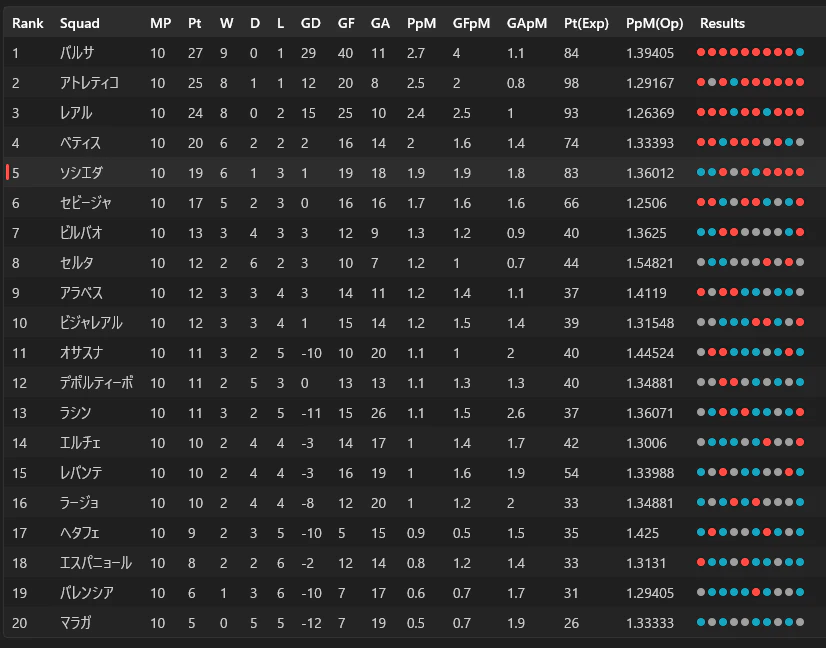
今のところ
- SelectionModeにMultipleがない
- WidthをAuto指定しないと固定長になる(
Grid.RowDefinitions="Auto,Auto,Auto,Auto,Auto"的なの欲しい) - テキストの右寄せするには
TableViewTemplateColumnにする必要がある - ソートのアイコンがヘッダー文字列と被ってしまう

などありますが、正式版では改善されることを願いましょう。
おわりに
現時点で、WinUI 3で同じことをやろうと思うなら
- 自作 (無謀)
- CommunityToolkitのDataGrid (Archived)
- w-ahmad/WinUI.TableView (DataGrid代替)