
概要
SpringのMCPサーバは、アノテーションを使用して簡単に書けるが、説明文には定数を指定する必要がある。
説明文が増えるとソースコード内では管理が大変であるため、今回は外部ファイル(.txt)から読みだして上書きする。
ツール説明文の上書き
今回は、Dynamic Tool Update Exampleのサンプルに修正を加えて、multiplyNumbersというツールの説明文を上書きする。Dynamic Tool Update Exampleの動かし方について以下の記事を参照。
実行結果
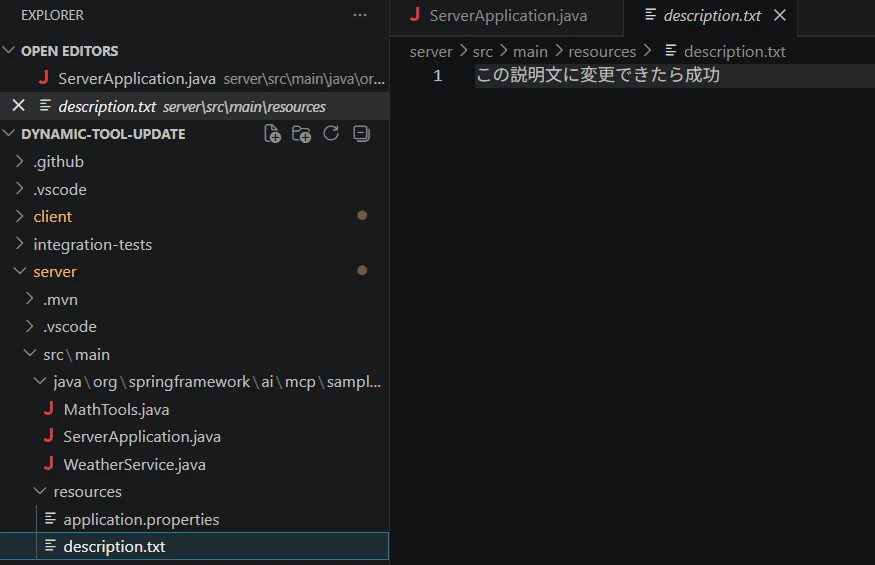
resources下のdescription.txtに上書き用のテキストを配置する。
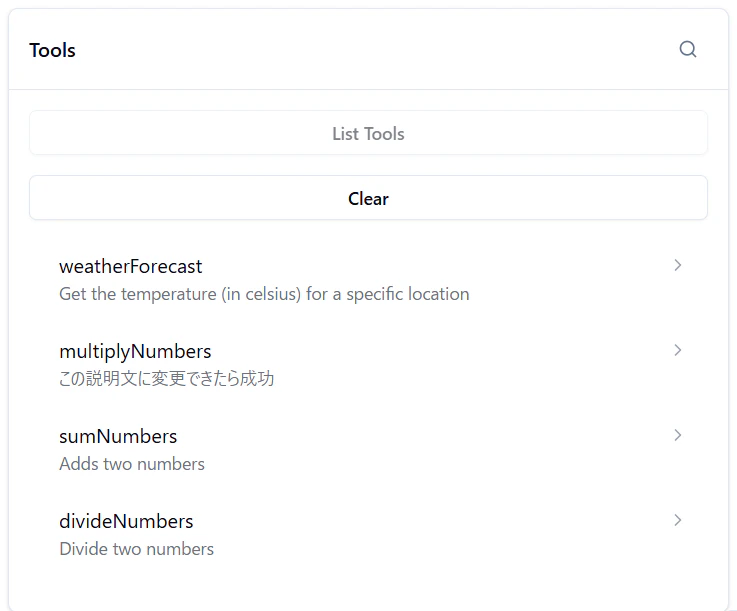
本来multiplyNumbersの説明文はこれだが、

description.txtの内容が反映される。
コード解説
MathToolsというツールの定義を書いたクラスからSyncToolSpecificationを生成。
multiplyNumbersツールの場合、descriptionのみを変更したSyncToolSpecificationを新たに作成して、McpSyncServerに登録する。
List<SyncToolSpecification> newTools = McpToolUtils
					.toSyncToolSpecifications(ToolCallbacks.from(new MathTools()));

			for (SyncToolSpecification newTool : newTools) {

				if (newTool.tool().name().equals("multiplyNumbers")) {
					McpSchema.Tool tool = newTool.tool();
					newTool = new SyncToolSpecification(
							new McpSchema.Tool(tool.name(), tool.title(), getDescrition(), tool.inputSchema(),
									tool.outputSchema(), tool.annotations(), tool.meta()),
							newTool.callHandler());
				}

				logger.info("Add new tool: " + newTool);
				mcpSyncServer.addTool(newTool);
			}
ソースコード(ServerApplication.java)
package org.springframework.ai.mcp.sample.server;

import java.io.BufferedReader;
import java.io.InputStream;
import java.io.InputStreamReader;
import java.nio.charset.StandardCharsets;
import java.util.List;
import java.util.concurrent.CountDownLatch;
import java.util.stream.Collectors;

import io.modelcontextprotocol.server.McpServerFeatures.SyncToolSpecification;
import io.modelcontextprotocol.spec.McpSchema;
import io.modelcontextprotocol.server.McpSyncServer;
import org.slf4j.Logger;
import org.slf4j.LoggerFactory;

import org.springframework.ai.mcp.McpToolUtils;
import org.springframework.ai.support.ToolCallbacks;
import org.springframework.ai.tool.ToolCallbackProvider;
import org.springframework.ai.tool.method.MethodToolCallbackProvider;
import org.springframework.boot.CommandLineRunner;
import org.springframework.boot.SpringApplication;
import org.springframework.boot.autoconfigure.SpringBootApplication;
import org.springframework.context.annotation.Bean;
import org.springframework.web.bind.annotation.GetMapping;
import org.springframework.web.bind.annotation.RestController;

@SpringBootApplication
@RestController
public class ServerApplication {

	private static final Logger logger = LoggerFactory.getLogger(ServerApplication.class);

	CountDownLatch latch = new CountDownLatch(1);

	public static void main(String[] args) {
		SpringApplication.run(ServerApplication.class, args);
	}

	@GetMapping("/updateTools")
	public String greeting() {
		latch.countDown();
		return "Update signal received!";
	}

	@Bean
	public ToolCallbackProvider weatherTools(WeatherService weatherService) {
		return MethodToolCallbackProvider.builder().toolObjects(weatherService).build();
	}

	@Bean
	public CommandLineRunner commandRunner(McpSyncServer mcpSyncServer) {

		return args -> {

			logger.info("Server: " + mcpSyncServer.getServerInfo());

			latch.await();

			List<SyncToolSpecification> newTools = McpToolUtils
					.toSyncToolSpecifications(ToolCallbacks.from(new MathTools()));

			for (SyncToolSpecification newTool : newTools) {

				if (newTool.tool().name().equals("multiplyNumbers")) {
					McpSchema.Tool tool = newTool.tool();
					newTool = new SyncToolSpecification(
							new McpSchema.Tool(tool.name(), tool.title(), getDescrition(), tool.inputSchema(),
									tool.outputSchema(), tool.annotations(), tool.meta()),
							newTool.callHandler());
				}

				logger.info("Add new tool: " + newTool);
				mcpSyncServer.addTool(newTool);
			}

			logger.info("Tools updated: ");
		};
	}

	private String getDescrition() {
		try {
			InputStream is = getClass().getClassLoader().getResourceAsStream("description.txt");
			if (is == null) {
				throw new RuntimeException("description.txt not found");
			}

			try (BufferedReader reader = new BufferedReader(
					new InputStreamReader(is, StandardCharsets.UTF_8))) {

				return reader.lines().collect(Collectors.joining("\n"));
			}

		} catch (Exception e) {
			throw new RuntimeException("Failed to read description.txt", e);
		}
	}

}