
概要
Streamable HTTPのMCPサーバにツールの引数以外で情報を渡す方法をひとつ紹介する。
何度も入力したくない、変更する頻度が少ない情報は、ヘッダーを介して渡すのも候補となると考える。
今回は、複数のクライアントがそれぞれの持つ認証情報でログインするというシチュエーションのMCPサーバを作成してみた。
今回のコードでできること(MCP Inspectorでの例)
①MCP Inspector上の「Authentication」の「JSON」をクリック

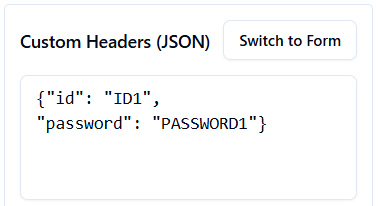
②「Custom Headers(JSON)」にidとpasswordを設定し、「Switch to Form」をクリック
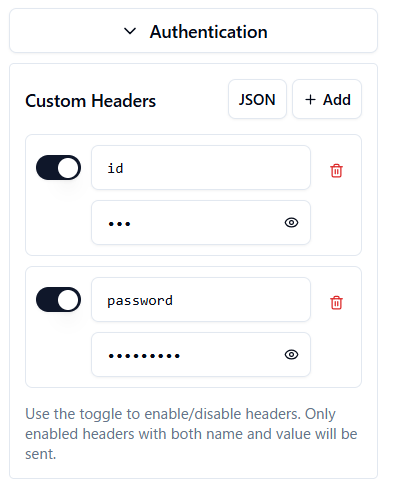
③「Custom Headers」に記述した項目が追加される
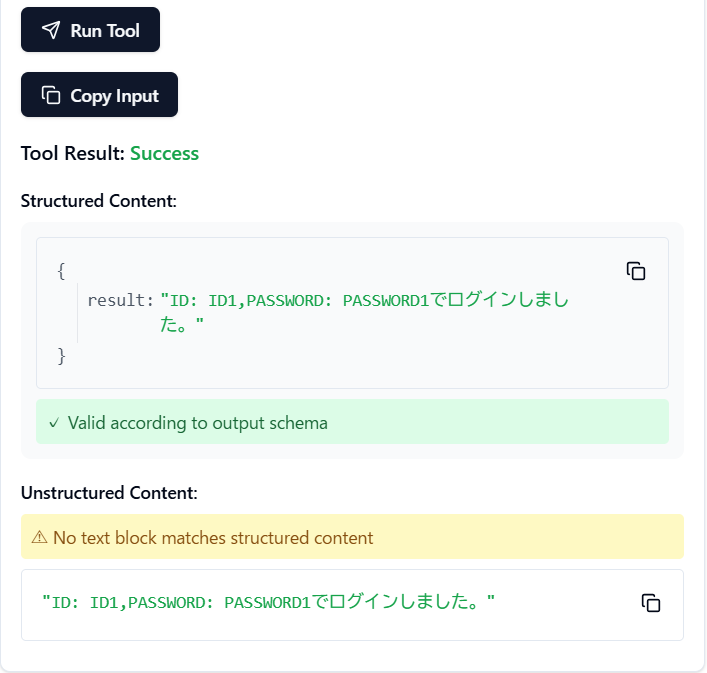
④あとは、Connectしてtoolからloginを実行すれば、②で設定した情報を使って処理が実行される。
ソースコード(Pythonファイル)
from fastmcp import FastMCP, Context
from fastmcp.server.dependencies import get_http_request
from starlette.requests import Request

mcp = FastMCP("LoginServer", debug=True)

@mcp.tool('login')
async def login() -> str:
    """ログイン処理"""
    request: Request = get_http_request()
    id = request.headers.get("id", None)
    password = request.headers.get("password", None)
    # 実際のログイン処理追記してください

    return f"ID: {id},PASSWORD: {password}でログインしました。"

if __name__ == "__main__":
    mcp.run(transport="streamable-http", host="localhost", port=7999)