
概要
2026-07-28 にMCPがアップデートされた。

SEP-2468の変更点は、認可サーバ側の変更点であるので、認可サーバを自作・カスタマイズしている人は気を付ける必要がある。
実例がなく分かりにくかったので、MCP TypeScript SDKのOAuth認可付きのDual-eraサーバを動かして確認する。
SEP-2468
authorization-flow-steps
フローのこの部分が今回の変更点

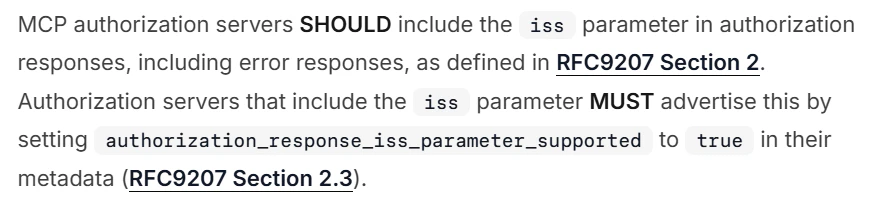
authorization-response-validation
この章が 2026-07-28 分から追加されている。
認可サーバの返す iss パラメータが、認可サーバのURLと一致しているかしているか確認するようになった。
ただし、推奨(SHOULD)であるため、iss パラメータがない場合でも、従来通り接続はできる。
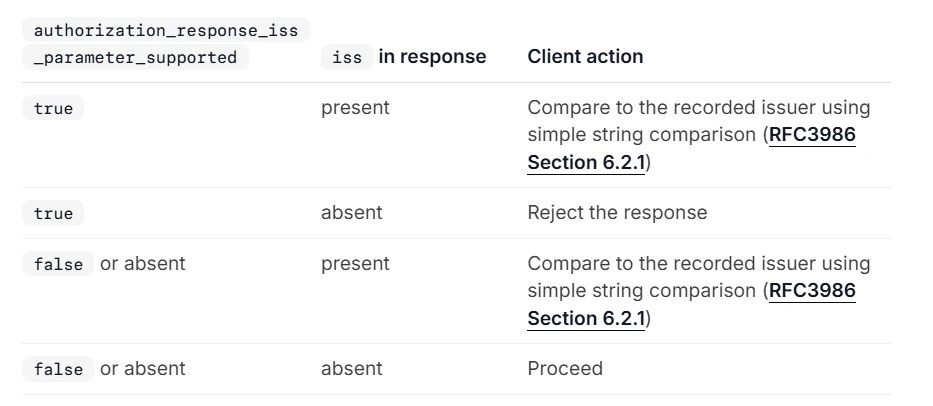
比較する条件と接続できるかの組み合わせは以下の表
OAuth認可付きのDual-eraサーバ
サンプルサーバの立ち上げ方は以下の記事参照。
今回はtoolsの代わりにoauthを立ち上げる
pnpm --filter @mcp-examples/oauth server -- --http --port 3000
クライアント
MCP Inspector v2を使用する。
以下でMCP Inspectorを起動
npx @modelcontextprotocol/inspector
MCP Inspectorの設定
以下の設定にする。
Server ID: 自由
Transport Type: Streamable HTTP
URL: http://127.0.0.1:3000/mcp

SEP-2468確認
確認したところ、この組み合わせで認可が行われている。ここからは確認した方法を紹介する。

.well-known/oauth-authorization-server
http://127.0.0.1:3001/.well-known/oauth-authorization-server で確認する。
issuer は http://127.0.0.1:3001
authorization_response_iss_parameter_supported は true

issパラメータ
MCP InspectorでDevTools(F12キー)を開き、MCPサーバに接続。その後、Networkからcallbackを見つける。
URLに iss=http://127.0.0.1:3001 が含まれている
