IntelliJ IDEAはデバッグ時に現在のスタックフレームを取り消して呼び出し元に戻る事ができる。これは例えば、あるブレークポイントからステップ実行が行き過ぎてしまったけども特定のメソッドをその場でもう一度再実行したい、という場合に役立つ。ただし、スタックフレームのリセットのみな点は注意が必要。
公式ドキュメントは https://pleiades.io/help/idea/altering-the-program-s-execution-flow.html#drop_frame にある。
環境
- IntelliJ IDEA 2025.2.5 (Community Edition)
解説
下記のようなごく単純なサンプルコードを使用する。
  public static void main(String[] args) {
    hoge(10);
  }

  static int global = 0;

  static void hoge(int local) {
    global++;
    System.out.printf("local=" + local);
  }
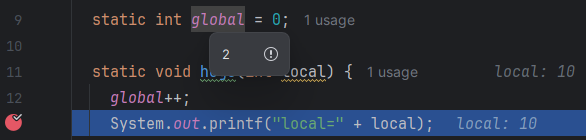
下記行にブレークポイントを設定してデバッグ実行した、とする。

デバッグウィンドウの対象行の先頭にあるReset Frameボタンをクリックする。
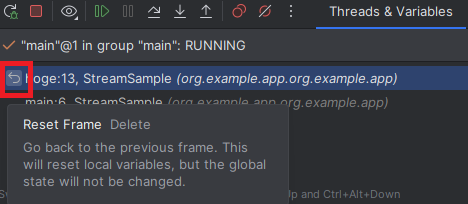
すると、下記のように、hogeメソッド呼出のスタックフレームが取り消されて呼び出し元まで戻される。
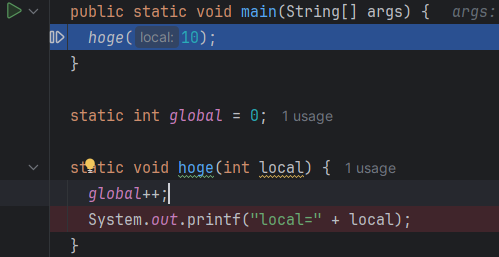
この状態でResume Programなどを実行すると再度同一のブレークポイントで停止する。これによって、ステップ実行を行き過ぎてしまったメソッド呼出の再度実行ができる。
注意:スタックフレームの取り消しのみ
あくまでもスタックフレームの取り消しのみの点は注意が必要。たとえば、このサンプルコードだとstatic変数のインクリメントはReset Frameしてもそのままになる。