
はじめに
Oracle Autonomous AI Database には、使用可能なデータ型や変更可能なパラメータに一部制限があります。
オラクルが提供している Cloud Premigration Advisor Tool (以降、CPAT) を使用すると、どの制限事項に抵触しているか確認可能です。
CPAT の入手
CPAT は My Oracle Support から DL可能です。(新しい MOS の UI にまだ慣れません…)
DLしたファイルを、制限事項の抵触の有無を確認したい DB に接続できる環境へ移送し、unzipします。(ここではローカル)
[root@handson-vm01 opc]# unzip /home/opc/p32613591_112048_Generic.zip -d /home/oracle/cpat/
Archive:  /home/opc/p32613591_112048_Generic.zip
  inflating: /home/oracle/cpat/README.txt
  inflating: /home/oracle/cpat/LICENSE.txt
  inflating: /home/oracle/cpat/THIRD_PARTY_LICENSES.txt
   creating: /home/oracle/cpat/bin/
  inflating: /home/oracle/cpat/bin/cma.cmd
  inflating: /home/oracle/cpat/bin/cma.sh
  inflating: /home/oracle/cpat/bin/premigration.ps1
  inflating: /home/oracle/cpat/premigration.cmd
  inflating: /home/oracle/cpat/premigration.sh
   creating: /home/oracle/cpat/lib/
  inflating: /home/oracle/cpat/lib/premigration.jar
  inflating: /home/oracle/cpat/lib/ojdbc8-19.3.0.0.jar
  inflating: /home/oracle/cpat/lib/ucp-19.3.0.0.jar
  inflating: /home/oracle/cpat/lib/oraclepki-19.3.0.0.jar
  inflating: /home/oracle/cpat/lib/oraclepki-23.5.0.24.07.jar
  inflating: /home/oracle/cpat/lib/osdt_core-19.3.0.0.jar
  inflating: /home/oracle/cpat/lib/osdt_cert-19.3.0.0.jar
  inflating: /home/oracle/cpat/lib/orai18n-19.3.0.0.jar
  inflating: /home/oracle/cpat/lib/ons-19.3.0.0.jar
  inflating: /home/oracle/cpat/lib/simplefan-19.3.0.0.jar
  inflating: /home/oracle/cpat/lib/commons-cli-1.9.0.jar
   creating: /home/oracle/cpat/misc/
  inflating: /home/oracle/cpat/misc/CPATReportSchema.json
[root@handson-vm01 opc]#
CPAT の実行
引数を指定せずに実行するとヘルプが表示されます。
[oracle@handson-vm01 cpat]$ ./premigration.sh

The Cloud Premigration Advisor Tool (CPAT) is a Java application that helps you evaluate existing Oracle databases for compatibility with Oracle's cloud database offerings.  See
 https://docs.oracle.com/en/database/oracle/oracle-database/23/sutil/premigration-advisor-tool.html for complete information about CPAT.

Please note that CPAT can be invoked in one of four "modes".  These four modes are:

=== Source Instance Analysis Mode ===

"Source instance analysis mode" is the most important mode to a majority of users.

In this mode CPAT will analyze a source instance by running a series of checks.  CPAT then generates report(s) listing anything those checks found that could be problematic when migrating
 that instance to one of Oracle's cloud database offerings.

=== Target Instance Properties Mode ===

Prior to using source instance analysis mode users should, if at all possible, use "target instance properties mode" to fetch details about the target instance.

The target instance details are captured in a Java properties file which can then be passed to CPAT when using source instance analysis mode. With access to these target instance properties
 CPAT can do a significantly better job analyzing the source instance.

=== Help and Version Information Mode ===

The "help and version information mode" is simply invoking the CPAT script with the command line options necessary to display this Help text or display the version information of the CPAT
 tool.

=== Version Update Check Mode ===

The "version update check mode" is simply invoking CPAT with the switches necessary to look on-line for an updated version of CPAT

Each of these modes are described in detail below along with examples and more context.

===================================================
=== Source Instance Analysis Mode Usage Details ===
===================================================
(snip)
Cloud Premigration Advisor Tool (CPAT) は、既存の Oracle データベースと Oracle のクラウド・データベース・サービスとの互換性を評価するのに役立つ Java アプリケーションです。CPAT の詳細については、https://docs.oracle.com/en/database/oracle/oracle-database/23/sutil/premigration-advisor-tool.html をご覧ください。
CPAT は 4 つの「モード」のいずれかで起動できます。これらの 4 つのモードは以下のとおりです。
=== ソース・インスタンス分析モード ===
「ソース・インスタンス分析モード」は、多くのユーザーにとって最も重要なモードです。
このモードでは、CPAT は一連のチェックを実行してソース・インスタンスを分析します。その後、CPAT は、これらのチェックによって発見された、そのインスタンスを Oracle のクラウド・データベース・サービスのいずれかに移行する際に問題となる可能性のある項目をリストしたレポートを生成します。
=== ターゲットインスタンスプロパティモード ===
ソースインスタンス分析モードを使用する前に、可能な限り「ターゲットインスタンスプロパティモード」を使用してターゲットインスタンスの詳細を取得してください。
ターゲットインスタンスの詳細はJavaプロパティファイルに記録され、ソースインスタンス分析モード使用時にCPATに渡すことができます。これらのターゲットインスタンスプロパティにアクセスすることで、
CPATはソースインスタンスの分析を大幅に効率化できます。=== ヘルプとバージョン情報モード ===
「ヘルプとバージョン情報モード」は、ヘルプテキストを表示したり、CPATツールのバージョン情報を表示したりするために必要なコマンドラインオプションを指定してCPATスクリプトを起動するだけです。
=== バージョン更新チェックモード ===
「バージョン更新チェックモード」は、CPATの更新バージョンをオンラインで検索するために必要なスイッチを指定してCPATを起動するだけです。
これらの各モードについて、例と詳細なコンテキストを交えて以下で詳しく説明します。
ソース・インスタンス分析の前にターゲットインスタンスプロパティを実施すると、ソース・インスタンス分析の結果がより最適化されるようです。
必須ではないようなので、ここではいったんターゲットインスタンスプロパティはすっ飛ばします。
DB の規模にもよると思いますが、今回は 1分もかからず完了しました。
データディクショナリを参照していると考えられるため、オプティマイザ統計が最新かは事前に確認しましょう。
[oracle@handson-vm01 cpat]$ date
Wed Feb  4 11:01:01 JST 2026
[oracle@handson-vm01 cpat]$ ./premigration.sh --connectstring jdbc:oracle:thin:@localhost:1521/orclpdb1 --username sys --sysdba --zip --targetcloud ATPS --outfileprefix try1
Enter password for sys user:
PremigrationException
CPAT-1018: Informational: The amount of memory available to CPAT is 3490 MB. Oracle recommends running CPAT using a 64-bit JVM on a system with at least 8 GB of memory.
Increase the memory by setting _JAVA_OPTIONS=-Xmx4g or higher if additional memory is available.

Cloud Premigration Advisor Tool Version 26.1.0

PremigrationException
CPAT-1013: Informational: No analysis properties file found on the command line. Source analysis will not be as complete as possible.
See the help text for information on using an analysis properties file.

Cloud Premigration Advisor Tool completed with overall result: Action Required
Cloud Premigration Advisor Tool generated report location: /home/oracle/cpat/try1_premigration_advisor_report.html
Cloud Premigration Advisor Tool generated report location: /home/oracle/cpat/try1_premigration_advisor_report.txt
Cloud Premigration Advisor Tool generated Zip file location: /home/oracle/cpat/try1_premigration_advisor.zip
[oracle@handson-vm01 cpat]$ date
Wed Feb  4 11:01:19 JST 2026
[oracle@handson-vm01 cpat]$ ls -la
total 1072
drwxrwxrwx. 5 root   root       4096 Feb  4 11:01 .
drwx------. 7 oracle oinstall   4096 Feb  4 09:25 ..
drwxr-xr-x. 2 root   root         59 Jan 30 14:37 bin
drwxr-xr-x. 2 root   root       4096 Jan 30 14:49 lib
-rw-r--r--. 1 root   root       6069 Jan 30 14:37 LICENSE.txt
drwxr-xr-x. 2 root   root         35 Jan 30 14:49 misc
-rw-r--r--. 1 root   root        139 Jan 30 14:37 premigration.cmd
-rwxr-xr-x. 1 root   root      10519 Jan 30 14:37 premigration.sh
-rw-r--r--. 1 root   root       2766 Jan 30 14:49 README.txt
-rw-r--r--. 1 root   root      11533 Jan 30 14:49 THIRD_PARTY_LICENSES.txt
-rw-r--r--. 1 oracle oinstall 480641 Feb  4 11:01 try1_premigration_advisor.log  ★
-rw-r--r--. 1 oracle oinstall 320327 Feb  4 11:01 try1_premigration_advisor_report.html  ★
-rw-r--r--. 1 oracle oinstall 124288 Feb  4 11:01 try1_premigration_advisor_report.txt  ★
-rw-r--r--. 1 oracle oinstall 108694 Feb  4 11:01 try1_premigration_advisor.zip  ★
[oracle@handson-vm01 cpat]$
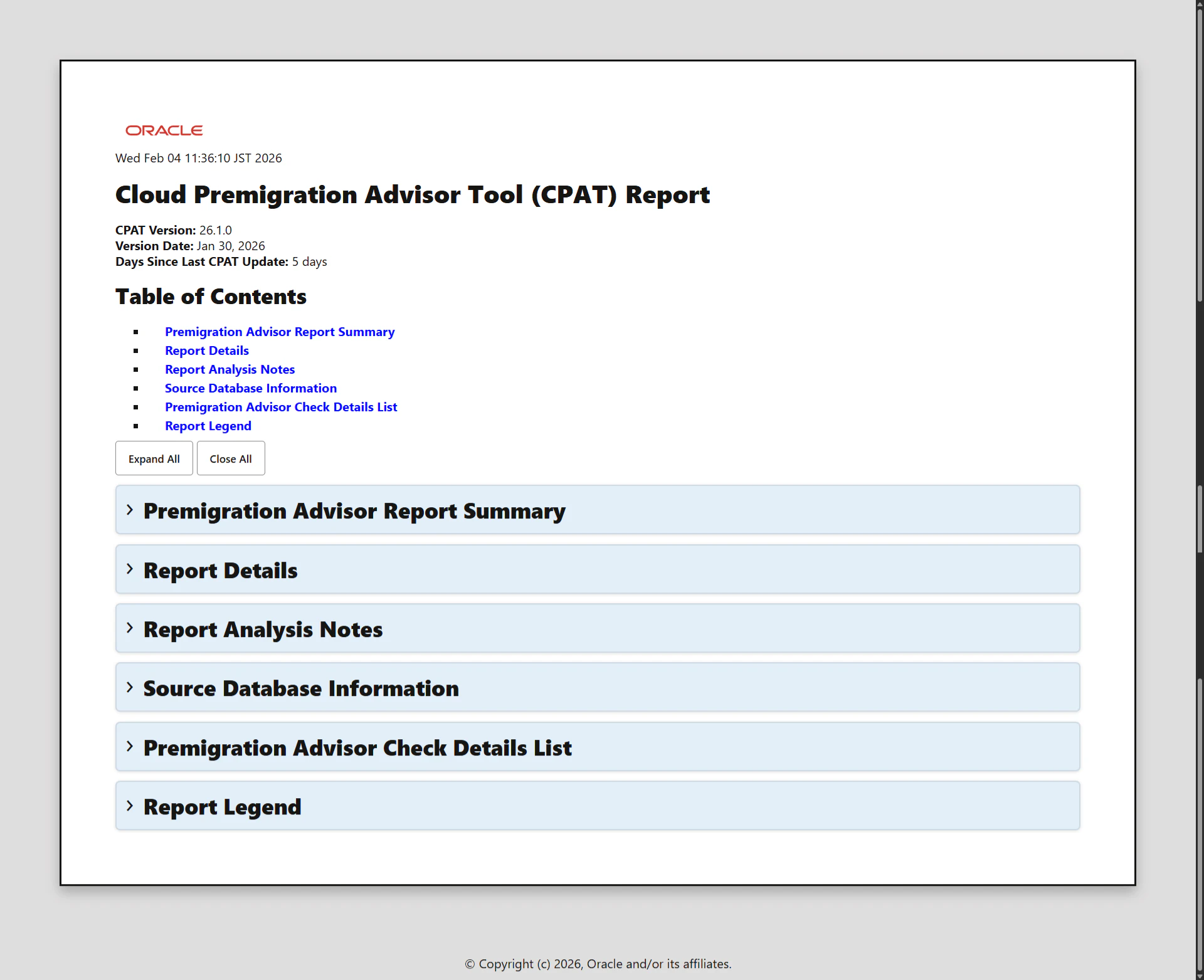
デフォルトでは txt形式と html形式両方のレポートが出力されました。
Premigration Advisor Report Summary セクション
レポートのサマリです。
Report Results Overview に記載の検出数をクリックすると、Premigration Advisor Check Details List セクション (後述) にジャンプできます。
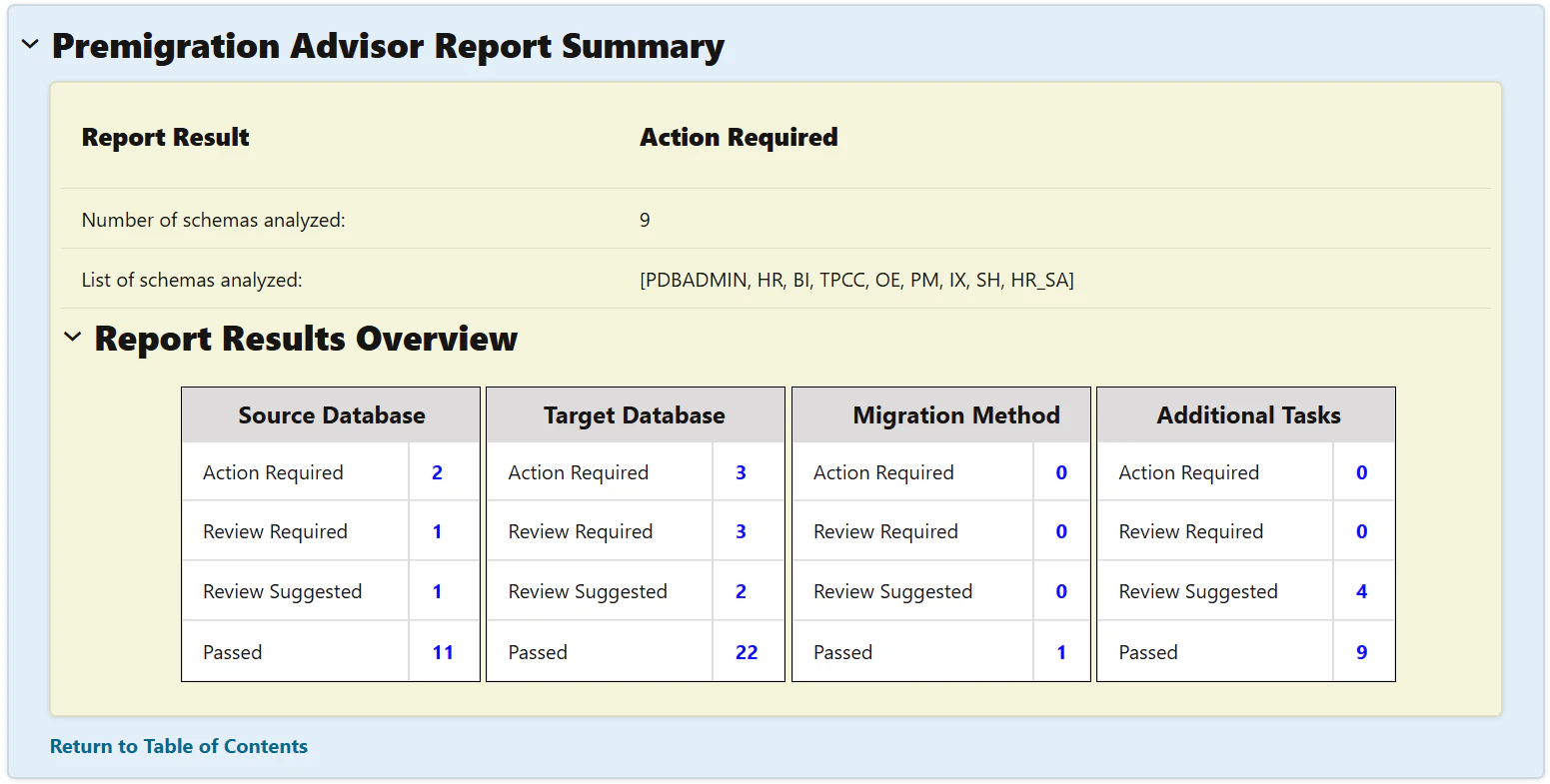
Report Result は下記のいずれかが表示されます。
| Check Result | Result Description | 翻訳 |
|---|---|---|
| Passed | The Cloud Premigration Advisor analysis indicates migration should succeed and applications should see no difference in behavior. | Cloud Premigration Advisor の分析によると、移行は成功するはずであり、アプリケーションの動作に違いはないはずです。 |
| Review Suggested | The Cloud Premigration Advisor analysis indicates migration should succeed and applications will likely see no functional difference but database administrators should evaluate each Check with this status to look for any unforeseen consequences. | Cloud Premigration Advisor の分析によると、移行は成功するはずであり、アプリケーションに機能的な違いはないはずですが、データベース管理者はこのステータスの各チェックを評価して、予期しない結果がないか確認する必要があります。 |
| Review Required | The Cloud Premigration Advisor analysis indicates migration may succeed (at least in part) but not everything is expected to work exactly like before or some work post migration must be done to bring the target instance into alignment with the source database. | Cloud Premigration Advisor の分析によると、移行は(少なくとも部分的には)成功する可能性があるものの、すべてが以前とまったく同じように動作するとは限らないか、ターゲットインスタンスをソースデータベースと整合させるために移行後に何らかの作業を行う必要があることが示されています。 |
| Action Required | The Cloud Premigration Advisor analysis discovered something that would likely cause the migration to be unsuccessful. Checks with this result typically need to be resolved before attempting migration. | Cloud Premigration Advisor の分析で、移行が失敗する可能性のある問題が検出されました。この結果のチェックは通常、移行を試行する前に解決する必要があります。 |
| Failed | The Cloud Premigration Advisor was unable to complete its analysis. Please contact Oracle Support Services. | Cloud Premigration Advisor は分析を完了できませんでした。Oracle Support Services にお問い合わせください。 |
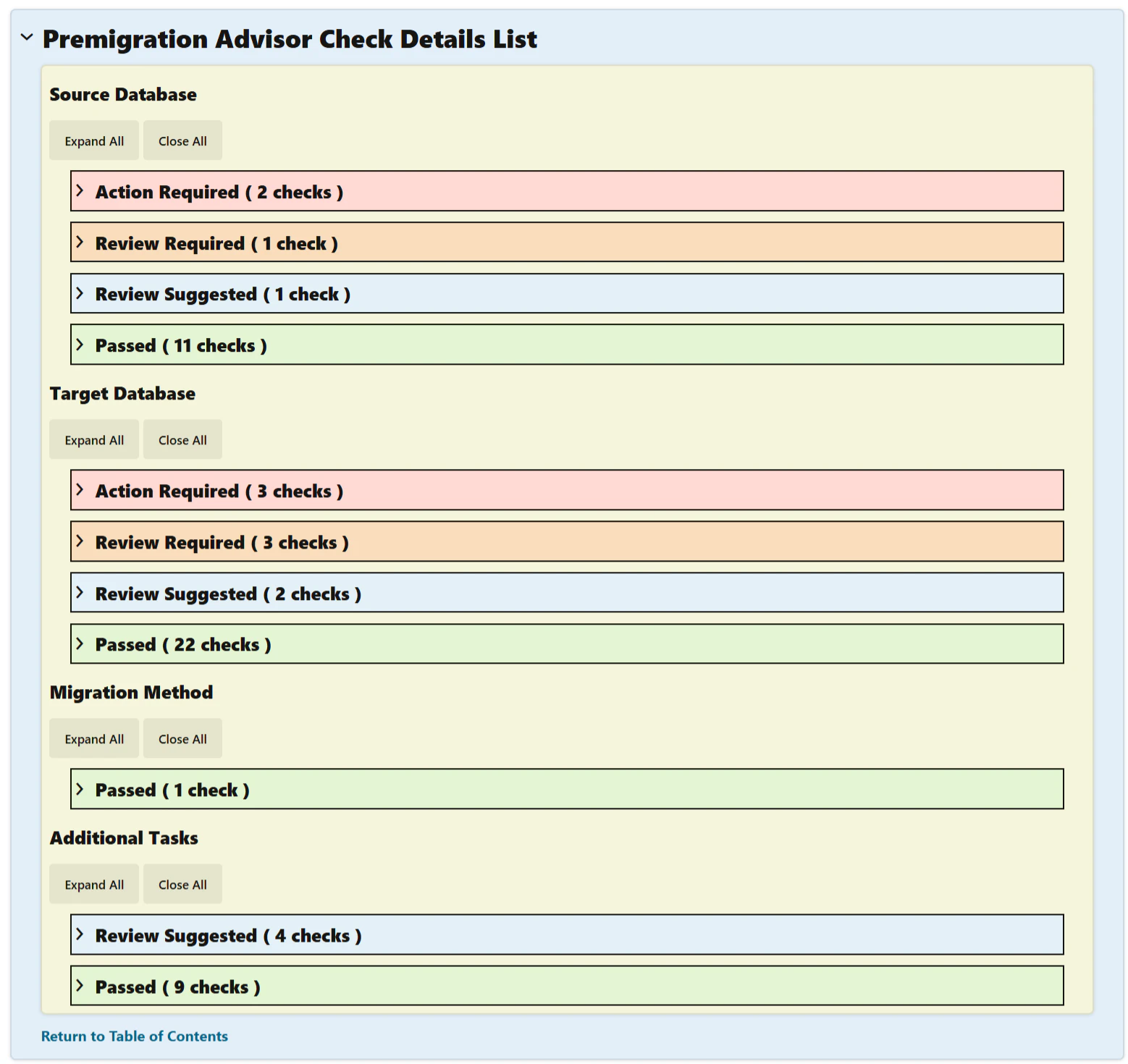
Premigration Advisor Check Details List セクション
レポートの詳細です。
分類 (Source Database, Target Database, Migration Method, Additional Tasks) ごとに NG だったもの、OK だったもの、要チェックなものが確認できます。
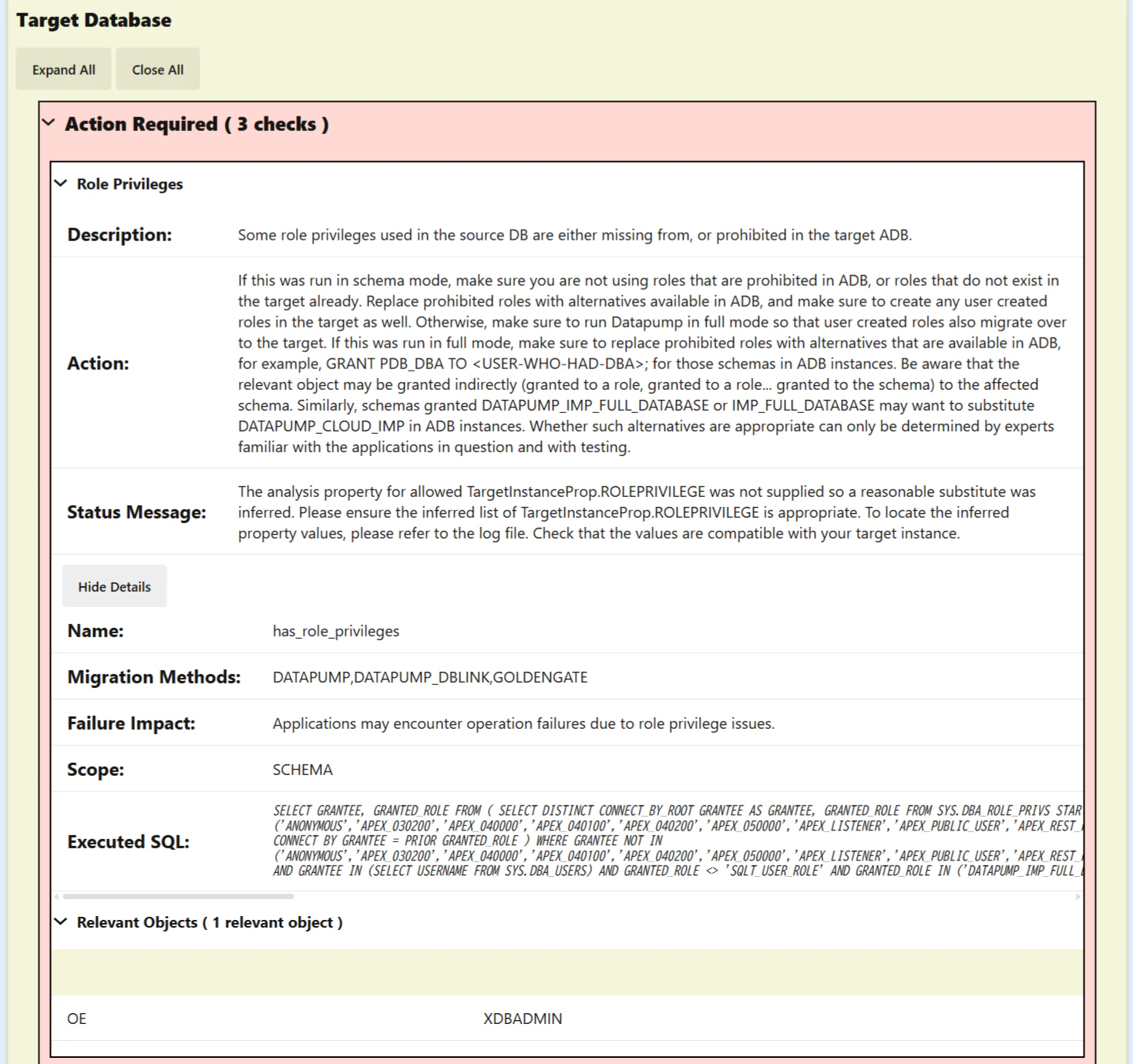
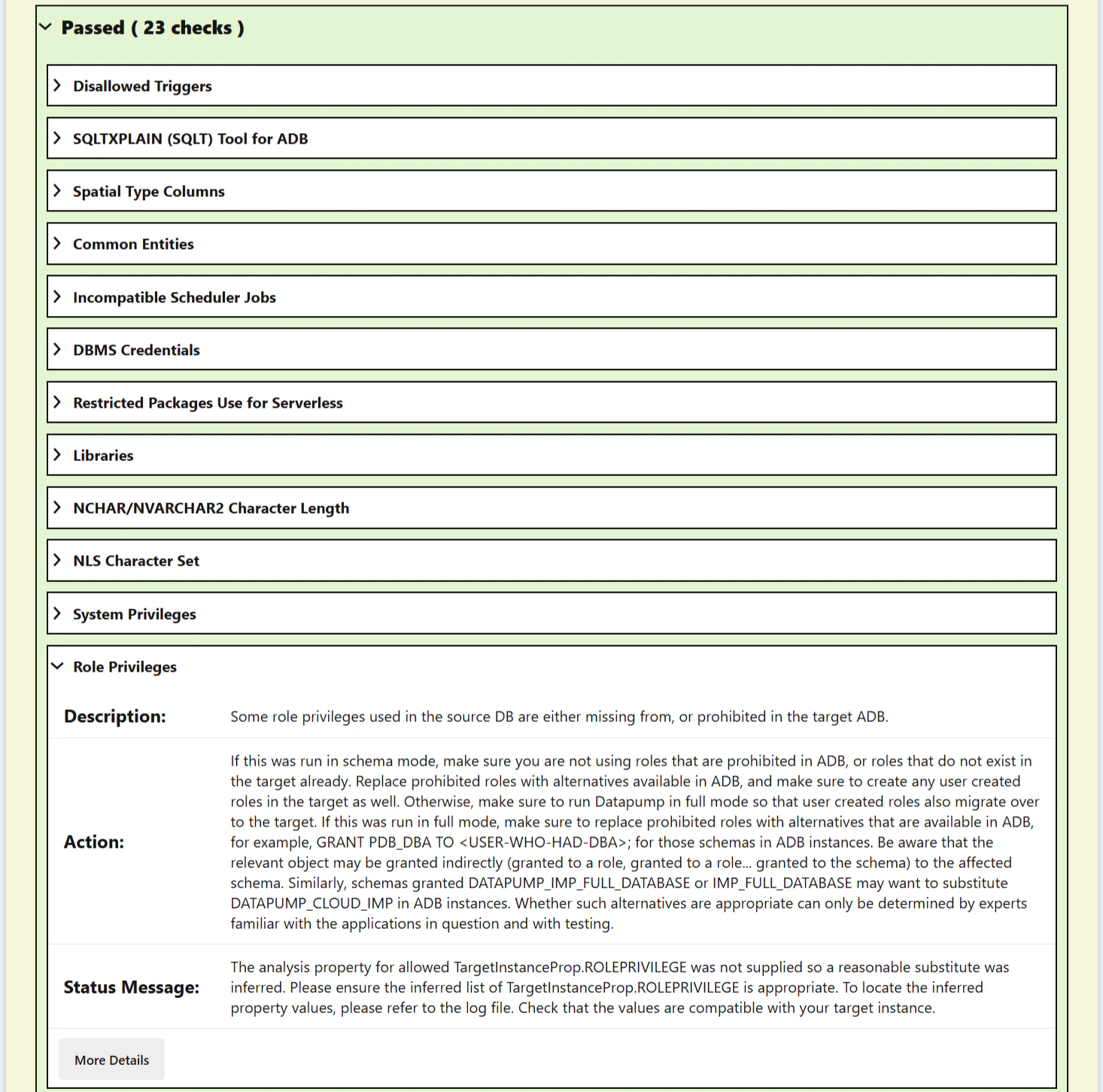
Target Database の Action Required を 1つ見てみます。
OEユーザに付与している XDBADMINロールが ADB では使用できないという内容でした。
XDBADMINロールを OEユーザからREVOKEして再度 CPAT を実行すると、当該項目は Action Required から Passed に変わっていました。
gatherdetails オプション
CPAT 実行時に--gatherdetails allを指定すると、より詳細な情報が収集されます。
[oracle@handson-vm01 cpat]$ ./premigration.sh --connectstring jdbc:oracle:thin:@localhost:1521/orclpdb1 --username sys --sysdba --zip --targetcloud ATPS --outfileprefix try3 --gatherdetails all
Enter password for sys user:
PremigrationException
CPAT-1018: Informational: The amount of memory available to CPAT is 3490 MB. Oracle recommends running CPAT using a 64-bit JVM on a system with at least 8 GB of memory.
Increase the memory by setting _JAVA_OPTIONS=-Xmx4g or higher if additional memory is available.

Cloud Premigration Advisor Tool Version 26.1.0

PremigrationException
CPAT-1013: Informational: No analysis properties file found on the command line. Source analysis will not be as complete as possible.
See the help text for information on using an analysis properties file.

Cloud Premigration Advisor Tool completed with overall result: Action Required
Cloud Premigration Advisor Tool generated report location: /home/oracle/cpat/try3_premigration_advisor_report.html
Cloud Premigration Advisor Tool generated report location: /home/oracle/cpat/try3_premigration_advisor_report.txt
Cloud Premigration Advisor Tool generated Zip file location: /home/oracle/cpat/try3_premigration_advisor.zip
[oracle@handson-vm01 cpat]$ ls -la
total 3016
drwxrwxrwx. 5 root   root       4096 Feb  4 15:34 .
drwx------. 7 oracle oinstall   4096 Feb  4 11:34 ..
drwxr-xr-x. 2 root   root         59 Jan 30 14:37 bin
drwxr-xr-x. 2 root   root       4096 Jan 30 14:49 lib
-rw-r--r--. 1 root   root       6069 Jan 30 14:37 LICENSE.txt
drwxr-xr-x. 2 root   root         35 Jan 30 14:49 misc
-rw-r--r--. 1 root   root        139 Jan 30 14:37 premigration.cmd
-rwxr-xr-x. 1 root   root      10519 Jan 30 14:37 premigration.sh
-rw-r--r--. 1 root   root       2766 Jan 30 14:49 README.txt
-rw-r--r--. 1 root   root      11533 Jan 30 14:49 THIRD_PARTY_LICENSES.txt
-rw-r--r--. 1 oracle oinstall 401868 Feb  4 11:36 try1_premigration_advisor.log
-rw-r--r--. 1 oracle oinstall 280300 Feb  4 11:36 try1_premigration_advisor_report.html
-rw-r--r--. 1 oracle oinstall 101433 Feb  4 11:36 try1_premigration_advisor_report.txt
-rw-r--r--. 1 oracle oinstall 102981 Feb  4 11:36 try1_premigration_advisor.zip
-rw-r--r--. 1 oracle oinstall 401648 Feb  4 15:24 try2_premigration_advisor.log
-rw-r--r--. 1 oracle oinstall 280074 Feb  4 15:24 try2_premigration_advisor_report.html
-rw-r--r--. 1 oracle oinstall 101352 Feb  4 15:24 try2_premigration_advisor_report.txt
-rw-r--r--. 1 oracle oinstall 102433 Feb  4 15:24 try2_premigration_advisor.zip
-rw-r--r--. 1 oracle oinstall 585694 Feb  4 15:34 try3_premigration_advisor.log
-rw-r--r--. 1 oracle oinstall 378949 Feb  4 15:34 try3_premigration_advisor_report.html
-rw-r--r--. 1 oracle oinstall 144875 Feb  4 15:34 try3_premigration_advisor_report.txt
-rw-r--r--. 1 oracle oinstall 124932 Feb  4 15:34 try3_premigration_advisor.zip
[oracle@handson-vm01 cpat]$
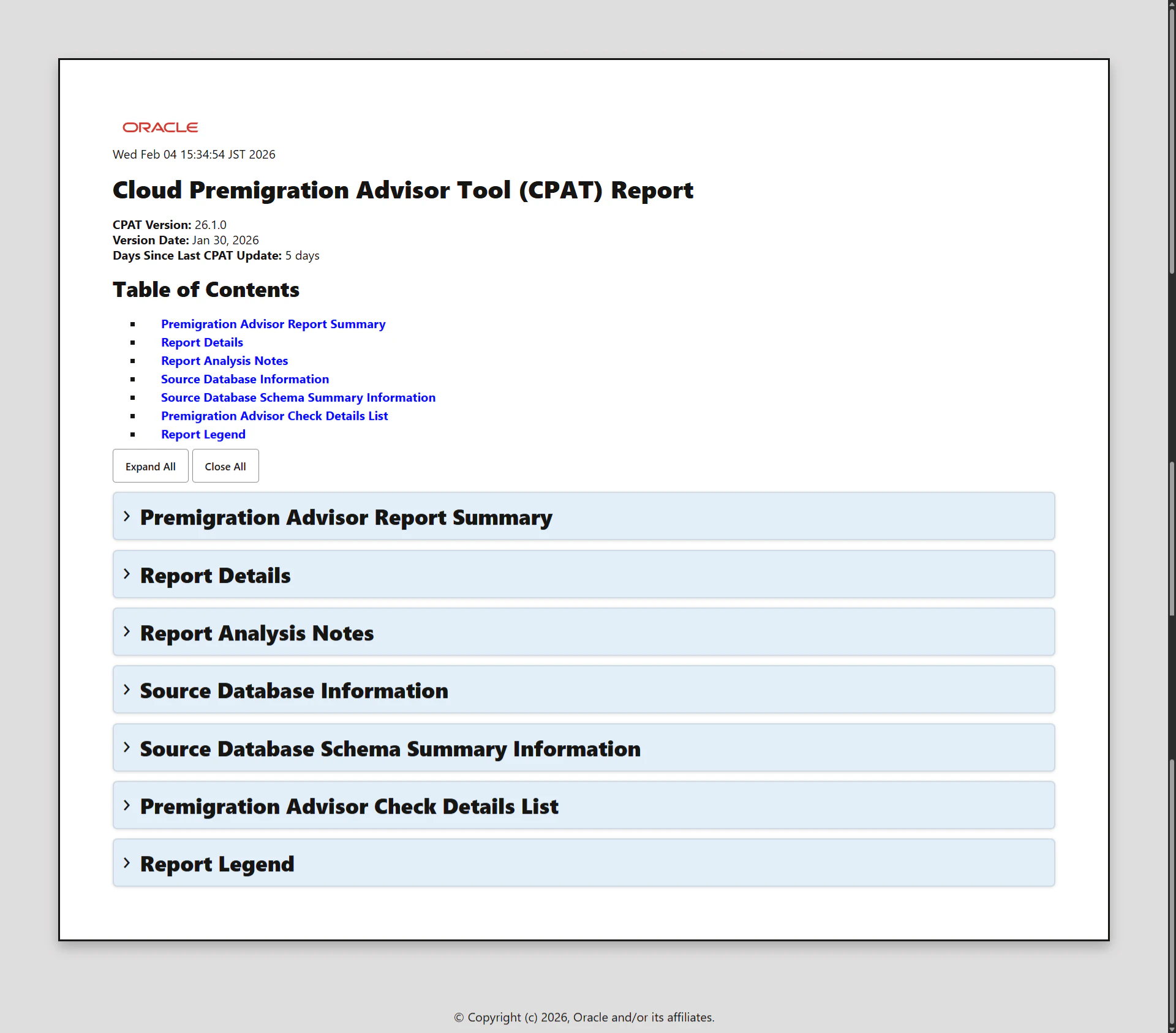
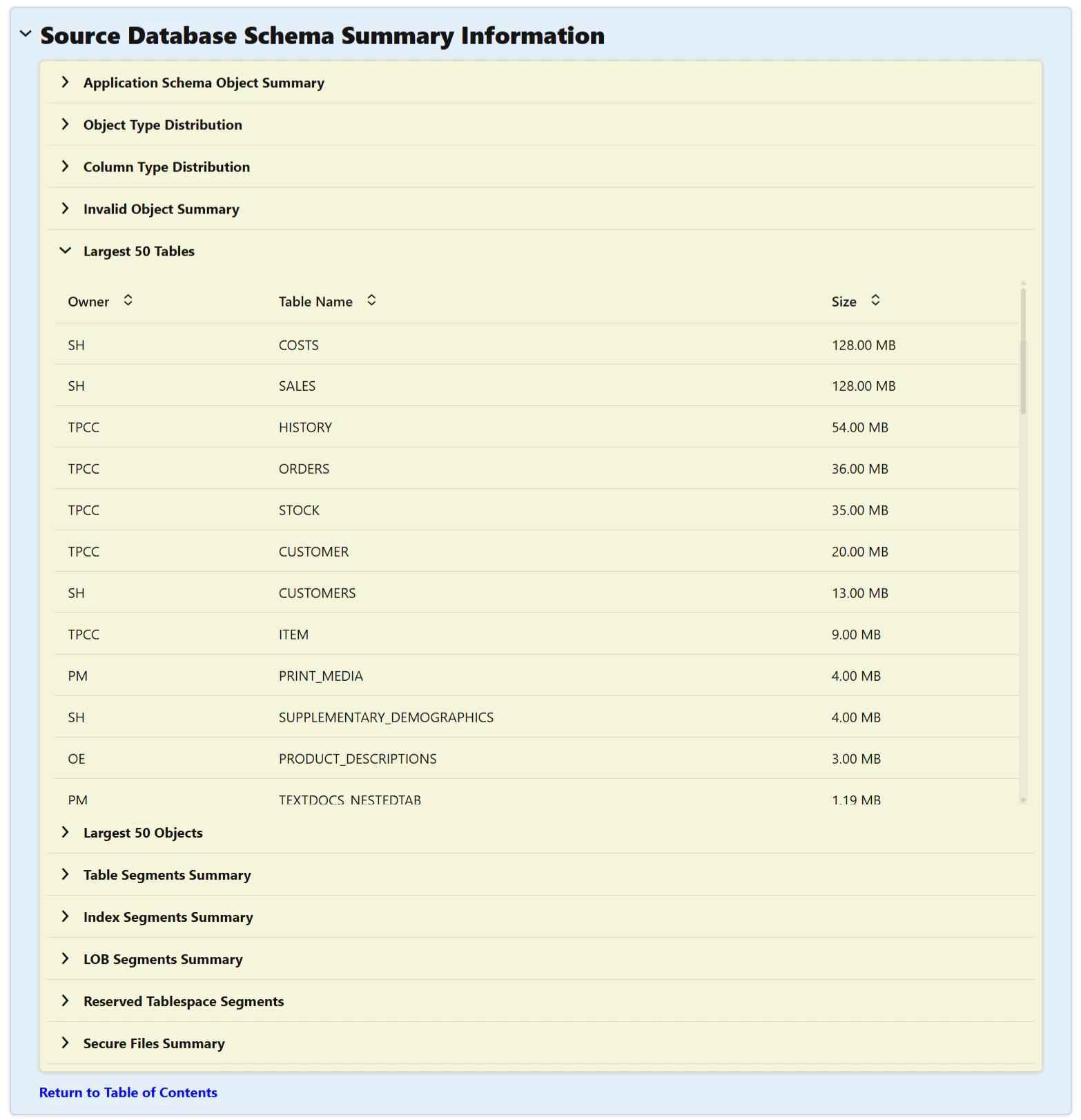
レポートを確認すると、Source Database Schema Summary Information セクションが追加されていることがわかります。
genfixups オプション
CPAT 実行時に--genfixupsを指定すると、一部のチェックに対する修正用スクリプトが生成されます。
[oracle@handson-vm01 cpat]$ ./premigration.sh --connectstring jdbc:oracle:thin:@localhost:1521/orclpdb1 --username sys --sysdba --zip --targetcloud ATPS --outfileprefix try4 --genfixups
Enter password for sys user:
PremigrationException
CPAT-1018: Informational: The amount of memory available to CPAT is 3490 MB. Oracle recommends running CPAT using a 64-bit JVM on a system with at least 8 GB of memory.
Increase the memory by setting _JAVA_OPTIONS=-Xmx4g or higher if additional memory is available.

Cloud Premigration Advisor Tool Version 26.1.0

PremigrationException
CPAT-1013: Informational: No analysis properties file found on the command line. Source analysis will not be as complete as possible.
See the help text for information on using an analysis properties file.

Cloud Premigration Advisor Tool completed with overall result: Action Required
A total of 3 fixup scripts were generated  ★
Cloud Premigration Advisor Tool generated report location: /home/oracle/cpat/try4_premigration_advisor_report.html
Cloud Premigration Advisor Tool generated report location: /home/oracle/cpat/try4_premigration_advisor_report.txt
Cloud Premigration Advisor Tool generated Zip file location: /home/oracle/cpat/try4_premigration_advisor.zip
[oracle@handson-vm01 cpat]$ ls -la
total 3892
drwxrwxrwx. 6 root   root       4096 Feb  4 15:47 .
drwx------. 7 oracle oinstall   4096 Feb  4 11:34 ..
drwxr-xr-x. 2 root   root         59 Jan 30 14:37 bin
drwxr-xr-x. 2 root   root       4096 Jan 30 14:49 lib
-rw-r--r--. 1 root   root       6069 Jan 30 14:37 LICENSE.txt
drwxr-xr-x. 2 root   root         35 Jan 30 14:49 misc
-rw-r--r--. 1 root   root        139 Jan 30 14:37 premigration.cmd
-rwxr-xr-x. 1 root   root      10519 Jan 30 14:37 premigration.sh
-rw-r--r--. 1 root   root       2766 Jan 30 14:49 README.txt
drwxr-xr-x. 2 oracle oinstall    109 Feb  4 15:47 target
-rw-r--r--. 1 root   root      11533 Jan 30 14:49 THIRD_PARTY_LICENSES.txt
-rw-r--r--. 1 oracle oinstall 401868 Feb  4 11:36 try1_premigration_advisor.log
-rw-r--r--. 1 oracle oinstall 280300 Feb  4 11:36 try1_premigration_advisor_report.html
-rw-r--r--. 1 oracle oinstall 101433 Feb  4 11:36 try1_premigration_advisor_report.txt
-rw-r--r--. 1 oracle oinstall 102981 Feb  4 11:36 try1_premigration_advisor.zip
-rw-r--r--. 1 oracle oinstall 401648 Feb  4 15:24 try2_premigration_advisor.log
-rw-r--r--. 1 oracle oinstall 280074 Feb  4 15:24 try2_premigration_advisor_report.html
-rw-r--r--. 1 oracle oinstall 101352 Feb  4 15:24 try2_premigration_advisor_report.txt
-rw-r--r--. 1 oracle oinstall 102433 Feb  4 15:24 try2_premigration_advisor.zip
-rw-r--r--. 1 oracle oinstall 585694 Feb  4 15:34 try3_premigration_advisor.log
-rw-r--r--. 1 oracle oinstall 378949 Feb  4 15:34 try3_premigration_advisor_report.html
-rw-r--r--. 1 oracle oinstall 144875 Feb  4 15:34 try3_premigration_advisor_report.txt
-rw-r--r--. 1 oracle oinstall 124932 Feb  4 15:34 try3_premigration_advisor.zip
-rw-r--r--. 1 oracle oinstall 403015 Feb  4 15:47 try4_premigration_advisor.log
-rw-r--r--. 1 oracle oinstall 280974 Feb  4 15:47 try4_premigration_advisor_report.html
-rw-r--r--. 1 oracle oinstall 102371 Feb  4 15:47 try4_premigration_advisor_report.txt
-rw-r--r--. 1 oracle oinstall 105111 Feb  4 15:47 try4_premigration_advisor.zip
[oracle@handson-vm01 cpat]$
今回試した DB では、create_object_grants.sql, grant_create_privileges.sql, revoke_create_privileges.sql の 3つのスクリプトが生成されました。
-- revoke_create_privileges
--
-- Check Name: has_users_lack_create_privileges
-- Check Result: Review Required
--
-- Fixup Script Execution Context Notes:
--    Execute this Fixup on the Target Instance
--    The instance need not be restarted after applying this Fixup
--
-- Action:
--    Grant the necessary create privileges to the affected users
--    before initiating the migration to ensure all their objects
--    are successfully imported. After the migration, revoke these privileges
--    to restore the original security state of the database. Keep in
--    mind CREATE LIBRARY / CREATE ANY LIBRARY is not a valid privilege in ADB,
--    so trying to grant those manually, or using the generated fixup,
--    will still result in an error.

-- Notes:
--    Revoke CREATE ALL PRIVILEGES to the affected users AFTER the migration to
--    restore the original security state of the database.
--
REVOKE ALL PRIVILEGES FROM HR;

REVOKE ALL PRIVILEGES FROM OE;

REVOKE ALL PRIVILEGES FROM PM;

REVOKE ALL PRIVILEGES FROM TPCC;

REVOKE ALL PRIVILEGES FROM IX;

REVOKE ALL PRIVILEGES FROM SH;

REVOKE ALL PRIVILEGES FROM HR_SA;


-- end of revoke_create_privileges
机上での制限事項抵触チェックは限界があり見落としの可能性もあるので、CPAT を使用して効率的・確実にチェックしましょう 