0
0

Delete article

Deleted articles cannot be recovered.

Draft of this article would be also deleted.

Are you sure you want to delete this article?

Windows エクスプローラーの左にいる「OneDrive - ○○大学」フォルダを消す方法

0
Posted at

大学のMicrosoftアカウントでログインしていたPCで,卒業して数年経ってもフォルダを消しても,エクスプローラーの左の一覧(ナビゲーションウィンドウ)から全然消えない「OneDrive-○○大学」フォルダ.
ようやく消し方がわかったので,備忘録代わりに手順を紹介します.

  1. win+Rキーで「ファイル名を指定して実行」を開く.
  2. regeditと入力しエンターを押し,「レジストリエディタ」を開く.
  3. コンピューター\HKEY_CURRENT_USER\Software\Microsoft\Windows\CurrentVersion\Explorer\Desktop\NameSpaceに移動
  4. 「NameSpace」内のフォルダを1つずつ確認し,ウィンドウの右側の「データ」欄にOneDrive - ○○大学的な事が書かれたフォルダがあるので,それを削除する.
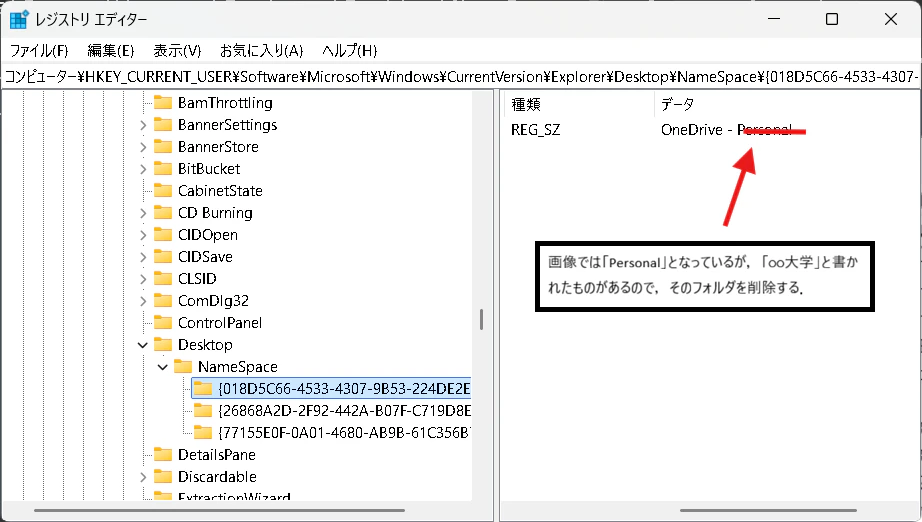
    レジストリエディタ.png
  5. エクスプローラーを一度閉じ,再度開いた際に消えている事を確認する.
0
0
0

Register as a new user and use Qiita more conveniently

  1. You get articles that match your needs
  2. You can efficiently read back useful information
  3. You can use dark theme
What you can do with signing up
0
0

Delete article

Deleted articles cannot be recovered.

Draft of this article would be also deleted.

Are you sure you want to delete this article?