

1. はじめに
「ちょっとした画像の背景だけ消したい」
「オンラインサービスに画像をアップしたくない」
という場面が近頃地味に増えてきました。
Pythonの便利ツールを漁っていたところ、オープンソースでローカル実行可能な画像背景除去AI「withoutBG」を発見。
rembg という既存の背景除去パッケージもありますが、せっかくなので、高精度であると謳われている withoutBG を使用して、
- ローカル環境のみで動作
- PCやスマホのブラウザから利用可能
- 画像アップロード → 背景除去 → ダウンロードまで完結
という簡単なWebアプリを実装してみました。
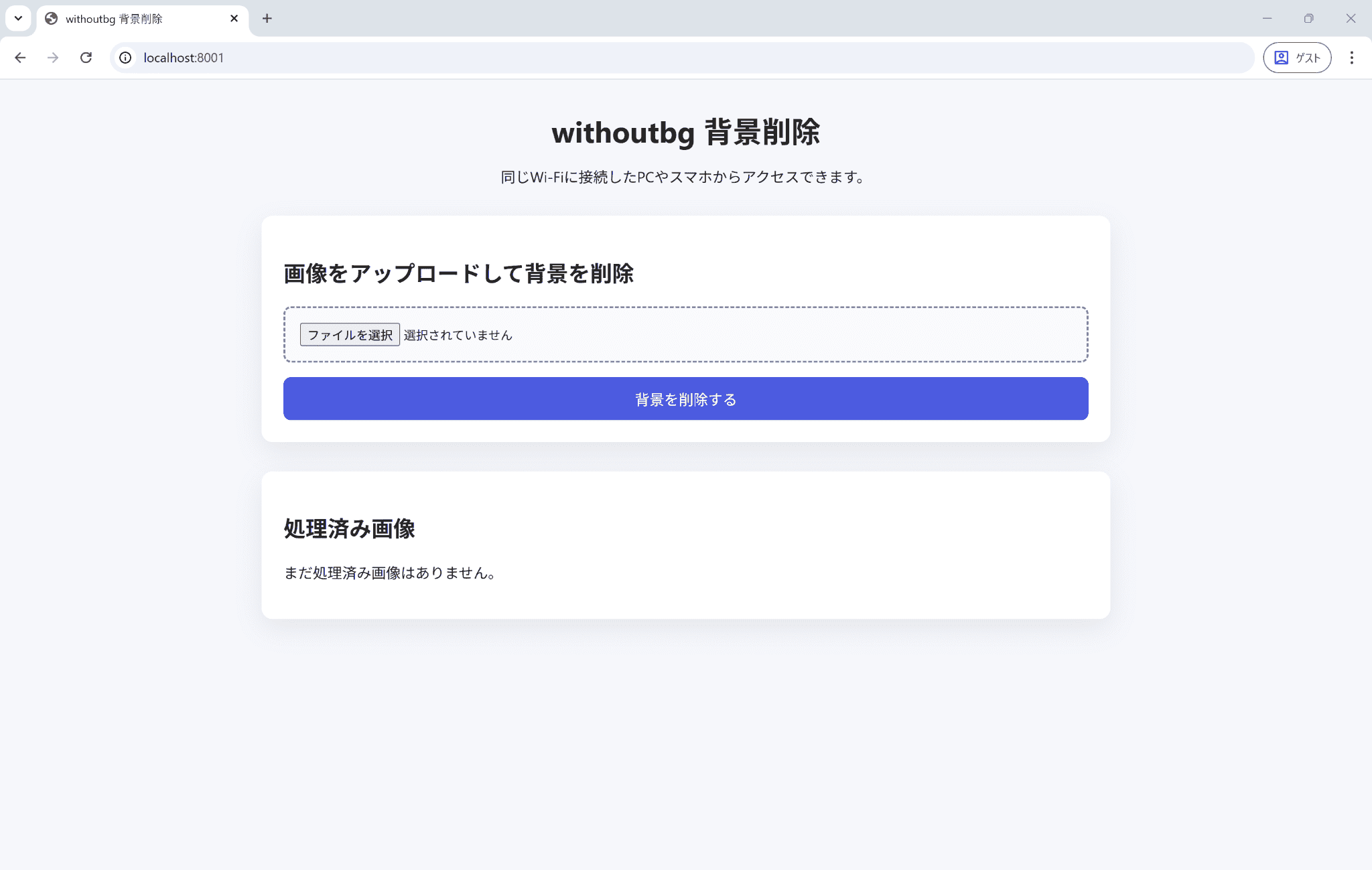
完成したWebアプリのトップ画面はこんな感じです。
2. withoutBG とは
withoutBGは、画像の背景を自動で除去できるライブラリです。
- 公式サイト:Open Source Background Removal & API | withoutBG
- GitHub:withoutbg/withoutbg: Image Background Removal Toolkit - Open Source and API Models
withoutBGの特徴をまとめると、以下になります。
- 画像背景除去に特化
- Local(オープンソース・無料)とCloud API(有料)を提供
- Pythonから簡単に利用可能
- ローカル実行でも十分実用的な精度
今回はオープンソースモデルである v0.1.0 Focus(Focus モデル) を使い、ローカル環境で動作する画像背景除去AIを実装します。
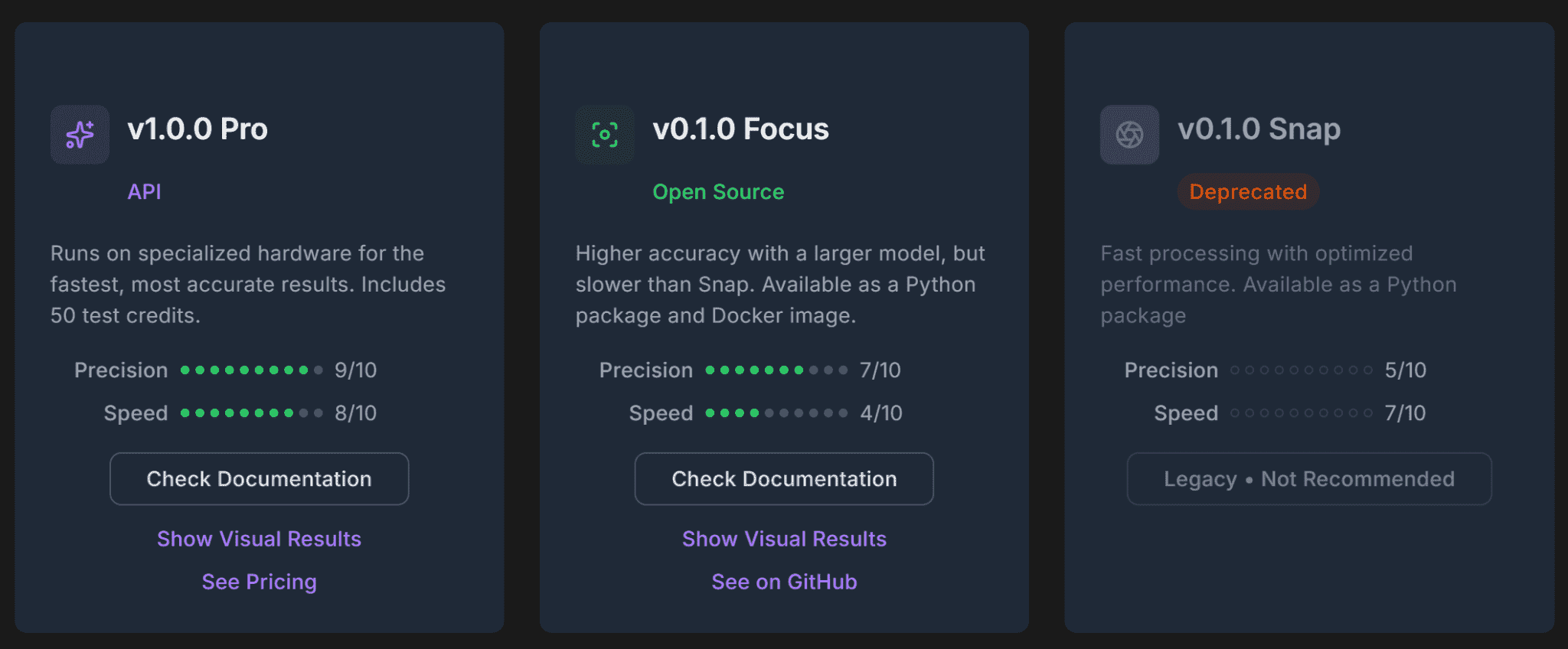
※ 出典:withoutBG API Documentation
3. 環境構築
3.1 方針
- Docker版(2GB)も公開されているが、今回は不使用
- Python + FastAPI + withoutBG でシンプルに実装
- 仮想環境でWebアプリを構築
- モデルは仮想環境内に配置して管理
3.2 実行環境
- OS:Windows 11
- Python:3.12
- フレームワーク:FastAPI
- 背景除去:withoutBG(Focus モデル)
3.3 仮想環境構築
作業フォルダで venv を作成。
py -3.12 -m venv .venv
3.4 フォルダ構成
今回の構成は以下の通りです。
/
├── .venv/                  # Python 仮想環境
│   └── ...
├── app/
│   ├── main.py             # アプリ本体
│   ├── models/             # 背景除去モデル
│   │   └── ...
│   ├── templates/          # HTML テンプレート
│   │   └── index.html
│   └── uploads/            # 画像アップロード関連
│       ├── original/       # 元画像
│       ├── processed/      # 処理済み画像
│       └── hidden/         # 非表示扱いの画像
│           └── ...
├── requirements.txt        # 依存パッケージ
└── run_server.py           # サーバー起動スクリプト
3.5 パッケージインストール
使用するパッケージは最小限。
fastapi
jinja2
python-multipart
uvicorn[standard]
withoutbg
インストール手順:
./.venv/Scripts/Activate.ps1
pip install -r ./requirements.txt
4. アプリケーション実装
実装は CodeX で生成したコードをベースに調整。
4.1 実装のポイント
-
WithoutBGOpenSource()を初回実行時に呼ぶと、約320MBのモデル(Focus モデル)が自動ダウンロード - モデルの保存先を
/app/modelsに指定(指定しない場合は OS のキャッシュディレクトリに保存される) - PC / スマホ両対応のシンプルな UI
- 処理済み画像の「非表示」が可能(実ファイルは残しつつ画面から消す)
4.2 全体コード
main.py
from __future__ import annotations

import asyncio
import mimetypes
import os
import shutil
from pathlib import Path
from uuid import uuid4

from fastapi import FastAPI, File, HTTPException, Request, UploadFile
from fastapi.responses import FileResponse, HTMLResponse, RedirectResponse
from fastapi.templating import Jinja2Templates
from huggingface_hub import hf_hub_download
from withoutbg.core import WithoutBGOpenSource


BASE_DIR = Path(__file__).resolve().parent
TEMPLATE_DIR = BASE_DIR / "templates"
UPLOAD_ROOT = BASE_DIR / "uploads"
ORIGINAL_DIR = UPLOAD_ROOT / "original"
PROCESSED_DIR = UPLOAD_ROOT / "processed"
HIDDEN_DIR = UPLOAD_ROOT / "hidden"
MODEL_DIR = BASE_DIR / "models"

for directory in (UPLOAD_ROOT, ORIGINAL_DIR, PROCESSED_DIR, HIDDEN_DIR, MODEL_DIR):
    directory.mkdir(parents=True, exist_ok=True)


app = FastAPI(title="withoutbg demo")
templates = Jinja2Templates(directory=str(TEMPLATE_DIR))


def _ensure_model_file(filename: str) -> Path:
    target = MODEL_DIR / filename
    if target.exists():
        return target
    downloaded = Path(hf_hub_download(repo_id="withoutbg/focus", filename=filename))
    shutil.copy2(downloaded, target)
    return target


def _create_model() -> WithoutBGOpenSource:
    return WithoutBGOpenSource(
        depth_model_path=_ensure_model_file("depth_anything_v2_vits_slim.onnx"),
        isnet_model_path=_ensure_model_file("isnet.onnx"),
        matting_model_path=_ensure_model_file("focus_matting_1.0.0.onnx"),
        refiner_model_path=_ensure_model_file("focus_refiner_1.0.0.onnx"),
    )


# 初回のみモデルダウンロード(約320MB)
WITHOUTBG_MODEL = _create_model()


def _build_file_entry(path: Path) -> dict:
    return {
        "name": path.name,
        "size_kb": round(path.stat().st_size / 1024, 1),
        "url": f"/processed/{path.name}",
        "download_url": f"/download/{path.name}",
        "hide_url": f"/hide/{path.name}",
    }


def _list_files(directory: Path) -> list[dict]:
    return [
        _build_file_entry(path)
        for path in sorted(directory.glob("*"), key=os.path.getmtime, reverse=True)
        if path.is_file()
    ]


@app.get("/", response_class=HTMLResponse)
async def index(request: Request) -> HTMLResponse:
    processed = _list_files(PROCESSED_DIR)
    return templates.TemplateResponse(
        "index.html",
        {
            "request": request,
            "processed": processed,
        },
    )


@app.post("/upload")
async def upload_image(file: UploadFile = File(...)) -> RedirectResponse:
    content_type = file.content_type or ""
    if not content_type.startswith("image/"):
        raise HTTPException(
            status_code=400, detail="画像ファイルのみアップロードしてください。"
        )

    data = await file.read()
    if not data:
        raise HTTPException(status_code=400, detail="ファイルが空です。")

    suffix = (
        Path(file.filename or "").suffix
        or mimetypes.guess_extension(content_type)
        or ".png"
    )
    token = uuid4().hex
    original_path = ORIGINAL_DIR / f"{token}{suffix}"
    processed_path = PROCESSED_DIR / f"{token}.png"

    original_path.write_bytes(data)
    try:
        result = await asyncio.to_thread(
            WITHOUTBG_MODEL.remove_background, original_path
        )
        await asyncio.to_thread(result.save, processed_path)
    except Exception as exc:
        original_path.unlink(missing_ok=True)
        processed_path.unlink(missing_ok=True)
        raise HTTPException(
            status_code=500, detail=f"背景削除に失敗しました: {exc}"
        ) from exc

    return RedirectResponse(url="/", status_code=303)


def _safe_processed_file(name: str) -> Path:
    safe_name = Path(name).name
    target = PROCESSED_DIR / safe_name
    if not target.exists():
        raise HTTPException(status_code=404, detail="ファイルが見つかりません。")
    return target


@app.get("/processed/{file_name}")
async def serve_processed(file_name: str) -> FileResponse:
    target = _safe_processed_file(file_name)
    return FileResponse(target, media_type="image/png")


@app.get("/download/{file_name}")
async def download_processed(file_name: str) -> FileResponse:
    target = _safe_processed_file(file_name)
    return FileResponse(
        target,
        media_type="image/png",
        filename=target.name,
    )


@app.post("/hide/{file_name}")
async def hide_image(file_name: str) -> RedirectResponse:
    source = _safe_processed_file(file_name)
    destination = HIDDEN_DIR / source.name
    source.rename(destination)
    return RedirectResponse(url="/", status_code=303)


@app.get("/healthz")
async def healthcheck() -> dict:
    return {"status": "ok"}
run_server.py
import socket
import uvicorn

PORT = 8001
HOST = "0.0.0.0"
APP_PATH = "app.main:app"


def _resolve_host_ip() -> str:
    hostname = socket.gethostname()
    try:
        return socket.gethostbyname(hostname)
    except OSError:
        return "127.0.0.1"


def main() -> None:
    ip_address = _resolve_host_ip()
    print("withoutbg demo server")
    print(f" - Localhost  : http://127.0.0.1:{PORT}")
    print(f" - LAN IP     : http://{ip_address}:{PORT}")
    print("同一LAN内のPC/スマホからアクセスする場合はLAN IPのURLを使ってください。")

    uvicorn.run(APP_PATH, host=HOST, port=PORT, log_level="info")


if __name__ == "__main__":
    main()
index.html
<!DOCTYPE html>
<html lang="ja">

<head>
  <meta charset="utf-8" />
  <meta name="viewport" content="width=device-width, initial-scale=1" />
  <title>withoutbg 背景削除</title>
  <style>
    * {
      box-sizing: border-box;
    }

    body {
      margin: 0;
      font-family: "Segoe UI", Arial, sans-serif;
      background: #f6f7fb;
      color: #222;
    }

    main {
      max-width: 960px;
      margin: 0 auto;
      padding: 2rem 1rem 3rem;
    }

    header {
      text-align: center;
      margin-bottom: 2rem;
    }

    h1 {
      margin: 0 0 0.5rem;
      font-size: 2rem;
    }

    .card {
      background: #fff;
      border-radius: 12px;
      padding: 1.5rem;
      margin-bottom: 2rem;
      box-shadow: 0 10px 30px rgba(15, 18, 40, 0.08);
    }

    form {
      display: flex;
      flex-direction: column;
      gap: 1rem;
    }

    input[type="file"] {
      border: 2px dashed #7a7caa;
      padding: 1rem;
      border-radius: 8px;
      background: #f9faff;
    }

    button {
      border: none;
      border-radius: 8px;
      padding: 0.75rem 1.5rem;
      font-size: 1rem;
      background: #4c5be0;
      color: #fff;
      cursor: pointer;
    }

    button:hover {
      opacity: 0.9;
    }

    .hint {
      font-size: 0.9rem;
      color: #555;
    }

    .gallery {
      display: grid;
      grid-template-columns: repeat(auto-fill, minmax(220px, 1fr));
      gap: 1rem;
    }

    article {
      background: #f0f2ff;
      border-radius: 10px;
      padding: 0.75rem;
      display: flex;
      flex-direction: column;
      gap: 0.5rem;
    }

    article img {
      width: 100%;
      border-radius: 8px;
      background: #fff;
    }

    article footer {
      display: flex;
      flex-direction: column;
      gap: 0.4rem;
      font-size: 0.9rem;
    }

    .actions {
      display: flex;
      justify-content: space-between;
      gap: 0.5rem;
      align-items: center;
    }

    .filesize {
      color: #555;
    }

    form .secondary {
      background: #fff;
      color: #4c5be0;
      border: 1px solid #4c5be0;
    }

    a {
      color: #3944bc;
      text-decoration: none;
    }

    a:hover {
      text-decoration: underline;
    }
  </style>
</head>

<body>
  <main>
    <header>
      <h1>withoutbg 背景削除</h1>
      <p>同じWi-Fiに接続したPCやスマホからアクセスできます。</p>
    </header>

    <section class="card">
      <h2>画像をアップロードして背景を削除</h2>
      <form action="/upload" method="post" enctype="multipart/form-data">
        <input type="file" name="file" accept="image/*" required />
        <button type="submit">背景を削除する</button>
      </form>
    </section>

    <section class="card">
      <h2>処理済み画像</h2>
      {% if processed %}
      <div class="gallery">
        {% for item in processed %}
        <article>
          <a href="{{ item.download_url }}" download>
            <img src="{{ item.url }}" alt="Processed image {{ loop.index }}" />
          </a>
          <footer>
            <div class="actions">
              <a href="{{ item.download_url }}">ダウンロード</a>
              <form action="{{ item.hide_url }}" method="post">
                <button type="submit" class="secondary">非表示</button>
              </form>
            </div>
            <span class="filesize">{{ item.size_kb }} KB</span>
          </footer>
        </article>
        {% endfor %}
      </div>
      {% else %}
      <p>まだ処理済み画像はありません。</p>
      {% endif %}
    </section>
  </main>
</body>

</html>
5. アプリケーション実行
Webアプリは以下のコマンドで起動します。
.venv\Scripts\Activate.ps1
python run_server.py
# または
.venv\Scripts\python run_server.py
起動すると、アクセス先が表示されます。
withoutbg demo server
 - Localhost  : http://127.0.0.1:8001
 - LAN IP     : http://[PCのIP]:8001
同一LAN内のPC/スマホからアクセスする場合はLAN IPのURLを使ってください。
INFO:     Started server process [プロセスID]
INFO:     Waiting for application startup.
INFO:     Application startup complete.
INFO:     Uvicorn running on http://0.0.0.0:8001 (Press CTRL+C to quit)
動作確認
http://[PCのIP]:8001 にアクセスし、以下の画像で背景除去のテストを実施。
- マーモットのアイコン風画像(AI生成)
- 建物の写真
- 観葉植物の写真
結果はこんな感じ。
アップロードした画像が、背景除去後に一覧表示されます。
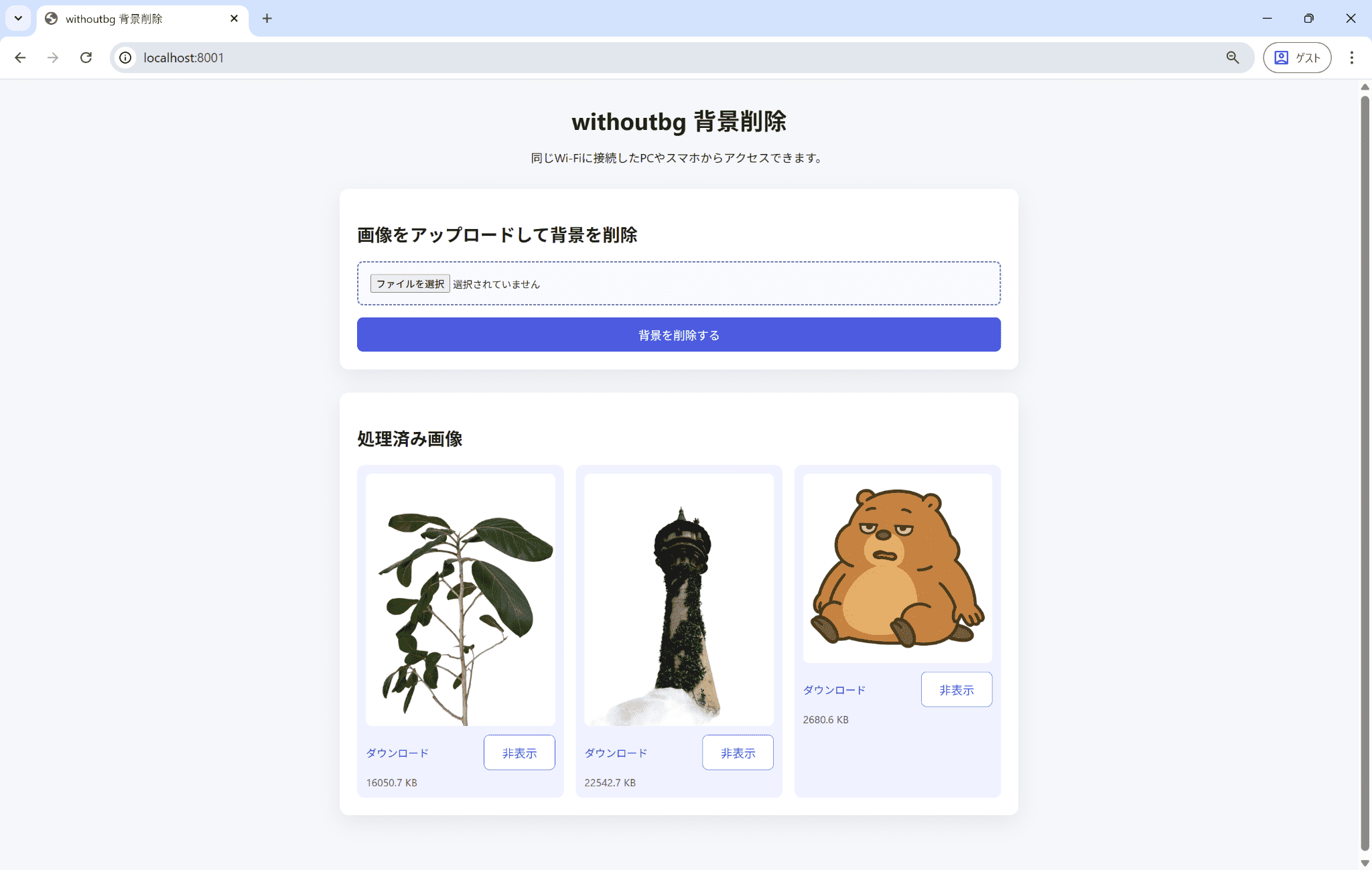
背景除去前後での比較。背景がきれいに除去されています。
1画像あたり5~10秒程度 で処理が完了します。

ダウンロードして加工すれば、冒頭のような合成画像も簡単に作れます。
6. まとめ
今回やったこと:
- オープンソースの背景除去AI「withoutBG」をローカルで利用
- FastAPIでWebアプリ化
- PC / スマホ両対応の簡易 UI を実装
使ってみた感想:
- 精度は想像以上に良好
- ローカル完結なので、画像を外部に出さずに加工できて便利
- ローカル環境内で共有も可能
- 小規模ツールとして扱いやすい
「背景削除だけしたい」、「外部に画像を出したくない」そんな用途におすすめです。
アイコン作成、資料用画像の切り抜き、簡易的な合成素材作成などにも利用できそうです。
おまけ
しいたけは未来の電子部品になる可能性を秘めているらしい。
3 Weird Things You Can Turn Into a Memristor Yes, you might want to plug a mushroom into your circuit