6
0

Delete article

Deleted articles cannot be recovered.

Draft of this article would be also deleted.

Are you sure you want to delete this article?

VSCode上でC++実行時に warning: GDB: Failed to set controlling terminal: Operation not permitted が出た人へ

6
Posted at

症状

VSCode上でC++のファイルを実行しようとすると

&"warning: GDB: Failed to set controlling terminal: Operation not permitted\n"

が出て実行ができない.

g++ -g main.cpp -o main
gdb ./main

とかでGDBを起動して実行とかは普通にできる.

対処法

C/C++の拡張を1.29.3以前に戻す

VSCodeの拡張機能のサイドバーからC/C++を探し,歯車マークを押して「特定のバージョンをインストール」から1.29.3以前のものをインストール.インストール後VSCodeの再起動で直った.

試した限り1.30以降ではだめでした.(2026/05/18)

自動更新も切っておいた方が無難かもしれません.
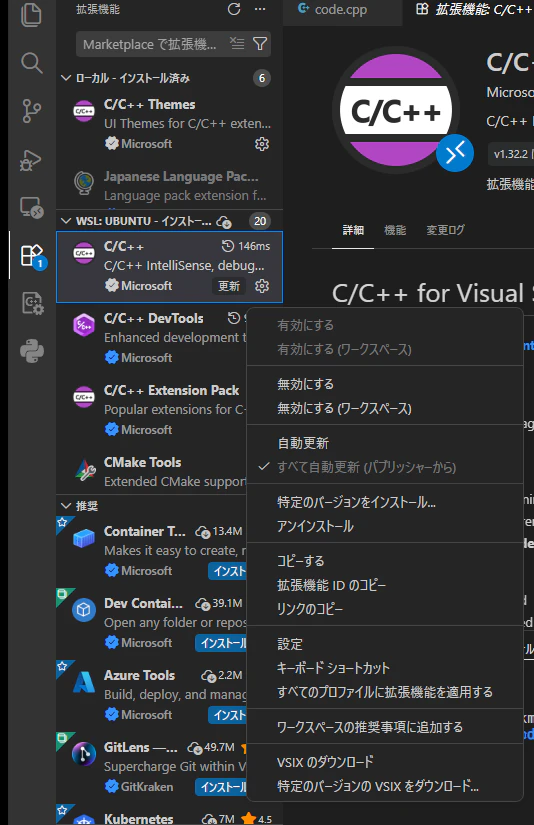
スクリーンショット 2026-05-18 000931.png

6
0
0

Register as a new user and use Qiita more conveniently

  1. You get articles that match your needs
  2. You can efficiently read back useful information
  3. You can use dark theme
What you can do with signing up
6
0

Delete article

Deleted articles cannot be recovered.

Draft of this article would be also deleted.

Are you sure you want to delete this article?