
業務で回っている Word 文書をモデルにより正確に理解させるには、まずファイルの中に何があるかを把握する必要があります。画面上は連続した段落に見えても、ファイルの中にはコメント、変更履歴、非表示テキスト、ヘッダー、テキストボックス、脚注、結合セル、埋め込み画像が同居しています。GetText() を呼ぶか Markdown に変換するだけでは、その一部しか取れず、逆にコンテキストに入れるべきでない内容まで含まれます。料金条項が新旧 2 回現れ、レビュー担当者のコメントが本文に混ざり、非表示にしていた見積下限が HTML コメントとして残り、十数 KB の図が 1 万文字を超える base64 になります。ここで行いたいのは Word を単なるテキストにすることではなく、どの内容をどの形でコンテキストに入れるかを決めることです。
この整理はライブラリに任せられます。文書オブジェクトを読み、変更履歴を確定し、コメントとプロパティを本文の外へ出し、オブジェクトの順序どおりに Markdown を組み直します。本記事では Free Spire.Doc for Python を使用します。インストールコマンドは次のとおりです。
pip install Spire.Doc.Free
オブジェクトモデル
| オブジェクト | 役割 | 本記事で使うメンバー |
|---|---|---|
Document |
文書コンテナ |
LoadFromFile、GetText、AcceptChanges、RejectChanges、Comments、TextBoxes、BuiltinDocumentProperties、SaveToFile
|
Section |
セクション |
Body、HeadersFooters
|
Body |
本文コンテナ |
Paragraphs、Tables、ChildObjects
|
Paragraph |
段落 |
StyleName、ChildObjects、AppendComment、AppendTextBox、AppendFootnote、AppendPicture
|
Table |
表 |
Rows、Cells、GridSpan、CellFormat.VerticalMerge
|
TextRange |
テキスト範囲 |
Text、CharacterFormat.Hidden、IsInsertRevision、IsDeleteRevision
|
Comment |
コメント |
Format.Author、OwnerParagraph、Body
|
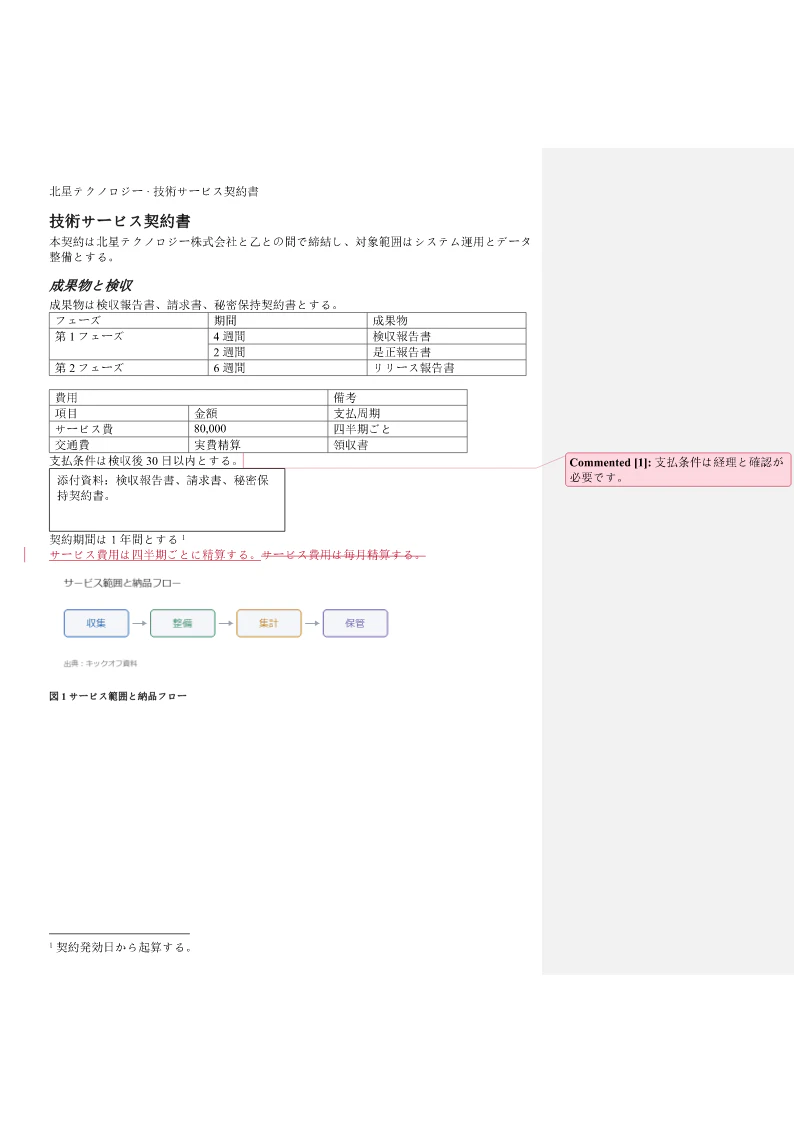
サンプルは 11 段落の技術サービス契約書です。表は 2 つあり、1 つは先頭列が縦結合、もう 1 つは見出し行が横結合です。コメント 1 件、変更履歴 1 か所、テキストボックス 1 個、脚注 1 件、画像 1 枚、非表示文字 12 文字、ヘッダーと 3 つの文書プロパティも含みます。
文書の中身を数える
前処理の最初は変更ではなく調査です。本文のオブジェクトは ChildObjects の順に並び、表はトップレベル、段落内のコメント、テキストボックス、脚注、画像は段落の子オブジェクトになります。変更履歴と非表示テキストは TextRange の階層です。順に数えることで、後で扱う対象が確定します。
import json
import os

from spire.doc import *
from spire.doc.common import *

os.makedirs("output", exist_ok=True)

doc = Document()
doc.LoadFromFile("samples/技術サービス契約書.docx")
body = doc.Sections[0].Body

paragraphs = body.Paragraphs.Count
tables = body.Tables.Count
comments = doc.Comments.Count
textboxes = doc.TextBoxes.Count
footnotes = pictures = hidden_chars = 0
inserts = deletes = 0

for i in range(paragraphs):
    para = body.Paragraphs[i]
    for j in range(para.ChildObjects.Count):
        obj = para.ChildObjects[j]
        if isinstance(obj, Footnote):
            footnotes += 1
        elif isinstance(obj, DocPicture):
            pictures += 1
        elif isinstance(obj, TextRange):
            if obj.CharacterFormat.Hidden:
                hidden_chars += len(obj.Text)
            if obj.IsInsertRevision:
                inserts += 1
            if obj.IsDeleteRevision:
                deletes += 1

print("paragraphs   :", paragraphs)
print("tables       :", tables)
print("comments     :", comments)
print("revisions    :", inserts, "insert /", deletes, "delete")
print("textboxes    :", textboxes)
print("footnotes    :", footnotes)
print("pictures     :", pictures)
print("hidden chars :", hidden_chars)
print("header       :", doc.Sections[0].HeadersFooters[HeaderFooterType.HeaderOdd].Paragraphs[0].Text)
print("properties   :", doc.BuiltinDocumentProperties.Title,
      "/", doc.BuiltinDocumentProperties.Author,
      "/", doc.BuiltinDocumentProperties.Comments)

manifest = {
    "paragraphs": paragraphs,
    "tables": tables,
    "comments": comments,
    "revisions": {"insert": inserts, "delete": deletes},
    "textboxes": textboxes,
    "footnotes": footnotes,
    "pictures": pictures,
    "hidden_chars": hidden_chars,
    "header": doc.Sections[0].HeadersFooters[HeaderFooterType.HeaderOdd].Paragraphs[0].Text,
    "properties": {
        "title": doc.BuiltinDocumentProperties.Title,
        "author": doc.BuiltinDocumentProperties.Author,
        "comments": doc.BuiltinDocumentProperties.Comments,
    },
}
with open("output/文書インベントリ.json", "w", encoding="utf-8") as fp:
    json.dump(manifest, fp, ensure_ascii=False, indent=2)

doc.Dispose()
paragraphs   : 11
tables       : 2
comments     : 1
revisions    : 1 insert / 1 delete
textboxes    : 1
footnotes    : 1
pictures     : 1
hidden chars : 12
header       : 北星テクノロジー · 技術サービス契約書
properties   : 技術サービス契約書 / 田中 / 社内レビュー版
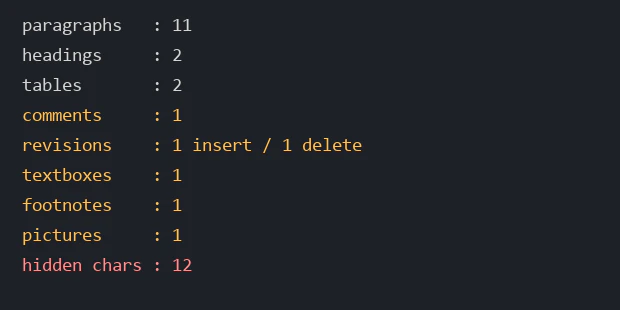
この一覧の各項目が、後の処理にそのまま対応します。コメントは書き出して削除、変更履歴は確定、非表示テキストは除去、ヘッダーは 1 回だけ保持、テキストボックスと脚注は補完、画像は個別に保存します。HasChanges が True なら、未処理の変更履歴が残っているということです。
既定の 2 つの出力が何を持ち出すか
ライブラリにはすぐ使える出力が 2 つあります。GetText() はプレーンテキスト、SaveToFile(..., FileFormat.Markdown) は Markdown を返します。どちらもモデル向けに作られたものではなく、持ち出す内容も同じではありません。
from spire.doc import *
from spire.doc.common import *

doc = Document()
doc.LoadFromFile("samples/技術サービス契約書.docx")

text = doc.GetText()
doc.SaveToFile("output/契約書_原本.md", FileFormat.Markdown)
markdown = open("output/契約書_原本.md", encoding="utf-8").read()

print("GetText chars :", len(text))
print("Markdown chars:", len(markdown))
doc.Dispose()
GetText chars : 388
Markdown chars: 12578
GetText() は 388 文字で最も短く見えますが、ヘッダーを先頭に置き、非表示テキストをそのまま出し、テキストボックスの内容を通常の段落として扱い、変更履歴の新旧両方を同じ段落に並べます。コメント、脚注、画像は含まれず、表はセルごとの行に崩れます。
北星テクノロジー · 技術サービス契約書
技術サービス契約書
本契約は北星テクノロジー株式会社と乙との間で締結し、対象範囲はシステム運用とデータ整備とする。見積下限は八千二百万円。
成果物と検収
成果物は検収報告書、請求書、秘密保持契約書とする。
フェーズ
期間
成果物
第1フェーズ
4 週間
検収報告書
第1フェーズ
2 週間
是正報告書
第2フェーズ
6 週間
リリース報告書

費用
備考
項目
金額
支払周期
サービス費
80,000
四半期ごと
交通費
実費精算
領収書
支払条件は検収後 30 日以内とする。
添付資料:検収報告書、請求書、秘密保持契約書。

契約期間は 1 年間とする
サービス費用は四半期ごとに精算する。サービス費用は毎月精算する。

図 1 サービス範囲と納品フロー
Markdown の 12,578 文字の大半は画像の base64 です。先頭と末尾を見ると、4 か所の残留も確認できます。見出しの前にヘッダーが 1 行入り、非表示テキストは <!--見積下限は八千二百万円。--> として読める形で残り、コメント本文はアンカー段落の後ろに追記され、変更履歴の新旧両方が並びます。
北星テクノロジー · 技術サービス契約書
# 技術サービス契約書
本契約は北星テクノロジー株式会社と乙との間で締結し、対象範囲はシステム運用とデータ整備とする。 <!--見積下限は八千二百万円。-->
## 成果物と検収
成果物は検収報告書、請求書、秘密保持契約書とする。
|フェーズ|期間|成果物|
|:---|:---|:---|
|第1フェーズ|4 週間|検収報告書|
...
支払条件は検収後 30 日以内とする。 支払条件は経理と確認が必要です。
添付資料:検収報告書、請求書、秘密保持契約書。
契約期間は 1 年間とする [^1]
サービス費用は四半期ごとに精算する。 サービス費用は毎月精算する。

図 1 サービス範囲と納品フロー
[^1]: <sup></sup> 契約発効日から起算する。
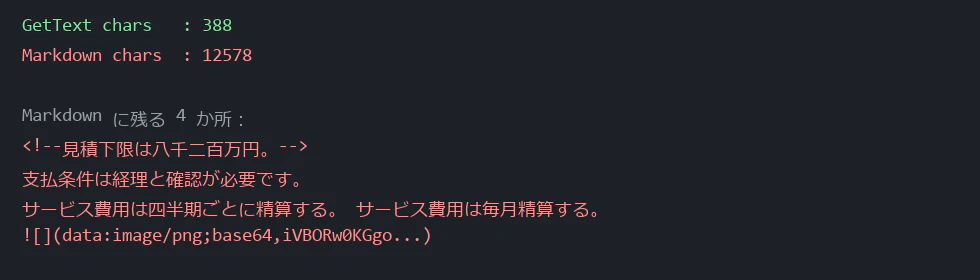
2 つの経路の違いは明確です。GetText() は短いものの、コメント、脚注、画像を落とし、非表示テキストと新旧両方の変更履歴を残します。Markdown は構造を保ちますが、画像を base64 にし、横結合のある表を HTML に落とします。整理とは、この 2 つのどちらでもなく、オブジェクトの種類ごとに残すか捨てるかを決める作業です。
変更履歴:先に確定してから出力する
変更履歴は独立した表ではなく、TextRange に付きます。1 回の書き換えで挿入と削除のマークが対になり、GetText() も Markdown も両方の文字を出します。本文には「四半期ごとに精算する」の直後に「毎月精算する」が並び、どちらが最終版かを示す情報はありません。
from spire.doc import *
from spire.doc.common import *

def revision_counts(doc):
    ins = dele = 0
    body = doc.Sections[0].Body
    for i in range(body.Paragraphs.Count):
        for j in range(body.Paragraphs[i].ChildObjects.Count):
            obj = body.Paragraphs[i].ChildObjects[j]
            if isinstance(obj, TextRange):
                if obj.IsInsertRevision:
                    ins += 1
                if obj.IsDeleteRevision:
                    dele += 1
    return ins, dele

for tag, action in [("original", None), ("accept", "accept"), ("reject", "reject")]:
    doc = Document()
    doc.LoadFromFile("samples/技術サービス契約書.docx")
    if action == "accept":
        doc.AcceptChanges()
    elif action == "reject":
        doc.RejectChanges()
    body = doc.Sections[0].Body
    target = ""
    for i in range(body.Paragraphs.Count):
        if "サービス費用" in body.Paragraphs[i].Text:
            target = body.Paragraphs[i].Text
            break
    ins, dele = revision_counts(doc)
    print("%-8s revisions=%d/%d  text=%s" % (tag, ins, dele, target))
    doc.Dispose()
original revisions=1/1  text=サービス費用は四半期ごとに精算する。サービス費用は毎月精算する。
accept   revisions=0/0  text=サービス費用は四半期ごとに精算する。
reject   revisions=0/0  text=サービス費用は毎月精算する。

AcceptChanges() と RejectChanges() は文書全体に効き、呼び出した後は変更履歴の数が 0 になり、本文には片方の版だけが残ります。どちらを選ぶかは技術判断ではありません。契約レビューなら修正を承認し、校正稿なら原文に戻すことがあります。コードは呼び出し側の決定を実行するだけです。確定してから出力すれば、モデルが 2 つの版を同時に読むことはありません。
コメント、非表示テキスト、文書プロパティ
コメントはレビュー情報であり、本文ではありません。Comments コレクションから作成者、アンカー段落、本文を取り出し、JSON に書き出してから全体を空にします。非表示テキストは別の扱いです。納品文書に残るべきではないため、CharacterFormat.Hidden が真のテキスト範囲を順に除去します。文書プロパティ(タイトル、作成者、備考)も本文に混ぜず、メタデータとして別に保存します。
import json
import os

from spire.doc import *
from spire.doc.common import *

os.makedirs("output", exist_ok=True)

doc = Document()
doc.LoadFromFile("samples/技術サービス契約書.docx")

comments = []
for i in range(doc.Comments.Count):
    cm = doc.Comments[i]
    comments.append({
        "author": cm.Format.Author,
        "anchor": cm.OwnerParagraph.Text,
        "text": "".join(cm.Body.Paragraphs[k].Text
                        for k in range(cm.Body.Paragraphs.Count)),
    })
print("comments:", json.dumps(comments, ensure_ascii=False))
with open("output/コメント一覧.json", "w", encoding="utf-8") as fp:
    json.dump(comments, fp, ensure_ascii=False, indent=2)

doc.Comments.Clear()

body = doc.Sections[0].Body
removed = []
for i in range(body.Paragraphs.Count):
    para = body.Paragraphs[i]
    for j in range(para.ChildObjects.Count - 1, -1, -1):
        obj = para.ChildObjects[j]
        if isinstance(obj, TextRange) and obj.CharacterFormat.Hidden:
            removed.append(obj.Text)
            para.ChildObjects.RemoveAt(j)
print("hidden removed:", removed)

props = {
    "title": doc.BuiltinDocumentProperties.Title,
    "author": doc.BuiltinDocumentProperties.Author,
    "comments": doc.BuiltinDocumentProperties.Comments,
}
print("properties:", json.dumps(props, ensure_ascii=False))
with open("output/文書プロパティ.json", "w", encoding="utf-8") as fp:
    json.dump(props, fp, ensure_ascii=False, indent=2)

text = doc.GetText()
print("comment text left:", "支払条件は経理と確認が必要です" in text)
print("hidden text left :", "見積下限" in text)
doc.Dispose()
comments: [{"author": "佐藤", "anchor": "支払条件は検収後 30 日以内とする。", "text": "支払条件は経理と確認が必要です。"}]
hidden removed: ['見積下限は八千二百万円。']
properties: {"title": "技術サービス契約書", "author": "田中", "comments": "社内レビュー版"}
comment text left: False
hidden text left : False
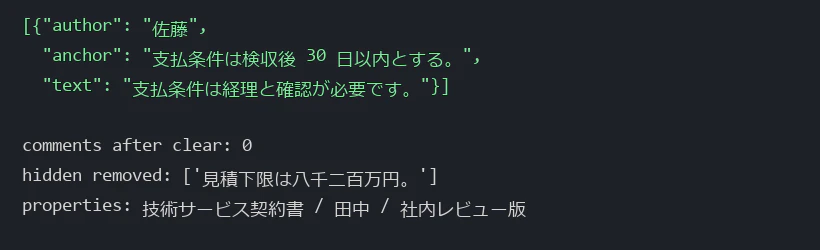
ChildObjects を末尾から前にたどるのが必要です。テキスト範囲を削除すると後ろの添字が変わるため、逆順なら添字は常に有効です。コメントを空にしてもアンカー段落は残り、レビュー意見だけが外れます。非表示テキストを除くと、本文は 388 文字から 376 文字になります。
ヘッダー、テキストボックス、脚注、画像
ヘッダーは毎ページ繰り返されるため、モデルに渡すのは 1 回で十分です。文書ラベルとして取り出し、ヘッダーコンテナから削除すれば、本文が孤立した 1 行で始まることはありません。テキストボックスの内容は本文の一部ですが、アンカー段落自体は空なので、組み直すときにアンカーの位置へ戻します。脚注は GetText() に含まれないため Footnote オブジェクトから個別に取り出し、画像は DocPicture.ImageBytes からファイルに落とします。
import os

from spire.doc import *
from spire.doc.common import *

os.makedirs("output/images", exist_ok=True)

doc = Document()
doc.LoadFromFile("samples/技術サービス契約書.docx")
section = doc.Sections[0]
body = section.Body

header = section.HeadersFooters[HeaderFooterType.HeaderOdd]
header_text = header.Paragraphs[0].Text
while header.Paragraphs.Count > 0:
    header.Paragraphs.RemoveAt(0)
print("header:", header_text)

for i in range(doc.TextBoxes.Count):
    tb = doc.TextBoxes[i]
    text = "".join(tb.Body.Paragraphs[k].Text
                   for k in range(tb.Body.Paragraphs.Count))
    print("textbox:", text)

for i in range(body.Paragraphs.Count):
    para = body.Paragraphs[i]
    for j in range(para.ChildObjects.Count):
        obj = para.ChildObjects[j]
        if isinstance(obj, Footnote):
            text = "".join(obj.TextBody.Paragraphs[k].Text
                           for k in range(obj.TextBody.Paragraphs.Count))
            print("footnote:", text.replace("\x02", "").strip())
        elif isinstance(obj, DocPicture) and obj.HasImage:
            path = os.path.join("output", "images", "figure-1.png")
            with open(path, "wb") as fp:
                fp.write(bytes(obj.ImageBytes))
            print("image:", path, os.path.getsize(path), "bytes")

doc.Dispose()
header: 北星テクノロジー · 技術サービス契約書
textbox: 添付資料:検収報告書、請求書、秘密保持契約書。
footnote: 契約発効日から起算する。
image: output\images\figure-1.png 10791 bytes
ヘッダーを外すと、GetText() の 1 行目は「北星テクノロジー · 技術サービス契約書」ではなくなります。テキストボックスは添付資料の完全な一覧で、脚注は \x02 を除くと「契約発効日から起算する」です。画像は 10,791 バイトの PNG として保存し、本文には  の 1 行だけを残せば、画像をコンテキストに符号化する必要はありません。
表:結合セルをパイプ表に戻す
表は Word から Markdown への変換で最も崩れやすい部分です。先頭列が縦結合の表は、既定の出力でもパイプ表のままですが、結合した値が各行に複製されます。見出し行が横結合の表は、そのまま HTML に落ちます。サンプルの 4 行 3 列の費用表は、既定では 2,927 文字の <table> になり、各セルに style、width、font-family が付きます。
コードは GridSpan と CellFormat.VerticalMerge を読んで行と列を組み直します。縦結合の継続セルは前の行の値を使い、横結合はスパン分だけ展開し、上位の見出しを下位の見出しに連結して colspan のグループ関係を保ちます。
from spire.doc import *
from spire.doc.common import *

def cell_text(cell):
    return "".join(cell.Paragraphs[k].Text
                   for k in range(cell.Paragraphs.Count)).strip()

def table_to_markdown(table):
    rows = []
    group_header = {}
    previous = []
    for r in range(table.Rows.Count):
        row = table.Rows[r]
        values = []
        groups = {}
        col = 0
        for c in range(row.Cells.Count):
            cell = row.Cells[c]
            text = cell_text(cell)
            span = cell.GridSpan
            if cell.CellFormat.VerticalMerge == CellMerge.Continue and col < len(previous):
                text = previous[col]
            for k in range(span):
                values.append(text)
                if span > 1:
                    groups[col + k] = text
            col += span
        if group_header:
            values = ["%s/%s" % (group_header[i], v) if i in group_header and v else v
                      for i, v in enumerate(values)]
            group_header = {}
        if groups and r + 1 < table.Rows.Count:
            group_header = groups
            continue
        rows.append(values)
        previous = values

    width = max(len(r) for r in rows)
    lines = []
    for i, values in enumerate(rows):
        values = values + [""] * (width - len(values))
        lines.append("| " + " | ".join(values) + " |")
        if i == 0:
            lines.append("| " + " | ".join(["---"] * width) + " |")
    return "\n".join(lines)

doc = Document()
doc.LoadFromFile("samples/技術サービス契約書.docx")
for i in range(doc.Sections[0].Body.Tables.Count):
    print(table_to_markdown(doc.Sections[0].Body.Tables[i]))
    print()
doc.Dispose()
| フェーズ | 期間 | 成果物 |
| --- | --- | --- |
| 第1フェーズ | 4 週間 | 検収報告書 |
| 第1フェーズ | 2 週間 | 是正報告書 |
| 第2フェーズ | 6 週間 | リリース報告書 |

| 費用/項目 | 費用/金額 | 支払周期 |
| --- | --- | --- |
| サービス費 | 80,000 | 四半期ごと |
| 交通費 | 実費精算 | 領収書 |
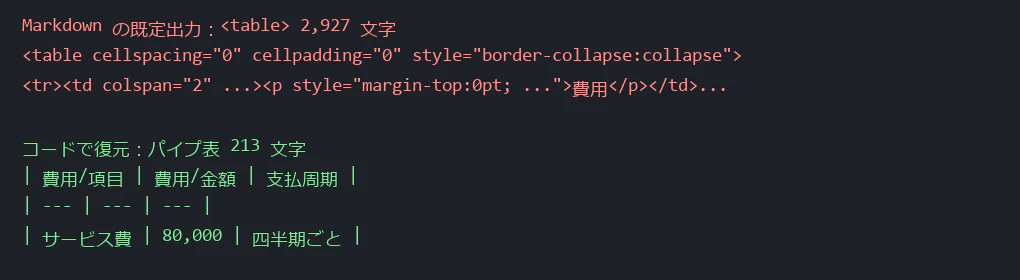
2 つの表を合わせて 213 文字で、HTML 版の 2,927 文字の約 14 分の 1 です。縦結合の「第1フェーズ」は 2 行に現れ、同じフェーズだと分かります。横結合の「費用」は「費用/項目」「費用/金額」に分かれ、上位の見出しが失われません。
組み立て:本文、インベントリ、画像
ここまでの処理をつなぎ、ChildObjects の順に Markdown を組み直します。変更履歴を確定し、コメントを消し、非表示テキストとヘッダーを外します。表は table_to_markdown、段落はスタイルに応じて見出しレベルを付け、テキストボックスはアンカーの位置に挿入し、脚注は文末にまとめ、画像は別ファイルにして元の位置に参照を残します。
doc = Document()
doc.LoadFromFile("samples/技術サービス契約書.docx")
section = doc.Sections[0]
body = section.Body
doc.AcceptChanges()
doc.Comments.Clear()
header = section.HeadersFooters[HeaderFooterType.HeaderOdd]
header_text = header.Paragraphs[0].Text if header.Paragraphs.Count else ""
while header.Paragraphs.Count > 0:
header.Paragraphs.RemoveAt(0)
for i in range(body.Paragraphs.Count):
para = body.Paragraphs[i]
for j in range(para.ChildObjects.Count - 1, -1, -1):
obj = para.ChildObjects[j]
if isinstance(obj, TextRange) and obj.CharacterFormat.Hidden:
para.ChildObjects.RemoveAt(j)
blocks = []
footnotes = []
figure_index = 0
for i in range(body.ChildObjects.Count):
obj = body.ChildObjects[i]
if obj.DocumentObjectType == DocumentObjectType.Table:
blocks.append(table_to_markdown(obj))
continue
if not isinstance(obj, Paragraph):
continue
text = obj.Text.strip()
textbox_text = ""
has_footnote = False
footnote_text = ""
picture = None
for j in range(obj.ChildObjects.Count):
child = obj.ChildObjects[j]
if isinstance(child, TextBox):
textbox_text = "".join(child.Body.Paragraphs[k].Text
for k in range(child.Body.Paragraphs.Count))
elif isinstance(child, Footnote):
has_footnote = True
footnote_text = "".join(child.TextBody.Paragraphs[k].Text
for k in range(child.TextBody.Paragraphs.Count))
elif isinstance(child, DocPicture) and child.HasImage:
picture = child
if picture is not None:
figure_index += 1
path = os.path.join("output", "images", "figure-%d.png" % figure_index)
with open(path, "wb") as fp:
fp.write(bytes(picture.ImageBytes))
blocks.append("" % (figure_index, figure_index))
continue
if textbox_text:
blocks.append(textbox_text)
if not text:
continue
if obj.StyleName.startswith("Heading"):
level = obj.StyleName.replace("Heading", "") or "1"
text = "#" * int(level) + " " + text
if has_footnote:
footnotes.append(footnote_text.replace("\x02", "").strip())
text = text + " [^1]"
blocks.append(text)
if footnotes:
blocks.append("[^1]: " + footnotes[0])
markdown = "\n\n".join(blocks).strip() + "\n"
open("output/契約書_整形.md", "w", encoding="utf-8").write(markdown)
print(markdown)
# 技術サービス契約書
本契約は北星テクノロジー株式会社と乙との間で締結し、対象範囲はシステム運用とデータ整備とする。
## 成果物と検収
成果物は検収報告書、請求書、秘密保持契約書とする。
| フェーズ | 期間 | 成果物 |
| --- | --- | --- |
| 第1フェーズ | 4 週間 | 検収報告書 |
| 第1フェーズ | 2 週間 | 是正報告書 |
| 第2フェーズ | 6 週間 | リリース報告書 |
| 費用/項目 | 費用/金額 | 支払周期 |
| --- | --- | --- |
| サービス費 | 80,000 | 四半期ごと |
| 交通費 | 実費精算 | 領収書 |
支払条件は検収後 30 日以内とする。
添付資料:検収報告書、請求書、秘密保持契約書。
契約期間は 1 年間とする [^1]
サービス費用は四半期ごとに精算する。

図 1 サービス範囲と納品フロー
[^1]: 契約発効日から起算する。
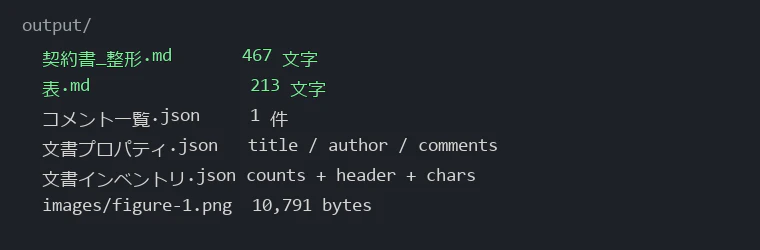
整形後の本文は 467 文字で、元の Markdown は 12,578 文字でした。画像は base64 から 1 行のパスになり、HTML 表はパイプ表に戻り、ヘッダー、コメント、非表示テキスト、古い版の変更履歴は本文から消えます。コメント一覧、文書プロパティ、文書インベントリはそれぞれ JSON として残し、追跡が必要なときにファイル名で参照します。
API 早見表
| クラス | 役割 |
|---|---|
Document |
文書の読み込み、全体の確定、コメントとプロパティ、出力 |
Section / Body
|
セクション、ヘッダー/フッター、本文オブジェクト |
Paragraph |
段落内容、コメント、テキストボックス、脚注、画像 |
Table / TableCell
|
表の行と列、結合スパン、結合方向 |
TextRange |
テキスト、非表示属性、変更履歴のマーク |
| メソッド / プロパティ | 所属 | 用途 |
|---|---|---|
LoadFromFile(path) |
Document |
docx の読み込み |
GetText() |
Document |
プレーンテキスト出力。ヘッダー、非表示テキスト、テキストボックス、新旧両版を含む |
SaveToFile(path, FileFormat.Markdown) |
Document |
Markdown 変換。画像は base64、横結合表は HTML に退化 |
AcceptChanges() / RejectChanges()
|
Document |
文書全体の変更履歴を承認または拒否 |
Comments / Comments.Clear()
|
Document |
コメントの列挙と全削除 |
TextBoxes |
Document |
テキストボックスの列挙 |
BuiltinDocumentProperties |
Document |
タイトル、作成者、備考などのプロパティ |
HeadersFooters[HeaderFooterType.HeaderOdd] |
Section |
指定したヘッダー/フッターの取得 |
ChildObjects |
Body / Paragraph
|
段落と子オブジェクトの順次走査 |
StyleName |
Paragraph |
見出しレベルの判定 |
AppendComment / AppendTextBox / AppendFootnote / AppendPicture
|
Paragraph |
コメント、テキストボックス、脚注、画像の書き込み |
GridSpan / CellFormat.VerticalMerge
|
TableCell |
横方向のスパンと縦結合の方向 |
CharacterFormat.Hidden |
TextRange |
非表示テキストの判定 |
IsInsertRevision / IsDeleteRevision
|
TextRange |
変更履歴の方向判定 |
境界と使い分け
この流れが扱うのは文書の形であり、業務のルールではありません。変更履歴を承認するか拒否するか、非表示テキストを残すか、コメントを書き出した後に戻すかは呼び出し側が決めます。コードは出力前に選んだ版を固定するだけです。表の結合復元も行と列の関係を保証するもので、列の意味は下流の schema で制約する必要があります。
結果は Free Spire.Doc for Python 12.12.0 に対応します。Free 版は 1 文書 500 段落までで、それを超える場合は商業版を使用します。AcceptChanges()、コメント、テキストボックスのインターフェースは Free 版と商業版で同じです。既定の Markdown 出力が HTML に退化するかどうかは、表に横結合があるかで決まります。縦結合だけの表はパイプ表のままで、colspan を持つ見出し行がある表は <table> 全体になります。パイプ表が必要な場合は、上記の組み直し処理を使います。