
Elastic社が提供するマネージドサービスであるElastic Cloudを利用してTwitterから検索したツイートでトレンドを作成してみました。
できたもの
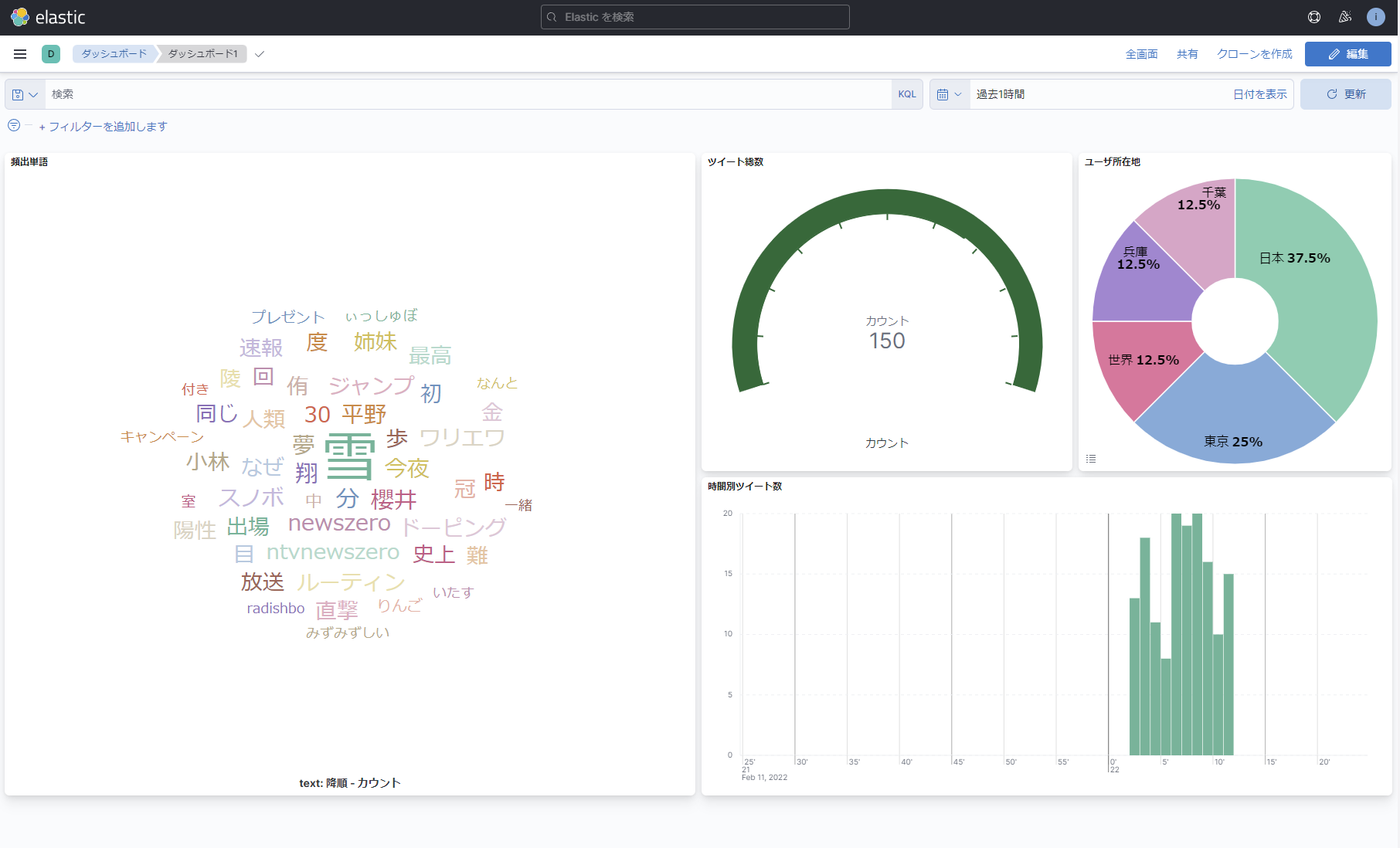
kibanaの機能を利用して、収集したツイートから各種グラフを作成してみました。
今回は「雪」で検索したので、トレンド1位はそのままでちょうど北京2022オリンピック競技大会中でしたので、スノーボードのツイートが多くそれが反映される結果となりました。
作成手順
中継サーバ(GCPのGCE)にてTwitterからツイートを収集し、それをElastic Cloudに上げる構成。
Elastic Cloudデプロイ
Elastic CloudにてElastic関連サービスをデプロイしていく。ライセンスはスタンダードで十分。
今回は最新のv8.0.0を利用。作成後、Elasticsearchのエンドポイントをコピーしておく。
中継サーバデプロイ
GCPにてGCEをデプロイ。
SSHでログイン後root化、パッケージのアップデート、Javaをインストールする。
logstashをサービスとしてインストールする。作業時の最新の8.Xを利用。
apt-get install -y wget
wget -qO - https://artifacts.elastic.co/GPG-KEY-elasticsearch | sudo apt-key add -
sudo apt-get install apt-transport-https
echo "deb https://artifacts.elastic.co/packages/8.x/apt stable main" | sudo tee -a /etc/apt/sources.list.d/elastic-8.x.list
apt-get update && sudo apt-get install logstash
logstashが使用するコンフィグファイルを作成する。
サービスとしてインストールした場合は以下に作成する。
/etc/logstash/conf.d/test.conf
今回は「雪」という単語を検索対象とする。
input {
 twitter {
   consumer_key => '(Twitter Developerから取得)'
   consumer_secret => '(Twitter Developerから取得)'
   keywords => [ '雪' ]
   full_tweet => true
 }
}
filter {
}
output {
   elasticsearch {
       hosts => ['(Elastic CloudのElasticsearchのエンドポイント)']
       user => 'elastic'
       password => '(デプロイ時に表示されたパスワード)'
       index => "twitter-trend"
   }
}
Kibana設定
編集が終わったらサービスを起動する。すると、GCE上のlogstashサービスが随時Twitterからツイート検索結果をElastic Cloud上のElasticsearchに投入していく。
Elastic CloudのKibanaのスタック管理のデータビューにて、インデックス「twitter-trend」のビューを作成すると、Discoverで収集されたツイートが検索できるようになる。

ダッシュボードでお好きなグラフを作成することで完成。