
はじめに
CodeCommitの機能でCloudFormationで構築する際に、構築と同時にコードを格納できるとのことなので、さっそくCFnを構築して恩恵を預かりたいと思います。
機能としては2019年からあるもの(AWS CodeCommit で AWS CloudFormation によるリポジトリ作成時にアプリケーションコードの追加をサポート)なので、目新しいものではないですが、さっそく構築していきます。
構成図

挙動について
1.S3に特定のオブジェクト(cicd.zip)を保存する
2.CFnで CodeCommitを構築する
3.cicd.zipに含まれているコンテンツがCodeCommitのリポジトリとして反映される
ハンズオン
構築のながれ
1.S3作成:CodeCommitリポジトリに反映させるZipファイルを保存用
2.S3にcicd.zipオブジェクトを保存
3.CodeCommit作成:CFnを利用してCodeCommit構築
1.S3作成:CodeCommitリポジトリに反映させるZipファイルを保存用
CodeCommitリポジトリに反映させるZipファイルを保存するためのS3を構築します。
S3のバケット名は全世界でユニークのため、cfn-s3-20221217-inamura部分は各自修正ください
※現在既にcfn-s3-20230103-inamuraは削除されております
AWSTemplateFormatVersion: '2010-09-09'
Description: CloudFormation to create S3 Bucket
# ------------------------------------------------------------#
#  Metadata
# ------------------------------------------------------------#
Metadata:
  "AWS::CloudFormation::Interface":
    ParameterGroups:
      - Label:
          default: "S3 Configuration"
        Parameters:
        - S3BucketName
        - AccessControl
        - BlockPublicAcls
        - BlockPublicPolicy
        - IgnorePublicAcls
        - RestrictPublicBuckets
        - ExpirationInDays
        - EventBridgeConfiguration
        - TagsName

# ------------------------------------------------------------#
#  InputParameters
# ------------------------------------------------------------#
Parameters:
  S3BucketName:
    Type: String
    Default: "cfn-s3-20230103-inamura"
    Description: Type of this BacketName.
  VersioningConfiguration:
    Type: String
    Default: "Enabled"
    Description: VersioningConfiguration.
  AccessControl:
    Type: String
    Description: AccessControl.
    Default: "Private"
    AllowedValues: [ "Private", "PublicRead", "PublicReadWrite", "AuthenticatedRead", "LogDeliveryWrite", "BucketOwnerRead", "BucketOwnerFullControl", "AwsExecRead" ]
  BlockPublicAcls:
    Type: String
    Description: BlockPublicAcls.
    Default: "True"
    AllowedValues: [ "True", "False" ]
  BlockPublicPolicy:
    Type: String
    Description: BlockPublicPolicy.
    Default: "True"
    AllowedValues: [ "True", "False" ]
  IgnorePublicAcls:
    Type: String
    Description: IgnorePublicAcls.
    Default: "True"
    AllowedValues: [ "True", "False" ]
  RestrictPublicBuckets:
    Type: String
    Description: RestrictPublicBuckets.
    Default: "True"
    AllowedValues: [ "True", "False" ]
  ExpirationInDays:
    Type: String
    Description: Lifecycle Days.
    Default: "7"
  TagsName:
    Type: String
    Description: UserName
    Default: "inamura"

# ------------------------------------------------------------#
#  Resources
# ------------------------------------------------------------#
Resources:
# ------------------------------------------------------------#
#  S3
# ------------------------------------------------------------#
  S3Bucket:
    Type: AWS::S3::Bucket
    Properties:
      BucketName: !Ref S3BucketName
      VersioningConfiguration:
        Status: !Ref VersioningConfiguration
      AccessControl: !Ref AccessControl
      PublicAccessBlockConfiguration:
        BlockPublicAcls: !Ref BlockPublicAcls
        BlockPublicPolicy: !Ref BlockPublicPolicy
        IgnorePublicAcls: !Ref IgnorePublicAcls
        RestrictPublicBuckets: !Ref RestrictPublicBuckets
      LifecycleConfiguration:
        Rules:
          - Id: LifeCycleRule
            Status: Enabled
            ExpirationInDays: !Ref ExpirationInDays
      Tags:
        - Key: "User"
          Value: !Ref TagsName
# ------------------------------------------------------------#
#  Outputs
# ------------------------------------------------------------#
Outputs:
  S3BucketName:
    Value: !Ref S3Bucket
    Export:
      Name: cfn-s3-BucketName
  S3BucketArn:
    Value: !GetAtt S3Bucket.Arn
    Export:
      Name: cfn-s3-BucketArn
2.S3にcicd.zipオブジェクトを保存する
2.1.構築したS3に、CodeCommitのリポジトリに反映させたいコンテンツを含んだZipファイルを保存します。次項で構築するCodeCommitでZipファイルの名称(自分の構築ではcicd.zip)の名称は任意で変更することは可能です。今回は赤枠で囲ってある部分をZip化して名前をcicd.zipにします。

2.2.S3にオブジェクトを保存します

3.CodeCommit作成:CFnを利用してCodeCommit構築
今回cicd.zipとしていますが、下記Keyのcicd.zipを修正することで、任意の名称のZipファイルに変更することが可能です。
      Code:
        S3:
          Bucket: !ImportValue cfn-s3-BucketName
          Key: cicd.zip
【以下、CodeCommit CFnテンプレート】
AWSTemplateFormatVersion: '2010-09-09'
Description:
  CodeCommit Create
# ------------------------------------------------------------#
#  Metadata
# ------------------------------------------------------------#
Metadata:
  "AWS::CloudFormation::Interface":
    ParameterGroups:
      - Label:
          default: "Lambda Configuration"
        Parameters:
        - RepositoryName
        - TagsName
# ------------------------------------------------------------#
#  InputParameters
# ------------------------------------------------------------#
Parameters:
  RepositoryName:
    Type: String
    Default: "cfn-codecommit-inamura"
  TagsName:
    Type: String
    Description: UserName
    Default: "inamura"
# ------------------------------------------------------------#
#  Resources
# ------------------------------------------------------------#
Resources:
# ------------------------------------------------------------#
#  Lambda
# ------------------------------------------------------------#
  CodeCommit:
    Type: AWS::CodeCommit::Repository
    Properties:
      RepositoryName: !Ref RepositoryName
      RepositoryDescription: !Sub "Source code for ${RepositoryName}"
      Tags:
        - Key: "User"
          Value: !Ref TagsName
      Code:
        S3:
          Bucket: !ImportValue cfn-s3-BucketName
          Key: cicd.zip
# ------------------------------------------------------------#
# Output Parameters
#------------------------------------------------------------#
Outputs:
  CodeCommitArn:
    Value: !GetAtt CodeCommit.Arn
    Export:
      Name: !Sub "${RepositoryName}-arn"
  RepositoryName:
    Value: !Ref RepositoryName
    Export:
      Name: !Sub "${RepositoryName}-name"
挙動の確認
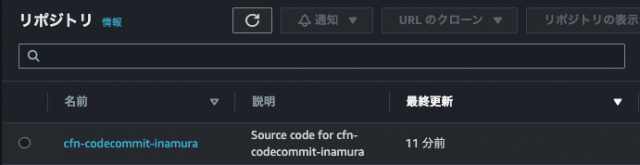
①CodeCommitにリポジトリが作成されていることを確認する
②-1作成されたリポジトリに、Zipファイル配下がリポジトリに反映されていることを確認する

②-2上記フォルダアイコンを押下して、その配下にファイルがおかれていることを確認する

さいごに
これでCodeCommitへ一括してリポジトリ反映する流れを理解することが出来ました。
次はこちらのCodeCommitを自身のローカルから操作できるようにしていきたいと思います。