
これはAngular Advent Calendar 2025の10日目の記事です。
みんなAngularの最新情報のキャッチアップをしてたり、本体のコードを読んでいたりすごいなぁと思いながら、自分もやりたい!と思いつつ色々な仕事や私事のタスクが積み重なりまくって全く出来ずじまいだけど、アドベントカレンダー登録してしまったからには実装TIPS程度の内容ですが書きます……
まずはアウトプット物
コンテキスト
- B2B向けWebアプリの開発を行っています
- フレームワークとしてAngularを利用しています
- コンポーネントライブラリとしてPrimeNGを利用しています
サイトパネル開閉時にサイドパネルに対してURLを付与したい
最初はこの要望から始まりました。あるあるですよね?
例えばGitHub projectでも一覧画面からアイテムをクリックするとサイドパネルが開き、それと同時にURLの書き換えが行われる、UXをそこそこ考えているWebアプリだとよくある実装かと思います。
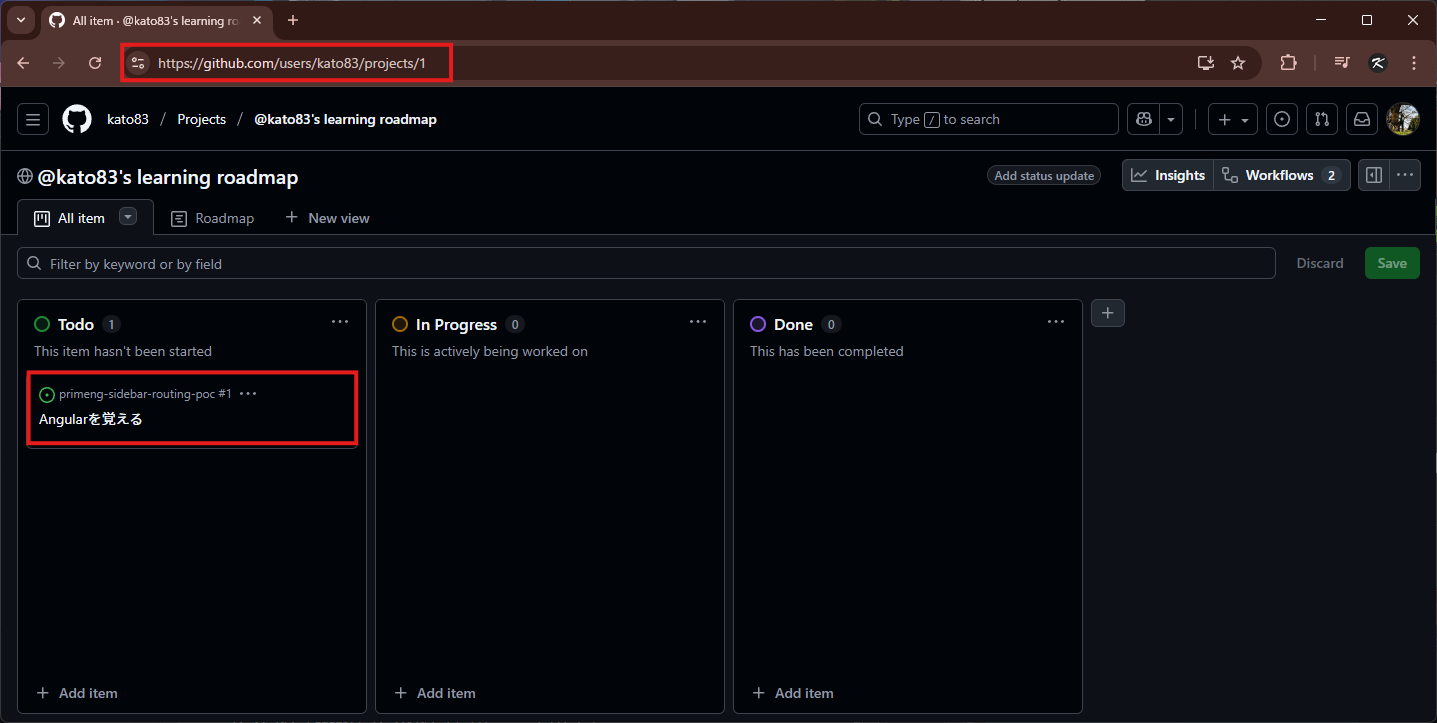
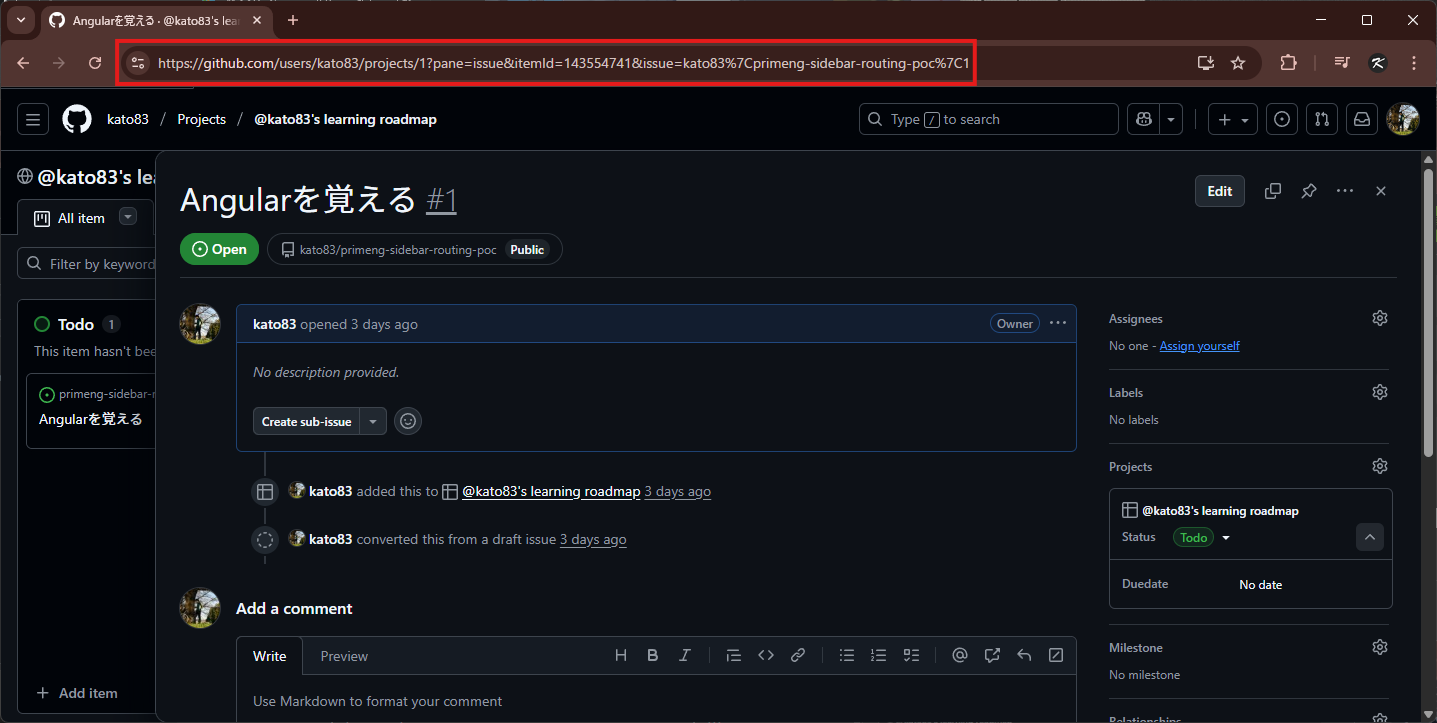
URLを眺めてみると、サイドパネルの開閉状態や表示対象の情報がクエリパラメータとして展開されていることがわかります。
https://github.com/users/kato83/projects/1/views/1 # パネル開閉問わず
?pane=issue # issueのサイドパネルを開いている事を表していると思われる
&itemId=143554741 # GitHub projectのアイテムのIDと思われる
&issue=kato83/primeng-sidebar-routing-poc/1 # 開いているissueのリポジトリとissue番号
そして、もちろんブラウザの戻る進む操作もサイドパネルの再開閉処理とURLの書き換えが行われますし、URLで直アクセスしたらGitHub projectのサイドパネルが開かれた状態で表示される仕組みになってます、いい感じですね。
クエリパラメータによるコンポーネントの状態の分岐
Angularで実装するとなると以下のようなイメージでしょうか。
<p>todos works!</p>
<p-sidebar [(visible)]="sidebarVisible" position="right" (onHide)="onHide()">
  <app-detail [id]="id()" />
</p-sidebar>
<ul>
  <li><a [routerLink]="[]" [queryParams]="{ todo: 1 }">/todos?todo=1</a></li>
  <li><a [routerLink]="[]" [queryParams]="{ todo: 2 }">/todos?todo=2</a></li>
  <li><a [routerLink]="[]" [queryParams]="{ todo: 3 }">/todos?todo=3</a></li>
</ul>
import { Component, inject, signal } from '@angular/core';
import { RouterLink, Router, NavigationEnd, ActivatedRoute } from '@angular/router';
import { takeUntilDestroyed } from '@angular/core/rxjs-interop';
import { filter } from 'rxjs';
import { SidebarModule } from 'primeng/sidebar';
import { DetailComponent } from './detail/detail.component';

@Component({
  selector: 'app-todos',
  standalone: true,
  imports: [RouterLink, SidebarModule, DetailComponent],
  templateUrl: './todos.component.html',
  styleUrl: './todos.component.scss'
})
export class TodosComponent {
  private router = inject(Router);
  private activatedRoute = inject(ActivatedRoute);
  sidebarVisible = signal<boolean>(false);
  id = signal<number | null>(null);

  constructor() {
    // URLの変更を検知
    this.router.events
      // コンポーネントが破棄されると自動でunsubscribeしてくれる凄いやつ
      .pipe(takeUntilDestroyed())
      .pipe(filter(event => event instanceof NavigationEnd))
      .subscribe((event) => this.onUrlChange(event));
  }

  /**
   * URL変更をトリガーに発火するイベント
   * @param event イベント
   */
  onUrlChange(event: any) {
    console.log('TodosComponent#onUrlChange', event);
    const id = Number.parseInt(this.activatedRoute.snapshot.queryParamMap.get('todo'), 10);
    if (!Number.isNaN(id) && id) {
      this.id.set(id);
      this.sidebarVisible.set(true);
    } else {
      this.id.set(null);
      this.sidebarVisible.set(false);
    }
  }

  /**
   * サイドペイン閉じた際のハンドリング
   * /todos へ遷移するようにする
   */
  onHide() {
    const queryParamMap = this.#activatedRoute
      .snapshot
      .queryParamMap;
    const queryParamEntries = queryParamMap.keys
      .filter(key => key !== 'todo')
      .map(key => [key, queryParamMap.getAll(key)]);
    this.#router.navigate(
      [],
      {
        relativeTo: this.activatedRoute,
        queryParams: Object.fromEntries(queryParamEntries)
      },
    );
  }
}
/todos が一覧でクエリパラメータに todo=[数値] (例: /todos?todo=1 )が含まれていたらサイドパネルが開くような仕組みです。
import { Routes } from '@angular/router';
import { TodosComponent } from './pages/todos/todos.component';

export const routes: Routes = [
  {
    path: 'todos',
    component: TodosComponent,
  }
];
これであれば一覧用のURL /todos で直アクセスがあっても /todos?todo=1 形式のサイドパネルが開いた状態でも問題なく TodosComponent コンポーネントを参照して表示してくれます。
パスパラメータによるコンポーネントの状態の分岐
今回私が参画しているプロジェクトでは サイドパネルの開閉状態をクエリパラメータではなくパスパラメータで表現したい方向性に舵切りがされました。
つまりサイドパネルを開いている際のURLを /todos?todo=1 ではなく /todos/1 としようとなったわけです。12
まずは直感的に /todos/(数値) なルーティングの設定と直アクセスの考慮をなし得るために以下のようなルーティングを行いました。
TODOのリストもサイドパネルで表示するためのコンポーネントの表示も上記のクエリパラメータ版のサンプルコードの通り TodosComponent で実装しているので /todos/(数値) なパスでアクセスが来ても TodosComponent を利用するようにルーティングファイルを追記します。
  import { Routes } from '@angular/router';
  import { TodosComponent } from './pages/todos/todos.component';

  export const routes: Routes = [
    {
      path: 'todos',
      component: TodosComponent,
+     children: [
+       {
+         path: ':id',
+         component: TodosComponent,
+       }
+     ]
    }
  ];
後は通常通りパスパラメータの値を取得する方法の通り ActivatedRoute.params でパスパラメータの id を取得すれば完了と思い以下の通り記述しましたが、なぜかパスパラメータの id 取得できず undefined となる問題で苦しみました。
  onUrlChange(event: any) {
    console.log('TodosComponent#onUrlChange', event);
-   const id = Number.parseInt(this.activatedRoute.snapshot.queryParamMap.get('todo'), 10);
+   const id = Number.parseInt(this.activatedRoute.snapshot.params['id'], 10);
    if (!Number.isNaN(id) && id) {
      this.id.set(id);
      this.sidebarVisible.set(true);
    } else {
      this.id.set(null);
      this.sidebarVisible.set(false);
    }
  }
結論: ActivatedRoute.firstChild.params を利用する
どうやら app.routes.ts のパスとコンポーネントの解決は恐らくですが配列を探索しつつ最初にマッチしたルートの内容で ActivatedRoute で得られる各種URLやパラメータ等の内容が解決されているような挙動を示していました。
それを利用して ActivatedRoute.firstChild で本来必要としている todos/:id のルーティング情報、つまりパスパラメータ :id の内容を解決する状況まで持ってこれるようになりました。
  onUrlChange(event: any) {
    console.log('TodosComponent#onUrlChange', event);
-   const id = Number.parseInt(this.activatedRoute.snapshot.params['id'], 10);
+   const id = Number.parseInt(this.activatedRoute.firstChild?.snapshot.params['id'], 10);
    if (!Number.isNaN(id) && id) {
      this.id.set(id);
      this.sidebarVisible.set(true);
    } else {
      this.id.set(null);
      this.sidebarVisible.set(false);
    }
  }
終わりに
来年のアドベントカレンダーこそAngularの本体のソースを読んだり、最新情報をキャッチアップとかしてキャッキャしたい……
あと、このAngularの実装方法だったりサイドパネル開閉状態におけるURLのステート管理の方法等、もっと良い方法があれば教えていただけると泣いて喜びます。
明日の記事は @warotarock さんです!