
はじめに
VCL で疑似パレットアニメーションをやってみたのですが、これを FireMonkey でもやってみたいと思います。
See also:
疑似パレットアニメーションを行う
FireMonkey ならアホ程簡単です。
ですが、本当にパレット変更してアニメーションさせるのではなく、前回やったアニメーションパレットと同じ視覚効果を得る事を目的としています。
ソースコード
適当にマルチデバイスアプリケーションを新規作成してください。
フォームに、サイズ 480x320 の Rectangle を貼ります。
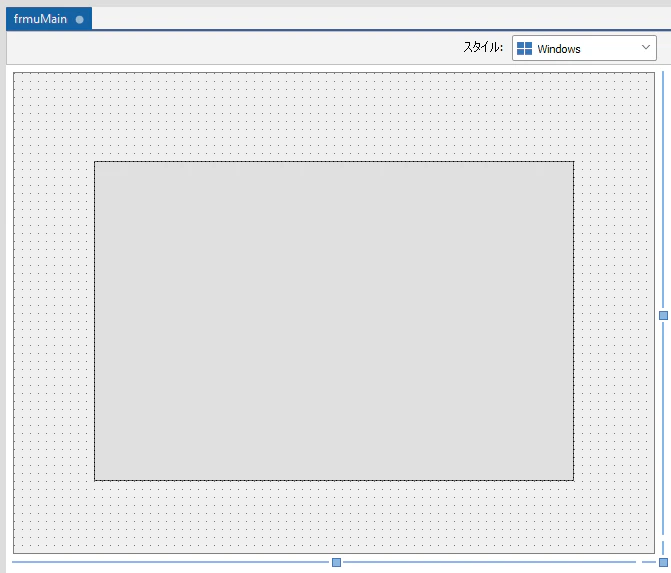
Fill.Color プロパティで TColorAnimation を作成します。

TColorAnimation のプロパティを設定します。
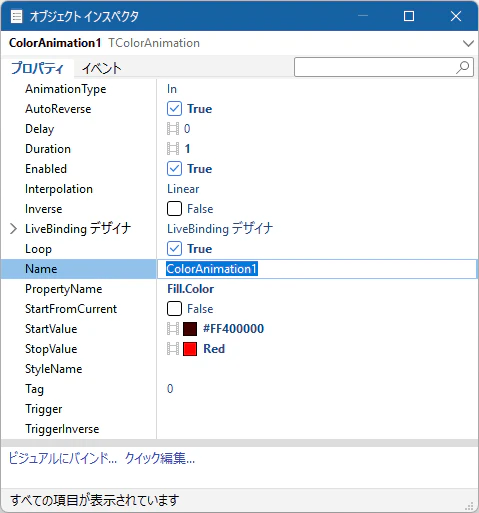
| プロパティ | 値 | 説明 |
|---|---|---|
| AutoReverse | True | アニメーションを往復させます |
| Duration | 1.0 | アニメーションを行う時間です |
| Enabled | True | アニメーションを有効にします |
| PropertyName | Fill.Color | このプロパティの値をアニメーションします |
| StartValue | RGB(64, 0, 0) | 開始色です |
| StopValue | RGB(255, 0, 0) | 終了色です |
サイズ 480x320 の Image を貼ります。実際にはぴったり重ねてください。

フォームをテキストで表示させるとこんな感じになります。
object frmMain: TfrmMain
  Left = 0
  Top = 0
  Caption = 'Animation Palette Test'
  ClientHeight = 480
  ClientWidth = 640
  Position = ScreenCenter
  FormFactor.Width = 320
  FormFactor.Height = 480
  FormFactor.Devices = [Desktop]
  OnCreate = FormCreate
  DesignerMasterStyle = 0
  object Rectangle1: TRectangle
    Position.X = 80.000000000000000000
    Position.Y = 88.000000000000000000
    Size.Width = 480.000000000000000000
    Size.Height = 320.000000000000000000
    Size.PlatformDefault = False
    object ColorAnimation1: TColorAnimation
      AutoReverse = True
      Enabled = True
      Duration = 1.000000000000000000
      Loop = True
      PropertyName = 'Fill.Color'
      StartValue = xFF400000
      StopValue = claRed
    end
  end
  object Image1: TImage
    MultiResBitmap = <
      item
      end>
    Position.X = 80.000000000000000000
    Position.Y = 88.000000000000000000
    Size.Width = 480.000000000000000000
    Size.Height = 320.000000000000000000
    Size.PlatformDefault = False
  end
end
ソースコードです。
unit frmuMain;

interface

uses
  System.SysUtils, System.Types, System.UITypes, System.Classes, System.Variants,
  FMX.Types, FMX.Controls, FMX.Forms, FMX.Graphics, FMX.Dialogs, FMX.Ani,
  FMX.Objects, System.IOUtils;

type
  TfrmMain = class(TForm)
    Rectangle1: TRectangle;
    ColorAnimation1: TColorAnimation;
    Image1: TImage;
    procedure FormCreate(Sender: TObject);
  private
    { private 宣言 }
  public
    { public 宣言 }
  end;

var
  frmMain: TfrmMain;

implementation

{$R *.fmx}

procedure TfrmMain.FormCreate(Sender: TObject);
const
  PNGIMGNAME = 'test.png';

begin
  var HasFile := TFile.Exists(PNGIMGNAME);
  if HasFile then
    Image1.Bitmap.LoadFromFile(PNGIMGNAME);
end;

end.
実行
そのまま実行するとこのようになります。

開始色と終了色の間でアニメーションします。
アニメーションしない場合には、マウスオーバーするか、クリックして画像だけを表示してみてください。
画像を用意して実行
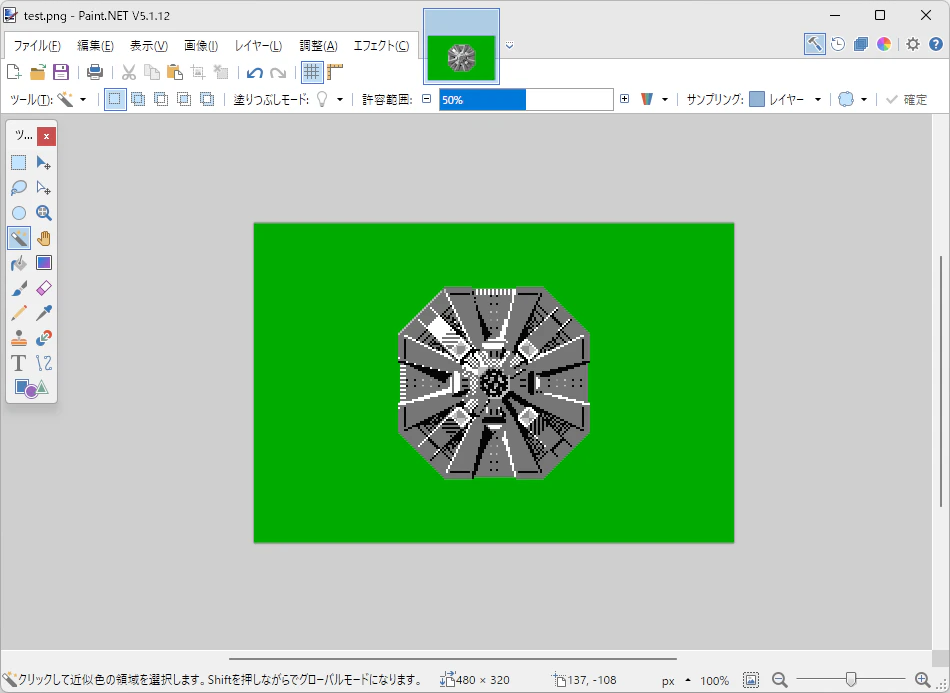
480x320 サイズで 32bit 色の透過 PNG ファイル (test.png) を読み込ませる事もできます。適当な画像を用意し、パレットアニメーションさせたい部分を透過色で塗りつぶします。
サンプルとしてファミコンデータベース.com さんからゼビウスのアンドアジェネシスの画像をお借りしました。赤色の部分を透過色で塗りつぶして 32bit 色 PNG として保存し、EXE と同じ場所に置きます。
実行するとこのようになります。

本物と見比べた訳ではないので、アニメーションは正確ではないかもしれません。
アニメーションしない場合には、マウスオーバーするか、クリックして画像だけを表示してみてください。
おわりに
「パレットアニメーション」ではないのですけれどね。
『ゼビウス(XEVIOUS)』は、ナムコ (現バンダイナムコエンターテインメント) の登録商標です。
See also: