
はじめに
開発ターゲットが Windows の場合、IDE の [イベントログ] ウインドウに OutputDebugString() でデバッグ文字列を出力することが出来ますが 1、これって Windows API なので、
OutputDebugString('Hello');
OutputDebugString(PChar('Hello,' + 'world.'));
複雑な文字列だと PChar() でキャストするのが面倒です。
OutputDebugString(PChar('value:' + v.ToString));
書式を使うには、Format() を使う必要があったりして、
OutputDebugString(PChar(Format('Location (%d, %d)', [x, y]));
ちょっと視認性がよくないですよね。
See also:
ユーザー定義のテキストファイルデバイスドライバ
Turbo Pascal 以降には、ユーザー定義のテキストファイルデバイスドライバというものがあり、テキストファイル用のドライバを書く事ができます。
テキストファイルデバイスドライバを書けば、Read() / Readln() / Write() / Writeln() 等でテキストファイルを扱えます。
例えば、シーザー暗号のデバイスドライバを書けば、Writeln('ABC'); ってやるとテキストファイルには BCD が書き込まれる...なんて事ができる訳です。
■ デバッグ文字列出力用のテキストファイルデバイスドライバ
それじゃあって事で、デバッグ文字列出力用のためのテキストファイルデバイスドライバユニットを書いてみました。
unit uDebugDevice;

interface

uses
  Windows, SysUtils;

  procedure DebugAssign(var F: TextFile);

implementation

function DebugOpen(var T: TTextRec): Integer;
begin
  T.Mode := fmOutput;
  T.BufPos := 0;
  Result := 0;
end;

function DebugInOut(var T: TTextRec): Integer;
var
  S: string;
begin
  if T.Mode = fmOutput then
  begin
    SetString(S, T.BufPtr, T.BufPos);
    if S <> '' then
      OutputDebugString(PChar(S));
  end;
  T.BufPos := 0;
  Result := 0;
end;

function DebugFlush(var T: TTextRec): Integer;
begin
  Result := DebugInOut(T);
end;

function DebugClose(var T: TTextRec): Integer;
begin
  Result := DebugFlush(T);
end;

procedure DebugAssign(var F: TextFile);
var
  T: ^TTextRec;
begin
  T := @F;
  FillChar(T^, SizeOf(T^), 0);
  T^.Mode := fmOutput;
  T^.BufSize := SizeOf(T^.Buffer);
  T^.BufPtr := @T^.Buffer;
  T^.OpenFunc  := @DebugOpen;
  T^.InOutFunc := @DebugInOut;
  T^.FlushFunc := @DebugFlush;
  T^.CloseFunc := @DebugClose;
end;
end.
Delphi 7 とかでも動作するハズです。
使い方 (その1)
外部テキストファイルにデバッグログを吐くコードがあったとします。
var
  F: TextFile;
begin
  AssignFile(F, 'LOG.TXT');
  Append(F);
  Writeln(F, 'Debug Test');
  CloseFile(F);
end;
デバッグ文字列を出力するのなら、AssignFile() を DebugAssign() に置き換えるだけです。
uses
  ..., uDebugDevice;

var
  F: TextFile;
begin
  DebugAssign(F); // 変更
  Append(F);
  Writeln(F, 'Debug Test');
  CloseFile(F);
end;
コンパイラ指令 (条件コンパイル) で切り替えるのも簡単ですね。
uses
  ..., uDebugDevice;

var
  F: TextFile;
begin
  {$IFDEF HOGE}
  AssignFile(F, 'LOG.TXT');
  {$ELSE}
  DebugAssign(F);
  {$ENDIF}
  Append(F);
  Writeln(F, 'Debug Test');
  CloseFile(F);
end;
この用途であれば、GUI アプリでも Write() / Writeln() が使えます。
使い方 (その2)
外部テキストファイルを吐くコードを使い回さないのであれば、
uses
  ..., System.DateUtils, uDebugDevice;

begin
  DebugAssign(Output);
  Write('Debug Test');
  Write('Location (', x, ',', y, ')');
  Write(Date.ToString); // Writeln(DateToStr(Date));
end;
DebugAssign(Output); を一度書けば、以降 Write() (Writeln() だと余計な改行が送られる) だけでデバッグ文字列を出力できます (テキストファイル変数の宣言やパラメータでの指定が不要) 2。
外部テキストファイルは使われていないので、Reset() / ReWrite() / Append() / CloseFile() 等は不要です。
■ デバッグ文字列出力用のテキストファイルデバイスドライバ (行バッファ版)
Write() で即時出力されない「Write() でバッファして Writeln() で書き込む」バージョンです。
unit uDebugDevice;

interface

uses
  Windows, SysUtils;

procedure DebugAssign(var F: TextFile);

implementation

threadvar
  Buf: String;

function DebugOpen(var T: TTextRec): Integer;
begin
  T.Mode := fmOutput;
  T.BufPos := 0;
  Result := 0;
end;

function DebugInOut(var T: TTextRec): Integer;
var
  i: Integer;
  S: String;
begin
  if T.Mode = fmOutput then
  begin
    SetString(S, T.BufPtr, T.BufPos);
    for i := 1 to Length(S) do
    begin
      case S[i] of
        #$0D: ;
        #$0A:
          begin
            if Buf <> '' then
              OutputDebugString(PChar(Buf));
            Buf := '';
          end;
      else
        Buf := Buf + S[i];
      end;
    end;
  end;
  T.BufPos := 0;
  Result := 0;
end;

function DebugFlush(var T: TTextRec): Integer;
begin
  {$IFDEF CONDITIONALEXPRESSIONS}
    {$IF CompilerVersion >= 17.0}
      {$DEFINE D2005ORLATER}
    {$IFEND}
  {$ENDIF}

  {$IFNDEF D2005ORLATER}
  if Buf <> '' then
  begin
    OutputDebugString(PChar(Buf));
    Buf := '';
  end;
  {$ENDIF}
  Result := 0;
end;

function DebugClose(var T: TTextRec): Integer;
begin
  Result := DebugFlush(T);
end;

procedure DebugAssign(var F: TextFile);
var
  T: ^TTextRec;
begin
  T := @F;
  FillChar(T^, SizeOf(T^), 0);
  T^.Mode := fmOutput;
  T^.BufSize := SizeOf(T^.Buffer);
  T^.BufPtr := @T^.Buffer;
  T^.OpenFunc  := @DebugOpen;
  T^.InOutFunc := @DebugInOut;
  T^.FlushFunc := @DebugFlush;
  T^.CloseFunc := @DebugClose;
end;
end.
先程のバージョンとは異なり、Writeln() で余計な OutputDebugString() が実行されません。
フラッシュのタイミングは Delphi 2005 を境に変更されたようです。
使い方 (その1)
CloseFile() が必須になっただけです。
var
  F: TextFile;
begin
  DebugAssign(F);
  Write(F, 'Hello,');
  Writeln(F, 'world.');
  CloseFile(F); // 必須
end;
CloseFile() がないと最後の行がバッファに溜まったままになり、出力されません。
begin
  DebugAssign(OUTPUT);
  Write('Hello,');
  Writeln('world.');
  CloseFile(OUTPUT); // 必須
end;
バッファをフラッシュできればいいので、空の Writeln() で代用する事も可能です 2。
begin
  DebugAssign(OUTPUT);
  Write('Hello,');
  Writeln('world.');
  Writeln; // 必須
end;
出力結果:
Hello,world.
使い方 (その2)
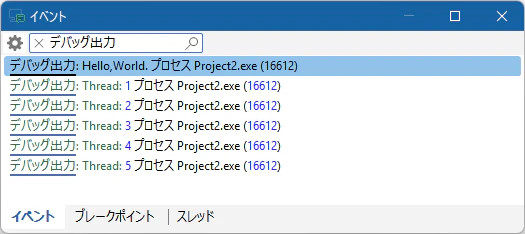
スレッドで使っても大丈夫です (多分)。
  DebugAssign(Output);
  Write('Hello,');

  TThread.CreateAnonymousThread(
    procedure
    begin
      for var i := 1 to 5 do
      begin
        Writeln('Thread: ' + i.ToString);
        Sleep(10);
      end;
      Writeln;
    end
  ).Start;

  Writeln('World.');
  CloseFile(Output);
See also:
おわりに
FireMonkey の場合は Log クラス を使ってくださいね。
  Log.d('Debug String');
  Log.d('Value: %d', [v]);
ドキュメントは空ですが (!)、FMX.Types.pas 内の定義やコメントを読めば使い方は解ると思います。
See also:
- FMX.Types.Log (DocWiki)
- Delphi の Android Log を正しく表示する (Qiita: @pik)
- 開発時やデバッグの時だけログを出力するさえないやり方 (Qiita: @ktz_alias)
- Delphi Starter Edition でのデバッグ (Qiita)