0
0

Delete article

Deleted articles cannot be recovered.

Draft of this article would be also deleted.

Are you sure you want to delete this article?

Visual Studio 2026 へコードスニペットを移行する

Posted at

Visual Studio 2026 を使い始めましたが、コードを思うように召喚できません。

マイドキュメントを見ると、Visual Studio 18 というフォルダーが追加されています。
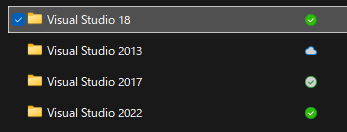
image.png

そう、Visual Studio 2022 に追加したコードスニペットは手動で移行しなければなりません。

そういえば、OneDrive などでクラウドのみにバックアップされてる状態だとうまく動かないようなので、ローカルへ保存されるようにしておきましょう。

やりたいこと

Visual Studio 2022 に追加したコードスニペットを Visual Studio 2026 で使えるようにする。

やり方

  1. Visual Studio 2022 の自作コードスニペット置き場を開く
    • 僕は以下にありました
      %USERPROFILE%\ドキュメント\Visual Studio 2022\Code Snippets\Visual C#\My Code Snippets
  2. 自作のスニペットファイルをコピー
  3. Visual Studio 2026 の自作コードスニペット置き場に貼り付け
    • %USERPROFILE%\ドキュメント\Visual Studio 18\Code Snippets\Visual C#\My Code Snippets

簡単ですね。

0
0
0

Register as a new user and use Qiita more conveniently

  1. You get articles that match your needs
  2. You can efficiently read back useful information
  3. You can use dark theme
What you can do with signing up
0
0

Delete article

Deleted articles cannot be recovered.

Draft of this article would be also deleted.

Are you sure you want to delete this article?