
はじめに
今回はMQTT5でHTTPのようにRequest/Responseを実現するための規格仕様を見ていきましょう。
Request/Responseを実現する
Response Topic (Publish)
Response TopicはPublishのプロパティに付く「返送先」トピック名です。Publishに返送先を指定することでhttpやgRPCのようにRequest/Responseのニーズに応えることができます。
Correlation Data (Publish)
Correlation Dataは、どのリクエストからの応答か区別するために付与するIDを入れるための領域です。HTTPではx-request-idがその役割を果たします。レスポンスを返す主体は受け取ったままのCorrelation Dataを返すことが期待されています。改ざんを防ぐ場合にはハッシュ化や暗号化の手段を取る必要があります。
Response Information (Connack)
Response InformationはConnackに含めることができるResponse Topicを作成するbaseとなる文字列です。Response Topicをランダムに生成することは権限上できない場合が多いのでResponse Informationでクライアントに権限があるtreeのprefixを教える。
Request Response Information (Connect)
Response Informationを要求するかどうかをConnect時にクライアントが決定して送信する。
使用する順番
- ConnectでResponse Informationを要求する
- ConnackでResponse InformationをUTF-8 Encoded Stringで返す
- PublishでResponse Informationに基づいてResponse Topic(返送用トピック)を指定する
- PublishでCorrelation Dataを指定する
例
- ConnectでRequest Response Informationを要求する
- Connackで
response/client123/をResponse Topicのprefixとして使ってくれということをサーバー(レスポンダ, 処理者)から通知される - PublishでTopicに
cmd/getStatusに対してResponse Topicとしてresponse/client123/resp、Correlation Dataとしてreq-001を入れて送信する - サーバ(レスポンダ、処理者)は処理が完了したあとに
response/client123/respに対しCorrelation Dataとしてreq-001を設定してPublishを行う
実践
-
例では、サーバ側に1日目で使用したものを使います。
-
mochi-coはResponse Informationに対応していませんでしたのでResponse Topicはあらかじめ決めておいたprefixを使用することにします。
responder
responderはResponse Topicにあるトピックに対して中身に応じて返答します
リクエストとレスポンスの結びつきがわかるようにCorrelation Dataはそのまま返します。
import paho.mqtt.client as mqtt
from paho.mqtt.properties import Properties
from paho.mqtt.packettypes import PacketTypes
import time

BROKER = "localhost"
REQUEST_TOPIC = "cmd/#"

def on_message(client, userdata, msg):
    print(f"[Responder] 受信: {msg.topic} → {msg.payload.decode()}")

    props = msg.properties

    # Response Topic なければ応答不要
    if not hasattr(props, "ResponseTopic") or props.ResponseTopic is None:
        print("[Responder] Response Topic が無いので応答しません")
        return

    response_topic = props.ResponseTopic
    correlation = props.CorrelationData

    print(f"[Responder] Response Topic = {response_topic}")
    print(f"[Responder] Correlation Data = {correlation}")

    # 応答メッセージ
    resp_payload = f"OK: {msg.payload.decode()}"

    # 応答側 Properties
    resp_props = Properties(PacketTypes.PUBLISH)
    # Correlation Data をそのままコピー
    resp_props.CorrelationData = correlation

    client.publish(
        response_topic,
        resp_payload,
        qos=0,
        properties=resp_props
    )
    print(f"[Responder] 応答送信 → {resp_payload}")


def main():
    cli = mqtt.Client(client_id="responder", protocol=mqtt.MQTTv5)
    cli.on_message = on_message

    cli.connect(BROKER, 1883, 60)
    cli.subscribe(REQUEST_TOPIC)

    print("[Responder] 起動しました")
    cli.loop_forever()


if __name__ == "__main__":
    main()
requester
Requester
- Correlation Dataを生成
- Response Topicを設定
- Payloadには処理してほしいrpcのもとになるデータを送信
import paho.mqtt.client as mqtt
from paho.mqtt.packettypes import PacketTypes
from paho.mqtt.properties import Properties
import time

BROKER = "localhost"
REQUEST_TOPIC = "cmd/get"

# デフォルトの Response Topic(サーバーが Response Information を返さなかった時)
fallback_response_topic = "resp/client1"


# ======================
# コールバック
# ======================

def on_connect(client, userdata, flags, reason_code, properties):
    print(f"[Requester] CONNECT: rc={reason_code}")

    # Response Information が来た場合
    if hasattr(properties, "ResponseInformation") and properties.ResponseInformation:
        base = properties.ResponseInformation
        userdata["response_topic"] = base + "resp"
        print(f"[Requester] Response Information = {base}")
    else:
        print("[Requester] Response Information が無いので fallback を使用")
        userdata["response_topic"] = fallback_response_topic

    # Response Topic に subscribe
    resp = userdata["response_topic"]
    client.subscribe(resp)
    print(f"[Requester] SUBSCRIBE → {resp}")


def on_message(client, userdata, msg):
    print(f"[Requester] 受信: {msg.topic} → {msg.payload.decode()}")
    print(f"[Requester] Correlation Data = {msg.properties.CorrelationData}")


# ======================
# メイン処理
# ======================

def main():
    userdata = {}

    # CONNECT properties: Request Response Information = 1
    connect_props = Properties(PacketTypes.CONNECT)
    connect_props.RequestResponseInformation = 1

    cli = mqtt.Client(
        client_id="requester",
        protocol=mqtt.MQTTv5,
        userdata=userdata
    )
    cli.on_connect = on_connect
    cli.on_message = on_message

    # CONNECT
    cli.connect(BROKER, 1883, 60, properties=connect_props)

    cli.loop_start()
    time.sleep(1)  # 接続待ち

    # Response Topic をコールバックで設定済み
    response_topic = userdata["response_topic"]

    # Correlation Data (任意のバイナリ)
    corr = b"req-001"

    # Request Properties
    props = Properties(PacketTypes.PUBLISH)
    props.ResponseTopic = response_topic
    props.CorrelationData = corr

    payload = "Hello Request"

    print(f"[Requester] Request 送信 → {payload}")
    cli.publish(
        REQUEST_TOPIC,
        payload,
        qos=0,
        properties=props
    )

    time.sleep(3)
    cli.loop_stop()
    cli.disconnect()


if __name__ == "__main__":
    main()
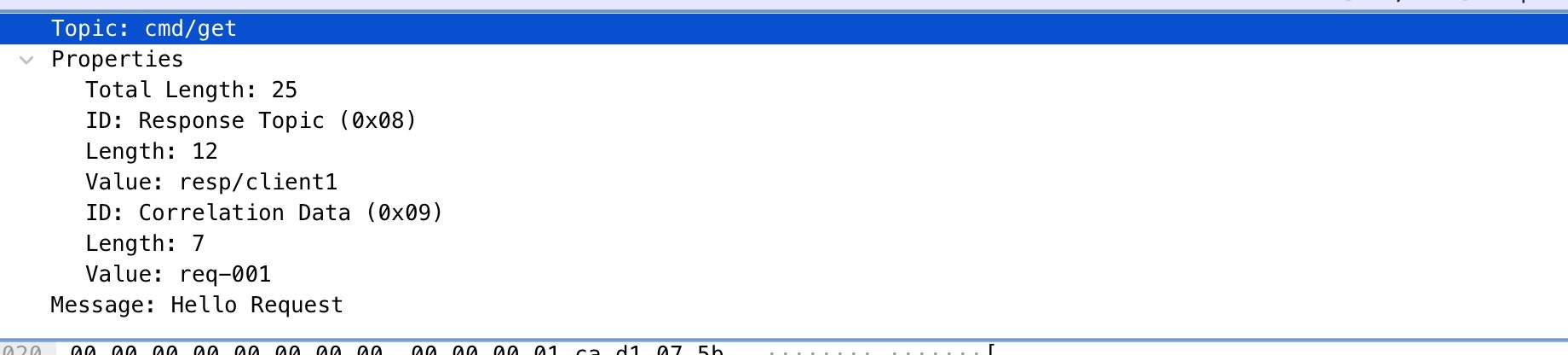
実行結果をWiresharkで見た結果です。
要求Publish
Correlation DataにValueが入っています。Response Topicも指定されています。
応答Publish
応答のCorrelationDataの中身も下記のようになります。

まとめ
うまく使えば、Response TopicとCorrelation DataでRequest/Responseが実装できそうですね