

CodeRabbitはAIの力でレビューを行うサービスです。GitHubやGitLabと連携し、プルリクエストを自動的にレビューします。最近、VS CodeやCursor、Windsurfで動作する無料の機能拡張もリリースしました。
そんなCodeRabbitと連携して使えるMCPサーバー(公式ではありません)が出ていたので、試してみました。
CodeRabbit MCP Server | MCP Servers · LobeHub
設定について
まず、自分でビルドする必要があります。
git clone https://github.com/bradthebeeble/coderabbitai-mcp.git
cd coderabbitai-mcp
npm install
npm run build
Claude Codeでの使い方
Claude Codeの場合は、各リポジトリの .claude/config.json に以下のように設定します。GitHubのトークンが必要です。 /path/to/coderabbitai-mcp はビルドしたディレクトリのパスです。
{
  "mcpServers": {
    "github": {
      "command": "npx",
      "args": ["-y", "@modelcontextprotocol/server-github"],
      "env": {
        "GITHUB_PERSONAL_ACCESS_TOKEN": "your_github_token_here"
      }
    },
    "coderabbitai": {
      "command": "node",
      "args": ["dist/index.js"],
      "cwd": "/path/to/coderabbitai-mcp"
    }
  }
}
Claude Desktopでの使い方
Claude Desktopの場合は、claude_desktop_config.json に設定を追加します。OSによってパスが違います。
- Windows
%APPDATA%/Claude/claude_desktop_config.json - macOS
~/Library/Application Support/Claude/claude_desktop_config.json
{
  "mcpServers": {
    "github": {
      "command": "npx",
      "args": ["-y", "@modelcontextprotocol/server-github"],
      "env": {
        "GITHUB_PERSONAL_ACCESS_TOKEN": "your_github_token_here"
      }
    },
    "coderabbitai": {
      "command": "node",
      "args": ["dist/index.js"],
      "cwd": "/path/to/coderabbitai-mcp"
    }
  }
}
使い方
今回はClaude Codeで試してみました。CodeRabbitが組み込まれているリポジトリで、質問してみます。
最新のPRのレビュー結果を教えて
そうすると、CodeRabbitのレビュー結果を教えてくれます。

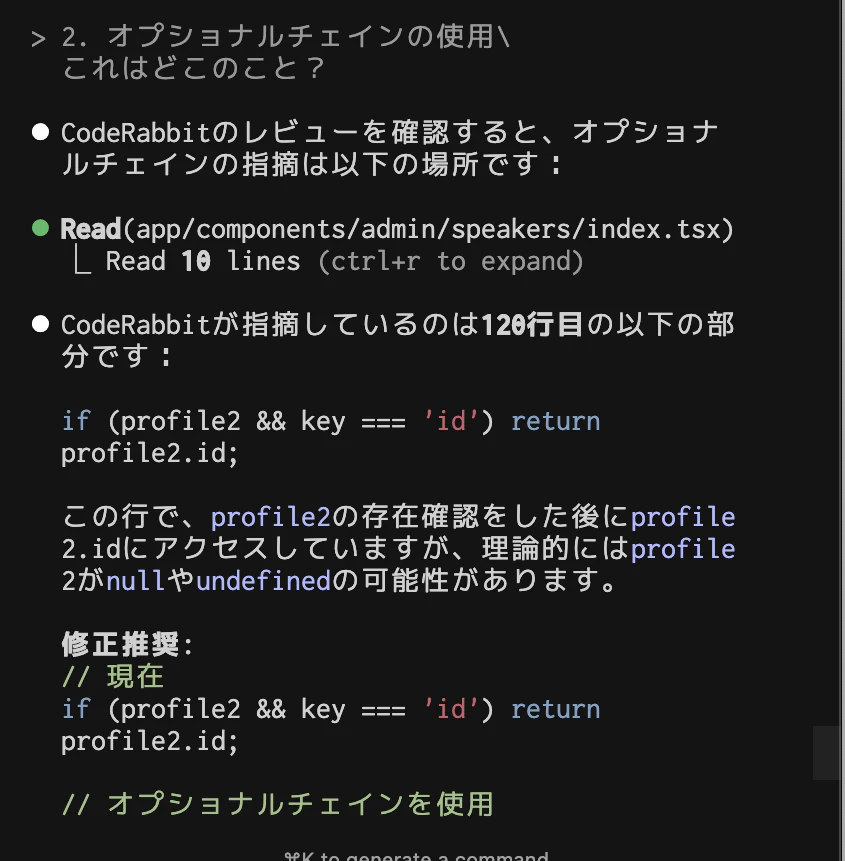
さらに、そのレビューの中で指摘されている内容について質問できます。
2. オプショナルチェインの使用
これはどこのこと?
該当の場所について、説明が返ってきます。
MCPサーバーの機能
CodeRabbit MCPサーバーは、以下の機能を提供しています。
- get_coderabbit_reviews
CodeRabbitのレビューのメタデータを取得 - get_review_details
詳細を取得 - get_review_comments
コメントを取得 - get_comment_details
コメントの詳細を取得 - resolve_comment
コメントを解決済にする
注意点
このMCPサーバーは、クラウド版のCodeRabbitと連携するものになります。VS Code機能拡張版のレビューではないので注意してください。クラウド版であれば、基本的にGitHubなどで完結できますが、手元の環境でその内容を確認したり、質問できるのは便利です。
まとめ
CodeRabbit MCPサーバーを使うと、レビューがよりインタラクティブなものになりそうです。質問した際のレスポンスも早いので、手元の環境で作業をサクサク進めたいときに便利です。