
追記
https://github.com/github0013/rpi-dht
gem化してみた
$ gem install rpi-dht
問題
dht-sensor-ffiを使ってみたが、長期的に使っているとなんだかんだでエラーが起きて何がどうしてだめなのか見通せなかった。
解決方法
ライブラリを自分で作るしか無い(Cは書けない)。rubyで
事前事項
まずはじめにDHTはSingle-bus communication(ONE-WIRE)であるということ。なので、GPIO4がそれに当たるんだと思う。
- 3.3v / 5vをRaspberryPiのプラスに
- マイナスをRaspberryPiのマイナスに
- データラインをRaspberryPiのGPIO4に
データシートの読み方
データ取得までの流れ
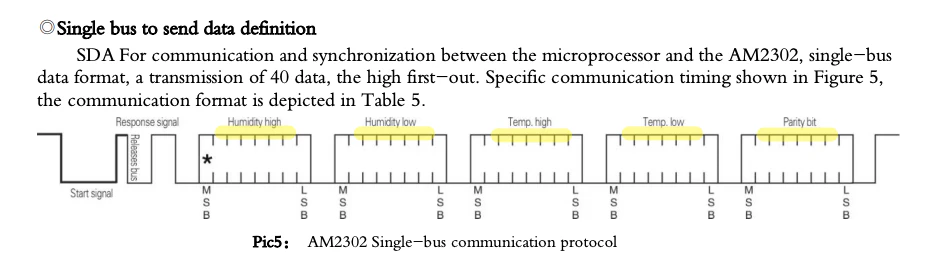
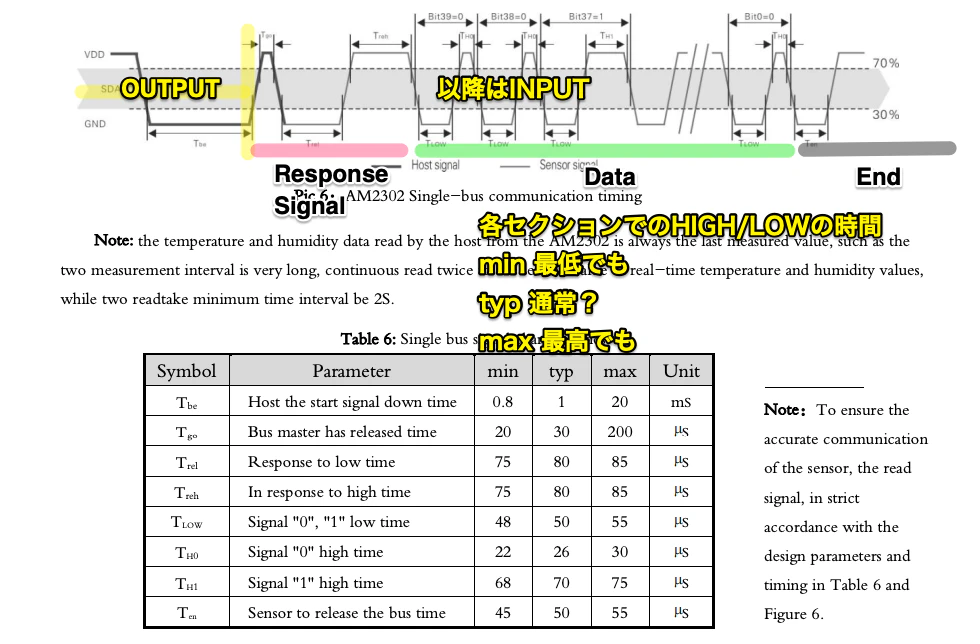
最終的なデータを取るまでは11/22に違いはない。流れはこう
- GPIO4を出力にする
- HIGHにする
- LOWにする(1 - 20ms以内)
- GPIO4を入力にする
- 一回HIGHが返ってくる 約20 - 200us
- Response signalとしてLOWが約80us返ってくる
- Response signalとしてHIGHが約80us返ってくる
- 40ビット(5バイト)相当のDataが続けて流れてくる
- LOWが流れて
- 以降ずっとHIGHになる
HIGH/LOWは刻一刻と(マイクロ秒単位)で流れてきていて、それを読み取っていかないといけない(だからrubyにはちと厳しい...)。
40ビットの読み方
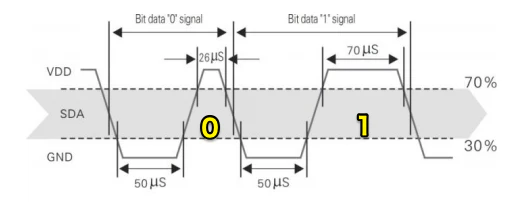
注意するのは単純にHIGH = 1、LOW = 0ではない。LOWが約50us続いた後、HIGHが50usより長く続く(= 1)か、続かないか(= 0)で判断する(だからrubyにはちと厳しい...)。
HIGH/LOWが???us続いたかどうかの確認
例えばデータ取得時にTime.now.to_fとか一緒に取ってると、多分この処理に時間がかかってデータが先に流れていってしまう。この為先にデータを連続で取っておいて、後からLOWが続く平均の回数を取っておいて、その平均よりHIGHが上か下かで判断するようにした。
40ビットの使い方
40ビットを8ビットずつのバイト単位に整理して、
- 湿度上位バイト
- 湿度下位バイト
- 温度上位バイト
- 温度下位バイト
- parityバイト
に分けていく。
parityバイトの使い方
湿度上位バイト + 湿度下位バイト + 温度上位バイト + 温度下位バイト == parity
でチェックする。
湿度上位バイト + 湿度下位バイト + 温度上位バイト + 温度下位バイト
00000001 + 00000001 + 00000001 + 00000001 # => 00000100
である場合、parityが00000100であればOK
上下バイトの使い方
DHT11の場合
精度が低いので下位バイトは常に00000000なので、無視していい。単純に
- 湿度上位バイト = 湿度%
- 温度上位バイト = 温度℃
DHT22の場合
湿度、温度共に2バイトで表現される。
例:
52.7%の湿度だとして0000001000001111(527)の2バイト、これを10で割ると52.7%
26.3℃の湿度だとして0000000100000111(263)の2バイト、これを10で割ると26.3℃
この為、上位バイトを8ビットずらして下位バイトと足さないと正しい数値にならない。
humidity = ((humidity_high << 8) + humidity_low) / 10.to_f
更に温度の場合のみだがマイナスも表現できる。これは温度の上位ビットの先頭が1かどうかで決まる。この為先頭ビットが1かどうかを確認した上で、先頭ビットを落とす必要がある。
  is_negative = temp_high & 0b10000000
  temp_high &= 0b01111111
後の計算は上の湿度の例と同じ。
実際のデータ取得
マイクロ秒単位で流れてくるデータを正確に取れるかどうか(parityチェックが通るかどうか)はその時の処理の混み具合とかもあるので、1回の呼び出しで確実に毎回データが取れるかどうかは分からない。
この為複数回、データが取れるまで繰り返し実行する必要がある。実際dht-sensor-ffiもデフォルトで50トライしてる。
コード
require "rpi_gpio"
RPi::GPIO.set_numbering :bcm # bcmベースの番号でピンを指定

class DHTBase
  CLEAR_SIGNALS = 500 / 1000.to_f # ms
  START_SIGNAL = 1 / 1000.to_f # ms
  VALID_BYTE_SIZE = 5 # humidity_high, humidity_low, temp_high, temp_low, parity
  BITS_IN_BYTE = 8
  HUMIDITY_PRECISION = 10.to_f
  TEMPERATURE_PRECISION = 10.to_f
  ENOUGH_TO_CAPTURE_COUNT = 1000 # 十分にデータが取れる回数(アバウト)

  class << self
    def read(pin)
      dht = new(pin)
      dht.send_start_signal
      dht.collect_response_bits
      dht.convert
    end
  end

  def initialize(pin)
    @pin = pin
  end

  def send_start_signal
    RPi::GPIO.setup pin, as: :output
    RPi::GPIO.set_high pin
    sleep(CLEAR_SIGNALS)

    RPi::GPIO.set_low pin
    sleep(START_SIGNAL)
  end

  def collect_response_bits
    RPi::GPIO.setup pin, as: :input, pull: :up
    @bits = ENOUGH_TO_CAPTURE_COUNT.times.collect { RPi::GPIO.high?(pin) }
    release

    break_into_byte_strings
    check_parity!
  end

  private

  attr_reader :pin, :bits, :byte_strings

  def release
    RPi::GPIO.clean_up pin
  end

  def break_by_high_or_low
    # HIGH = true
    # LOW = false
    # [false, false, false, ...]
    # [true, true, true, ...]
    # のようにまとめていく
    last_value = :not_yet
    bits.slice_before do |value|
      (last_value != value).tap { |not_same| last_value = value if not_same }
    end.to_a
  end

  def break_into_byte_strings
    # この為reverseして、下からtrue/falseの配列ペアを作った後に
    # 8ビット分ずつに更にまとめて5バイト分のデータを用意している

    # ture/falseの配列ペア=0か1かのビット
    # これが5バイト分、40ビット分ある=80配列
    # [false, false, false, ...]
    # [true, true, true, ...]
    # [false, false, false, ...]
    # [true, true, true, ...]
    # [false, false, false, ...]
    # [true, true, true, ...]
    # ...
    # ...
    # ...
    # 最後は必ずfalseの連続とtrueの長期連続で終わるし、データではないので使わない
    # [false, false, false, ...]
    # [true, true, true, true, true, true, true, true, true, ...]
    end_part, *low_high_pairs = break_by_high_or_low.reverse.each_slice(2).to_a
    # low_high_pairs = [
    #   ture / false 配列ペア = 1ビット分
    #   8要素分で1バイト分
    #   [
    #     [[true, true ...], [false, false ...]],  1
    #     [[true, true ...], [false, false ...]],  2
    #     [[true, true ...], [false, false ...]],  3
    #     [[true, true ...], [false, false ...]],  4
    #     [[true, true ...], [false, false ...]],  5
    #     [[true, true ...], [false, false ...]],  6
    #     [[true, true ...], [false, false ...]],  7
    #     [[true, true ...], [false, false ...]],  8
    #   ]

    #   ...
    #   合計で5バイト分
    # ]

    # 最初にResponse signal分のtrue/false配列があるが読む必要がないので
    # 最後の5個だけ取っている
    valid_bytes =
      low_high_pairs.reverse.each_slice(8).to_a.last(VALID_BYTE_SIZE).select do |pair|
        pair.all? { |x| x.is_a?(Array) }
      end

    unless valid_bytes.size == VALID_BYTE_SIZE
      raise "not valid byte set (#{valid_bytes.size}bytes, should be #{
              VALID_BYTE_SIZE
            }bytes)"
    end

    valid_bytes.each do |byte|
      unless byte.size == BITS_IN_BYTE
        raise "not a byte (#{byte.size}bits, should be #{BITS_IN_BYTE}bits)"
      end
    end

    all_falses = valid_bytes.collect { |byte| byte.collect(&:last) }.flatten(1) # flattenでバイト単位からバイト内のビット単位の配列に
    average_false_count = all_falses.sum(&:size) / all_falses.size.to_f

    # 50us相当のfalseの連続が平均何回分のfalseなのかを基準にtrueの要素数と比較して1か0かを判断する
    @byte_strings =
      valid_bytes.collect do |byte|
        byte.collect { |trues, _| average_false_count <= trues.size ? 1 : 0 }.join
      end
  end

  def bytes
    byte_strings.collect { |x| x.to_i(2) }
  end

  def check_parity!
    humidity_high, humidity_low, temp_high, temp_low, parity = bytes
    unless (humidity_high + humidity_low + temp_high + temp_low) == parity
      raise "parity check failed"
    end
  end
end
class DHT11 < DHTBase
  def convert
    humidity_high, _, temp_high, _, _ = bytes

    humidity = humidity_high
    temperature = temp_high # マイナス温度は分からないはず
    { humidity: humidity, temperature: temperature }
  end
end
class DHT22 < DHTBase
  def convert
    humidity_high, humidity_low, temp_high, temp_low, _ = bytes

    is_negative = 0 < (temp_high & 0b10000000)
    temp_high &= 0b01111111

    humidity = ((humidity_high << 8) + humidity_low) / HUMIDITY_PRECISION
    temperature = ((temp_high << 8) + temp_low) / TEMPERATURE_PRECISION
    temperature *= -1 if is_negative
    { humidity: humidity, temperature: temperature }
  end
end
100.times do
  begin
    p DHT22.read(4)
    break
  rescue => exception
    p exception
    puts exception.backtrace.first(10).join("\n")
    sleep 0.1
  end
end