
はじめに
中高生向けに植物のクローン苗づくりを体験する「細胞培養シミュレーター」(HTML/JS)を作成したました。
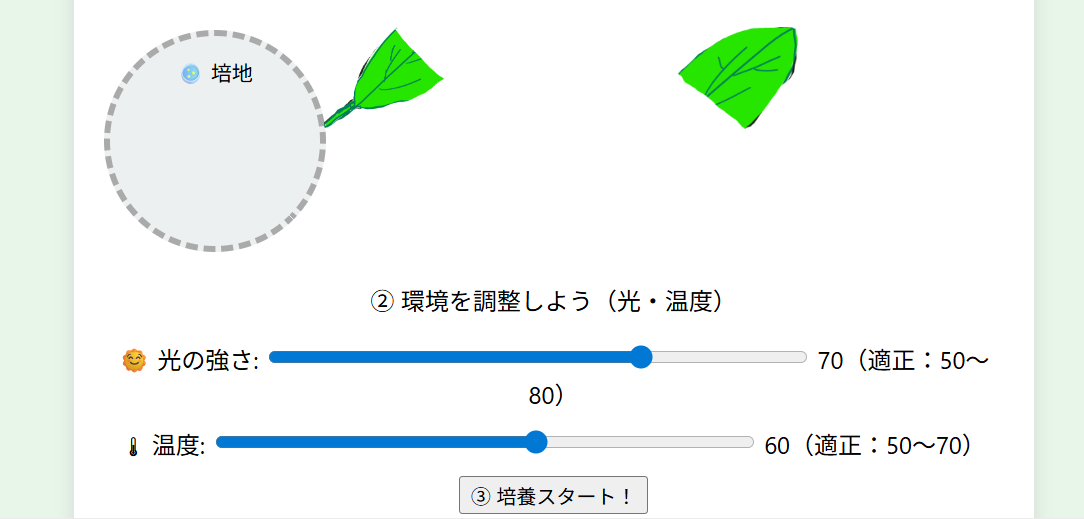
植物は、葉っぱの細胞1つからでも、条件がそろうと“同じ遺伝子の苗(クローン苗)”になれることがあります(=植物の細胞のすごさ!)。
今回はそれを、ゲーム感覚で試行錯誤できるミニ・シミュレーターにしました。
※これは学習用のシミュレーションです。実際の培養は「無菌操作」などが重要でです(ここでは簡略化しています)。
できること(遊び方)
- 🍃 葉をクリックして「なんちゃって切片」を作る
- 🧫 切片を培地(シャーレ)に入れる
- 🌞 光・🌡温度をスライダーで調整
- ▶ 培養スタート → 成功(🌿)/失敗(🥀)
仕様(超ざっくり)
-
成功条件(例)
- 光:50~80
- 温度:50~70

-
条件が合えば 🌿、外れると 🥀
-
結果は2秒後に表示(「培養中…」の演出

動かし方(共通)
- 下のHTMLを
index.htmlとして保存 - ブラウザで開くだけ(ローカルでOK)
- 例:Chrome / Edge / Safari など
コードは2通り
-
1は画像パス不要で動きます(そのままコピペでOK)

-
2 は画像パス(またはURL)を img src="" に入れて使います

1. コピペ用コード(画像なし・1ファイル完結で動く版)
<!DOCTYPE html>
<html lang="ja">
<head>
  <meta charset="UTF-8" />
  <meta name="viewport" content="width=device-width, initial-scale=1" />
  <title>細胞培養シミュレーター</title>

  <style>
    body {
      font-family: system-ui, "Segoe UI", sans-serif;
      background: #e8f5e9;
      text-align: center;
      padding: 30px;
    }
    h1 { color: #2e7d32; }

    #lab {
      margin: auto;
      width: 90%;
      max-width: 680px;
      background: #ffffff;
      border-radius: 10px;
      box-shadow: 0 4px 12px rgba(0,0,0,0.1);
      padding: 20px;
    }

    #leaf {
      display: inline-block;
      padding: 10px 16px;
      border-radius: 999px;
      background: #e0f2f1;
      border: 2px solid #a7d7cf;
      cursor: pointer;
      user-select: none;
      font-size: 18px;
      margin: 6px 0 10px;
    }
    #leaf:active { transform: translateY(1px); }

    #piecesArea {
      margin: 10px auto 0;
      display: flex;
      justify-content: center;
      gap: 12px;
      flex-wrap: wrap;
      min-height: 56px;
    }

    .cutpiece {
      width: 170px;
      height: 52px;
      border-radius: 12px;
      border: 2px solid #a5d6a7;
      background: #f1f8e9;
      display: flex;
      align-items: center;
      justify-content: center;
      cursor: grab;
      user-select: none;
      font-size: 18px;
    }
    .cutpiece:active { cursor: grabbing; }
    .cutpiece.in-dish {
      cursor: default;
      background: #e8f5e9;
      border-style: solid;
    }

    #dish {
      margin: 18px auto 18px;
      width: 180px;
      height: 180px;
      background: #ecf0f1;
      border-radius: 50%;
      border: 4px dashed #aaa;
      position: relative;
      display: flex;
      align-items: center;
      justify-content: center;
      flex-wrap: wrap;
      gap: 8px;
      padding: 18px;
      box-sizing: border-box;
    }
    #dish p {
      position: absolute;
      top: 10px;
      left: 0;
      right: 0;
      font-size: 14px;
      margin: 0;
      color: #555;
      pointer-events: none;
    }

    .slider-container { margin: 10px 0; font-size: 16px; }
    input[type="range"] { width: 60%; max-width: 360px; }

    #seedling {
      font-size: 50px;
      opacity: 0;
      transition: opacity 2s ease;
    }
    #result {
      font-size: 20px;
      font-weight: bold;
      margin-top: 20px;
      white-space: pre-wrap;
      min-height: 3em;
    }
  </style>
</head>

<body>
  <h1>🧬 細胞培養シミュレーター</h1>

  <div id="lab">
    <p>① 葉をクリックして切片をつくろう!</p>
    <div id="leaf" onclick="cutLeaf()">🍃 葉を切る</div>

    <div id="piecesArea"></div>

    <div id="dish" ondrop="dropToDish(event)" ondragover="allowDrop(event)">
      <p>🧫 培地(ここに切片を入れる)</p>
    </div>

    <p>② 環境を調整しよう(光・温度)</p>
    <div class="slider-container">
      🌞 光の強さ:
      <input type="range" id="light" min="0" max="100" value="70" oninput="updateLight(this.value)">
      <span id="light-value">70</span>(適正:50~80)
    </div>
    <div class="slider-container">
      🌡 温度:
      <input type="range" id="temp" min="0" max="100" value="60" oninput="updateTemp(this.value)">
      <span id="temp-value">60</span>(適正:50~70)
    </div>

    <button onclick="startGrowth()">③ 培養スタート!</button>

    <div id="seedling">🌱</div>
    <div id="result"></div>
  </div>

  <script>
    let piecesCut = 0;

    function cutLeaf() {
      if (piecesCut >= 1) return;

      const area = document.getElementById("piecesArea");

      const makePiece = (label, id) => {
        const piece = document.createElement("div");
        piece.className = "cutpiece";
        piece.id = id;
        piece.textContent = `🍃 切片 ${label}`;
        piece.draggable = true;

        // PC:ドラッグ&ドロップ
        piece.addEventListener("dragstart", (ev) => {
          ev.dataTransfer.setData("text/plain", ev.target.id);
        });

        // スマホ:タップで培地へ入れられるようにする
        piece.addEventListener("click", () => placePieceToDish(piece));

        return piece;
      };

      area.appendChild(makePiece("L", "cutL"));
      area.appendChild(makePiece("R", "cutR"));

      piecesCut++;
      alert("✂️ 葉を切ったよ!切片を培地に入れよう!(ドラッグ or タップ)");
    }

    function allowDrop(ev) {
      ev.preventDefault();
    }

    function dropToDish(ev) {
      ev.preventDefault();
      const id = ev.dataTransfer.getData("text/plain");
      const piece = document.getElementById(id);
      if (!piece) return;
      placePieceToDish(piece);
    }

    function placePieceToDish(piece) {
      const dish = document.getElementById("dish");
      if (piece.classList.contains("in-dish")) return;

      dish.appendChild(piece);
      piece.classList.add("in-dish");
      piece.draggable = false;
    }

    function updateLight(val) {
      document.getElementById("light-value").textContent = val;
    }
    function updateTemp(val) {
      document.getElementById("temp-value").textContent = val;
    }

    function startGrowth() {
      const dish = document.getElementById("dish");
      const piecePlaced = dish.querySelector(".cutpiece") !== null;

      if (!piecePlaced) {
        alert("❌ 切片を置いてから始めよう!");
        return;
      }

      const light = parseInt(document.getElementById("light").value, 10);
      const temp  = parseInt(document.getElementById("temp").value, 10);
      const seedling = document.getElementById("seedling");
      const result = document.getElementById("result");

      seedling.style.opacity = 1;
      seedling.textContent = "🌱";
      result.textContent = "培養中…";

      const lightOK = light >= 50 && light <= 80;
      const tempOK  = temp  >= 50 && temp  <= 70;

      setTimeout(() => {
        if (lightOK && tempOK) {
          result.style.color = "#2e7d32";
          result.textContent = "🎉 成功!クローン苗が育ちました!";
          seedling.textContent = "🌿";
        } else {
          result.style.color = "#c62828";
          seedling.textContent = "🥀";
          let reason = "💀 失敗…条件が合いませんでした。\n";
          if (!lightOK) reason += (light < 50) ? "・光が弱すぎました。\n" : "・光が強すぎました。\n";
          if (!tempOK)  reason += (temp  < 50) ? "・温度が低すぎました。\n" : "・温度が高すぎました。\n";
          result.textContent = reason;
        }
      }, 2000);
    }
  </script>
</body>
</html>
-
img/leaf.png(葉っぱ) -
img/left.png(左切片) -
img/right.png(右切片)
…のように置くか、URLを直接書いてもOKです。
<!DOCTYPE html>
<html lang="ja">
<head>
  <meta charset="UTF-8" />
  <meta name="viewport" content="width=device-width, initial-scale=1" />
  <title>細胞培養シミュレーター(画像パス版)</title>

  <style>
    body {
      font-family: 'Segoe UI', system-ui, sans-serif;
      background: #e8f5e9;
      text-align: center;
      padding: 30px;
    }
    h1 { color: #2e7d32; }

    #lab {
      margin: auto;
      width: 90%;
      max-width: 680px;
      background: #ffffff;
      border-radius: 10px;
      box-shadow: 0 4px 12px rgba(0,0,0,0.1);
      padding: 20px;
      position: relative;
    }

    #leaf {
      width: 120px;
      cursor: pointer;
      user-select: none;
    }

    #piecesArea {
      margin: 12px auto 0;
      display: flex;
      justify-content: center;
      gap: 14px;
      flex-wrap: wrap;
      min-height: 90px;
      align-items: center;
    }

    .cutpiece {
      width: 90px;
      cursor: grab;
      user-select: none;
      border-radius: 8px;
      box-shadow: 0 2px 6px rgba(0,0,0,0.10);
      background: #fff;
    }
    .cutpiece:active { cursor: grabbing; }

    #dish {
      margin-top: 16px;
      width: 160px;
      height: 160px;
      background: #ecf0f1;
      border-radius: 50%;
      border: 4px dashed #aaa;
      margin-bottom: 18px;
      position: relative;

      /* ここに切片が入るので、中央寄せ */
      display: flex;
      align-items: center;
      justify-content: center;
      gap: 8px;
      flex-wrap: wrap;
      padding: 18px;
      box-sizing: border-box;
    }

    #dish p {
      position: absolute;
      top: 10px;
      left: 0;
      right: 0;
      margin: 0;
      font-size: 14px;
      color: #555;
      pointer-events: none; /* pの上にドロップしてもdish扱いになるように */
    }

    .slider-container {
      margin: 10px 0;
      font-size: 16px;
    }
    input[type="range"] { width: 60%; max-width: 360px; }

    #seedling {
      font-size: 50px;
      opacity: 0;
      transition: opacity 2s ease;
      margin-top: 6px;
    }

    #result {
      font-size: 20px;
      font-weight: bold;
      margin-top: 16px;
      white-space: pre-wrap;
      min-height: 3em;
    }
  </style>
</head>

<body>
  <h1>🧬 細胞培養シミュレーター</h1>

  <div id="lab">
    <p>① 葉をクリックして切片をつくろう!</p>

    <!-- ▼▼▼ ここを自分の画像パスに差し替え▼▼▼ -->
    <!-- 例:img/leaf.png  または https://.../leaf.png:絶対パスで -->
    <img
      id="leaf"
      src="img/leaf.png"
      alt="葉"
      onclick="cutLeaf()"
    />
    <!-- ▲▲▲ ここまで ▲▲▲ -->

    <div id="piecesArea"></div>

    <div id="dish" ondrop="dropToDish(event)" ondragover="allowDrop(event)">
      <p>🧫 培地</p>
    </div>

    <p>② 環境を調整しよう(光・温度)</p>

    <div class="slider-container">
      🌞 光の強さ:
      <input type="range" id="light" min="0" max="100" value="70" oninput="updateLight(this.value)">
      <span id="light-value">70</span>(適正:50~80)
    </div>

    <div class="slider-container">
      🌡 温度:
      <input type="range" id="temp" min="0" max="100" value="60" oninput="updateTemp(this.value)">
      <span id="temp-value">60</span>(適正:50~70)
    </div>

    <button onclick="startGrowth()">③ 培養スタート!</button>

    <div id="seedling">🌱</div>
    <div id="result"></div>
  </div>

  <script>
    let piecesCut = 0;

    // ▼▼▼ ここを画像パスに差し替え ▼▼▼
    // 例:img/left.png / img/right.png  または https://.../left.png
    const IMG_LEFT  = "img/left.png";
    const IMG_RIGHT = "img/right.png";
    // ▲▲▲ ここまで ▲▲▲

    function cutLeaf() {
      if (piecesCut >= 1) return;

      const area = document.getElementById("piecesArea");
      area.innerHTML = ""; // 念のため初期化

      const makePiece = (src, id, altText) => {
        const piece = document.createElement("img");
        piece.src = src;
        piece.alt = altText;
        piece.className = "cutpiece";
        piece.id = id;
        piece.setAttribute("draggable", "true");

        piece.addEventListener("dragstart", (ev) => {
          ev.dataTransfer.setData("text/plain", ev.target.id);
        });

        // スマホ対策:タップでも培地へ入れられる
        piece.addEventListener("click", () => placePieceToDish(piece));

        return piece;
      };

      area.appendChild(makePiece(IMG_LEFT, "cutL", "葉の左切片"));
      area.appendChild(makePiece(IMG_RIGHT, "cutR", "葉の右切片"));

      piecesCut++;
      alert("✂️ 葉を切ったよ!切片をドラッグ(またはタップ)して培地に入れよう!");
    }

    function allowDrop(ev) {
      ev.preventDefault();
    }

    function dropToDish(ev) {
      ev.preventDefault();
      const id = ev.dataTransfer.getData("text/plain");
      const piece = document.getElementById(id);
      if (!piece) return;
      placePieceToDish(piece);
    }

    function placePieceToDish(piece) {
      const dish = document.getElementById("dish");

      // すでに入ってるなら何もしない
      if (dish.contains(piece)) return;

      dish.appendChild(piece);

      // 培地に入ったらドラッグ不可にして安定化
      piece.setAttribute("draggable", "false");
      piece.style.cursor = "default";
      piece.style.boxShadow = "none";
      piece.style.background = "transparent";
    }

    function updateLight(val) {
      document.getElementById("light-value").textContent = val;
    }
    function updateTemp(val) {
      document.getElementById("temp-value").textContent = val;
    }

    function startGrowth() {
      const dish = document.getElementById("dish");
      const hasPiece = dish.querySelector(".cutpiece") !== null;

      if (!hasPiece) {
        alert("❌ 切片を置いてから始めよう!");
        return;
      }

      const light = parseInt(document.getElementById("light").value, 10);
      const temp  = parseInt(document.getElementById("temp").value, 10);

      const seedling = document.getElementById("seedling");
      const result = document.getElementById("result");

      seedling.style.opacity = 1;
      seedling.textContent = "🌱";
      result.textContent = "培養中…";

      const lightOK = light >= 50 && light <= 80;
      const tempOK  = temp  >= 50 && temp  <= 70;

      setTimeout(() => {
        if (lightOK && tempOK) {
          result.style.color = "#2e7d32";
          result.textContent = "🎉 成功!クローン苗が育ちました!";
          seedling.textContent = "🌿";
        } else {
          result.style.color = "#c62828";
          seedling.textContent = "🥀";
          let reason = "💀 失敗…条件が合いませんでした。\n";
          if (!lightOK) reason += (light < 50) ? "・光が弱すぎました。\n" : "・光が強すぎました。\n";
          if (!tempOK)  reason += (temp  < 50) ? "・温度が低すぎました。\n" : "・温度が高すぎました。\n";
          result.textContent = reason;
        }
      }, 2000);
    }
  </script>
</body>
</html>
おわりに
「葉っぱ1枚から増やせる」という植物の不思議さを、手を動かして理解できる教材にしたくて作りました。