
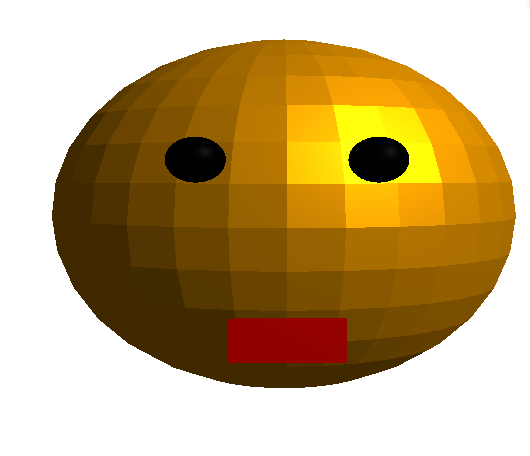
※この記事の「ジョン・スノウ」は、自作3Dアバター英会話ボットの名前です(Game of Thrones の主人公名から拝借)。
- 「英語の勉強したいな……」と思って、英会話の相手を作りました。
英語が苦手なので、“会話相手を用意する”ところから実装した感じです。
はじめに
最近は 知っての通り、ChatGPT や Geminiみたいに、最初から音声会話までできるAIが普通にあります。
それでもあえて自作したのは、「会話できる」こと自体より、会話が成立するまでのパイプライン(ASR→LLM→TTS→表情)を自分の手で繋いで理解したかったからです。
“完成品を使う”のではなく、“部品を組んで動かす”ことで、どこが詰まりやすいか(認識精度・遅延・文脈・同期など)を体感できるのが狙いでした。
この Jon Snow は、次の4つをパイプライン接続したものです。
- ASR(音声認識):マイク音声 → 文字(SpeechRecognition + Google Speech API)
- 対話LLM:文字 → 返答(DialoGPT)
- TTS(音声合成):返答テキスト → 音声(pyttsx3)
- 3Dアバター表示:口パク+まばたき(pythreejs)
できること(動作の流れ)
- マイクで英語を話す
- 音声認識で文字起こし(英語 en-US)
- DialoGPT が返答文を生成
- pyttsx3 が返答を読み上げ
- 3Dアバターの口がパクパクして、たまにまばたきする
何をやっているのか(整理)
この手の会話ボットは、ざっくり 知覚 → 言語 → 行動 の連鎖です。
1) ASR(Automatic Speech Recognition)
音声波形(連続信号)から、言語の記号列(単語・サブワード列)を推定します。
今回はSpeechRecognition経由で recognize_google(..., language="en-US") を呼び、クラウド側のASRにデコードしてもらっています。
2) 対話モデル(Causal Language Model)
DialoGPT は GPT 系列の****自己回帰(Causal)言語モデルです。
直前までのトークン列x1:tを条件に、次トークンの確率分布p(xt+1∣x1:t) を繰り返しサンプリングして文章を作ります。
コード上はAutoModelForCausalLM + model.generate() で実装されています。
いまの構成だと「直近発話だけ」を入れているので、会話の文脈(履歴)保持は弱めです(改善案で後述)。
3) TTS(Text-to-Speech)
pyttsx3 はOSの音声合成エンジンを叩くラッパーで、非同期スレッドでしゃべらせています。
UI(3D表示)やメインループを止めない設計としては正解です.
4) 3Dアバター(pythreejs)
pythreejsで「顔(球)+目(小球)+口(平面)」の最小モデルを作り、Rendererで表示します。
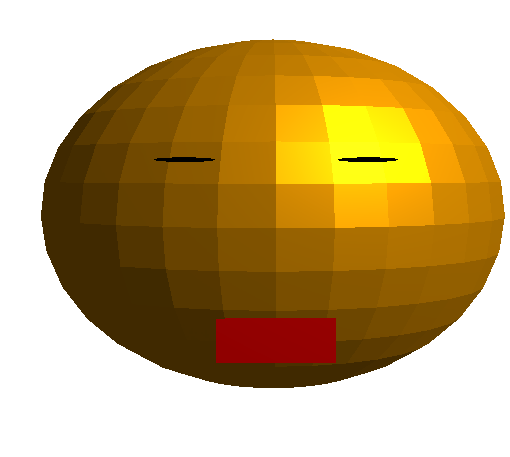
口パクは mouth.scaleのY成分を乱数で揺らして擬似的に開閉、まばたきは目のYスケールを一瞬つぶす実装です。
実装コード
import pyttsx3
import speech_recognition as sr
from transformers import AutoModelForCausalLM, AutoTokenizer
import time
from threading import Thread
import numpy as np
from pythreejs import *

# ジョンスノーの形態
sphere = Mesh(
    geometry=SphereGeometry(radius=1, widthSegments=32, heightSegments=16),
    material=MeshStandardMaterial(color="orange", flatShading=True),
    position=[0, 0, 0],
)

mouth = Mesh(
    geometry=PlaneGeometry(0.4, 0.2),
    material=MeshStandardMaterial(color="red"),
    position=[0, -0.5, 1],
)

eye_left = Mesh(
    geometry=SphereGeometry(radius=0.1, widthSegments=16, heightSegments=16),
    material=MeshStandardMaterial(color="black"),
    position=[-0.3, 0.3, 1],
)

eye_right = Mesh(
    geometry=SphereGeometry(radius=0.1, widthSegments=16, heightSegments=16),
    material=MeshStandardMaterial(color="black"),
    position=[0.3, 0.3, 1],
)

light = PointLight(position=[10, 10, 10], intensity=1.2)
scene = Scene(children=[sphere, mouth, eye_left, eye_right, light, AmbientLight(intensity=0.5)])

camera = PerspectiveCamera(position=[3, 3, 3], fov=50, up=[0, 1, 0])
controller = OrbitControls(controlling=camera)

renderer = Renderer(camera=camera, scene=scene, controls=[controller], width=800, height=600)

# 文投げ~
def load_conversational_model():
    try:
        print("Loading the conversational model. please wait")
        tokenizer = AutoTokenizer.from_pretrained("microsoft/DialoGPT-medium")
        model = AutoModelForCausalLM.from_pretrained("microsoft/DialoGPT-medium")
        print("Model loaded successfully!")
        return tokenizer, model
    except Exception as e:
        print(f"Error: {e}")
        return None, None

tokenizer, model = load_conversational_model()

# 音声入力 (英語対応)
def listen_for_speech(language="en-US"):
    recognizer = sr.Recognizer()
    with sr.Microphone() as source:
        print("Say something...")
        try:
            recognizer.adjust_for_ambient_noise(source, duration=1)
            audio = recognizer.listen(source, timeout=5, phrase_time_limit=10)
            print("Processing audio...")
            text = recognizer.recognize_google(audio, language=language)
            print(f"You said: {text}")
            return text
        except sr.UnknownValueError:
            print("Sorry, I couldn't understand that. Please try again.")
            return ""
        except sr.RequestError as e:
            print(f"Speech recognition error: {e}")
            return ""
        except sr.WaitTimeoutError:
            print("No speech detected. Please try again.")
            return ""

# Function to generate a response using the AI model
def generate_response(input_text):
    if tokenizer is None or model is None:
        return "Sorry, the conversational model is not available."
    try:
        inputs = tokenizer.encode(input_text + tokenizer.eos_token, return_tensors="pt")
        reply_ids = model.generate(inputs, max_length=100, pad_token_id=tokenizer.eos_token_id)
        response = tokenizer.decode(reply_ids[:, inputs.shape[-1]:][0], skip_special_tokens=True)
        return response
    except Exception as e:
        print(f"Error while generating response: {e}")
        return "Sorry, I couldn't generate a response."

# Function to synthesize speech asynchronously using pyttsx3
def text_to_speech(text):
    def speak():
        try:
            engine = pyttsx3.init()
            voices = engine.getProperty('voices')
            engine.setProperty('voice', voices[1].id)
            engine.setProperty('rate', 150)
            engine.setProperty('volume', 1)
            print("Speaking:", text)
            engine.say(text)
            engine.runAndWait()
        except Exception as e:
            print(f"Error in text-to-speech: {e}")

    thread = Thread(target=speak)
    thread.start()

# Function to animate the avatar's mouth movement
def move_mouth_for_duration(duration):
    start_time = time.time()
    while time.time() - start_time < duration:
        mouth.scale = [1, np.random.uniform(0.5, 1.5), 1]
        time.sleep(0.1)
    mouth.scale = [1, 1, 1]

# 目を閉じるアクション
def blink_eyes():
    while True:
        time.sleep(np.random.uniform(2, 5))
        eye_left.scale = [1, 0.1, 1]
        eye_right.scale = [1, 0.1, 1]
        time.sleep(0.1)  # Blink duration
        eye_left.scale = [1, 1, 1]
        eye_right.scale = [1, 1, 1]

# アバターと連携して発話
def speak_with_avatar(text):
    def sync_mouth_with_speech():
        text_to_speech(text)
        duration = len(text.split()) / 2
        move_mouth_for_duration(duration)

    threading_thread = Thread(target=sync_mouth_with_speech)
    threading_thread.start()

if __name__ == "__main__":
    display(renderer)
    blink_thread = Thread(target=blink_eyes, daemon=True)
    blink_thread.start()

    print("Please say something in English!")

    while True:
        user_input = listen_for_speech(language="en-US")
        if user_input:
            response = generate_response(user_input)
            print(f"Avatar says: {response}")
            speak_with_avatar(response)

        if any(command in user_input.lower() for command in ["exit", "goodbye", "bye", "end", "終了"]):
            print("Goodbye!")
            text_to_speech("Goodbye!")
            break
ハマりどころ(実運用で効くやつ)
-
Jupyter前提になりがち:
display(renderer)があるので、ノートブック環境だと楽です。 -
voices[1]は環境差が出る:OSによってはvoicesが1つしかなくて落ちます。 -
口パク同期は“それっぽい”レベル:発話時間を
len(text.split())/2で推定してるので、厳密な同期ではありません。
改善案(英会話の練習として“効かせる”)
- 会話履歴を入れる:DialoGPTに過去ターンも連結して渡すと、会話らしさが上がります(今は単発入力)。
- 学習用フィードバックを足す:返答だけでなく「自然な言い換え」「文法ミス指摘」「短い例文リピート」などを返すと学習効率が上がります。
- ASRのローカル化:クラウドASRを避けたいならローカルASRに置換(プライバシー・安定性が上がる)。
まとめ
- Jon Snow(自作英会話アバター)を、ASR→対話LLM→TTS→3D表示で繋いで作った。
- 仕組みとしては「連続信号(音声)を離散記号(テキスト)に写像し、確率モデルで生成し、また信号に戻す」なので、整理もしやすい。
- 次の一手は「履歴」「同期」「学習フィードバック」で、英語練習ツールとして一段上がる。