
はじめに
M5Stack PaperMono で Radiko を聞いてみます。
wakuwaku-koba さんの WebRadio_Japan ライブラリーを使います。
M5Stack PaperMono のブザー
M5Stack PaperMono では、GPIO の G42 からブザーに接続されています。
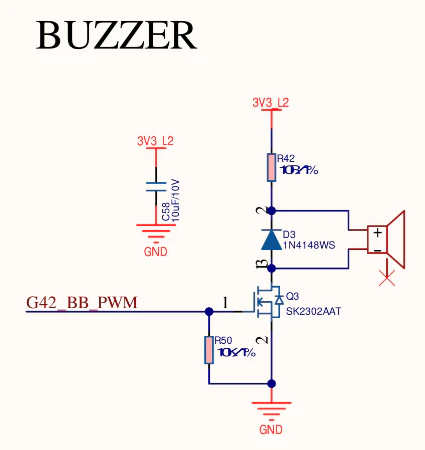
ESP8266Audio ライブラリーの AudioOutputPWM は Raspberry Pi Pico RP2040 のみ対応なので、ESP32S3 用に 同じようなものを作成 して利用します。
コード
E-Paperなので画面は控えめに局名と番組名のみ表示します。
Aボタンで選局、Bボタンで音量調整します。
#include <WiFi.h>
#include <M5Unified.h>
#include <WebRadio_Radiko.h>
#include <AudioOutputPWM.h>

#define WIFI_SSID <SSID>
#define WIFI_PASS <PASS>

static constexpr uint8_t m5spk_task_pinned_core = APP_CPU_NUM;

static AudioOutputPWM out(44100, 42);
static Radiko radio(&out, 1-m5spk_task_pinned_core);

static char stream_title[128] = { 0 };
static const char* meta_text[2] = { nullptr, stream_title };
static const size_t meta_text_num = sizeof(meta_text) / sizeof(meta_text[0]);
static uint8_t meta_mod_bits = 0;

static void gfxSetup(LGFX_Device* gfx)
{
  if (gfx == nullptr) { return; }
  if (gfx->width() < gfx->height())
  {
//    gfx->setRotation(gfx->getRotation()^1);
    gfx->setRotation(3);
  }
  gfx->setFont(&fonts::lgfxJapanGothic_28);
  gfx->setColor(TFT_BLACK);
  gfx->setEpdMode(epd_mode_t::epd_fastest);
  gfx->setTextWrap(false);
  gfx->setCursor(0, 8);
  gfx->println("WebRadio player");
  gfx->fillRect(0, 6, gfx->width(), 2, TFT_WHITE);
}

void gfxLoop(LGFX_Device* gfx)
{
  if (gfx == nullptr) { return; }
  if (meta_mod_bits)
  {
    gfx->startWrite();
    for (int id = 0; id < meta_text_num; ++id)
    {
      if (0 == (meta_mod_bits & (1<<id))) { continue; }
      meta_mod_bits &= ~(1<<id);
      size_t y = id * 30;
      gfx->setCursor(4, 36 + y);
      gfx->fillRect(0, 36 + y, gfx->width(), 30, gfx->getBaseColor());
      gfx->print(meta_text[id]);
      gfx->print(" "); // Garbage data removal when UTF8 characters are broken in the middle.
    }
    gfx->display();
    gfx->endWrite();
  }
}

void setup() {
  {
    auto cfg = M5.config();
    cfg.external_spk = true;    /// use external speaker (SPK HAT / ATOMIC SPK)
//  cfg.external_spk_detail.omit_atomic_spk = true; // exclude ATOMIC SPK
//  cfg.external_spk_detail.omit_spk_hat    = true; // exclude SPK HAT
//  cfg.external_speaker.module_rca = true; // RCA Module 13.2
    M5.begin(cfg);

    if(!cfg.external_speaker.module_rca) { /// custom setting
      auto cfg = M5.Speaker.config();
      cfg.sample_rate = 144000; // default:64000 (64kHz)  e.g. 48000 , 50000 , 80000 , 96000 , 100000 , 128000 , 144000 , 192000 , 200000
      cfg.task_pinned_core = m5spk_task_pinned_core;
      M5.Speaker.config(cfg);
    }
  }

  Serial.begin(11500);
  M5.Display.setBrightness(0);

  gfxSetup(&M5.Display);

  WiFi.begin(WIFI_SSID, WIFI_PASS);
  while(WiFi.status() != WL_CONNECTED) {
    Serial.print(".");
    delay(100);
  }

  if(!radio.begin()) {
    Serial.println("failed: radio.begin()");
    for(;;);
  }

  // radiko
  radio.onPlay = [](const char * station_name, const size_t station_idx) {
    Serial.printf("onPlay:%d %s", station_idx, station_name);
    Serial.println();
    meta_text[0] = station_name;
    stream_title[0] = 0;
    meta_mod_bits = 3;
    gfxLoop(&M5.Display);
  };
  radio.onInfo = [](const char *text) {
    Serial.println(text);
  };
  radio.onError = [](const char * text) {
    Serial.println(text);
  };
  radio.onProgram = [](const char * program_title) {
    strcpy(stream_title, program_title);
    meta_mod_bits |= 2;
    gfxLoop(&M5.Display);
  };

  radio.play();
}

void loop() {
  radio.handle();

  M5.update();
  int8_t adjStation = 0;
  int8_t adjVolume = 0;

  if (M5.BtnA.wasDecideClickCount())
  {
    switch (M5.BtnA.getClickCount())
    {
    case 1:
      adjStation = +1;
      break;

    case 2:
      adjStation = -1;
      break;
    }
  }
  if (M5.BtnB.wasDecideClickCount())
  {
    switch (M5.BtnB.getClickCount())
    {
    case 1:
      adjVolume = +1;
      break;

    case 2:
    adjVolume = -1;
      break;
    }
  }

  if(M5.Touch.getCount() > 0)
  {
    auto t = M5.Touch.getDetail();
    static auto prev_state = t.state;
    if (prev_state != t.state && t.state == m5::touch_state_t::flick_end) {
      if (t.distanceY() + (M5.Display.height() >> 2) < 0)
        adjStation = -1;
      else if (t.distanceY() - (M5.Display.height() >> 2) > 0)
        adjStation = +1;
    } else if (t.y < M5.Display.height() && t.state & m5::touch_state_t::flick) {
      adjVolume = t.deltaX();
    }
    prev_state = t.state;
  }

  if(adjStation) {
    radio.play(adjStation > 0);
  }

  if(adjVolume) {
    int v = M5.Speaker.getVolume() + adjVolume * 64;
    if (v < 0)
      v = 0;
    else if (v > 255)
      v = 255;

    M5.Speaker.setVolume(v);
    float gain = (float)v / 64;
    Serial.printf("Volume: %d\n", v);
    Serial.printf("Gain: %f\n", gain);
    out.SetGain(gain);
  }

}
まとめ
個体差による可能性はあるものの、M5Stack PaperMono のブザーの音は小さくて(ささやき声程度)実用的ではないかもしれませんが、PWM接続のブザーからAMラジオの音質くらいで聴くことができました。