

GPUコンピューティングの効果を確認するため、
高速な GPU を搭載した専用PCを組み立て、
CPU と GPU での処理時間を比較してみました。
GPUコンピューティング
GPUコンピューティングは、大量のコアを使って計算作業を並列処理する事で
計算時間を大幅に短縮する手法です。
Nvidia - GPUで加速化したコンピューティングとは?
PC構成
PC構成は、以下となります。
計算に GPU を用いるため、あまり重要ではない CPU のスペックは抑えています。
GPU はコストパフォーマンスのよい GeForce GTX 1080 を選択しました。
| 製品名 | 詳細 | |
|---|---|---|
| GPU | GF-GTX1080-E8GB/BLF | GeForce GTX 1080 |
| CPU | Intel Core i5 7500 | 3.2GHz 4コア |
| メモリ | CMK16GX4M2A2666C16 | 16GB |
| マザーボード | GA-Z170X-UD3 | Z170, LGA1151 |
| SSD | CSSD-S6T240NMG1Q | 240GB |
| 電源 | NeoECO Classic NE650C | 650W |
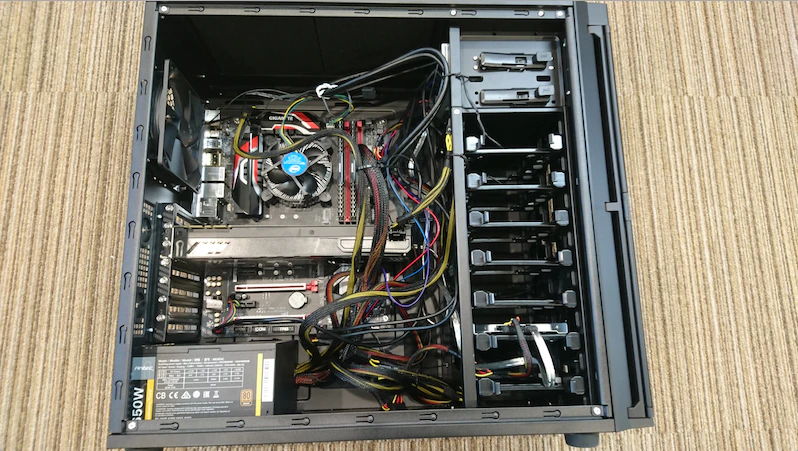
組み立て
組み立て後のPCの内部になります。
OS
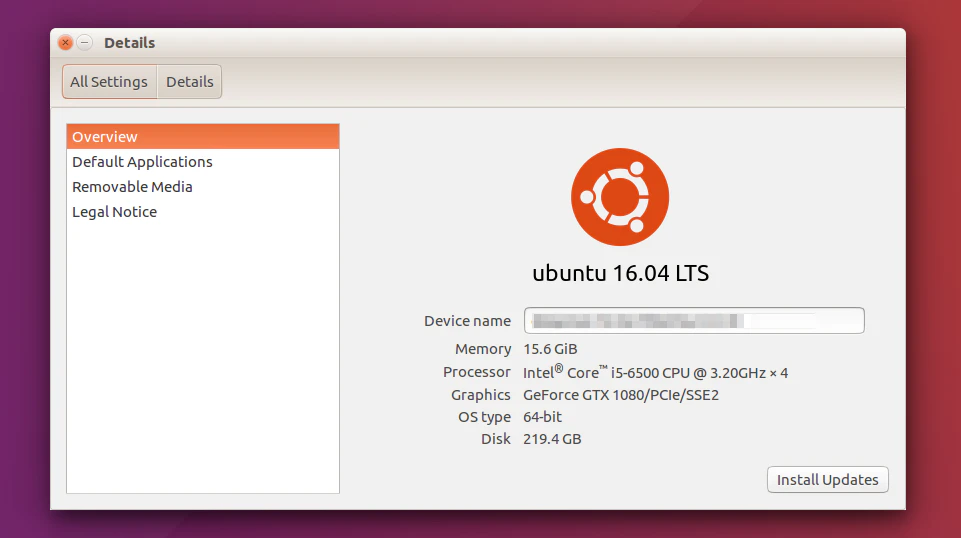
OSは、Ubuntu 16.04 LTS (64bit) をインストール
Ubuntu
Nvidia関連インストール
Nvidia関連をインストール
- ドライバ
- CUDA 8.0
- cuDNN など
参考)
Installing TensorFlow on Ubuntu
実行環境
python は 3.5.2 を virtualenv にてインストール
TensorFlowは、GPU版(tensorflow-gpu 1.1.0)をインストールしました。
開発環境
IDEは PyCharm をインストール
- PyCharm (Linux)
実行時間比較
前回のエントリーで作成した CIFAR-10 の
カラー画像分類のトレーニングを実行しました。
実行回数は 20000回 でバッチサイズは 50 になります。
(20000 x 50 = 100万回トレーニング)
※ CPU での実行は、iMacの CPU を利用しました。
※ training accuracy は目安になります(正確な精度ではありません)
CPU (iMac : Intel Core i5 2.9 GHz)
| step | training accuracy | time |
|---|---|---|
| 0 | 0.100000 | 0:00:00.083046 |
| 1000 | 0.440000 | 0:02:31.927596 |
| 2000 | 0.440000 | 0:05:03.851899 |
| 3000 | 0.700000 | 0:07:40.492688 |
| 4000 | 0.560000 | 0:10:09.004866 |
| 5000 | 0.580000 | 0:12:36.556484 |
| 6000 | 0.580000 | 0:15:12.126450 |
| 7000 | 0.580000 | 0:17:41.140809 |
| 8000 | 0.700000 | 0:20:14.581239 |
| 9000 | 0.600000 | 0:22:45.350451 |
| 10000 | 0.700000 | 0:25:19.588373 |
| 11000 | 0.700000 | 0:27:50.592196 |
| 12000 | 0.740000 | 0:30:17.858361 |
| 13000 | 0.620000 | 0:33:00.572951 |
| 14000 | 0.680000 | 0:35:43.369907 |
| 15000 | 0.700000 | 0:38:20.477208 |
| 16000 | 0.800000 | 0:40:48.248491 |
| 17000 | 0.920000 | 0:43:18.382643 |
| 18000 | 0.780000 | 0:45:46.533236 |
| 19000 | 0.800000 | 0:48:17.275133 |
| 20000 | 0.840000 | 0:50:47.150484 |
GPU (GeForce GTX 1080)
| step | training accuracy | time |
|---|---|---|
| 0 | 0.060000 | 0:00:01.168950 |
| 1000 | 0.460000 | 0:00:06.891809 |
| 2000 | 0.540000 | 0:00:12.568306 |
| 3000 | 0.400000 | 0:00:18.085924 |
| 4000 | 0.520000 | 0:00:23.652687 |
| 5000 | 0.560000 | 0:00:29.273809 |
| 6000 | 0.600000 | 0:00:35.029218 |
| 7000 | 0.660000 | 0:00:40.668440 |
| 8000 | 0.760000 | 0:00:46.297917 |
| 9000 | 0.560000 | 0:00:52.000282 |
| 10000 | 0.580000 | 0:00:57.790308 |
| 11000 | 0.760000 | 0:01:03.411751 |
| 12000 | 0.740000 | 0:01:09.110631 |
| 13000 | 0.720000 | 0:01:14.808173 |
| 14000 | 0.760000 | 0:01:20.417229 |
| 15000 | 0.660000 | 0:01:26.038076 |
| 16000 | 0.820000 | 0:01:31.681729 |
| 17000 | 0.840000 | 0:01:37.353628 |
| 18000 | 0.820000 | 0:01:43.051405 |
| 19000 | 0.920000 | 0:01:48.953982 |
| 20000 | 0.840000 | 0:01:54.729048 |
結果
CPU では 50分47秒かかりましたが、GPU では 1分54秒で終了する事が出来ました。
GPU で実行した場合、約26.7倍 早くトレーニングが終了する事がわかりました。
以上、今回は GPUコンピューティングを試してみました。