
Android StudioとFlutterをインストールしても、flutter doctorで完了状況のチェックを行うと、cmdline-toolsがないよ、と怒られることがある。
PowerShell
PS C:\> flutter doctor
Doctor summary (to see all details, run flutter doctor -v):
[✓] Flutter (Channel stable, 3.44.6, on Microsoft Windows [Version 10.0.26200.8655], locale en-US)
[✓] Windows Version (Windows 11 or higher, 25H2, 2009)
[!] Android toolchain - develop for Android devices (Android SDK version 36.1.0)
    ✗ cmdline-tools component is missing.
      Try installing or updating Android Studio.
      Alternatively, download the tools from https://developer.android.com/studio#command-line-tools-only and make sure
      to set the ANDROID_HOME environment variable.
      See https://developer.android.com/studio/command-line for more details.
    ✗ Android license status unknown.
      Run `flutter doctor --android-licenses` to accept the SDK licenses.
      See https://flutter.dev/to/windows-android-setup for more details.
[✓] Chrome - develop for the web
[✓] Visual Studio - develop Windows apps (Visual Studio Community 2026 18.7.0)
[✓] Connected device (3 available)
[✓] Network resources

! Doctor found issues in 1 category.
調べてみると解決策を提示しているサイトは多く出てくるが、最近のAndroidStudioは設定する箇所が変わってしまったらしい。
私が使っているAndroidStudioは「Quail1 | 2026.1.1 Patch2」です。
AndroidStudioを設定しよう
新しい設定箇所は以下の場所にある。
AndroidStudioを起動するとプロジェクト作成の画面が表示される。左下にある歯車アイコンからSettingsを選択する。
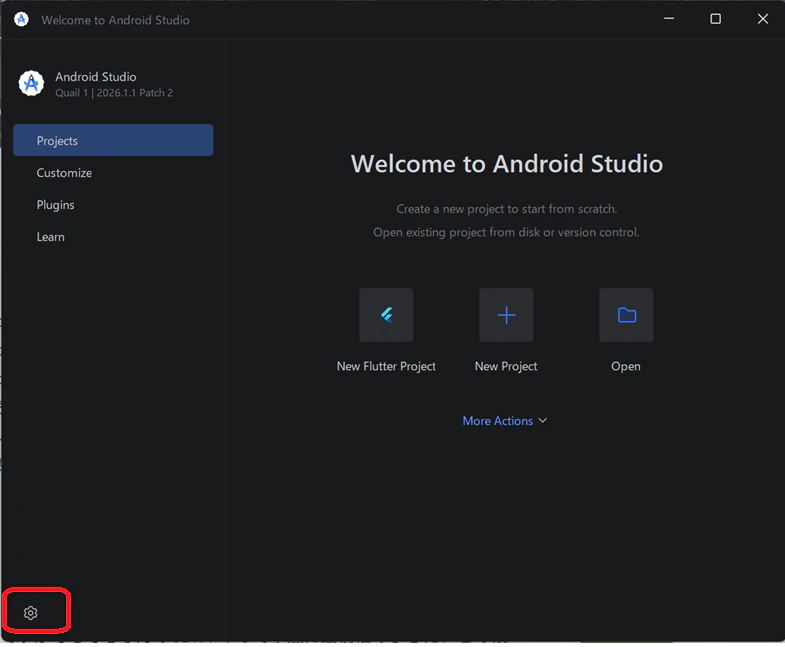
左メニューから「Languages & Frameworks」→「Android SDK」を選択する。
その後、右側の画面で「SDK Tools」を選択するとツール一覧が表示される。
その中から「Android SDK Command-line Tools(latest)」をチェックする。

最後に「OK」または「Apply」を押して確定する。
確認のために再度Powershellでflutter doctorを行うと、cmdline-toolsがOKになっていることが確認できる。
Powershell
PS C:\> flutter doctor
Doctor summary (to see all details, run flutter doctor -v):
[✓] Flutter (Channel stable, 3.44.6, on Microsoft Windows [Version 10.0.26200.8655],
    locale en-US)
[✓] Windows Version (Windows 11 or higher, 25H2, 2009)
[!] Android toolchain - develop for Android devices (Android SDK version 36.1.0)
    ! Some Android licenses not accepted. To resolve this, run: flutter doctor
      --android-licenses
[✓] Chrome - develop for the web
[✓] Visual Studio - develop Windows apps (Visual Studio Community 2026 18.7.0)
[✓] Connected device (3 available)
[✓] Network resources

! Doctor found issues in 1 category.
上記にはライセンスのエラーも表示されていますが、簡単に解決できるのでここでは取り扱いません。