

はじめに(結論)
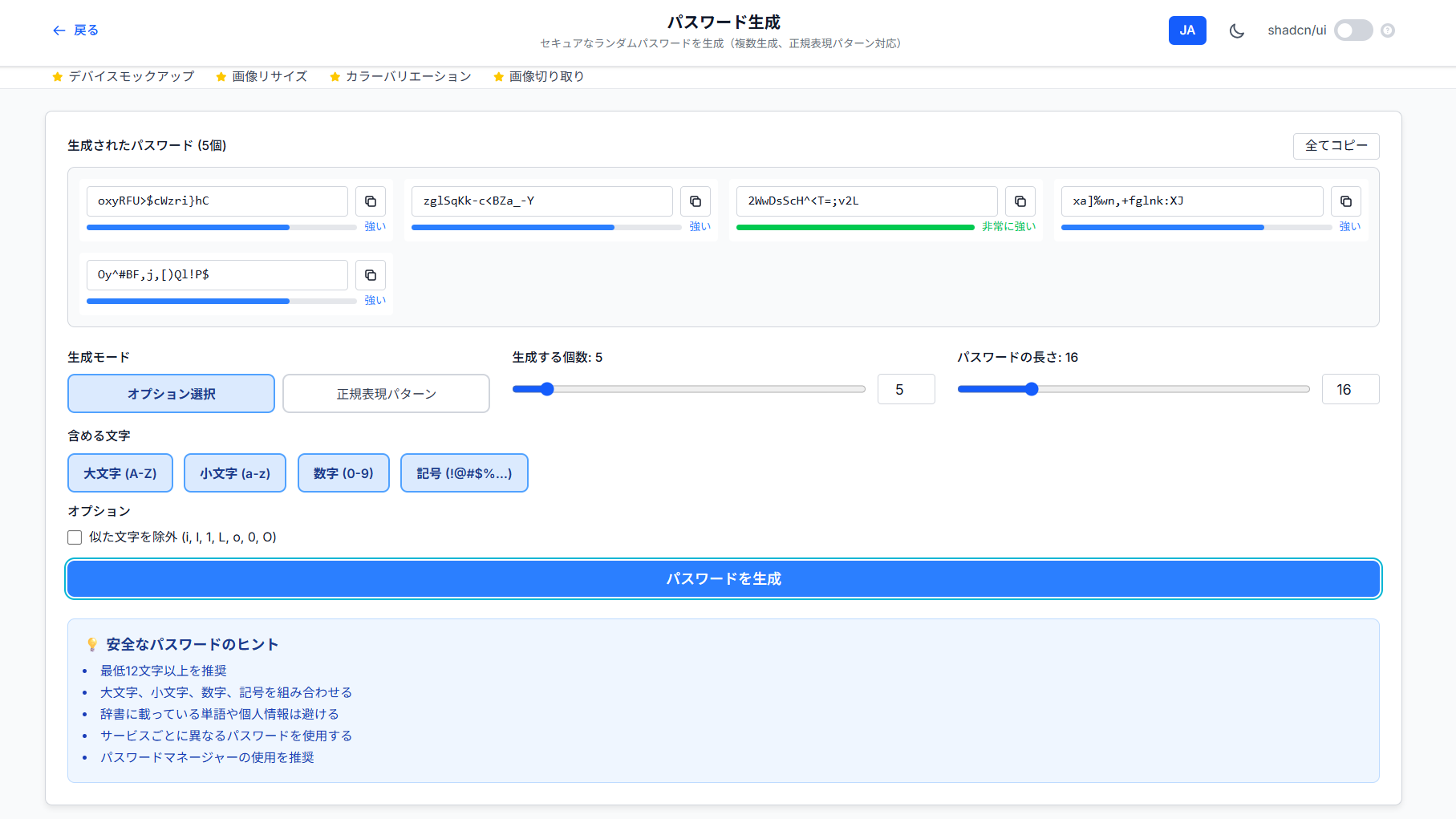
暗号学的に安全な乱数生成器とカスタム正規表現パターンに対応したパスワードジェネレーターをNext.js + TypeScriptで実装しました。
この記事で分かること:
-
crypto.getRandomValuesによる安全な乱数生成 - 正規表現パターンからパスワードを生成するロジック
- パスワード強度の自動判定アルゴリズム
- 複数パスワードの一括生成とコピー機能
主な機能:
- オプション選択モード(大小英数記号の組み合わせ)
- 正規表現パターンモード(
[A-Za-z0-9]{16}など) - パスワード強度のリアルタイム表示
- 最大50個の一括生成
セキュリティの核心:crypto.getRandomValues
Math.random()を使ってはいけない理由
// ❌ 予測可能な乱数(セキュリティ用途に不適)
const insecurePassword = Array.from({ length: 16 }, () =>
  charset[Math.floor(Math.random() * charset.length)]
).join('');
Math.random()は**擬似乱数生成器(PRNG)**で、予測可能な値を生成します。
正しい実装:Web Crypto API
const generateSinglePassword = (): string => {
  let charset = '';
  if (includeUppercase) charset += 'ABCDEFGHIJKLMNOPQRSTUVWXYZ';
  if (includeLowercase) charset += 'abcdefghijklmnopqrstuvwxyz';
  if (includeNumbers) charset += '0123456789';
  if (includeSymbols) charset += '!@#$%^&*()_+-=[]{}|;:,.<>?';

  // 暗号学的に安全な乱数を生成
  const array = new Uint32Array(length);
  crypto.getRandomValues(array);

  let result = '';
  for (let i = 0; i < length; i++) {
    result += charset.charAt(array[i] % charset.length);
  }

  return result;
};
ポイント:
-
Uint32Array(length)で32ビット整数配列を作成 -
crypto.getRandomValues()がOSの乱数生成器から値を取得 -
% charset.lengthでインデックスに変換
セキュリティ比較:
| 方法 | 予測可能性 | パスワード用途 |
|---|---|---|
Math.random() |
高い(シード値から予測可能) | ❌ 不適 |
crypto.getRandomValues() |
低い(ハードウェア乱数) | ✅ 適切 |
正規表現パターン生成の実装
パターン解析ロジック
const expandRegexPattern = (pattern: string): string => {
  let result = '';
  let i = 0;

  while (i < pattern.length) {
    if (pattern[i] === '[') {
      const closeBracket = pattern.indexOf(']', i);
      if (closeBracket === -1) break;

      const content = pattern.substring(i + 1, closeBracket);
      let chars = '';

      // Parse character class content (supports multiple ranges like [A-Za-z0-9])
      let j = 0;
      while (j < content.length) {
        if (j + 2 < content.length && content[j + 1] === '-') {
          // Range like A-Z
          const start = content[j].charCodeAt(0);
          const end = content[j + 2].charCodeAt(0);
          for (let code = start; code <= end; code++) {
            chars += String.fromCharCode(code);
          }
          j += 3;
        } else {
          // Single character
          chars += content[j];
          j++;
        }
      }

      // 繰り返し回数の解析 {16}
      let repeatCount = 1;
      if (pattern[closeBracket + 1] === '{') {
        const closeCurly = pattern.indexOf('}', closeBracket);
        if (closeCurly > -1) {
          repeatCount = parseInt(pattern.substring(closeBracket + 2, closeCurly));
          i = closeCurly + 1;
        } else {
          i = closeBracket + 1;
        }
      } else {
        i = closeBracket + 1;
      }

      // セキュアな乱数で文字を選択
      if (chars) {
        const randomValues = new Uint32Array(repeatCount);
        crypto.getRandomValues(randomValues);
        for (let j = 0; j < repeatCount; j++) {
          result += chars[randomValues[j] % chars.length];
        }
      }
    } else {
      result += pattern[i];
      i++;
    }
  }

  return result;
};
パターン解析の流れ:
入力: [A-Za-z0-9]{16}

ステップ1: '['検出 → 文字クラス開始
ステップ2: 'A-Z' → 65~90のASCII範囲 → "ABCD...XYZ"
ステップ3: 'a-z' → 97~122のASCII範囲 → "abcd...xyz"
ステップ4: '0-9' → 48~57のASCII範囲 → "0123...89"
ステップ5: chars = "ABCD...XYZ" + "abcd...xyz" + "0123...89"
ステップ6: '{16}' → 16文字生成
ステップ7: 各文字をcrypto.getRandomValues()で選択
対応パターン例:
^(?=.*[A-Z])(?=.*[a-z])(?=.*[0-9])[A-Za-z0-9]{16}$
→ 大文字・小文字・数字を必ず含む16文字

[A-Za-z0-9!@#$%^&*]{20}
→ 英数記号の20文字

[0-9]{6}
→ 6桁の数字(PINコード)
パスワード強度判定アルゴリズム
const getPasswordStrength = (password: string) => {
  if (!password) return { label: '', color: '', width: 0 };

  let strength = 0;
  if (password.length >= 8) strength++;
  if (password.length >= 12) strength++;
  if (password.length >= 16) strength++;
  if (/[a-z]/.test(password)) strength++;
  if (/[A-Z]/.test(password)) strength++;
  if (/[0-9]/.test(password)) strength++;
  if (/[^a-zA-Z0-9]/.test(password)) strength++;

  if (strength <= 2) return { label: '弱い', color: 'bg-red-500', width: 25 };
  if (strength <= 4) return { label: '普通', color: 'bg-yellow-500', width: 50 };
  if (strength <= 6) return { label: '強い', color: 'bg-blue-500', width: 75 };
  return { label: '非常に強い', color: 'bg-green-500', width: 100 };
};
判定基準:
| 要素 | 加点 |
|---|---|
| 8文字以上 | +1 |
| 12文字以上 | +1 |
| 16文字以上 | +1 |
| 小文字を含む | +1 |
| 大文字を含む | +1 |
| 数字を含む | +1 |
| 記号を含む | +1 |
強度評価:
0~2点: 弱い(赤)
3~4点: 普通(黄)
5~6点: 強い(青)
7点: 非常に強い(緑)
似た文字の除外機能
const similarChars = 'il1Lo0O';

if (excludeSimilar) {
  charset = charset.split('').filter(char => !similarChars.includes(char)).join('');
}
除外される文字:
-
i,l,1,L(縦棒に見える) -
o,0,O(円に見える)
メリット:
- 手書きメモや口頭伝達時の誤読防止
- フォントによる判別困難性の回避
クリップボードコピーの実装
const handleCopy = async (password: string, index: number) => {
  if (!password) return;

  try {
    await navigator.clipboard.writeText(password);
    setCopiedIndex(index);
    setTimeout(() => setCopiedIndex(null), 2000); // 2秒後にリセット
  } catch (err) {
    // エラーハンドリング
  }
};

const copyAllToClipboard = async () => {
  if (passwords.length === 0) return;

  const allPasswords = passwords.join('\n');
  try {
    await navigator.clipboard.writeText(allPasswords);
    setCopiedIndex(-1);
    setTimeout(() => setCopiedIndex(null), 2000);
  } catch (err) {
    // エラーハンドリング
  }
};
UI/UXのポイント:
- コピー成功時にチェックマークアイコン表示
- 2秒後に自動的にアイコン復帰
- 全件コピーは改行区切りで結合
Known Issues / セキュリティ上の注意
現状の制限
- 正規表現の完全解析は未対応(複雑なパターンはエラー)
- ブラウザのクリップボードに平文保存(メモリ管理外)
セキュリティのベストプラクティス
// ✅ 推奨:生成後すぐにパスワードマネージャーに保存
// ❌ 非推奨:ブラウザのオートフィル保存

// 使用後のクリア(実装例)
useEffect(() => {
  return () => {
    setPasswords([]); // コンポーネントアンマウント時にクリア
  };
}, []);
今後の拡張案
// エントロピー計算の追加
const calculateEntropy = (password: string, charsetSize: number): number => {
  return password.length * Math.log2(charsetSize);
};

// 例: 16文字・62種類(大小英数)の場合
// エントロピー = 16 * log2(62) ≈ 95.27ビット
まとめ
セキュアなパスワード生成には、crypto.getRandomValues()の使用が必須です。正規表現パターン対応により、組織のパスワードポリシーに柔軟に対応できます。
セキュリティチェックリスト:
- ✅ 暗号学的に安全な乱数生成器を使用
- ✅ 最低12文字以上を推奨
- ✅ 大小英数記号を混在
- ✅ 似た文字の除外オプション提供
- ✅ パスワード強度の可視化
参考文献
- Web Crypto API - MDN
- Crypto.getRandomValues() - MDN
- OWASP Password Storage Cheat Sheet
- NIST Special Publication 800-63B
ツールを試す: TechTools - パスワード生成