

はじめに
JWT(JSON Web Token)のデコード・編集・署名検証機能を持つツールをNext.js + TypeScript + Web Crypto APIで実装しました。
この記事で分かること:
- JWTの構造(ヘッダー・ペイロード・署名)
- Base64URLエンコード/デコードの実装
- Web Crypto APIによるHMAC署名の生成・検証
- クライアントサイドでの安全なJWT操作
主な機能:
- JWTトークンのデコード(ヘッダー・ペイロード表示)
- ヘッダー・ペイロードの編集と再署名
- HMAC署名の検証(HS256/HS384/HS512対応)
- リアルタイムJSON検証
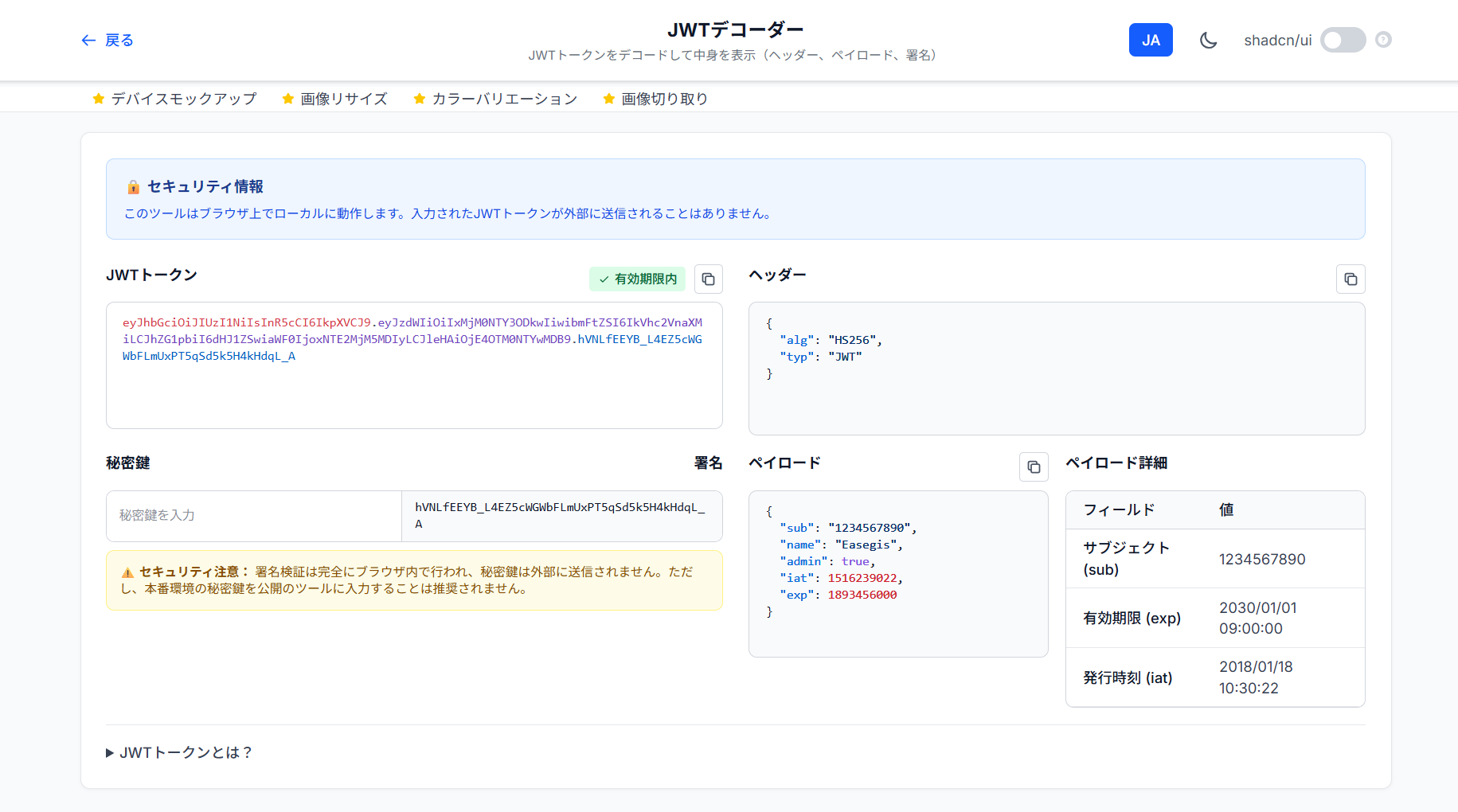
ツールを試す: TechTools - JWTデコーダー
JWTの構造
JWTは3つのパートから構成されます。
eyJhbGciOiJIUzI1NiIsInR5cCI6IkpXVCJ9.eyJzdWIiOiIxMjM0NTY3ODkwIiwibmFtZSI6IkpvaG4gRG9lIiwiaWF0IjoxNTE2MjM5MDIyfQ.SflKxwRJSMeKKF2QT4fwpMeJf36POk6yJV_adQssw5c
ドットで区切られた3つの部分:
[ヘッダー].[ペイロード].[署名]
1. ヘッダー(Header)
アルゴリズムとトークンタイプを指定します。
{
  "alg": "HS256",
  "typ": "JWT"
}
Base64URLエンコード → eyJhbGciOiJIUzI1NiIsInR5cCI6IkpXVCJ9
2. ペイロード(Payload)
実際のデータ(クレーム)を含みます。
{
  "sub": "1234567890",
  "name": "John Doe",
  "iat": 1516239022,
  "exp": 1893456000
}
標準クレーム:
-
sub(Subject): ユーザーID -
iat(Issued At): 発行時刻(Unix時間) -
exp(Expiration): 有効期限(Unix時間) -
iss(Issuer): 発行者 -
aud(Audience): 対象者
3. 署名(Signature)
改ざん防止のための署名です。
HMACSHA256(
  base64UrlEncode(header) + "." + base64UrlEncode(payload),
  secret
)
Base64URLエンコード/デコードの実装
JWTは標準のBase64ではなく、Base64URLを使います。
標準Base64との違い
| 文字 | 標準Base64 | Base64URL |
|---|---|---|
| 62番目 | + |
- |
| 63番目 | / |
_ |
| パディング | = |
なし |
URLセーフにするための変換です。
デコード実装
const base64UrlDecode = (str: string): Uint8Array => {
  // パディングを追加
  const padding = '='.repeat((4 - (str.length % 4)) % 4);

  // Base64URLをBase64に変換
  const base64 = str.replace(/-/g, '+').replace(/_/g, '/') + padding;

  // Base64デコード
  const binary = atob(base64);
  const bytes = new Uint8Array(binary.length);
  for (let i = 0; i < binary.length; i++) {
    bytes[i] = binary.charCodeAt(i);
  }
  return bytes;
};
パディング計算の解説:
文字列長が4の倍数でない場合、'='で埋める

長さ23 → (4 - 23 % 4) % 4 = 1 → '='を1つ
長さ22 → (4 - 22 % 4) % 4 = 2 → '='を2つ
長さ21 → (4 - 21 % 4) % 4 = 3 → '='を3つ
長さ24 → (4 - 24 % 4) % 4 = 0 → パディング不要
エンコード実装
const base64UrlEncode = (buffer: ArrayBuffer): string => {
  const bytes = new Uint8Array(buffer);
  let binary = '';
  for (let i = 0; i < bytes.length; i++) {
    binary += String.fromCharCode(bytes[i]);
  }
  return btoa(binary)
    .replace(/\+/g, '-')
    .replace(/\//g, '_')
    .replace(/=/g, '');
};
オブジェクトのエンコード:
const encodeObject = (obj: any): string => {
  const jsonStr = JSON.stringify(obj);
  return btoa(jsonStr)
    .replace(/\+/g, '-')
    .replace(/\//g, '_')
    .replace(/=/g, '');
};
JWTのデコード
const decodeJwt = (token: string): DecodedJwt => {
  const parts = token.split('.');

  if (parts.length !== 3) {
    return {
      header: null,
      payload: null,
      signature: '',
      isValid: false,
      error: 'Invalid JWT format'
    };
  }

  try {
    const [headerB64, payloadB64, signatureB64] = parts;

    // ヘッダーをデコード
    const headerBytes = base64UrlDecode(headerB64);
    const headerStr = new TextDecoder().decode(headerBytes);
    const header = JSON.parse(headerStr);

    // ペイロードをデコード
    const payloadBytes = base64UrlDecode(payloadB64);
    const payloadStr = new TextDecoder().decode(payloadBytes);
    const payload = JSON.parse(payloadStr);

    return {
      header,
      payload,
      signature: signatureB64,
      isValid: true
    };
  } catch (error) {
    return {
      header: null,
      payload: null,
      signature: '',
      isValid: false,
      error: 'Failed to decode JWT'
    };
  }
};
Web Crypto APIによる署名検証
HMAC署名の生成
const generateSignature = async (
  header: any,
  payload: any,
  secretKey: string
): Promise<string> => {
  const algorithm = header.alg?.toUpperCase();

  // アルゴリズムのマッピング
  const hashAlgorithm = algorithm === 'HS256' ? 'SHA-256' :
                       algorithm === 'HS384' ? 'SHA-384' : 'SHA-512';

  // Base64URLエンコード
  const headerB64 = encodeObject(header);
  const payloadB64 = encodeObject(payload);

  // シークレットキーをインポート
  const encoder = new TextEncoder();
  const keyData = encoder.encode(secretKey);
  const cryptoKey = await crypto.subtle.importKey(
    'raw',
    keyData,
    { name: 'HMAC', hash: hashAlgorithm },
    false,
    ['sign']
  );

  // 署名対象データ(header.payload)
  const data = encoder.encode(`${headerB64}.${payloadB64}`);

  // 署名を生成
  const signature = await crypto.subtle.sign('HMAC', cryptoKey, data);

  // Base64URLエンコード
  const signatureB64 = base64UrlEncode(signature);

  return `${headerB64}.${payloadB64}.${signatureB64}`;
};
crypto.subtle.importKey()の引数:
| 引数 | 説明 |
|---|---|
'raw' |
生のバイト列としてインポート |
keyData |
シークレットキーのバイト配列 |
{ name: 'HMAC', hash: 'SHA-256' } |
HMACアルゴリズムとハッシュ関数 |
false |
鍵のエクスポート不可 |
['sign'] |
署名用途のみ |
署名の検証
const verifySignature = async (
  token: string,
  secretKey: string
): Promise<boolean> => {
  const parts = token.split('.');
  if (parts.length !== 3) return false;

  const [headerB64, payloadB64, signatureB64] = parts;

  // ヘッダーをデコード
  const headerBytes = base64UrlDecode(headerB64);
  const header = JSON.parse(new TextDecoder().decode(headerBytes));

  const algorithm = header.alg?.toUpperCase();
  if (!['HS256', 'HS384', 'HS512'].includes(algorithm)) {
    return false;
  }

  const hashAlgorithm = algorithm === 'HS256' ? 'SHA-256' :
                       algorithm === 'HS384' ? 'SHA-384' : 'SHA-512';

  // シークレットキーをインポート
  const encoder = new TextEncoder();
  const keyData = encoder.encode(secretKey);
  const cryptoKey = await crypto.subtle.importKey(
    'raw',
    keyData,
    { name: 'HMAC', hash: hashAlgorithm },
    false,
    ['verify']
  );

  // 署名対象データ
  const data = encoder.encode(`${headerB64}.${payloadB64}`);

  // 署名をデコード
  const signatureBytes = base64UrlDecode(signatureB64);

  // 検証
  const isValid = await crypto.subtle.verify(
    'HMAC',
    cryptoKey,
    signatureBytes,
    data
  );

  return isValid;
};
リアルタイムJSON検証
const validateJson = (jsonStr: string): { valid: boolean; obj?: any; error?: string } => {
  try {
    const obj = JSON.parse(jsonStr);
    return { valid: true, obj };
  } catch (error) {
    return {
      valid: false,
      error: error instanceof Error ? error.message : 'Invalid JSON'
    };
  }
};

// 編集中にリアルタイム検証
useEffect(() => {
  const validation = validateJson(editablePayload);
  if (!validation.valid) {
    setPayloadError(validation.error || '');
  } else {
    setPayloadError('');
  }
}, [editablePayload]);
有効期限の表示
const formatExpiration = (exp?: number): string => {
  if (!exp) return 'なし';

  const expDate = new Date(exp * 1000); // Unix時間をミリ秒に
  const now = new Date();

  if (expDate < now) {
    return `期限切れ(${expDate.toLocaleString()})`;
  }

  return expDate.toLocaleString();
};

// ペイロードのexp表示
{decoded.payload.exp && (
  <div className="text-sm text-gray-600">
    有効期限: {formatExpiration(decoded.payload.exp)}
  </div>
)}
セキュリティ上の注意
❌ 避けるべきこと
// フロントエンドでシークレットキーを埋め込む
const SECRET_KEY = 'my-super-secret-key'; // 絶対ダメ!

// JWTに機密情報を含める
const payload = {
  password: 'user-password', // ダメ!
  creditCard: '1234-5678-...' // ダメ!
};
✅ ベストプラクティス
// 1. JWTは暗号化されていない(Base64エンコードのみ)
// → 機密情報は含めない

// 2. シークレットキーはサーバーサイドのみで保持
// → クライアントでは検証のみ

// 3. 有効期限を設定
const payload = {
  sub: userId,
  exp: Math.floor(Date.now() / 1000) + (60 * 60) // 1時間後
};

// 4. HTTPS必須
// → 中間者攻撃対策
まとめ
JWTデコーダーの実装を通じて、以下を学びました。
- JWTの3部構成(ヘッダー・ペイロード・署名)
- Base64URLエンコード/デコードの実装
- Web Crypto APIによるHMAC署名
- セキュリティ上の注意点
JWTの特性:
- ✅ ステートレス認証
- ✅ 署名による改ざん防止
- ❌ 暗号化されていない
- ❌ 無効化が困難
参考文献
ツールを試す: TechTools - JWTデコーダー