
目的
x86でVBEを使う環境を整えています。
VBEはVRAMの開始アドレスをBIOSから教えて貰う形になるので、アセンブリ側で取得したアドレスをC側から参照出来るようにしました。
前回まではQEMUでしか使えない固定のVRAMアドレスを決め打ちしていました。
VBE800×600 24bpp表示
自作OS Windowを表示する為の準備
x86 VBEのVRAM開始アドレスを調べる
方法
1 ブートローダから一旦VBEの設定をします
2 VBEから取得したVRAM開始アドレスを保存します
3 VBEだと自分で字体を用意しなくてはいけないのBIOSの字体を使えるVGA MODE3に切り替えます
4 C言語から先ほど保存したアドレスをポインタで指して、16進数で表示します
VRAMを保存する位置
ブートローダはBIOSにより0x7c00へ読み込まれ、510バイト目と511バイト目に0x55 0xAAが置かれるのでそれに隣接する形でVBEのVRAM先頭アドレスを配置します。
<>で括った32バイトがVRAMの先頭アドレスです。
(qemu)xp /512xb 0x7c00

...

0000000000007df0: 0x00 0x00 0x00 0x00 0x00 0x00 <0x00 0x00
0000000000007df8: 0x00 0x00 0x00 0x00 0x00 0xfd> 0x55 0xaa
実行結果
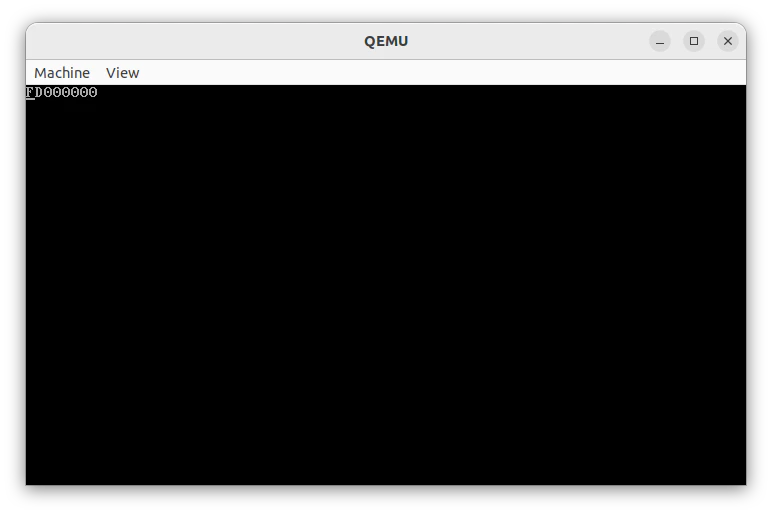
コード
nasm -f bin boot.asm -o boot.bin
nasm -f elf32 entry.asm -o entry.o
gcc -O0 -m32 -ffreestanding -fno-pic -fno-stack-protector -c mainc.c -o mainc.o

ld -m elf_i386 -T linker.ld -o kernel.elf entry.o mainc.o
objcopy -O binary kernel.elf kernel.bin
cat boot.bin kernel.bin > disk.img

qemu-system-i386 -drive format=raw,file=disk.img -monitor stdio
boot.asm
[org 0x7C00]
bits 16

start:
    cli
    xor ax, ax
    mov ds, ax
    mov es, ax
    mov ss, ax
    mov sp, 0x7C00
    sti

    ; VBEのVRAMをBIOSに聞く
    mov ax, 0x4F01
    mov cx, 0x115          ; 聞きたいモード
    mov di, modeinfo
    int 0x10

    ; 800x600 24bpp (モード 0115h)
    mov ax, 0x4F02    ; VBE Set Mode
    mov bx, 0x4115    ; 0115h (24bpp) + ビット14
    int 0x10

    ; vbe_vram_addrへVBEのアドレスを置く
    mov eax, [modeinfo + 0x28]
    mov [vbe_vram_addr], eax

    ; 表示の為にVGA MODE3へ戻す
    mov ax, 0x0003
    int 0x10

    ; --- INT 13h CHS 読み込み ---
    mov ah, 0x02         ; BIOS: Read Sectors
    mov al, 1            ; 読み込むセクタ数 (1)
    mov ch, 0            ; シリンダ = 0
    mov dh, 0            ; ヘッド = 0
    mov cl, 2            ; セクタ = 2 (ブートローダの次)
    mov dl, 0x80         ; ドライブ番号=HDD
    mov bx, 0x7E00       ; ES:BX = 読み込み先
    int 0x13
    jc disk_error

    jmp 0x0000:0x7E00    ; 読み込んだコードへjmp

disk_error:
    hlt
    jmp disk_error


; VBE返り値44バイト modeinfo + 0x28 = VRAM開始アドレス
modeinfo: resb 0x2C

times 506-($-$$) db 0
vbe_vram_addr: resd 1 ; VBE VRAM開始アドレス

times 510-($-$$) db 0
dw 0xAA55
entry.asm
entry.asm
bits 16
global start
extern kernel_main

start:
    cli
    xor ax, ax
    mov ds, ax
    mov es, ax
    mov ss, ax
    mov sp, 0x7C00

    ; GDTロード
    lgdt [gdt_descriptor]

    ; プロテクトモード有効化
    mov eax, cr0
    or eax, 1
    mov cr0, eax

    ; 32ビットコードへ移行
    jmp 0x08:pm_start

; -----------------------------
gdt_start:
    dq 0x0000000000000000            ; NULL

gdt_code:
    dw 0xFFFF                        ; limit 0-15
    dw 0x0000                        ; base 0-15
    db 0x00                          ; base 16-23
    db 0x9A                          ; code segment
    db 0xCF                          ; flags
    db 0x00                          ; base 24-31

gdt_data:
    dw 0xFFFF
    dw 0x0000
    db 0x00
    db 0x92                          ; data segment
    db 0xCF
    db 0x00
gdt_end:

gdt_descriptor:
    dw gdt_end - gdt_start - 1
    dd gdt_start

; -----------------------------
[bits 32]
pm_start:
    ; データセグメント設定
    mov ax, 0x10
    mov ds, ax
    mov es, ax
    mov fs, ax
    mov gs, ax
    mov ss, ax
    mov esp, 0x9FC00

    call kernel_main

.hlt_loop:
    hlt
    jmp .hlt_loop
mainc.c
typedef unsigned char  u8;
typedef unsigned int   u32;

void kernel_main(void) {
    volatile u8 *text = (u8 *)0xB8000;
    u32 addr = *(volatile u32 *)0x7DFA; // 0x7C00 + 506(10進数) = 0x7DFA

    // BIOSの表示した文字を全て消す
    for (int i = 0; i < 80 * 25 * 2; i += 2) {
        text[i] = ' ';
        text[i + 1] = 0x07;
    }

    // ブートローダでvbe_vram_addrに置いたVBE VRAMアドレスを表示する
    for (int i = 0; i < 8; i++) {
        u8 nibble = (addr >> (28 - i * 4)) & 0xF;
        text[i * 2]     = "0123456789ABCDEF"[nibble];
        text[i * 2 + 1] = 0x07;
    }

    for (;;) asm ("hlt");
}
大連出張中で、ホテルで書いているので記事が雑になっています。