
はじめに
なんか突然、RHEL互換のちょっと古めの環境でMakefile書いたりVerilogのシミュレーション回したい気分になったんだけど、まあどうせすぐに熱が冷めるか飽きるかするだろうし、あんまり気張らずに軽く使い捨て感覚で、雑に環境構築だけしとこっかなーっていうやる気のない炭素系生命体の皆さまに送る、サンタさんからのクリスマスプレゼントなのです。
AlmaLinux-8のセットアップ
とりあえず、Windows側でWSLが使える状態になっていることを確認します。
C:\tmp>wsl --version

WSL version: 2.6.1.0
Kernel version: 6.6.87.2-1
WSLg version: 1.0.66
MSRDC version: 1.2.6353
Direct3D version: 1.611.1-81528511
DXCore version: 10.0.26100.1-240331-1435.ge-release
Windows version: 10.0.26200.7171
大丈夫そうなら、AlmaLinux-8(RHEL8互換)をインストールします。
C:\tmp>wsl --install AlmaLinux-8
DSimのダウンロード
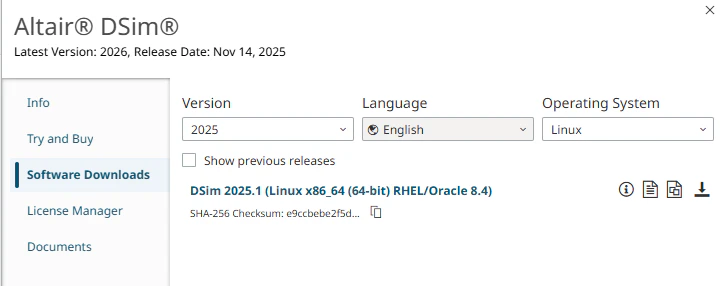
Windows側で、Altair MarketplaceからRHEL8向けのDSimをダウンロードして、
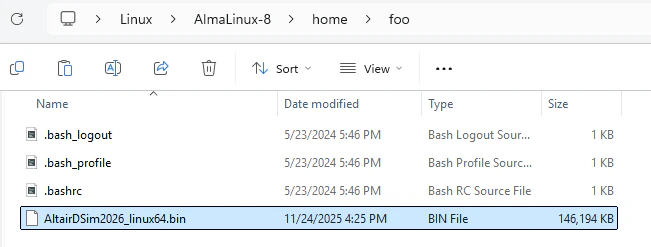
Linux側のホームディレクトリにコピーします。
DSimのインストール
Linux側でホームディレクトリに移動して、
[foo@i7-12700 tmp]$ cd ~
[foo@i7-12700 ~]$
DSimのインストーラ起動用に、最低限のX11ライブラリを入れて、
[foo@i7-12700 ~]$ sudo dnf install libX11 libXext libXrender libXtst libXi libXrandr
先ほどWindows側から持ってきたDSimのインストーラを、シェルで起動します。
[foo@i7-12700 ~]$ sh AltairDSim2025.1_linux64.bin
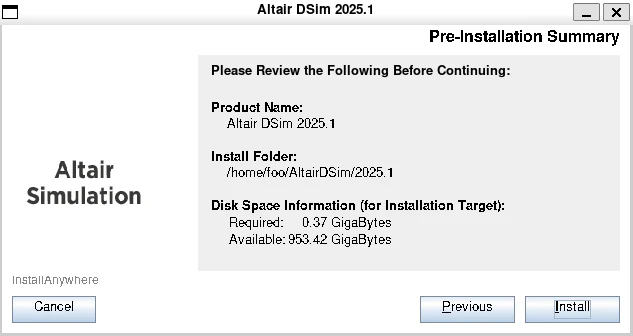
こんな感じでGUIが出てくるので、インストールを進めていきます。
最後に、DSimでシミュレーションを実行するのに必要そうな開発系ツール一式を入れておきます。これを省略すると、Linking image.so... ds_ld=N:linker exited with status: 1とかいうなんかよくわからんエラーが出てきて先に進めなくなるのでしゃーなし。
[foo@i7-12700 ~]$ sudo dnf groupinstall "Development Tools"
DSimでシミュレーションを実行してみる
Activate用のシェルスクリプトをロードして、
[foo@i7-12700 ~]$ source AltairDSim/2025.1/shell_activate.bash
環境変数でライセンスファイルの場所を設定したら、
[foo@i7-12700 ~]$ export DSIM_LICENSE=/home/foo/lic.json
テキトーにSystemVerilogのコードを用意して、
module test;
initial begin $info("hello"); $finish; end
endmodule
DSimでシミュレーションを実行すると、こんなかんじ。たぶん大丈夫そう。
[foo@i7-12700 ~]$ dsim test.sv -top test
Copyright (C) 2017-2025 Altair Engineering Inc. All rights reserved.
=N:[UsageMeter (2025-11-24 17:17:53 +0900)] usage server initial connection
=N:[License]
Licensed for Altair DSim Cloud.
=N:[License] New lease granted.
Analyzing...
Elaborating...
  Top-level modules:
    $unit
    test
  Found 4 unique specialization(s) of 4 design element(s).
Optimizing...
Building models...
PLI/VPI access: (none)
Simulation time precision is 1ns.
  [1/4] module $root: 98 functions, 229 basic blocks
  [3/4] module test: 2 functions, 4 basic blocks
Linking image.so...
Using default typical min/typ/max.
=S:Begin run-time elaboration and static initialization...
=N:Starting event scheduler...
=N:[$info call] test.sv:2:15 from test @ 0
    hello
=T:Simulation terminated by $finish at time 0 (test.sv:2);
Run directory: /home/foo
  System timescale is 1ns / 1ns
  Altair DSim version: 2025.1.0 (b:R #c:449 h:df8da7d488 os:rocky_8.10)
  Random seed: (defaulted to 1)
おわり
この手順だと、VS CodeとかFirefoxとかをLinux側にインストールしなくていいので楽ちんちんです。おすすめ。セットアップにあんまり手間がかからないぶん、途中で飽きてwsl --unregisterで環境まるごと雑に捨てても心がいたまないのじゃー。
2026/4/18 追記
AlmaLinux-9でAltair DSim 2026をインストールする場合は、X11ライブラリに加えて、下記のフォントのインストールも必要です。
[foo@i7-12700 ~]$ sudo dnf install fontconfig dejavu-sans-fonts