
はじめに
(Canvasへの直接アクセスは)初投稿です。
古来より伝わる「ライフゲーム」を色々な技術で実装するチャレンジやっております。
今回はHTMLのCanvas要素に直接アクセスしてピクセル表現で実装してみます。
過去シリーズは以下です。
- ライフゲームをモダンな書き方で・Swift編・探究の章
- ライフゲームをモダンな書き方で・Swift編・発動の章
- ライフゲームをモダンな書き方で・Rust接触編
- ライフゲームをモダンな書き方で・Elixir接触編
- ライフゲームをElixir言語で並列化したかっただけなのに…
- Three.jsでゲーミングライフゲーム
- ライフゲームを立体空間に拡張(仮)
ライフゲームとは
概要は先駆者様の解説に委ねます。
コーディングに必要なルールは以下となります。
- 2次元グリッド上で展開され、各セルは「生」または「死」の2つの状態を持つ
- 各世代で、「隣接(上下左右と斜め4方向の計8方向にある)」セルを以下のルールに従って状態が更新される
- 誕生:死んでいるセルに隣接する生きたセルがちょうど3つあれば、次の世代で誕生する
- 生存:生きているセルに隣接する生きたセルが2つまたは3つならば、次の世代でも生存する
- 過疎:生きているセルに隣接する生きたセルが1つ以下ならば、過疎により死滅する
- 過密::生きているセルに隣接する生きたセルが4つ以上ならば、過密により死滅する
- 端は常に死んでいるとみなす(固定境界)
開発環境
- MacStudio2023(M2 Max)
- macOS Tahoe(26.1)
動作映像
グライダー銃パターンを再現
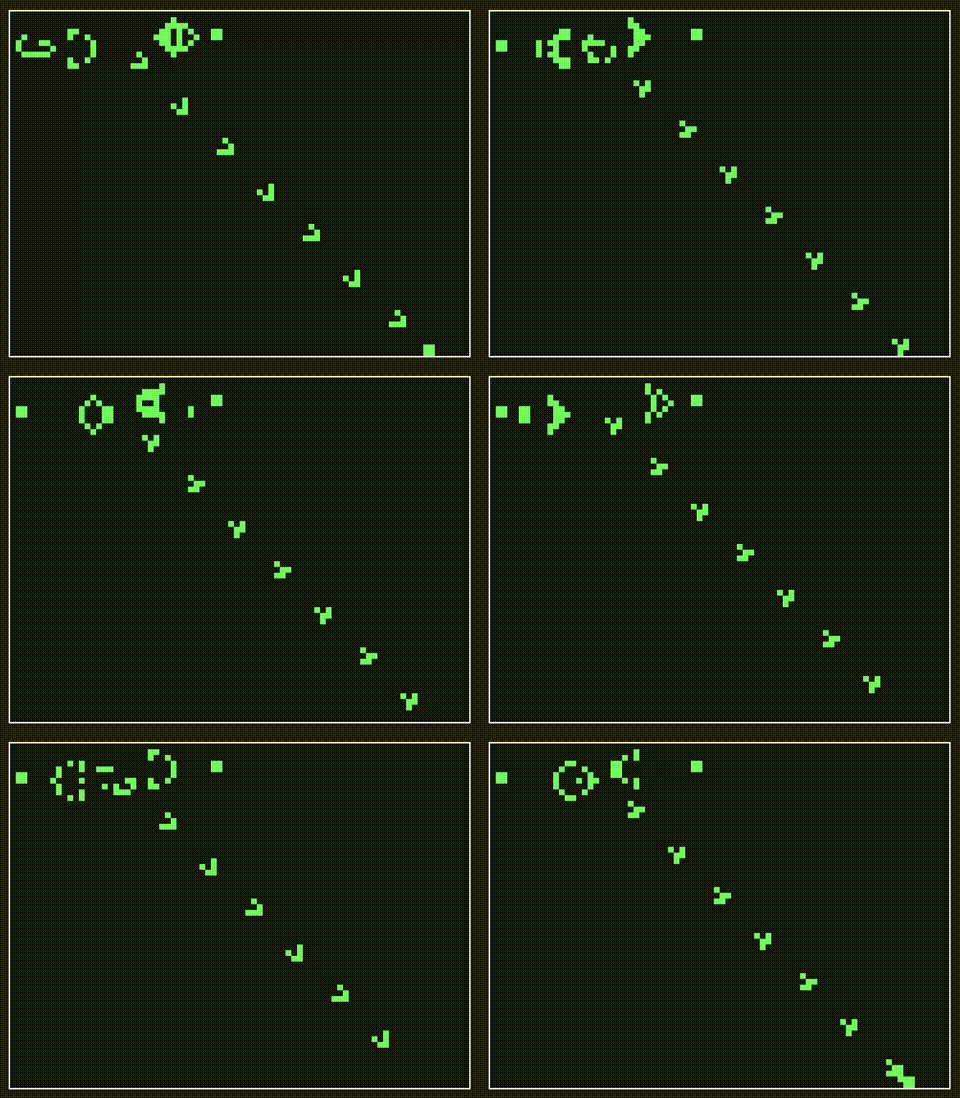
コード全体
<!DOCTYPE html>
<html lang="ja">

<head>
    <meta charset="UTF-8">
    <title>Pixel Art Canvas</title>
    <style>
        body {
            display: flex;
            justify-content: center;
            align-items: center;
            height: 100vh;
            background-color: #222;
        }

        canvas {
            /* 拡大してもボケないように設定 */
            image-rendering: pixelated;
            border: 2px solid #fff;
            /* 実際の表示サイズ */
            width: 640px;
            height: 480px;
        }
    </style>
</head>

<body>
    <canvas id="pixelCanvas" width="80" height="60"></canvas>
    <script>
        // ---- ライフゲームロジック ----
        // セル情報格納クラス
        class CellInfo {
            constructor(x, y, alive) {
                this.x = x;
                this.y = y;
                this.alive = alive;
            }
        }
        // 連想配列キー取得
        // 座標表現で文字列化
        const cellKey = (x, y) => `${x},${y}`;
        // 生存数取得
        // (CellInfo, Map<string, CellInfo>) => number
        const countAliveNeighbors = (cell, cellMap) => {
            let result = 0;
            for (let dy = -1; dy <= 1; dy++) {
                for (let dx = -1; dx <= 1; dx++) {
                    if (dx == 0 && dy == 0) continue; // 自分を除外
                    // 隣接するセルの座標を計算
                    const neighborX = cell.x + dx;
                    const neighborY = cell.y + dy;
                    // 連想配列キー生成
                    const key = cellKey(neighborX, neighborY);
                    // 存在チェック
                    if (cellMap.hasOwnProperty(key)) {
                        const neighborCell = cellMap[key];
                        if (neighborCell.alive) {
                            result += 1;
                        }
                    }
                }
            }
            return result;
        };
        // 状態更新
        // (CellInfo, Map<string, CellInfo>) => boolean
        const updateAliveFlag = (cell, cellMap) => {
            // 生存:生きているセルに隣接する生きたセルが2つかまたは3つあれば、生存維持
            // 過疎or過密:上記の条件を満たさない場合は、次の世代で死滅する
            // 誕生:死んでいるセルに隣接する生きたセルがちょうど3つあれば、次の世代で誕生する
            // 過疎or過密:上記の条件を満たさない場合は、次の世代で死滅する
            const aliveCount = countAliveNeighbors(cell, cellMap);
            if (cell.alive && (aliveCount < 2 || aliveCount > 3)) {
                return false;
            } else if (!cell.alive && aliveCount == 3) {
                return true;
            } else {
                return cell.alive;
            }
        };

        // ---- 初期配置 ----

        // セルマップ生成
        // (number, number, Map<string, boolean>) => Map<string, CellInfo>
        const createCellMap = (width, height, layoutMap) => {
            const result = {};
            for (let y = 0; y < height; y++) {
                for (let x = 0; x < width; x++) {
                    const key = cellKey(x, y);
                    const alive = layoutMap.hasOwnProperty(key) ? layoutMap[key] : false;
                    result[key] = new CellInfo(x, y, alive);
                }
            }
            return result;
        }

        const firstLayoutMap = {
            '1,5': true,
            '1,6': true,
            '2,5': true,
            '2,6': true,
            '11,5': true,
            '11,6': true,
            '11,7': true,
            '12,4': true,
            '12,8': true,
            '13,3': true,
            '13,9': true,
            '14,3': true,
            '14,9': true,
            '15,6': true,
            '16,4': true,
            '16,8': true,
            '17,5': true,
            '17,6': true,
            '17,7': true,
            '18,6': true,
            '21,3': true,
            '21,4': true,
            '21,5': true,
            '22,3': true,
            '22,4': true,
            '22,5': true,
            '23,2': true,
            '23,6': true,
            '25,1': true,
            '25,2': true,
            '25,6': true,
            '25,7': true,
            '35,3': true,
            '35,4': true,
            '36,3': true,
            '36,4': true,
        };

        // ---- 描画ロジック ----

        const canvas = document.getElementById('pixelCanvas');
        const ctx = canvas.getContext('2d');
        const canvasWidth = canvas.width;
        const canvasHeight = canvas.height;

        // セルマップ
        const allCellMap = createCellMap(canvasWidth, canvasHeight, firstLayoutMap);

        // 背景を塗りつぶす
        ctx.fillRect(0, 0, canvasWidth, canvasHeight);

        // ピクセルを描画する関数
        function drawPixel(x, y, color) {
            ctx.fillStyle = color;
            ctx.fillRect(x, y, 1, 1);
        }

        function animate() {
            // 画面をクリア
            ctx.clearRect(0, 0, canvasWidth, canvasHeight);
            // ライフゲームの生死状態を保持する連想配列
            const aliveMap = {};
            for (const key in allCellMap) {
                const cell = allCellMap[key];
                const alive = updateAliveFlag(cell, allCellMap);
                aliveMap[key] = alive;
            }
            // セルを描画
            for (const key in allCellMap) {
                let cell = allCellMap[key];
                if (aliveMap.hasOwnProperty(key)) {
                    // キーが一致するセルの生死状態を更新
                    cell.alive = aliveMap[key];
                }
                const color = cell.alive ? '#7f7' : '#114';
                drawPixel(cell.x, cell.y, color);
            }
            // 次のフレームを予約
            requestAnimationFrame(animate);
        }
        animate();
    </script>
</body>

</html>
今後の展開予定
- ピクセル描画を用いた他アルゴリズム
- 他の技術でライフゲーム再現
参考文献
あとがき
今回は初心に立ち帰ってピクセル表現をブラウザ上で基本要素のみで表現してみました。
最近は進行に行き詰まっていたので、むしろ新鮮な感覚が戻ってきて新しい学びを感じました。
制約がある事は学習にとってはむしろプラスだと思います。
おわりに
ここまでご閲覧いただきありがとうございます。
今後も思いつくままに記事投稿を続けて行きたい所存であります。
飛べ、飛べ、インパルス加速して、行け、行け