
初心者必見!初めてのAPI通信〜Nuxt.js編〜
Nuxt.jsでQiitaのAPIを叩いて、情報を取得して表示させるアプリを実装したので
共有します。
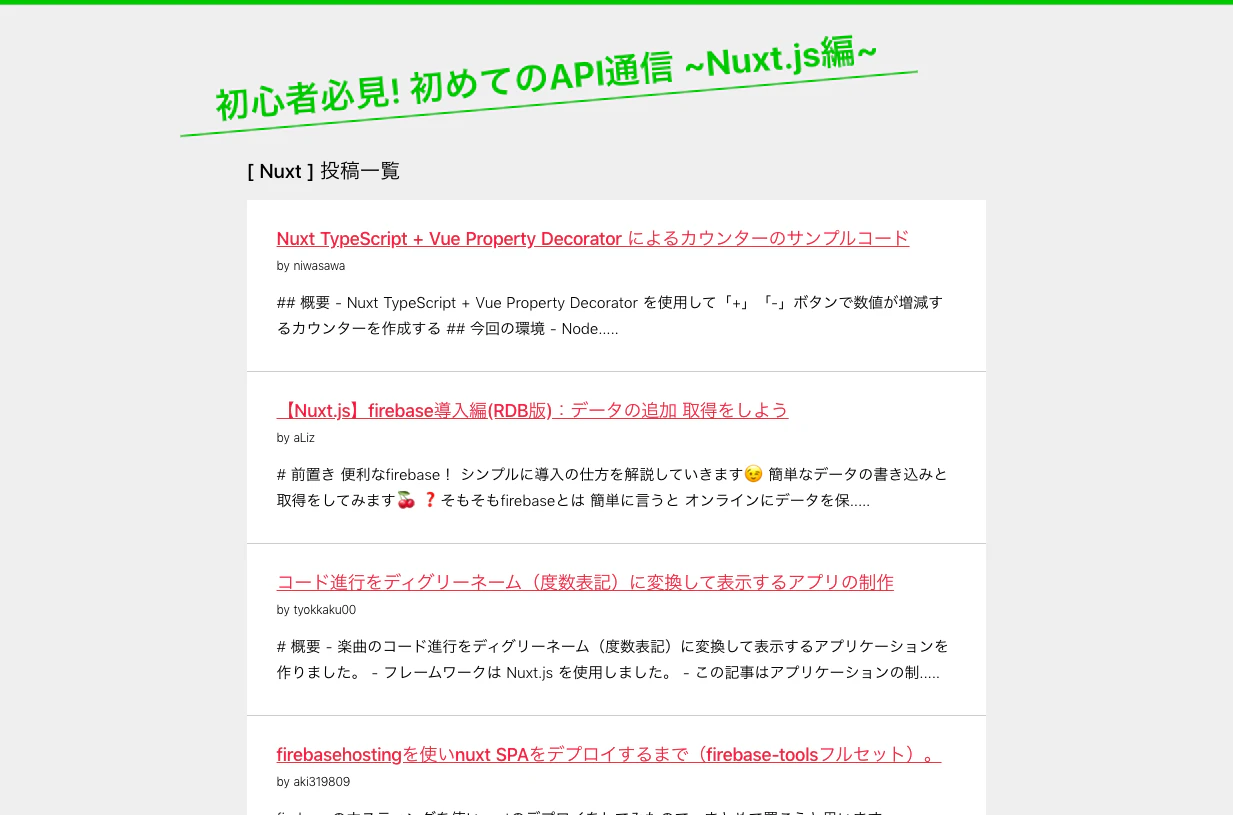
成果物
環境
・Nuxtプロジェクト作成
$ npx create-nuxt-app <project-name>
・axios-moduleの利用
axiosはAPI通信するための拡張モジュールです。
$ npm install --save @nuxtjs/axios
・axios-moduleをインストールしたらnuxt.config.jsにaxiosの末尾に下記を追加します
export default {
  // ......省略
  build: {
    // ......省略
  },

  // ここから追加
  modules: [
    '@nuxtjs/axios'
  ],
  axios: {
  }
}
Qiitaのアクセストークンを発行
Qiitaトークン発行URL
https://qiita.com/settings/tokens/new
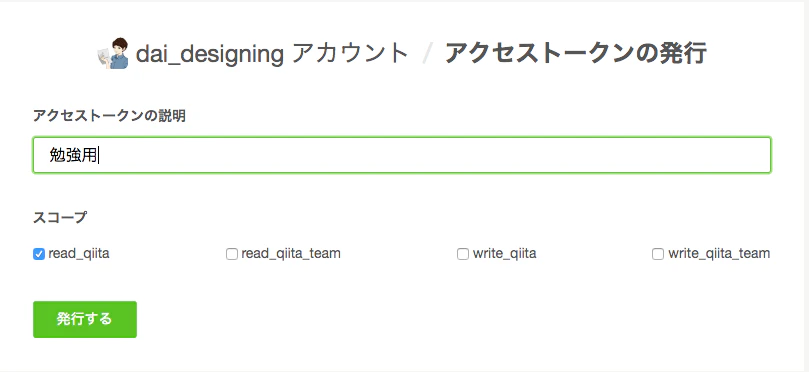
アクセストークンの説明を任意で入れる
スコープはread_qiitaのみでOK
(注)
発行ボタンをクリックすると、アクセストークンは発行されるので
必ず、メモしておいてください。
セキュリティ上、画面を閉じると、その画面に戻れません。
認証情報の設定
export default function({ $axios }) {
    $axios.onRequest((config) => {
        if(process.env.QIITA_TOKEN) {
            config.headers.common['Authorization'] = process.env.QIITA_TOKEN;
        }
        return config
    });
}
プラグインは1つの関数を返す
axios-moduleのインスタンスである$axiosが格納されている
nuxt.config.jsに追加
export default {
  // ......省略
  build: {
    // ......省略
  },

  modules: [
    '@nuxtjs/axios'
  ],
  axios: {
  },

  // ここから追加
  plugins: [
    '~/plugins/axios.js'
  ],
  env: {
    QIITA_TOKEN: process.env.QIITA_TOKEN
  }
}
環境変数を渡す
デフォルトではマシンの環境変数をアプリケーションに渡すことがありません。
もし渡したい場合は下記のように渡しあげる必要があります。
$ export QIITA_TOKEN=<先ほど取得したトークン>
# サーバーを落とし、再起動
$ npm run dev
これでAPIが取得できる状態になりました。
もしくは
.envrcの作成
export QIITA_TOKEN=<先ほど取得したトークン>
# サーバーを落とし、再起動
$ npm run dev
非同期通信を含むサーバーサイドレンダリング
<template>
  <section class="container">
    <h1><strong>初心者必見!</strong> 初めてのAPI通信 ~Nuxt.js編~</h1>
    <h2>[ Nuxt ] 投稿一覧</h2>
    <ul class="item-lists">
      <li class="item-list" v-for="item in items" :key="item.id">
        <h3>
          <span><a :href="item.url" target="_blank">{{ item.title }}</a></span>
          <p>by {{ item.user.id }}</p>
        </h3>
        <h4>{{ item.body.slice(0, 100) }}.....</h4>
      </li>
    </ul>
  </section>
</template>

<script>
export default {
  async asyncData({ app }) {
    // QiitaのAPIからnuxt.jsのタグが入った情報をゲットしてitemsに格納 => return => あとはtemplate側で表示
    const items = await app.$axios.$get('https://qiita.com/api/v2/items?query=tag:nuxt.js');
    console.log(items);
    return {
      items
    }
  }
}
</script>

<style>
  * {
    margin: 0;
    padding: 0;
    box-sizing: border-box;
  }
  body {
    border-top: 5px solid rgb(0, 199, 0);
    padding: 0 0 100px 0;
    background: #efefef;
  }
  a {
    color: crimson;
  }
  ul li {
    list-style: none;
  }
  h1 {
    text-align: center;
    font-size: 35px;
    line-height: 1.25em;
    margin: 0 0 50px 0;
    padding: 0 0 5px 0;
    transform: rotate(-5deg);
    color: rgb(0, 199, 0);
    border-bottom: 2px solid rgb(0, 199, 0);
    right: 70px;
    position: relative;
  }
  h2 {
    font-size: 20px;
    font-weight: 500;
  }
  .container {
    width: 60%;
    margin: 50px auto;
  }
  .item-lists {
    margin: 15px 0 0 0;
  }
  .item-lists .item-list {
    padding: 25px 30px 15px;
    border-bottom: 1px solid #ccc;
    background: #fff;
  }
  .item-lists .item-list:last-child {
    border-bottom: none;
  }
  .item-lists .item-list h3 {
    font-size: 18px;
    font-weight: 500;
    line-height: 1.5em;
    letter-spacing: -0.25px;
    margin: 0 0 10px 0;
  }
  .item-lists .item-list h3 p {
    font-size: 12px;
    font-weight: 100;
  }
  .item-lists .item-list h4 {
    font-size: 15px;
    font-weight: 300;
    line-height: 1.75em;
    margin: 0 0 15px 0;
  }

  @media screen and (max-width:768px) {
    body {
      padding: 0;
    }
    h1 {
      font-size: 25px;
      padding: 0 15px 15px;
      right: 0px;
      transform: rotate(0deg);
    }
    h2 {
      padding: 0 0 0 30px;
    }
    .container {
      width:100%;
      margin: 50px auto 0;
    }
  }
</style>
ルーティングと組み合わせたSSR
上記で作ったindex.vueから
各ユーザーの投稿した記事の一覧を作りたいと思います。
- <p>by {{ item.user.id }}</p>
+ <p>by <nuxt-link :to="`/users/${ item.user.id }`">{{ item.user.id }}</nuxt-link></p>
<nuxt-link :to="/users/${ item.user.id }">
※nuxt-linkタグはNuxtのルーティングです(最終aタグになります)。
※${ item.user.id }はQiitaのユーザーIDになります。
受け渡し先では$route.params.idで受け取れます
各ユーザー投稿記事一覧を作る
pages/users/_id.vueを作成
_id.vueファイルを作ることで$route.params.idで受け取れるデータになります
<template>
<section class="container">
<nuxt-link class="navi" :to="`/`">>Top</nuxt-link>
<h2>{{ user.id }}さん 投稿一覧</h2>
<ul class="item-lists">
<li class="item-list" v-for="item in items" :key="item.id">
<h3>
<span><a :href="item.url" target="_blank">{{ item.title }}</a></span>
<p>
by <nuxt-link :to="`/users/${ item.user.id }`">{{ item.user.id }}</nuxt-link>
</p>
</h3>
<h4>{{ item.body.slice(0, 100) }}.....</h4>
</li>
</ul>
<p class="article-write-user">記事を書いた人</p>
<aside class="user">
<img :src="user.profile_image_url" alt="Profile Image">
<div class="user-detail">
<div class="user-name">{{ user.name }}</div>
<div class="user-id">@{{ user.id }}</div>
<p class="user-description">{{ user.description || 'No description' }}</p>
</div>
</aside>
</section>
</template>
<script>
export default {
async asyncData({ route, app }) {
const user = await app.$axios.$get(`https://qiita.com/api/v2/users/${route.params.id}`);
const items = await app.$axios.$get(`https://qiita.com/api/v2/items?query=user:${route.params.id}`);
// console.log(user);
// console.log(items);
return {
user,
items,
}
}
}
</script>
<style>
* {
margin: 0;
padding: 0;
box-sizing: border-box;
}
body {
border-top: 5px solid rgb(0, 199, 0);
padding: 0 0 100px 0;
background: #efefef;
}
a {
color: crimson;
}
ul li {
list-style: none;
}
h1 {
text-align: center;
font-size: 35px;
line-height: 1.25em;
margin: 0 0 50px 0;
padding: 0 0 5px 0;
transform: rotate(-5deg);
color: rgb(0, 199, 0);
border-bottom: 2px solid rgb(0, 199, 0);
right: 70px;
position: relative;
}
h2 {
font-size: 20px;
font-weight: 500;
}
.container {
width: 60%;
margin: 50px auto;
}
.container .navi {
font-size: 18px;
text-decoration: none;
color: rgb(0, 199, 0);
top: 10px;
left: 10px;
position: fixed;
}
.item-lists {
margin: 15px 0 0 0;
}
.item-lists .item-list {
padding: 25px 30px 15px;
border-bottom: 1px solid #ccc;
background: #fff;
}
.item-lists .item-list:last-child {
border-bottom: none;
}
.item-lists .item-list h3 {
font-size: 18px;
font-weight: 500;
line-height: 1.5em;
letter-spacing: -0.25px;
margin: 0 0 10px 0;
}
.item-lists .item-list h3 p {
font-size: 12px;
font-weight: 100;
}
.item-lists .item-list h3 p a {
font-size: 15px;
color: rgb(0, 82, 0);
text-decoration: none;
}
.item-lists .item-list h4 {
font-size: 15px;
font-weight: 300;
line-height: 1.75em;
margin: 0 0 15px 0;
}
.article-write-user {
font-size: 15px;
font-weight: bold;
letter-spacing: -0.25px;
margin: 70px 0 0 0;
}
.user {
display: flex;
width: 100%;
margin: 10px auto 0;
padding: 30px;
background: #fff;
}
.user img {
width: 125px;
height: 125px;
object-fit: cover;
margin: 0 20px 0 0;
}
.user .user-detail .user-name {
font-size: 25px;
font-weight: bold;
}
.user .user-detail .user-id {
font-size: 12px;
font-weight: 100;
margin: 0 0 20px 0;
}
.user .user-detail .user-description {
text-align: justify;
font-size: 14px;
line-height: 1.5em;
}
@media screen and (max-width:768px) {
body {
padding: 0;
}
h1 {
font-size: 25px;
padding: 0 15px 15px;
right: 0px;
transform: rotate(0deg);
}
h2 {
padding: 0 0 0 30px;
}
.container {
width:100%;
margin: 50px auto 0;
}
.article-write-user {
padding: 0 0 0 30px;
}
.user {
display: block;
text-align: center;
width: 85%;
margin: 10px auto 30px;
padding: 20px;
}
.user img {
border-radius: 50%;
}
}
</style>
// QiitaのAPIから各ユーザー情報をuser変数に格納
const user = await app.$axios.$get(`https://qiita.com/api/v2/users/${route.params.id}`);

// そのuserのアイテム一覧をitems配列に格納
const items = await app.$axios.$get(`https://qiita.com/api/v2/items?query=user:${route.params.id}`);
head情報を書き換える
共通タイトルの設定
head: {
    title: process.env.npm_package_name || '',
    // 追加
    titleTemplate: 'Nuxt viewer | %s',
    // .....省略
},
Nuxt viewer - 各ページ共通で入る値
%s - titleプロパティの値が入る
ページごとにの設定
%sはnuxt.config.jsの中のtitleプロパティが入るが
各ページでtitleの値を変えてあげれば設定変更が可能です。
export default {
    // 追加
    head() {
        return {
            // QiitaのユーザーIDにする
            title: this.user.id
        }
    },
    // .....省略
}
Vuexストアを導入する
NuxtのVuexはクラシックモードとモジュールモードの2種類
クラシックモード - 最もシンプルなVuexストア ※今回はこちら
モジュールモード - 本格的なアプリケーション開発に向いたVuexストア
Vuexの雛形用意
import Vuex from 'vuex';

const store = {
state: {
        items: [],
    },
}

export default () => new Vuex.Store(store);
実際に書いていきます。
import Vuex from 'vuex';

const store = {
    state: {
        items: [],
        users: {},
        userItems: {},
    },
    getters: {
        items: (state) => state.items,
        users: (state) => state.users,
        userItems: (state) => state.userItems
    },
    mutations: {
        setItems (state, { items }) {
            state.items = items;
        },
        setUser (state, { user }) {
            state.users[user.id] = user;
        },
        setUserItems(state, { user, items }) {
            state.userItems[user.id] = items;
        }
    },
    actions: {
        async fetchItems({ commit }) {
            const items = await this.$axios.$get(
                'https://qiita.com/api/v2/items?query=tag:nuxt.js'
            );
            commit('setItems', { items });
        },
        async fetchUserInfo({ commit }, { id }) {
            const [user, items] = await Promise.all([
                this.$axios.$get(`https://qiita.com/api/v2/users/${id}`),
                this.$axios.$get(`https://qiita.com/api/v2/items?query=user:${id}`)
            ]);
            commit('setUser', { user });
            commit('setUserItems', { user, items });
        }
    }
};

export default () => new Vuex.Store(store);
続いてpages/index.vueとpages/user/_id.vueを改修
※templateとstyleは変更なし
<script>
import { mapGetters } from 'vuex';

export default {
  // Vuex使用なし
  // async asyncData({ app }) {
  //   const items = await app.$axios.$get('https://qiita.com/api/v2/items?query=tag:nuxt.js');
  //   return {
  //     items
  //   }
  // }

  // Vuex
  async asyncData({ store }) {
    if (store.getters['items'].length) { // length = indexに+1したものを返す
      return
    }
    await store.dispatch('fetchItems');
  },
  computed: {
    ...mapGetters(['items'])
  }
}
</script>
<script>
import { mapGetters } from 'vuex';

export default {
    head() {
        return {
            title: this.user.id
        }
    },

    // Vuex使用なし
    // async asyncData({ route, app }) {
    //     const user = await app.$axios.$get(`https://qiita.com/api/v2/users/${route.params.id}`);
    //     const items = await app.$axios.$get(`https://qiita.com/api/v2/items?query=user:${route.params.id}`);
    //     return {
    //         user,
    //         items,
    //     }
    // }

    // Vuex
    async asyncData({ route, store, redirect }) {
        if(store.getters['users'][route.params.id]) {
            return
        }
        try {
            await store.dispatch('fetchUserInfo', { id: route.params.id })
        } catch (e) {
            redirect('/')
        }
    },
    computed: {
        user() {
            return this.users[this.$route.params.id]
        },
        items() {
            return this.userItems[this.$route.params.id] || []
        },
        ...mapGetters(['users', 'userItems'])
    }
}
</script>