
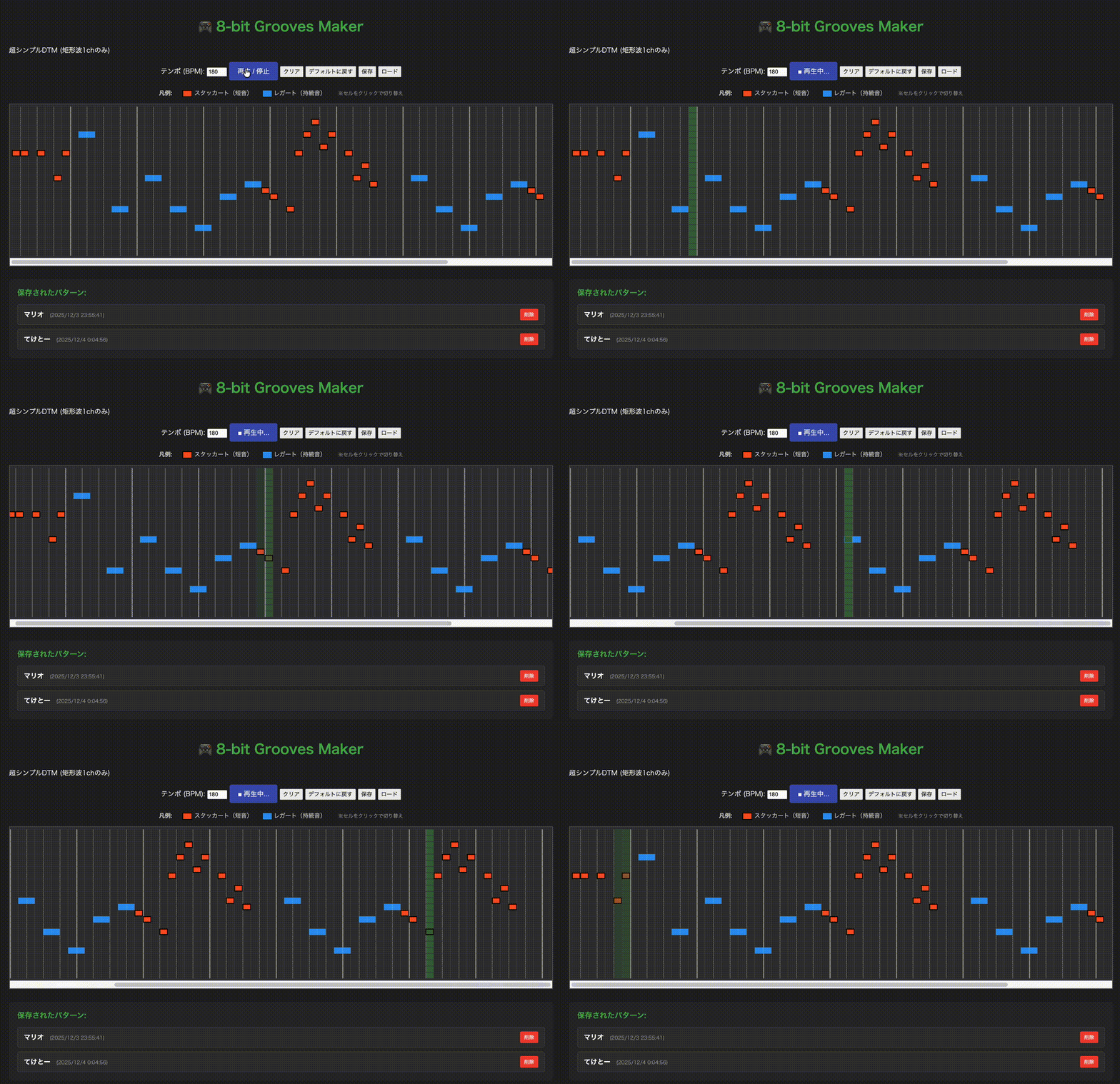
TypeScriptとWeb Audio APIを使って、レトロゲーム風の8-bit音楽を作成できるステップシーケンサーを作成しました。矩形波(Square Wave)を使用したチップチューン風のサウンドで、モノフォニックなメロディーを作成・編集・保存できます。デフォルトでSuper Mario Bros.のテーマが搭載されています。
リポジトリは以下
使用技術
- TypeScript - 型安全なJavaScript
- Web Audio API - 矩形波(Square Wave)による8-bitサウンド生成
- CSS Grid - レスポンシブなステップシーケンサーUI
- localStorage - パターンの保存・管理
- HTML/CSS - レトロゲーム風ダークテーマUI
使用ツール
- Cursor + Claude Sonnet 4.5 - コード生成・デバッグ・機能追加
- Vercel - デプロイ・ホスティング(予定)
ディレクトリ構成
03/
├── index.html      # メインHTML
├── style.css       # スタイルシート
├── script.ts       # TypeScriptソース
├── dist/           # コンパイル後のJS
├── package.json
└── tsconfig.json
セットアップ
# 依存関係のインストール
npm install

# TypeScriptのコンパイル
npm run build

# ローカルサーバーの起動
npx serve
# または
python3 -m http.server 8080
主な機能
- ステップシーケンサー - 8分音符ベースの80ステップグリッド
- 3状態トグル - スタッカート(短音)/ レガート(持続音)/ OFF
- モノフォニック - 各ステップに1音のみ配置可能
- 自動スクロール - 再生位置が常に画面中央に表示
- パターン保存/ロード - 複数のパターンを名前付きで保存・管理
- デフォルトパターン - Super Mario Bros.のテーマを搭載
- リアルタイム編集 - クリックで音符を配置・編集
音符タイプ
- スタッカート(オレンジ・黒枠) - 8分音符の50%の短い音
- レガート(青) - 次の音符まで持続する長い音
音階範囲
B5からC4までの半音階(24音):
- B5, A#5, A5, G#5, G5, F#5, F5, E5
- D#5, D5, C#5, C5
- B4, A#4, A4, G#4, G4, F#4, F4, E4
- D#4, D4, C#4, C4
コードのポイント
Web Audio APIによる矩形波生成
private playPulse(frequency: number, duration: number): void {
  const oscillator = this.audioContext.createOscillator()
  const gainNode = this.audioContext.createGain()

  oscillator.type = "square" // 矩形波でファミコン風サウンド
  oscillator.frequency.setValueAtTime(frequency, time)

  // エンベロープ (Attack + Decay)
  gainNode.gain.setValueAtTime(0.0, time)
  gainNode.gain.linearRampToValueAtTime(0.3, time + 0.005)
  gainNode.gain.linearRampToValueAtTime(0.0, time + duration)

  oscillator.connect(gainNode)
  gainNode.connect(this.audioContext.destination)
  oscillator.start(time)
  oscillator.stop(time + duration)
}
正確なタイミング制御
スケジューラーパターンでメトロノームのような正確なタイミングを実現:
private scheduler(): void {
  const lookahead: number = 0.1 // 100ms先までスケジュール
  const stepDuration: number = 60 / bpm / 2 // 8分音符の長さ

  while (this.nextStepTime < this.audioContext.currentTime + lookahead) {
    this.playStep(this.currentStep)
    this.nextStepTime += stepDuration
    this.currentStep++

    // 最後の音符まで到達したらループ
    if (this.currentStep > this.getLastNoteStep()) {
      this.currentStep = 0
    }
  }
}
3状態トグル
private toggleNote(e: MouseEvent): void {
  const currentState = this.sequence[noteIndex][stepIndex]

  // 0 (OFF) -> 1 (Staccato) -> 2 (Continuous) -> 0
  if (currentState === 0) {
    this.sequence[noteIndex][stepIndex] = 1 // Staccato
  } else if (currentState === 1) {
    this.sequence[noteIndex][stepIndex] = 2 // Continuous
  } else {
    this.sequence[noteIndex][stepIndex] = 0 // OFF
  }
}
名前付き保存
private handleSave(): void {
  const name = prompt("パターン名を入力してください:")
  const saves = this.getSavedPatterns()

  saves[name] = {
    name: name,
    sequence: this.sequence,
    bpm: this.bpmInput.value,
    timestamp: new Date().toISOString()
  }

  localStorage.setItem("sequencer-saves", JSON.stringify(saves))
}
操作方法
- 音符の配置: セルをクリックして OFF → スタッカート → レガート → OFF
- 再生: 「再生 / 停止」ボタンで再生開始・停止
- テンポ調整: BPM値を変更(60-300)
- 保存: 「保存」ボタンで現在のパターンを名前付きで保存
- ロード: 保存リストからパターンをクリックして読み込み
- クリア: 全ての音符を削除
- デフォルトに戻す: Super Mario Bros.のテーマを再ロード
デプロイ
Vercelを使用してデプロイ予定。
# Vercel CLIでデプロイ
npx vercel --prod
注意点
- ESモジュールを使用するため、
file://プロトコルでは動作しません - ローカルサーバー経由でアクセスしてください
- Web Audio APIは初回クリックでコンテキストが起動します
参考リンク
ライセンス
MIT
Created by @da1ssk, 2025