

【C++17】まだ誰も使っていない!? 最新のSDL3でテトリスを作ってみた
はじめに
こんにちは!今回は、現在開発が進められている最新の SDL3 (Simple DirectMedia Layer 3) を使って、C++でテトリスを作ってみました。
SDL3はまだプレビュー段階(あるいは開発段階)ですが、SDL2から多くのAPIが刷新され、よりモダンで使いやすくなっています。この記事では、作成したリポジトリの紹介と、SDL3を導入する上でのポイントを共有します。
この記事のコードは全部GitHubにあります
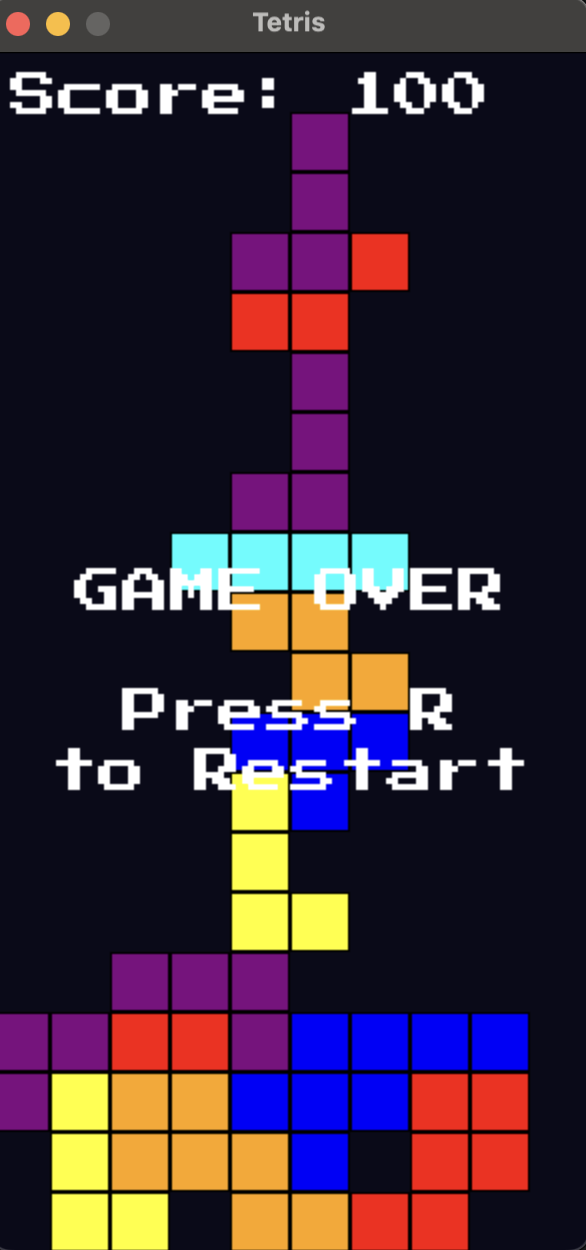
作ったもの
シンプルかつモダンな設計のテトリスです。
Windows, macOS, Linux すべてで動作するように、クロスプラットフォームなビルド環境を整えました。
技術スタック (Tech Stack)
開発にあたって採用した技術は以下の通りです。
- 言語: C++17
- ライブラリ: SDL3 (Graphics, Input, Windowing)
- ビルドツール: CMake
- パッケージマネージャー: vcpkg
特にこだわったのは vcpkg と CMake の連携です。依存関係の解決を自動化し、git clone してすぐにビルドできる環境を目指しました。
実装のポイント
1. SDL3 の導入 (vcpkg)
SDL3はまだパッケージマネージャーによっては対応していない場合もありますが、vcpkgを使うことで簡単に導入できます。vcpkg.json は以下のように設定しました。
// vcpkg.json の中身をここに貼る(推奨)
{
  "name": "sdl3-tetris",
  "version-string": "0.1.0",
  "dependencies": [
    "sdl3"
  ]
}
2. SDL3 でのレンダリング
SDL2と比べて、SDL3ではレンダラーのAPI名や使い勝手がいくつか変更されています。 今回のプロジェクトでは renderer.cpp に描画周りを集約しました。
// renderer.cpp
void drawBlock(SDL_Renderer *renderer, int x, int y, int color) {
  SDL_FRect rect = {(float)x * BLOCK_SIZE, (float)y * BLOCK_SIZE,
                    (float)BLOCK_SIZE, (float)BLOCK_SIZE};
  SDL_Color blockColor = getColorForBlock(color);
  SDL_SetRenderDrawColor(renderer, blockColor.r, blockColor.g, blockColor.b,
                         blockColor.a);
  SDL_RenderFillRect(renderer, &rect);
  SDL_SetRenderDrawColor(renderer, 0, 0, 0, 255);
  SDL_RenderRect(renderer, &rect);
}

void drawGrid(SDL_Renderer *renderer) {
  for (int y = 0; y < grid.size(); ++y) {
    for (int x = 0; x < grid[y].size(); ++x) {
      if (grid[y][x] != 0) {
        drawBlock(renderer, x, y, grid[y][x]);
      }
    }
  }
}

void drawPiece(SDL_Renderer *renderer, const Piece &piece) {
  for (int y = 0; y < 4; ++y) {
    for (int x = 0; x < 4; ++x) {
      if (piece.shape[y][x] != 0) {
        drawBlock(renderer, piece.x + x, piece.y + y, piece.color);
      }
    }
  }
}
3. ゲームループの設計
game.cpp でメインループを管理し、tetris.cpp にテトリス固有のロジック(ミノの回転や衝突判定)を切り出しています。
// game.cpp
void updateGame(Uint64 &lastFallTime) {
  const Uint64 fallInterval = 500; // ms

  // Update Game State (Gravity)
  if (SDL_GetTicks() - lastFallTime > fallInterval) {
    Piece tempPiece = currentPiece;
    tempPiece.y++;
    if (!checkCollision(tempPiece)) {
      currentPiece = tempPiece;
    } else {
      lockPiece();

      int numCleard = clearLines();
      if (numCleard > 0) {
        switch (numCleard) {
        case 1:
          scores += 100;
          break;
        case 2:
          scores += 200;
          break;
        case 3:
          scores += 400;
          break;
        case 4:
          scores += 1000;
          break;
        }
        std::cout << "Current scores : " << scores << std::endl;
      }

      spawnNewPiece();

      if (checkCollision(currentPiece)) {
        currentState = STATE_GAME_OVER;
      }
    }
    lastFallTime = SDL_GetTicks();
  }
};

// Input
void handleInput(const SDL_Event &event) {
  Piece tempPiece = currentPiece;
  switch (event.key.key) {
  case SDLK_LEFT:
    tempPiece.x--;
    break;
  case SDLK_RIGHT:
    tempPiece.x++;
    break;
  case SDLK_DOWN:
    tempPiece.y++;
    break;
  case SDLK_UP:
    tempPiece.currentRotation = (tempPiece.currentRotation + 1) % 4;
    copyShape(tempPiece.shape,
              ALL_BLOCKS[currentPiece.color - 1][tempPiece.currentRotation]);
    break;
  }
  if (!checkCollision(tempPiece)) {
    currentPiece = tempPiece;
  }
}
苦労した点・ハマった点
- SDL3の情報不足: まだドキュメントや記事が少ないため、ヘッダーファイルや公式のMigration Guideを読み込む必要がありました。
- APIの変更: SDL2で慣れ親しんだ関数名が変わっていたり(例: SDL_RenderCopy → SDL_RenderTexture など)、引数の仕様が変わっている点に注意が必要でした。
ビルド方法
このプロジェクトは以下のコマンドだけで簡単にビルドできます。
git clone https://github.com/chirateep/sdl3-tetris.git
cd sdl3-tetris
cmake --preset=default
cmake --build build
./build/SDL3Tetris
おわりに
SDL3はパフォーマンスも向上しており、APIも整理されていて非常に書き心地が良いです。C++でゲームプログラミングを始めたい方、新しい技術に触れてみたい方は、ぜひリポジトリを参考にしてみてください!