

Db2 12.1.4よりRHEL 10をサポート
2026年3月より提供されたDb2 LUW 12.1.4 (Db2 for Linux, UNIX and Windows 12.1.4)では、サポートするRHEL OSに、今までのRHEL 9に加えてRHEL 10も追加されました。
- Db2 12.1.4 テクニカル・フラッシュ
Db2 LUW 12.1 Mod 4 (Db2 12.1.4) 公開のお知らせ
Db2 12.1.4 の新機能や変更点が解説されています。こちらより一部を以下に抜粋します。
Db2 12.1.4 より、Db2シングル構成 および DPF(Database Partitioning Feature)構成における、Red Hat Enterprise Linux 10(RHEL 10) のサポートが追加された。
以下では、RHEL 10 に Db2 12.1.4 をインストールし、起動確認までを行います。
Db2 fix pack ダウンロードサイトから導入イメージをダウンロード
Db2のfix packは公開サイトからダウンロード可能であり(※IBMidは必要)、最新のfix packモジュールを使って新規インストールができます。
Download Db2 fix packs by version for Db2 for Linux, UNIX and Windows
より、
Db2 12.1の一番上にある、
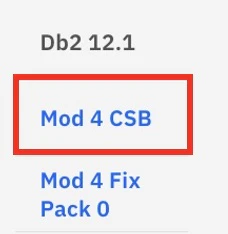
MOD 4 CSB を選びます(2026/05時点)。
次の画面のDownloadsを選択し、
Linuxの、
IBM Db2 Server Fix Pack
を選択し、Fix Centralよりダウンロードします。
インストール手順
環境
- Red Hat Enterprise Linux release 10.1
(vCPU 8、メモリー 32 GB)
$ cat /etc/redhat-release
Red Hat Enterprise Linux release 10.1 (Coughlan)

# cat /proc/meminfo
MemTotal:       32590900 kB


# nproc
8
インストール・イメージの配置
rootユーザーで、/tmp等のディレクトリーにDb2イメージを配置します。
Fix Centralより、special_80714_v12.1.4_linuxx64_server_dec.tar.gz (1.51 GB)をダウンロードします(2026/05時点)。
(※)wgetコマンドでダウンロードする例
# cd /tmp
# dnf install -y wget
# wget https://xxxxxxx[※Fix Centralよりspecial_80714_v12.1.4_linuxx64_server_dec.tar.gzのリンクをコピーしたアドレスをいれる]
ダウンロードしたファイルを確認します。
# ls -l spe*
-rw-r--r--. 1 root root 1623697116 Apr  3 14:56 special_80714_v12.1.4_linuxx64_server_dec.tar.gz
インストール・イメージを解凍
rootユーザーで、Db2インストール・イメージを解凍します。
# tar -zxvf special_80714_v12.1.4_linuxx64_server_dec.tar.gz
server_dec/
server_dec/db2/
server_dec/db2/common/
server_dec/db2/common/db2installer.jar
server_dec/db2/common/jhbasic.jar
server_dec/db2/common/Common.jar
server_dec/db2/common/flatlaf-3.6.jar
server_dec/db2/linuxamd64/
server_dec/db2/linuxamd64/pcmk/
server_dec/db2/linuxamd64/pcmk/Linux/
server_dec/db2/linuxamd64/pcmk/Linux/rhel/
server_dec/db2/linuxamd64/pcmk/Linux/rhel/rhel10/
server_dec/db2/linuxamd64/pcmk/Linux/rhel/rhel10/x86_64/
server_dec/db2/linuxamd64/pcmk/Linux/rhel/rhel10/x86_64/libnozzle1-1.31-1.db2pcmk.el10.x86_64.rpm
server_dec/db2/linuxamd64/pcmk/Linux/rhel/rhel10/x86_64/libknet1-crypto-openssl-plugin-1.31-1.db2pcmk.el10.x86_64.rpm
(以下略)
インストール前提条件の検証
インストール前に、db2prereqcheckコマンドを使って、インストールの前提条件を満たしているかチェックします。
参考:db2prereqcheck - インストール前提条件の検査
インストール・イメージを解凍した、server_dec ディレクトリーに移動します。
# cd server_dec
# ls -ltr
total 84
-r-xr-xr-x. 1 bin bin  5095 Apr  3 13:12 installFixPack
-r-xr-xr-x. 1 bin bin  5059 Apr  3 13:12 db2prereqcheck
-r-xr-xr-x. 1 bin bin  5041 Apr  3 13:12 db2ls
-r-xr-xr-x. 1 bin bin  5254 Apr  3 13:12 db2ckupgrade
-r--r--r--. 1 bin bin 16902 Apr  3 13:12 db2checkCOL.tar.gz
-r-xr-xr-x. 1 bin bin  5059 Apr  3 13:12 db2setup
-r--r--r--. 1 bin bin  4987 Apr  3 13:12 db2checkCOL_readme.txt
-r-xr-xr-x. 1 bin bin  5077 Apr  3 13:12 db2_install
-r-xr-xr-x. 1 bin bin  5207 Apr  3 13:12 db2_deinstall
drwxr-xr-x. 6 bin bin   134 Apr  3 13:12 db2
今回、インストールするのは v12.1.4 なので、-vオプションには 12.1.4.0 を指定します。
Db2 pureScale は導入しないので、-iオプションをつけて、Db2 pureScale 環境に関連しない前提条件を検査するように指定します。
(※)メッセージを見て、必要に応じて足りないライブラリは追加します。
足りないライブラリ導入方法の例
dnf install -y ksh
dnf  group -y install "Development Tools"
dnf install -y libxcrypt-compat
dnf install -y libaio
以下のように、db2prereqcheckコマンドを使って必要な前提条件が満たされているかチェックします。
# ./db2prereqcheck -i -v 12.1.4.0

==========================================================================

Fri May 22 01:30:17 2026
Checking prerequisites for DB2 installation. Version "12.1.4.0". Operating system "Linux"

Validating "kernel level " ...
   Required minimum operating system kernel level: "5.14.0".
   Actual operating system kernel level: "6.12.0".
   Requirement matched.

Validating "Linux distribution " ...
   Required minimum operating system distribution: "RHEL"; Version: "9"; Service pack: "4".
   Actual operating system distribution Version: "10"; Service pack: "1".
   Requirement matched.

Validating "ksh symbolic link" ...
   Requirement matched.

Validating "Bin user" ...
   Requirement matched.

Validating "HOME free space" ...
The directory "/root" has enough space on host "linux-6a0eb0b586732028d2637d8e-vm".
   Requirement matched.

Validating "libxcrypt-compat" ...
   Package (or file) found: "libxcrypt-compat"
   Requirement matched.

Validating "libcurl.so.4 library" ...
   Requirement matched.

Validating "C++ Library version " ...
   Required minimum C++ library: "libstdc++.so.6"
   Standard C++ library is located in the following directory: "/usr/lib64/libstdc++.so.6.0.33".
   Actual C++ library: "CXXABI_1.3.1"
   Requirement matched.


Validating "32 bit version of "libstdc++.so.6" " ...
   Found the 64 bit "/lib64/libstdc++.so.6" in the following directory "/lib64".
DBT3514W  The db2prereqcheck utility failed to find the following 32-bit library file only required to support 32-bit non-sql routines: "libstdc++.so.6" provided by the "libstdc++.i686" package.

Validating "libaio.so version " ...
DBT3553I  The db2prereqcheck utility successfully loaded the libaio.so.1 file.
   Requirement matched.

Validating "libaio.so.1 symbolic link " ...
   Requirement matched.

Validating "libnuma.so version " ...
DBT3610I  The db2prereqcheck utility successfully loaded the libnuma.so.1 file.
   Requirement matched.

Validating "/lib/libpam.so*" ...
   DBT3514W  The db2prereqcheck utility failed to find the following 32-bit library file only required to support 32-bit non-sql routines: "/lib/libpam.so*" provided by the "pam.i686" package.
   WARNING : Requirement not matched.
Requirement not matched for DB2 database "Server" . Version: "12.1.4.0".
Summary of prerequisites that are not met on the current system:
   DBT3514W  The db2prereqcheck utility failed to find the following 32-bit library file only required to support 32-bit non-sql routines: "/lib/libpam.so*" provided by the "pam.i686" package.


DBT3514W  The db2prereqcheck utility failed to find the following 32-bit library file only required to support 32-bit non-sql routines: "libstdc++.so.6" provided by the "libstdc++.i686" package.
今回、DBT3514W という警告メッセージが出ていますが、32ビットの非SQL ルーチン を使わない場合は、このメッセージを無視することができます。
参照文書)How to Resolve DBT3514W Warnings for Missing 32-bit Libraries (pam.i686, libstdc++.i686) During db2prereqcheck
(db2prereqcheck 実行中に欠落している32ビットライブラリ(pam.i686、libstdc++.i686)に対するDBT3514Wの警告の解決方法)
DB2の前提条件チェックにより、pam.i686 や libstdc++.i686 などの欠落している32 ビットライブラリに関する警告が表示される場合があると説明しています。これらのライブラリは、DB2を使用して32ビットアプリケーションを実行する必要がある場合にのみ必要です。そうでない場合、警告は無視できます。
本検証環境では、pam.i686 および libstdc++.i686 を追加せずに導入・起動確認まで実施できました。32ビット非SQLルーチンを使用しないため、本記事ではこの警告を許容しています。
32ビット非SQLルーチンは不要であるため、このままインストールに進みます。
インストールの実行
今回はdb2_installコマンドを使用してインストールします。
参考:db2_install - Db2 データベース製品のインストール・コマンド
インストール・イメージを解凍した、server_dec ディレクトリーに移動して実行します。
途中のライセンスやデフォルトディレクトリーの選択には「yes」または必要な指定を、製品種別の選択では「SERVER」と入力します。
冒頭に出る警告 DBT3514W は、32ビット非SQLルーチンは不要であるため無視できます。
# ./db2_install
Requirement not matched for DB2 database "Server" . Version: "12.1.4.0".

Summary of prerequisites that are not met on the current system:

   DBT3514W  The db2prereqcheck utility failed to find the following 32-bit library file only required to support 32-bit non-sql routines: "/lib/libpam.so*" provided by the "pam.i686" package.


DBT3514W  The db2prereqcheck utility failed to find the following 32-bit library file only required to support 32-bit non-sql routines: "libstdc++.so.6" provided by the "libstdc++.i686" package.


Read the license agreement file in the db2/license directory.

***********************************************************
To accept those terms, enter "yes". Otherwise, enter "no" to cancel the install process. [yes/no]
yes


Default directory for installation of products - /opt/ibm/db2/V12.1

***********************************************************
Install into default directory (/opt/ibm/db2/V12.1) ? [yes/no]
no
Enter the full path of the base installation directory:

------------------------------------------------
/opt/ibm/db2/V12.1


Specify one of the following keywords to install DB2 products.

  SERVER
  CONSV
  CLIENT
  RTCL

Enter "help" to redisplay product names.

Enter "quit" to exit.

***********************************************************
SERVER
***********************************************************
Do you want to install the DB2 pureScale Feature? [yes/no]
no
Requirement not matched for DB2 database "Server" . Version: "12.1.4.0".

Summary of prerequisites that are not met on the current system:

   DBT3514W  The db2prereqcheck utility failed to find the following 32-bit library file only required to support 32-bit non-sql routines: "/lib/libpam.so*" provided by the "pam.i686" package.


DBT3514W  The db2prereqcheck utility failed to find the following 32-bit library file only required to support 32-bit non-sql routines: "libstdc++.so.6" provided by the "libstdc++.i686" package.


DB2 installation is being initialized.

 Total number of tasks to be performed: 56
Total estimated time for all tasks to be performed: 3027 second(s)

Task #1 start
Description: Checking license agreement acceptance
Estimated time 1 second(s)
Task #1 end

Task #2 start
Description: Product Messages - English
Estimated time 14 second(s)
Task #2 end

Task #3 start
Description: Base Client Support for installation with root privileges
Estimated time 3 second(s)
Task #3 end

Task #4 start
Description: Base client support
Estimated time 308 second(s)
Task #4 end

Task #5 start
Description: Java Runtime Support
Estimated time 204 second(s)
Task #5 end

Task #6 start
Description: Java Help (HTML) - English
Estimated time 7 second(s)
Task #6 end

Task #7 start
Description: Java Common files
Estimated time 18 second(s)
Task #7 end

Task #8 start
Description: ICU Utilities
Estimated time 43 second(s)
Task #8 end

Task #9 start
Description: SQL procedures
Estimated time 3 second(s)
Task #9 end

Task #10 start
Description: Global Secure ToolKit
Estimated time 76 second(s)
Task #10 end

Task #11 start
Description: Java support
Estimated time 11 second(s)
Task #11 end

Task #12 start
Description: Base server support for installation with root privileges
Estimated time 3 second(s)
Task #12 end

Task #13 start
Description: Base server support
Estimated time 798 second(s)
Task #13 end

Task #14 start
Description: Relational wrappers common
Estimated time 3 second(s)
Task #14 end

Task #15 start
Description: DB2 data source support
Estimated time 7 second(s)
Task #15 end

Task #16 start
Description: Control Center Help (HTML) - English
Estimated time 13 second(s)
Task #16 end

Task #17 start
Description: Spatial Extender server support
Estimated time 24 second(s)
Task #17 end

Task #18 start
Description: Application data sources
Estimated time 4 second(s)
Task #18 end

Task #19 start
Description: EnterpriseDB code
Estimated time 3 second(s)
Task #19 end

Task #20 start
Description: Teradata data source support
Estimated time 3 second(s)
Task #20 end

Task #21 start
Description: ODBC data source support
Estimated time 259 second(s)
Task #21 end

Task #22 start
Description: Sybase data source support
Estimated time 3 second(s)
Task #22 end

Task #23 start
Description: Spatial Extender client
Estimated time 3 second(s)
Task #23 end

Task #24 start
Description: DB2 Instance Setup wizard
Estimated time 15 second(s)
Task #24 end

Task #25 start
Description: Structured file data sources
Estimated time 5 second(s)
Task #25 end

Task #26 start
Description: DB2 LDAP support
Estimated time 4 second(s)
Task #26 end

Task #27 start
Description: Base application development tools
Estimated time 36 second(s)
Task #27 end

Task #28 start
Description: SQL Server data source support
Estimated time 4 second(s)
Task #28 end

Task #29 start
Description: DB2 Text Search
Estimated time 110 second(s)
Task #29 end

Task #30 start
Description: Replication tools
Estimated time 62 second(s)
Task #30 end

Task #31 start
Description: Sample database source
Estimated time 6 second(s)
Task #31 end

Task #32 start
Description: IBM Software Development Kit (SDK) for Java(TM)
Estimated time 469 second(s)
Task #32 end

Task #33 start
Description: Command Line Processor Plus
Estimated time 8 second(s)
Task #33 end

Task #34 start
Description: Connect support
Estimated time 3 second(s)
Task #34 end

Task #35 start
Description: itlm
Estimated time 3 second(s)
Task #35 end

Task #36 start
Description: Informix data source support
Estimated time 4 second(s)
Task #36 end

Task #37 start
Description: Parallel Extension
Estimated time 3 second(s)
Task #37 end

Task #38 start
Description: Pacemaker
Estimated time 100 second(s)
Task #38 end

Task #39 start
Description: Oracle data source support
Estimated time 5 second(s)
Task #39 end

Task #40 start
Description: Communication support - TCP/IP
Estimated time 3 second(s)
Task #40 end

Task #41 start
Description: Scientific Data Sources
Estimated time 5 second(s)
Task #41 end

Task #42 start
Description: JDBC data source support
Estimated time 266 second(s)
Task #42 end

Task #43 start
Description: Federated Data Access Support
Estimated time 3 second(s)
Task #43 end

Task #44 start
Description: Guardium Installation Manager Client
Estimated time 3 second(s)
Task #44 end

Task #45 start
Description: Product Signature for Db2 Server Edition
Estimated time 8 second(s)
Task #45 end

Task #46 start
Description: First Steps
Estimated time 3 second(s)
Task #46 end

Task #47 start
Description: Setting Db2 library path
Estimated time 180 second(s)
Task #47 end

Task #48 start
Description: Enabling the watchdog
Estimated time 20 second(s)
Task #48 end

Task #49 start
Description: Installing or updating Db2 resource agent scripts for Pacemaker
Estimated time 20 second(s)
Task #49 end

Task #50 start
Description: Executing control tasks
Estimated time 20 second(s)
Task #50 end

Task #51 start
Description: Updating global registry
Estimated time 20 second(s)
Task #51 end

Task #52 start
Description: Starting Db2 Fault Monitor
Estimated time 10 second(s)
Unit db2fmcd.service could not be found.
Task #52 end

Task #53 start
Description: Updating the db2ls and db2greg link
Estimated time 1 second(s)
Task #53 end

Task #54 start
Description: Registering Db2 licenses
Estimated time 5 second(s)
Task #54 end

Task #55 start
Description: Setting default global profile registry variables
Estimated time 1 second(s)
Task #55 end

Task #56 start
Description: Initializing instance list
Estimated time 5 second(s)
Task #56 end

Task #57 start
Description: Updating global profile registry
Estimated time 3 second(s)
Task #57 end

The execution completed successfully.

For more information see the DB2 installation log at
"/tmp/db2_install.log.50153".
これでDb2が導入できました。
インストール直後のライセンス状態の確認と製品ライセンスの登録
Db2インストール先のディレクトリーである /opt/ibm/db2/V12.1/adm に移動し、
db2licmコマンドを実行して、導入したDb2のライセンス情報を確認します。
Db2 Community Editionであることが表示されますが、これは期待された動作です。
# ./db2licm -l
Product name:                     "DB2 Community Edition"
License type:                     "Community"
Expiry date:                      "Permanent"
Product identifier:               "db2dec"
Version information:              "12.1"
Max amount of memory (GB):        "8"
Max number of cores:              "4"
Enforcement policy:               "Soft Stop"
Features:
IBM DB2 Performance Management Offering:              "Not licensed"
お持ちの製品ライセンスを登録するためには、以下を行います。
- 製品ライセンスを登録
db2licmコマンドで Db2 Standard Edition (仮想プロセッサー・コア) ライセンスを登録する例
# ./db2licm -a db2std_vpc.lic
- Db2 Community Editionのライセンスを除去
db2licmコマンドでDb2 Community Editionのライセンスを除去する例
./db2licm -r db2dec
インスタンスの作成
db2icrt コマンドを使用し、インスタンス db2inst1 を作成します。
<インスタンス作成コマンド>
/opt/ibm/db2/V12.1/instance/db2icrt -u <fenced ユーザー> <インスタンス名>
ユーザーは事前に作成しておきます。
参考:Db2 データベース・インストール用のグループおよびユーザー ID の作成 (Linux および UNIX)
(※)グループとユーザーを作成する例
サンプル)
インスタンス所有者 db2inst1 グループ db2iadm1
fencedユーザー db2fenc1 グループ db2fsdm1
# groupadd db2iadm1
# useradd -g db2iadm1 -m -d /home/db2inst1 db2inst1

# groupadd db2fsdm1
# useradd -g db2fsdm1 -m -d /home/db2fenc1 db2fenc1

# passwd db2inst1
# passwd db2fenc1
/opt/ibm/db2/V12.1/instanceに移動し、db2icrt コマンドを使用し、インスタンス db2inst1 を作成します。
# ./db2icrt -a server -u db2fenc1 db2inst1
DBI1446I  The db2icrt command is running.


DB2 installation is being initialized.

 Total number of tasks to be performed: 4
Total estimated time for all tasks to be performed: 309 second(s)

Task #1 start
Description: Setting default global profile registry variables
Estimated time 1 second(s)
Task #1 end

Task #2 start
Description: Initializing instance list
Estimated time 5 second(s)
Task #2 end

Task #3 start
Description: Configuring Db2 instances
Estimated time 300 second(s)
Task #3 end

Task #4 start
Description: Updating global profile registry
Estimated time 3 second(s)
Task #4 end

The execution completed successfully.

For more information see the DB2 installation log at "/tmp/db2icrt.log.60823".
DBI1070I  Program db2icrt completed successfully.
これで、db2inst1というインスタンスが作成されました。
確認
作成したインスタンスのユーザー db2inst1 にスイッチします。
# su - db2inst1
db2levelコマンドで、導入されたDb2のバージョンを確認します。
参考:db2level - Db2 サービス・レベルの表示コマンド
$ db2level
DB21085I  This instance or install (instance name, where applicable:
"db2inst1") uses "64" bits and DB2 code release "SQL12014" with level
identifier "02050110".
Informational tokens are "DB2 v12.1.4.0", "special_80714",
"DYN2604020808AMD64_80714", and Fix Pack "0".
Product is installed at "/opt/ibm/db2/V12.1".
"DB2 v12.1.4.0", "special_80714" であることが表示されました。
db2startコマンドでDb2を開始します。
参考:db2start - Start Db2 コマンド
$ db2start
05/22/2026 02:52:46     0   0   SQL1063N  DB2START processing was successful.
SQL1063N  DB2START processing was successful.
Db2付属のSAMPLEデータベースを作成します。
参考:db2sampl - サンプル・データベースの作成コマンド
$ db2sampl -sql

  Creating database "SAMPLE"...
  Connecting to database "SAMPLE"...
  Creating tables and data in schema "DB2INST1"...

  'db2sampl' processing complete.
このSAMPLEデータベースを使ってDb2を操作してみることができます。
$ db2 connect to sample

   Database Connection Information

 Database server        = DB2/LINUXX8664 12.1.4.0
 SQL authorization ID   = DB2INST1
 Local database alias   = SAMPLE


$ db2 list tables

Table/View                      Schema          Type  Creation time
------------------------------- --------------- ----- --------------------------
ACT                             DB2INST1        T     2026-05-22-02.56.30.245511
ADEFUSR                         DB2INST1        S     2026-05-22-02.56.32.176462
CL_SCHED                        DB2INST1        T     2026-05-22-02.56.27.424399
DEPARTMENT                      DB2INST1        T     2026-05-22-02.56.27.632441
DEPT                            DB2INST1        A     2026-05-22-02.56.27.961736
EMP                             DB2INST1        A     2026-05-22-02.56.28.301208
EMPACT                          DB2INST1        A     2026-05-22-02.56.30.244731
EMPLOYEE                        DB2INST1        T     2026-05-22-02.56.27.962280
EMPMDC                          DB2INST1        T     2026-05-22-02.56.32.632790
EMPPROJACT                      DB2INST1        T     2026-05-22-02.56.30.086607
EMP_ACT                         DB2INST1        A     2026-05-22-02.56.30.245167
EMP_PHOTO                       DB2INST1        T     2026-05-22-02.56.28.301670
EMP_RESUME                      DB2INST1        T     2026-05-22-02.56.28.846203
IN_TRAY                         DB2INST1        T     2026-05-22-02.56.30.594621
ORG                             DB2INST1        T     2026-05-22-02.56.30.716996
PROJ                            DB2INST1        A     2026-05-22-02.56.29.756592
PROJACT                         DB2INST1        T     2026-05-22-02.56.29.757040
PROJECT                         DB2INST1        T     2026-05-22-02.56.29.414551
SALES                           DB2INST1        T     2026-05-22-02.56.30.991998
STAFF                           DB2INST1        T     2026-05-22-02.56.30.858410
STAFFG                          DB2INST1        T     2026-05-22-02.56.31.774873
VACT                            DB2INST1        V     2026-05-22-02.56.31.172863
VASTRDE1                        DB2INST1        V     2026-05-22-02.56.31.208971
VASTRDE2                        DB2INST1        V     2026-05-22-02.56.31.233518
VDEPMG1                         DB2INST1        V     2026-05-22-02.56.31.191960
VDEPT                           DB2INST1        V     2026-05-22-02.56.31.143034
VEMP                            DB2INST1        V     2026-05-22-02.56.31.162030
VEMPDPT1                        DB2INST1        V     2026-05-22-02.56.31.202148
VEMPLP                          DB2INST1        V     2026-05-22-02.56.31.332861
VEMPPROJACT                     DB2INST1        V     2026-05-22-02.56.31.185756
VFORPLA                         DB2INST1        V     2026-05-22-02.56.31.284086
VHDEPT                          DB2INST1        V     2026-05-22-02.56.31.155340
VPHONE                          DB2INST1        V     2026-05-22-02.56.31.314357
VPROJ                           DB2INST1        V     2026-05-22-02.56.31.167272
VPROJACT                        DB2INST1        V     2026-05-22-02.56.31.179189
VPROJRE1                        DB2INST1        V     2026-05-22-02.56.31.240452
VPSTRDE1                        DB2INST1        V     2026-05-22-02.56.31.251851
VPSTRDE2                        DB2INST1        V     2026-05-22-02.56.31.263591
VSTAFAC1                        DB2INST1        V     2026-05-22-02.56.31.294176
VSTAFAC2                        DB2INST1        V     2026-05-22-02.56.31.303897

  40 record(s) selected.


$ db2 "select * from staff"

ID     NAME      DEPT   JOB   YEARS  SALARY    COMM
------ --------- ------ ----- ------ --------- ---------
    10 Sanders       20 Mgr        7  98357.50         -
    20 Pernal        20 Sales      8  78171.25    612.45
    30 Marenghi      38 Mgr        5  77506.75         -
    40 O'Brien       38 Sales      6  78006.00    846.55
    50 Hanes         15 Mgr       10  80659.80         -
    60 Quigley       38 Sales      -  66808.30    650.25
    70 Rothman       15 Sales      7  76502.83   1152.00
    80 James         20 Clerk      -  43504.60    128.20
    90 Koonitz       42 Sales      6  38001.75   1386.70
   100 Plotz         42 Mgr        7  78352.80         -
   110 Ngan          15 Clerk      5  42508.20    206.60
   120 Naughton      38 Clerk      -  42954.75    180.00
   130 Yamaguchi     42 Clerk      6  40505.90     75.60
   140 Fraye         51 Mgr        6  91150.00         -
   150 Williams      51 Sales      6  79456.50    637.65
   160 Molinare      10 Mgr        7  82959.20         -
   170 Kermisch      15 Clerk      4  42258.50    110.10
   180 Abrahams      38 Clerk      3  37009.75    236.50
   190 Sneider       20 Clerk      8  34252.75    126.50
   200 Scoutten      42 Clerk      -  41508.60     84.20
   210 Lu            10 Mgr       10  90010.00         -
   220 Smith         51 Sales      7  87654.50    992.80
   230 Lundquist     51 Clerk      3  83369.80    189.65
   240 Daniels       10 Mgr        5  79260.25         -
   250 Wheeler       51 Clerk      6  74460.00    513.30
   260 Jones         10 Mgr       12  81234.00         -
   270 Lea           66 Mgr        9  88555.50         -
   280 Wilson        66 Sales      9  78674.50    811.50
   290 Quill         84 Mgr       10  89818.00         -
   300 Davis         84 Sales      5  65454.50    806.10
   310 Graham        66 Sales     13  71000.00    200.30
   320 Gonzales      66 Sales      4  76858.20    844.00
   330 Burke         66 Clerk      1  49988.00     55.50
   340 Edwards       84 Sales      7  67844.00   1285.00
   350 Gafney        84 Clerk      5  43030.50    188.00

  35 record(s) selected.
以上です。
おまけ)Db2の管理ビューでシステム環境を取得してみる
冒頭でRHELのvCPU数とメモリーを確認しました。
- Red Hat Enterprise Linux release 10.1
(vCPU 8、Memory 32GB)
$ cat /etc/redhat-release
Red Hat Enterprise Linux release 10.1 (Coughlan)

# cat /proc/meminfo
MemTotal:       32590900 kB

# cat /proc/cpuinfo
siblings	: 8
cpu cores	: 4
参考として、Db2 の管理ビューを使用してシステム情報を確認します。
Db2のENV_SYS_INFO 管理ビューは、システムについての情報を戻します。
$ db2 -tvf 1.sql
SELECT TOTAL_CPUS,		    -- このホストでのプロセッサーの数
 CONFIGURED_CPUS,	-- システム上の構成済み物理 CPU の数
 TOTAL_MEMORY		--  システム上のメモリーの合計量 (MB 単位)
 from SYSIBMADM.ENV_SYS_INFO

TOTAL_CPUS           CONFIGURED_CPUS      TOTAL_MEMORY
-------------------- -------------------- --------------------
                   8                    8                31828

  1 record(s) selected.
同じく、(vCPU 8、メモリー 32GB)が取得できました。
参考
Db2 12.1 マニュアルのトップページ
- 日本語
- 英語
- https://www.ibm.com/docs/en/db2/12.1
- 最新情報は英語で更新されていますので英語で確認するのがお薦めです
Db2 12.1 システム要件
稼働環境の前提要件等の確認はこちらです(英語)
Db2 fix pack ダウンロードサイト
日本のサポート部門によるFAQ集
こちらのサイトには、IBMのソフトウェア・テクニカル・サポートによく寄せられる質問 (FAQ) の一覧があり、非常に有用な情報が数多く記載されています。
(※補足)Db2 Community Editionとは
Db2 for Linux, UNIX and Windows 12.1では、無料の「Db2 Community Edition」が以下の環境であれば期限の制約なく使えます。
-IBM Db2 Community Edition
・最大4コア、最大8GBのメモリー
・Db2 12.1のCommunity Editionは、非生産環境(非プロダクション環境)でのみ使用可能
Db2 12.1からは、無料の「Db2 Community Edition」が「非生産環境(非プロダクション環境)でのみ使用可能」となったことが注意する点です。
しかし、最大 4 コア、最大 8 GB メモリーの範囲であれば、機能制限なく自習やテストに利用することができます。
- 参考)Db2 Community Edition 12.1.4のライセンス情報