

はじめに
AAP on AWS (SaaS) では、Playbookを実行するための Execution Node がSaaS側に提供されていないため、ユーザー自身のVPC環境等に構築・設定する必要があります。
今回は、インバウンド通信の許可が不要で、セキュアなプライベートネットワーク環境に適している Execution Node Pull型 の環境構築手順を確認・検証しました。
参考資料 (Red Hat 公式ドキュメント):
AAP on AWS (Controle Plane) の初期セットアップについては下記に記載しています。
システム構成
AAP on AWS (SaaS) では、Control Plane と Hop Node がRed Hat側のマネージド環境として提供されています。
一方、VPC環境側で実際に処理を行う Execution Node は、ユーザー側でEC2インスタンスとして用意し、SaaS側の Hop Node に対してアウトバウンド通信(Pull型)で接続を確立します。
AWS EC2 Private NW 環境で SSM による接続の確認
今回はプライベートサブネットに配置した Execution Node へのセキュアなアクセス経路として、AWS Systems Manager (SSM) Session Manager を利用します。
Private NW 環境のみのインスタンス作成、およびSSMによる接続手順の詳細については、以下の別記事をご参照ください。
Execution node 事前設定
Automation Mesh の設定手順 に基づいて設定を進めます。
1. RHEL 側の準備
Execution Node となるEC2インスタンス(RHEL)にて、以下の事前準備を行います。
-
RHEL サブスクリプションの登録 (
subscription-manager register) -
ansible-coreのインストール
2. AAP コンソールでのインスタンス追加とバンドル取得
AAPの管理画面(SaaS側)から、対象となる Execution Node をインフラストラクチャに登録し、インストール用の設定バンドルファイルをダウンロードします。
ナビゲーションパネルから Automation Execution → Infrastructure → Instances を選択します。
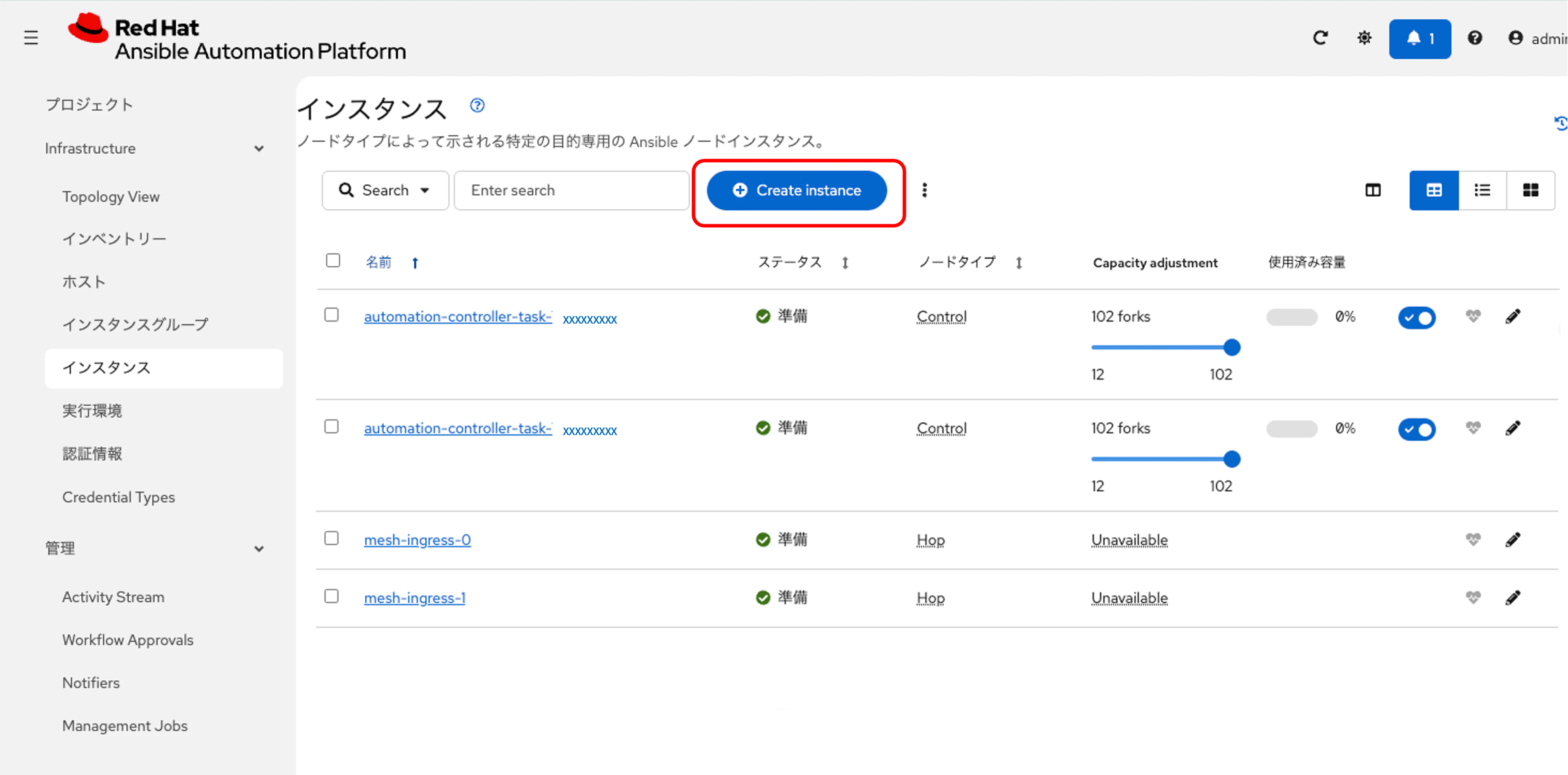
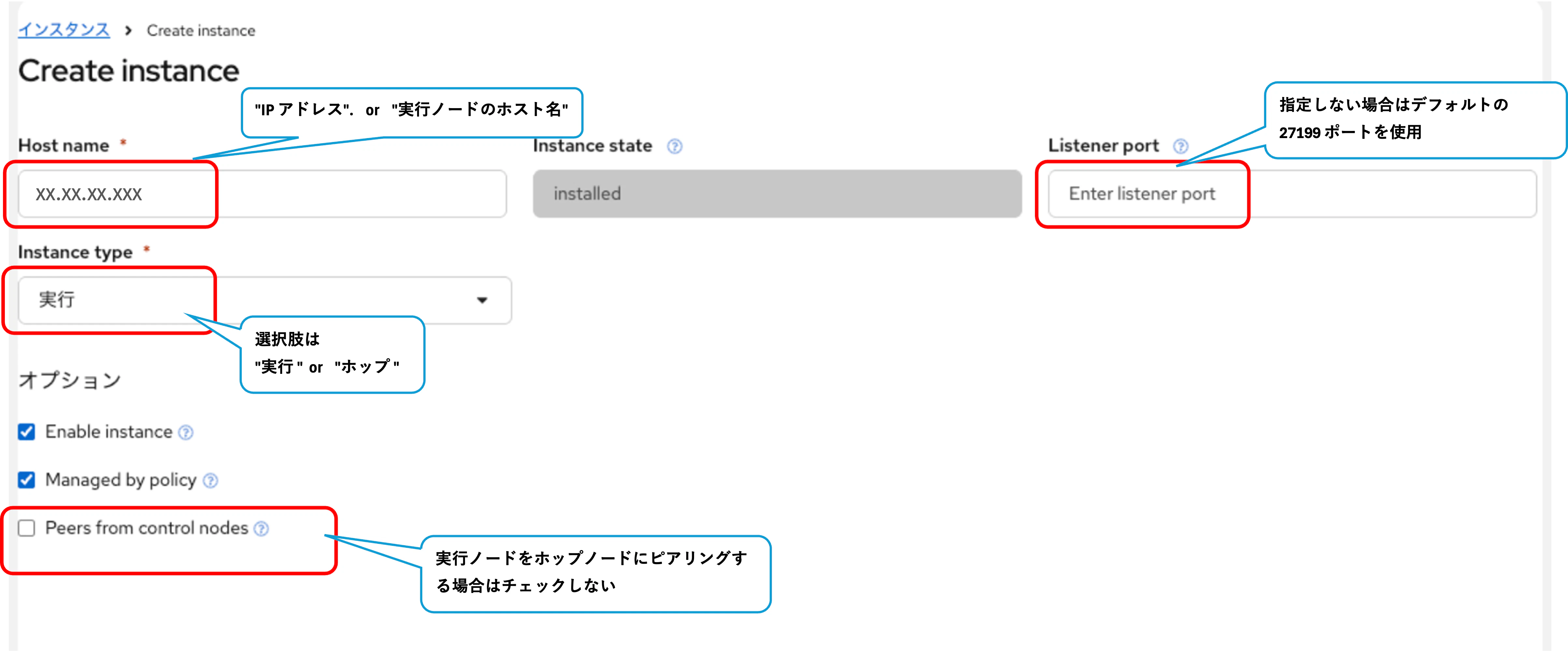
Instances リストページで 必要な情報を入力し、Add instance をクリックします。
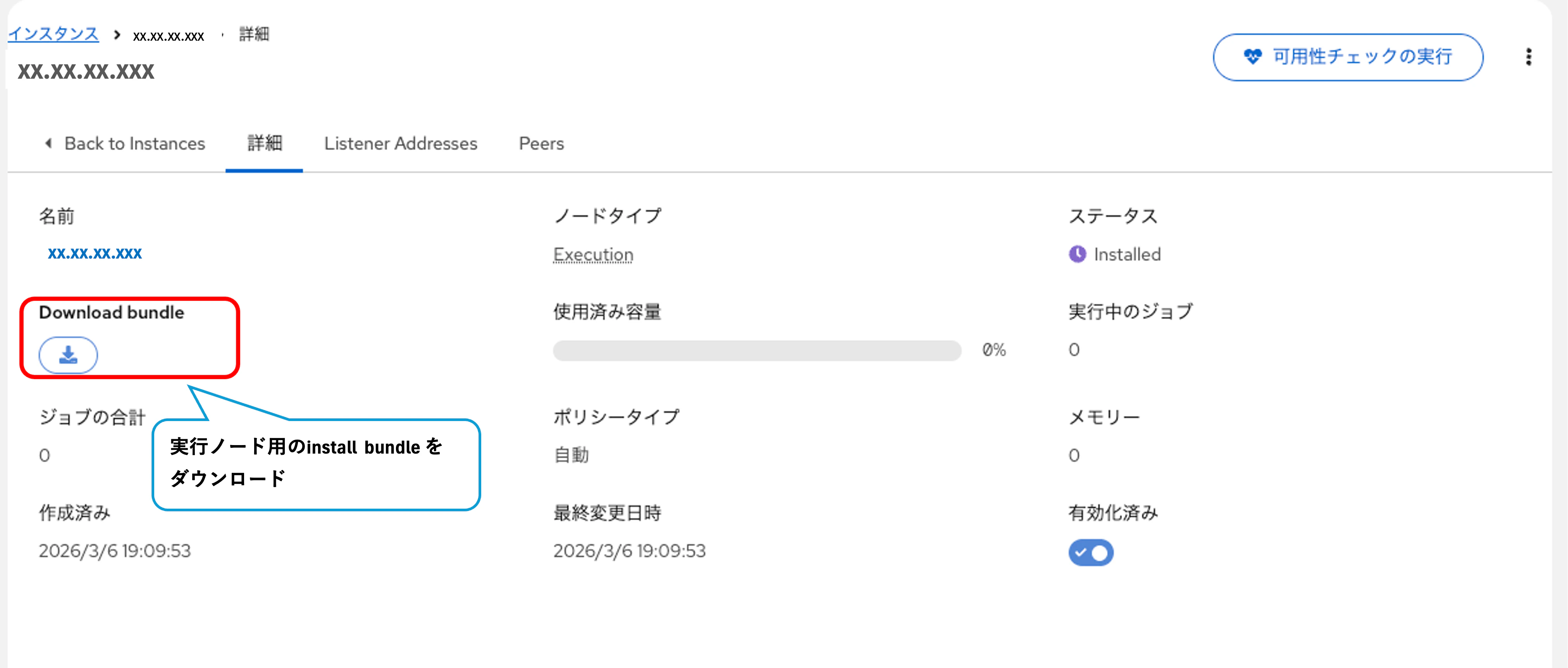
登録後、生成されたインストールバンドル(XX.X.X.XXX_install_bundle.tar.gz)をダウンロードしておきます。
インストールバンドルの配置と展開
ローカル端末からSSMポートフォワードを利用して、プライベート環境のEC2インスタンスにインストールバンドルを転送します。
【ターミナルA: SSMポートフォワードの開始】
# ターミナルA
$ aws ssm start-session \
  --target <instance id> \
  --document-name AWS-StartPortForwardingSession \
  --parameters '{"portNumber":["22"],"localPortNumber":["10022"]}'

Starting session with SessionId: xxxxxx-xxxxxxxxxxxx
Port 10022 opened for sessionId xxxxxx-xxxxxxxxxxxx.
Waiting for connections...
【ターミナルB: トンネル経由でファイルをSCP転送】
# ターミナルBを立ち上げる:トンネル経由でコピー
$ scp -P 10022 ./xx.x.x.xxx_install_bundle.tar.gz ec2-user@localhost:/home/ec2-user
** WARNING: connection is not using a post-quantum key exchange algorithm.
** This session may be vulnerable to "store now, decrypt later" attacks.
** The server may need to be upgraded. See https://openssh.com/pq.html
ec2-user@localhost's password:
xx.x.x.xxx_install_bundle.tar.gz                                  100% 5108    63.1KB/s   00:00
$
別ターミナルで SSM 経由で EC2 にログイン
【EC2側: バンドルの展開】
EC2インスタンスにログインし、転送されたファイルを解凍します。
[ec2-user@ip-XX-X-X-XXX~]$ cd /home/ec2-user
[ec2-user@ip-XX-X-X-XXX~]$ gzip -d XX.X.X.XXX_install_bundle.tar.gz
[ec2-user@ip-XX-X-X-XXX~]$ ls -l
total 32
-rw-r--r--. 1 ec2-user ec2-user 30720 Mar  3 07:41 XX.X.X.XXX_install_bundle.tar


[ec2-user@ip-XX-X-X-XXX~]$ tar -xvf XX.X.X.XXX_install_bundle.tar
XX.X.X.XXX_install_bundle/receptor/tls/ca/mesh-CA.crt
XX.X.X.XXX_install_bundle/receptor/work_public_key.pem
XX.X.X.XXX_install_bundle/receptor/tls/receptor.key
XX.X.X.XXX_install_bundle/receptor/tls/receptor.crt
XX.X.X.XXX_install_bundle/install_receptor.yml
XX.X.X.XXX_install_bundle/inventory.yml
XX.X.X.XXX_install_bundle/group_vars/all.yml
XX.X.X.XXX_install_bundle/requirements.yml


[ec2-user@ip-XX-X-X-XXX~]$ ls -ltr
total 32
-rw-r--r--. 1 ec2-user ec2-user 30720 Mar  3 07:41 XX.X.X.XXX_install_bundle.tar
drwxr-xr-x. 4 ec2-user ec2-user   113 Mar  3 07:44 XX.X.X.XXX_install_bundle

[ec2-user@ip-XX-X-X-XXX~]$ cd XX.X.X.XXX_install_bundle
[ec2-user@ip-XX-X-X-XXXXX.X.X.XXX_install_bundle]$ ls -ltr
total 12
-rw-r--r--. 1 ec2-user ec2-user 264 Mar  3 07:13 install_receptor.yml
-rw-r--r--. 1 ec2-user ec2-user 168 Mar  3 07:13 inventory.yml
-rw-r--r--. 1 ec2-user ec2-user  63 Mar  3 07:13 requirements.yml
drwxr-xr-x. 3 ec2-user ec2-user  44 Mar  3 07:44 receptor
drwxr-xr-x. 2 ec2-user ec2-user  21 Mar  3 07:44 group_vars
Receptor のセットアップ
Ansible Collection のインストール
設定 Playbook を実行するため、事前に必要な Collection(ansible.receptor)をインストールします。
$ ansible-galaxy install -r requirements.yml
実行ログの詳細 (クリックで展開)
$ ansible-galaxy collection install -r requirements.yml
Process install dependency map
Starting collection install process
Downloading https://galaxy.ansible.com/api/v3/plugin/ansible/content/published/collections/artifacts/ansible-receptor-2.0.8.tar.gz to /home/ec2-user/.ansible/tmp/ansible-local-18011e2sp_e21/tmpuwtwys6w/ansible-receptor-2.0.8-voptgmjw
Installing 'ansible.receptor:2.0.8' to '/home/ec2-user/.ansible/collections/ansible_collections/ansible/receptor'
ansible.receptor:2.0.8 was installed successfully
[ec2-user@ip-XX-X-X-XXXXX.X.X.XXX_install_bundle]$
※デフォルトでダウンロードされるバンドルには、SaaS環境側のHopノードへの接続情報(ws-peer)が完全に含まれておらず、そのままインストールすると通信に失敗しました。そのため、/etc/receptor/receptor.conf にHopノードの情報を追記しています。
- node:
    id: XX.X.X.XXX

- ws-peer:      # <=追加
    address: wss://mesh-ingress-0.cus-xxxxxxx.aws.ansiblecloud.redhat.com:443/receptor   # <=追加
    tls: tls_client   # <=追加
- ws-peer:   # <=追加
    address: wss://mesh-ingress-1.cus-xxxxxxx.aws.ansiblecloud.redhat.com:443/receptor   # <=追加
    tls: tls_client   # <=追加

- work-verification:
    publickey: /etc/receptor/work_public_key.pem
- log-level: info
- control-service:
    service: control
    filename: /var/run/receptor/receptor.sock
    permissions: 0660
    tls: tls_server
- tls-server:
    name: tls_server
    cert: /etc/receptor/tls/XX.X.X.XXX.crt
    key: /etc/receptor/tls/XX.X.X.XXX.key
    clientcas: /etc/receptor/tls/ca/mesh-CA.crt
    requireclientcert: true
    mintls13: False

- tls-client:
    name: tls_client
    cert: /etc/receptor/tls/XX.X.X.XXX.crt
    key: /etc/receptor/tls/XX.X.X.XXX.key
    rootcas: /etc/receptor/tls/ca/mesh-CA.crt
    insecureskipverify: true
    mintls13: False

- work-command:
    worktype: ansible-runner
    command: ansible-runner
    params: worker
    allowruntimeparams: True
    verifysignature: True
修正後、install_receptor.yml をローカル実行します。
$ ansible-playbook -i inventory.yml install_receptor.yml --extra-vars "ansible_connection=local"
実行ログの詳細 (クリックで展開)
[ec2-user@ip-XX-X-X-XXXXX.X.X.XXX_install_bundle]$ ansible-playbook -i inventory.yml install_receptor.yml --extra-vars "ansible_connection=local"
[WARNING]: Collection ansible.receptor does not support Ansible version 2.14.18

PLAY [all] *********************************************************************

TASK [Gathering Facts] *********************************************************
ok: [remote-execution]

TASK [Create the receptor user] ************************************************
ok: [remote-execution]

TASK [ansible.receptor.podman : Include variables] *****************************
included: /home/ec2-user/.ansible/collections/ansible_collections/ansible/receptor/roles/podman/tasks/variables.yml for remote-execution

TASK [ansible.receptor.podman : Include OS-specific variables "RedHat"] ********
ok: [remote-execution]

TASK [ansible.receptor.podman : Define podman_packages] ************************
ok: [remote-execution]

TASK [ansible.receptor.podman : Run OS-specific tasks] *************************
included: /home/ec2-user/.ansible/collections/ansible_collections/ansible/receptor/roles/podman/tasks/setup-RedHat.yml for remote-execution

TASK [ansible.receptor.podman : Install podman packages] ***********************
ok: [remote-execution]

TASK [ansible.receptor.podman : Create directory for podman runtime config] ****
ok: [remote-execution]

TASK [ansible.receptor.podman : Configure podman default runtime] **************
ok: [remote-execution]

TASK [ansible.receptor.podman : Create empty mounts config file to avoid permissions error message] ***
ok: [remote-execution]

TASK [ansible.receptor.podman : Create storage.conf to defer fuse-overlayfs on rootless env] ***
ok: [remote-execution]

TASK [ansible.receptor.podman : Ensure registries.conf.d exists] ***************
ok: [remote-execution]

TASK [ansible.receptor.podman : Force fully qualified image names to be provided to podman pull] ***
ok: [remote-execution]

TASK [ansible.receptor.setup : Run preflight] **********************************
included: /home/ec2-user/.ansible/collections/ansible_collections/ansible/receptor/roles/setup/tasks/preflight.yml for remote-execution

TASK [ansible.receptor.setup : Check local binary file is set] *****************
skipping: [remote-execution]

TASK [ansible.receptor.setup : Include variables] ******************************
included: /home/ec2-user/.ansible/collections/ansible_collections/ansible/receptor/roles/setup/tasks/variables.yml for remote-execution

TASK [ansible.receptor.setup : Import distribution-specific variables] *********
ok: [remote-execution] => (item=/home/ec2-user/.ansible/collections/ansible_collections/ansible/receptor/roles/setup/vars/RedHat-9.yml)

TASK [ansible.receptor.setup : Run OS-specific tasks] **************************
included: /home/ec2-user/.ansible/collections/ansible_collections/ansible/receptor/roles/setup/tasks/setup-RedHat.yml for remote-execution

TASK [ansible.receptor.setup : Install receptor packages] **********************
[15852.959804] SELinux:  Converting 491 SID table entries...
[15852.968675] SELinux:  policy capability network_peer_controls=1
[15852.968701] SELinux:  policy capability open_perms=1
[15852.968713] SELinux:  policy capability extended_socket_class=1
[15852.968727] SELinux:  policy capability always_check_network=0
[15852.968740] SELinux:  policy capability cgroup_seclabel=1
[15852.968753] SELinux:  policy capability nnp_nosuid_transition=1
[15852.968768] SELinux:  policy capability genfs_seclabel_symlinks=1
[15853.488133] systemd-rc-local-generator[20722]: /etc/rc.d/rc.local is not marked executable, skipping.
changed: [remote-execution]

TASK [ansible.receptor.setup : Ensure systemd override directory exists] *******
changed: [remote-execution]

TASK [ansible.receptor.setup : Override receptor's systemd service runuser] ****
changed: [remote-execution]

TASK [ansible.receptor.setup : Install dependencies specific to the node type] ***
changed: [remote-execution]

TASK [ansible.receptor.setup : Append receptorctl to python packages if needed] ***
skipping: [remote-execution]

TASK [ansible.receptor.setup : Install python packages] ************************
skipping: [remote-execution]

TASK [ansible.receptor.setup : Receptor install local] *************************
skipping: [remote-execution]

TASK [ansible.receptor.setup : Receptor install release] ***********************
skipping: [remote-execution]

TASK [ansible.receptor.setup : Check if receptor was installed correctly] ******
ok: [remote-execution]

TASK [ansible.receptor.setup : Assert receptor installation] *******************
ok: [remote-execution] => {
    "changed": false,
    "msg": "Receptor installed correctly"
}

TASK [ansible.receptor.setup : Configure receptor socket] **********************
included: /home/ec2-user/.ansible/collections/ansible_collections/ansible/receptor/roles/setup/tasks/configure.yml for remote-execution

TASK [ansible.receptor.setup : Ensure soft/hard file descriptors limits] *******
changed: [remote-execution]

TASK [ansible.receptor.setup : Configure the receptor socket directory] ********
changed: [remote-execution]

TASK [ansible.receptor.setup : Create tmpfiles.d entry for receptor socket directory] ***
changed: [remote-execution]

TASK [ansible.receptor.setup : TLS files] **************************************
included: /home/ec2-user/.ansible/collections/ansible_collections/ansible/receptor/roles/setup/tasks/tls.yml for remote-execution

TASK [ansible.receptor.setup : Create Receptor cert directories] ***************
changed: [remote-execution] => (item=/etc/receptor/tls)
changed: [remote-execution] => (item=/etc/receptor/tls/ca)

TASK [ansible.receptor.setup : Process provided TLS files] *********************
included: /home/ec2-user/.ansible/collections/ansible_collections/ansible/receptor/roles/setup/tasks/tls_local.yml for remote-execution

TASK [ansible.receptor.setup : Ensure both TLS files are provided] *************
ok: [remote-execution]

TASK [ansible.receptor.setup : Ensure CA certfile is provided] *****************
ok: [remote-execution]

TASK [ansible.receptor.setup : Check TLS private key modulus] ******************
ok: [remote-execution -> localhost]

TASK [ansible.receptor.setup : Check TLS x509 key modulus] *********************
ok: [remote-execution -> localhost]

TASK [ansible.receptor.setup : Ensure TLS pair matches] ************************
ok: [remote-execution]

TASK [ansible.receptor.setup : Ensure x509 certificate was signed by the expected Certificate Authority] ***
ok: [remote-execution -> localhost]

TASK [ansible.receptor.setup : Upload TLS files] *******************************
changed: [remote-execution] => (item={'src': 'receptor/tls/receptor.crt', 'dest': '/etc/receptor/tls/XX.X.X.XXX.crt'})
changed: [remote-execution] => (item={'src': 'receptor/tls/receptor.key', 'dest': '/etc/receptor/tls/XX.X.X.XXX.key'})
changed: [remote-execution] => (item={'src': 'receptor/tls/ca/mesh-CA.crt', 'dest': '/etc/receptor/tls/ca/mesh-CA.crt'})

TASK [ansible.receptor.setup : Set TLS file permissions] ***********************
ok: [remote-execution] => (item=/etc/receptor/tls/XX.X.X.XXX.crt)
ok: [remote-execution] => (item=/etc/receptor/tls/XX.X.X.XXX.key)
ok: [remote-execution] => (item=/etc/receptor/tls/ca/mesh-CA.crt)

TASK [ansible.receptor.setup : Work signing] ***********************************
included: /home/ec2-user/.ansible/collections/ansible_collections/ansible/receptor/roles/setup/tasks/worksign.yml for remote-execution

TASK [ansible.receptor.setup : Work signing local] *****************************
included: /home/ec2-user/.ansible/collections/ansible_collections/ansible/receptor/roles/setup/tasks/worksign_local.yml for remote-execution

TASK [ansible.receptor.setup : Distribute private work signing key] ************
skipping: [remote-execution]

TASK [ansible.receptor.setup : Distribute public work signing key] *************
changed: [remote-execution]

TASK [ansible.receptor.setup : Generate receptor config] ***********************
included: /home/ec2-user/.ansible/collections/ansible_collections/ansible/receptor/roles/setup/tasks/generate_config.yml for remote-execution

TASK [ansible.receptor.setup : Create receptor config dir] *********************
changed: [remote-execution]

TASK [ansible.receptor.setup : Deploy receptor config] *************************
changed: [remote-execution]

TASK [ansible.receptor.setup : Setup systemd] **********************************
skipping: [remote-execution]

TASK [ansible.receptor.setup : Start Receptor service] *************************
[15880.325251] systemd-rc-local-generator[21378]: /etc/rc.d/rc.local is not marked executable, skipping.
[15880.617539] systemd-rc-local-generator[21413]: /etc/rc.d/rc.local is not marked executable, skipping.
changed: [remote-execution]

RUNNING HANDLER [ansible.receptor.setup : Restart Receptor] ********************
skipping: [remote-execution]

RUNNING HANDLER [ansible.receptor.setup : Reload Receptor] *********************
skipping: [remote-execution]

PLAY RECAP *********************************************************************
remote-execution           : ok=45   changed=13   unreachable=0    failed=0    skipped=9    rescued=0    ignored=0

[ec2-user@ip-XX-X-X-XXXXX.X.X.XXX_install_bundle]$
エラーなく完了し、failed=0 となっていることを確認します。
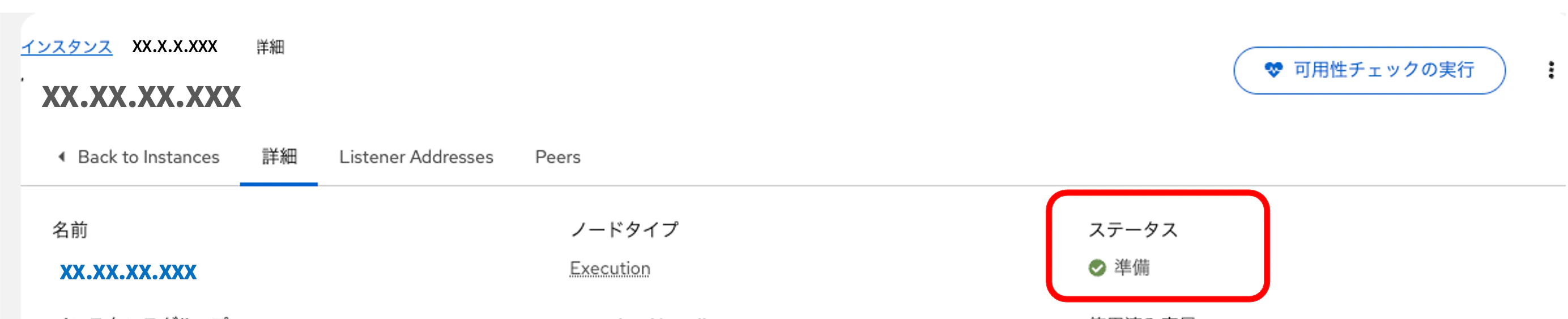
SaaS側のコンソールに戻り、設定した Execution Node が正常に通信できているかを確認します。
インスタンスで対象ノードを選択し、「可用性チェックの実行 (Run health check)」を行います。

ステータスが「Ready」となり、バージョン情報やヘルスチェック結果が正常に取得できていれば、Execution Node (Pull型) の構築は成功です。
Topology View でも 実行ノードから hop ノードに矢印が向いており、Pull 型の通信が確立していることが確認できます。
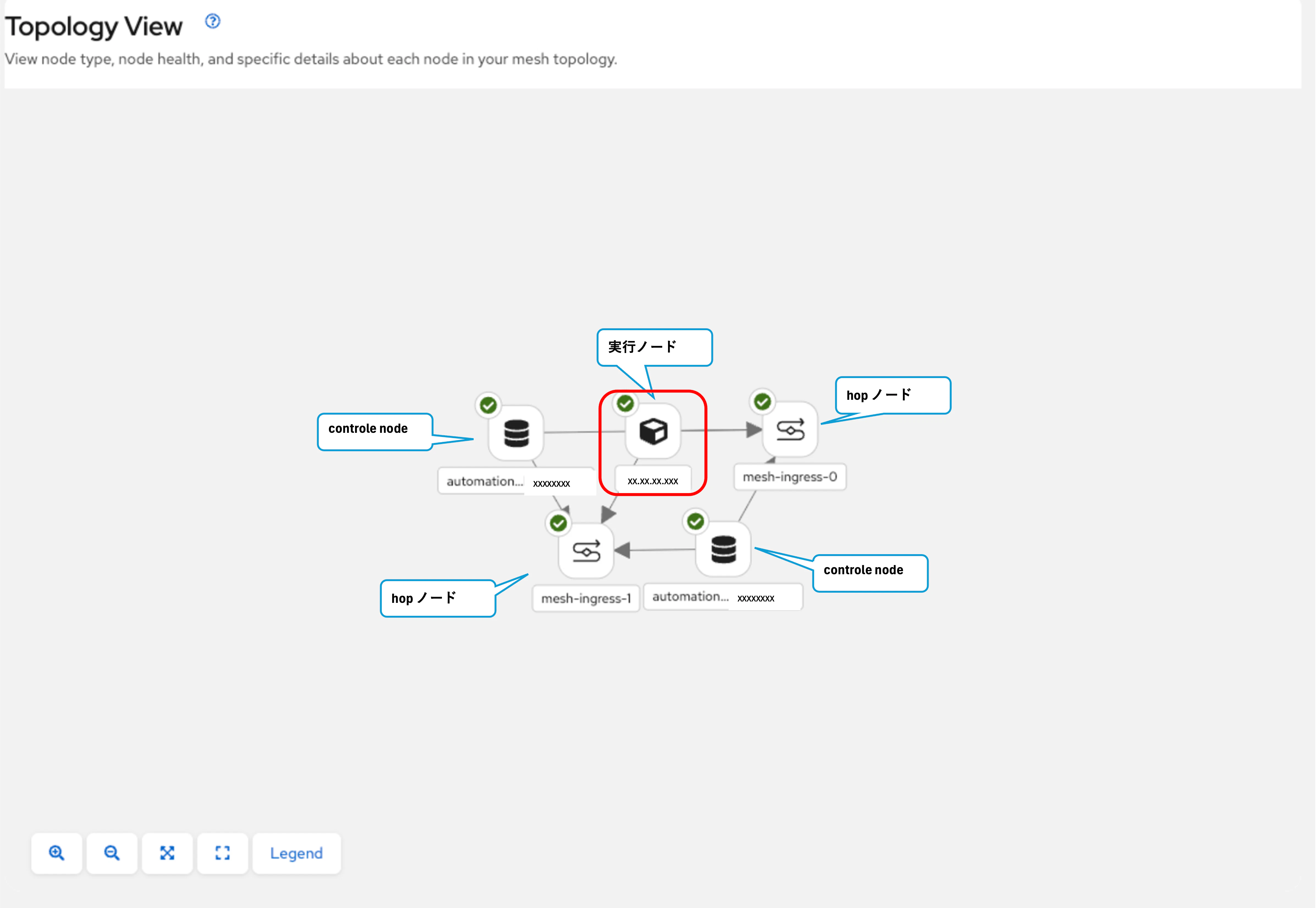
この後、ジョブテンプレートを登録してテスト稼働しましたが、無事に稼働できていました。(ログは省略します。)
AAP on AWS (SaaS) の Pull型 Execution Node の設定方法を確認しました。
Pull型 Execution Node を利用することで、セキュリティ要件の厳しいプライベートネットワーク環境でも AAP on AWS (SaaS) のジョブ実行基盤を構築できます。ws-peer の追記が必要な点が明示されていないなど、同様の環境を構築する際の参考になれば幸いです。
以上です。