
はじめに
案件業務で、AWS EC2上にMicrosoft SQL Serverを構築する話が出たときに実施したハンズオンについて紹介します。
今回はChatGPTにハンズオンのシナリオや大まかな手順を考えてもらいました。
またEC2や関連リソースの構築はIaC(CloudFormation)で行いました。最後に使用したテンプレートを置いておくので、もしやってみたい方はご利用ください!
前提
ハンズオンは以下の前提のもと行いました。
- 既にMicrosoft SQL ServerがインストールされたAMIがあるのは認識していたが、ハンズオンのためコスト面を考慮、また実際に手動でインストールする作業イメージを掴みたかったので、あえて該当のAMIは使用せず、Microsoft SQL Serverを手動インストールする。
- 案件化の制約を想定して、EC2への接続はVPCエンドポイントを作成して、System Manager(以下、SSMとする)を経由する。
- ハンズオンのため、インターネット経由でMicrosoft SQL Serverをインストールするため、インターネットゲートウェイおよびNATゲートウェイを使用する。
- APサーバーからの接続を想定した構成とする。(本ハンズオンではAPサーバーのセットアップ等は特になし。今後のハンズオンの拡張性を考慮して、インスタンスを作成するテンプレートになっている。)
注意
このハンズオンではEC2インスタンス3台、NATゲートウェイ、ElasticIP等を作成しますので、コストが発生します。
予めご認識の上実施してください。
ハンズオン手順
1. IaCテンプレートを使用し、CloudFormationのスタックを作成
対象のIaCテンプレートが選択されていることを確認して「次へ」を押下

スタック名、各パラメータを入力し、「次へ」を押下
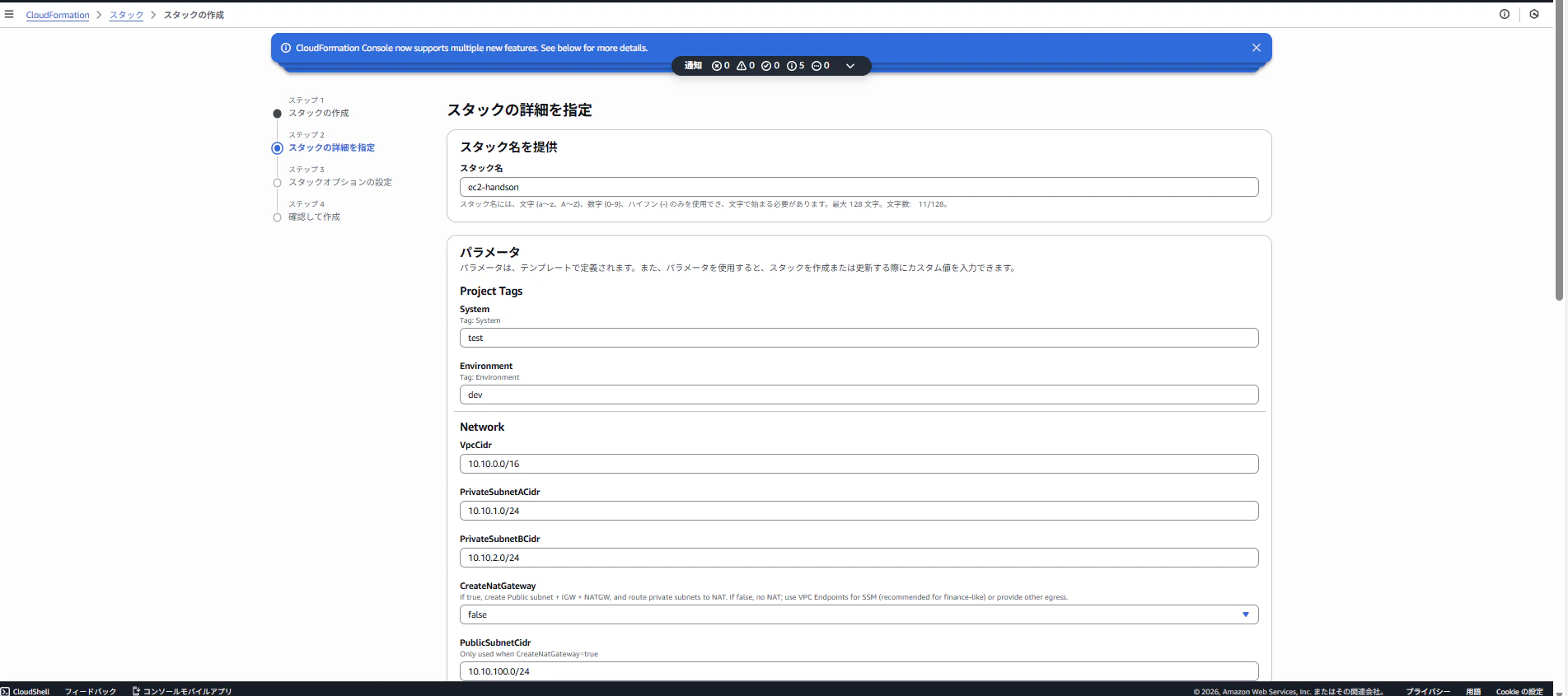
パラメータは以下を参照
System: 任意の値
Environment: 任意の値
VpcCidr: "10.10.0.0/16"
PrivateSubnetACidr: "10.10.1.0/24"
PrivateSubnetBCidr: "10.10.2.0/24"
CreateNatGateway: "true"
PublicSubnetCidr: "10.10.100.0/24"
EnableSsmVpcEndpoints: "true"
LatestWindowsAmiSsmParam: "/aws/service/ami-windows-latest/Windows_Server-2022-English-Full-Base"
KeyPairName: ""
SqlInstanceType: "t3.micro"
AppInstanceType: "t3.micro"
SqlRootVolumeGiB: "60"
SqlDataVolumeGiB: "31"
SqlLogVolumeGiB: "20"
SqlBackupVolumeGiB: "30"
SqlEbsVolumeType: "gp3"
AppPortHttp: "80"
AppPortHttps: "443"
SqlPort: "1433"
※System/Environmentパラメータはテンプレートの再利用を考慮して設定、基本的には任意の値でOKです。
「AWS CloudFormation によって IAM リソースがカスタム名で作成される場合があることを承認します。」にチェックを入れて、他は何も変更せず、「次へ」を押下

確認画面で、パラメータの値やスタック名が間違っていないかを確認して、「送信」を押下

ステータスが「CREATE_COMPLETE」になったら作成完了

2. RDP接続用の管理者PWの設定
EC2>インスタンスより、作成したインスタンスを選択

「接続」を押下

セッションマネージャーのタブで、「接続」を押下

以下のコマンドでRDP用の管理者ユーザのPWを設定(PWは任意の値でOK)
右クリック>貼り付けでコピペ可能
net user Administrator Password123!

3. Microsoft SQL Serverのインストール
「2.RDP接続用の管理者PWの設定」と同様にEC2>インスタンスから該当のインスタンスを選択、接続を押下し、RDPクライアントを選択
「FleetManagerを使用して接続する」を選択して、「Fleet Manager Remote Desktop」を押下

ユーザ名とパスワードを入力し、「接続」を押下
ユーザ名: Administrator
パスワード: 2で設定したPW(例: Password123!)

接続成功画面

MicrosoftEdgeで以下のURLにアクセス
https://www.microsoft.com/ja-jp/sql-server/sql-server-downloads
SQL Server 2025 Developerから「Standard Developerエディションをダウンロードする」を押下

ダウンロードしたexeファイルを実行(「OpenFile」を押下)

「Basic」を押下

「Accept」を押下

「Install」を押下

インストール完了後、「Install SSMS」を押下し、管理用ツールをインストール

以下のページに遷移するので、「Download SQL Server Management Studio 22 installer」を押下

ダウンロードしたexeファイルを実行(「OpenFile」を押下)

「Continue」を押下

「Install」を押下
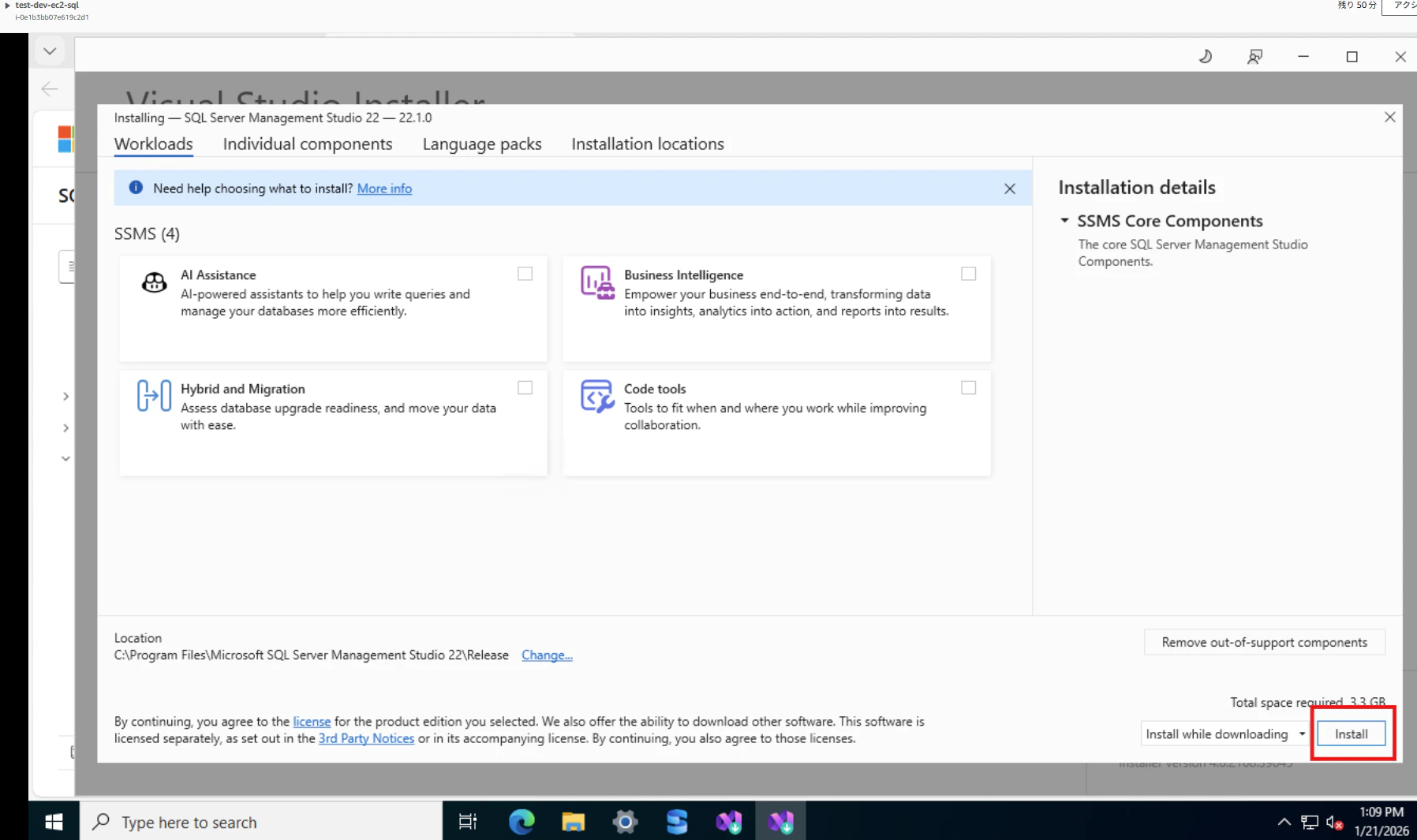
インストール完了画面

「Services」を開く

「SQL Server(MSSQLSERVER)」が「Running」になっていることを確認

4. SSMSを使ってみる
SSMSを開く

「Skip and add accounts later」を押下(アカウント作成、ログインは今回スキップ)

Connectポップアップから、Browse>Local>EC2AMAZ-XXXXXを選択し、「Connection Properties」の「Server Name」に選択したLoaclをサーバー名が記載されていることを確認
「Encrypt」は「Optional」を選択し、「Connect」を押下(サーバー名はホーム画面の右上から確認可能)

「Databases」右クリックで、表示されるメニューより、「New Database...」を押下

任意のDB名を入力し(ここではtestと命名)、「OK」を押下

作成したDBが表示されることを確認

テーブルを作ってみます。
作成したDBを開き、「Tables」右クリックで、「New」>「Table」を押下

任意のカラムを追加して、「Ctrl」+「S」を押下
テーブル名を入力して、「OK」を押下
※カラムはデータタイプやNullを許容するかを選択可能(今回はIDとNameのみNullを許容せずに設定)

作成したテーブルの確認

今回のハンズオンはここまでです!
ハンズオンが終了したら、CloudFormationからスタックを削除してください!
参考にさせていただいた記事
https://repost.aws/ja/knowledge-center/ec2-windows-launch-sql-server
https://qiita.com/ohtsuka-shota/items/ae36b326778b1f9c5252
https://docs.aws.amazon.com/sql-server-ec2/latest/userguide/connect-sql-server-on-ec2-instance.html
https://techblog.techfirm.co.jp/entry/introduction-to-windows-server-on-ec2
https://techblog.techfirm.co.jp/entry/accessing-windows-server-with-ssm
備忘録
SQL ServerのDeveloperをインストール後、SSMSをインストールしようとしたところ、NWエラーとなった
以下コマンド等で調査するも、原因不明
Test-NetConnection -ComputerName www.microsoft.com -Port 443
Test-NetConnection -ComputerName aka.ms -Port 443
Get-NetRoute -DestinationPrefix 0.0.0.0/0 | Format-Table -AutoSize(NATゲートウェイに通信が向いているか)
試しにSGのアウトバウンドで80ポートの許可を追加したら解消した(初歩的な設定漏れでした。。)
IaCテンプレート
今回使用したIaCテンプレートです。
必要なければAPサーバーに関連するEC2やSGの部分の記載はコメントアウトしても良いです。
このレベルであれば、生成AIで簡単に作れます。
ポイントとしては、EC2のストレージ設定(用途ごとにディスクを分割)やSSMで接続するためのエンドポイントをYAMLで定義している点です。
IaCテンプレート
AWSTemplateFormatVersion: "2010-09-09"
Description: >
  Hands-on (DR-style) baseline: VPC, private subnets (Multi-AZ),
  optional NAT, optional VPC Endpoints for SSM, SGs, IAM (SSM),
  EC2: SQL Server host (Windows) + AP servers (Windows),
  plus SSM Associations to (1) initialize DB disks (D/L/B) and (2) install IIS on AP.

Metadata:
  AWS::CloudFormation::Interface:
    ParameterGroups:
      - Label:
          default: "Project Tags"
        Parameters:
          - System
          - Environment
      - Label:
          default: "Network"
        Parameters:
          - VpcCidr
          - PrivateSubnetACidr
          - PrivateSubnetBCidr
          - CreateNatGateway
          - PublicSubnetCidr
          - EnableSsmVpcEndpoints
      - Label:
          default: "EC2 / OS"
        Parameters:
          - LatestWindowsAmiSsmParam
          - KeyPairName
          - SqlInstanceType
          - AppInstanceType
          - SqlRootVolumeGiB
          - AppRootVolumeGiB
      - Label:
          default: "SQL Server EC2 Data Disks (EBS)"
        Parameters:
          - SqlDataVolumeGiB
          - SqlLogVolumeGiB
          - SqlBackupVolumeGiB
          - SqlEbsVolumeType
      - Label:
          default: "Access / Security"
        Parameters:
          - AppPortHttp
          - AppPortHttps
          - SqlPort

Parameters:
  System:
    Type: String
    Description: "Tag: System"

  Environment:
    Type: String
    Description: "Tag: Environment"

  # ----------------------------
  # Network
  # ----------------------------
  VpcCidr:
    Type: String
    Default: "10.10.0.0/16"

  PrivateSubnetACidr:
    Type: String
    Default: "10.10.1.0/24"

  PrivateSubnetBCidr:
    Type: String
    Default: "10.10.2.0/24"

  CreateNatGateway:
    Type: String
    Default: "true"
    AllowedValues: ["true", "false"]
    Description: >
      If true, create Public subnet + IGW + NATGW, and route private subnets to NAT.
      If false, no NAT; use VPC Endpoints for SSM (recommended for finance-like) or provide other egress.

  PublicSubnetCidr:
    Type: String
    Default: "10.10.100.0/24"
    Description: "Only used when CreateNatGateway=true"

  EnableSsmVpcEndpoints:
    Type: String
    Default: "true"
    AllowedValues: ["true", "false"]
    Description: >
      If true, create Interface VPC Endpoints (ssm, ssmmessages, ec2messages) in the VPC.
      Recommended when NAT is not used (or even when used, for tighter control).

  # ----------------------------
  # EC2 / OS
  # ----------------------------
  LatestWindowsAmiSsmParam:
    Type: AWS::SSM::Parameter::Value<AWS::EC2::Image::Id>
    Default: "/aws/service/ami-windows-latest/Windows_Server-2022-English-Full-Base"
    Description: "SSM public parameter for latest Windows Server 2022 base AMI."

  KeyPairName:
    Type: String
    Default: ""
    Description: >
      Optional. Leave empty for SSM-only access (recommended).
      If you must use RDP in emergency, set a key pair and use SSM port-forwarding.

  SqlInstanceType:
    Type: String

  AppInstanceType:
    Type: String

  SqlRootVolumeGiB:
    Type: Number
#    Default: 120
    MinValue: 60
    MaxValue: 1024

  AppRootVolumeGiB:
    Type: Number
#    Default: 80
    MinValue: 60
    MaxValue: 1024

  # ----------------------------
  # SQL Server EC2 disks
  # (Make sizes DISTINCT so we can deterministically map drive letters)
  # ----------------------------
  SqlDataVolumeGiB:
    Type: Number
#    Default: 220
    MinValue: 20
    MaxValue: 2048
    Description: "Mapped to D: (DATA). Choose a unique size."

  SqlLogVolumeGiB:
    Type: Number
#    Default: 160
    MinValue: 10
    MaxValue: 2048
    Description: "Mapped to L: (LOG). Choose a unique size (different from others)."

  SqlBackupVolumeGiB:
    Type: Number
#    Default: 140
    MinValue: 20
    MaxValue: 2048
    Description: "Mapped to B: (BACKUP). Choose a unique size (different from others)."

  SqlEbsVolumeType:
    Type: String
    Default: "gp3"
    Description: "EBS type for SQL host data/log/backup volumes."

  # ----------------------------
  # Ports
  # ----------------------------
  AppPortHttp:
    Type: Number
    Default: 80

  AppPortHttps:
    Type: Number
    Default: 443

  SqlPort:
    Type: Number
    Default: 1433

Conditions:
  UseNat: !Equals [!Ref CreateNatGateway, "true"]
  UseSsmEndpoints: !Equals [!Ref EnableSsmVpcEndpoints, "true"]
  HasKeyPair: !Not [!Equals [!Ref KeyPairName, ""]]

Resources:
  # ============================================================
  # VPC
  # ============================================================
  Vpc:
    Type: AWS::EC2::VPC
    Properties:
      CidrBlock: !Ref VpcCidr
      EnableDnsSupport: true
      EnableDnsHostnames: true
      Tags:
        - Key: Name
          Value: !Sub "${System}-${Environment}-vpc"
        - Key: System
          Value: !Ref System
        - Key: Environment
          Value: !Ref Environment

  PrivateSubnetA:
    Type: AWS::EC2::Subnet
    Properties:
      VpcId: !Ref Vpc
      AvailabilityZone: !Select [0, !GetAZs ""]
      CidrBlock: !Ref PrivateSubnetACidr
      MapPublicIpOnLaunch: false
      Tags:
        - Key: Name
          Value: !Sub "${System}-${Environment}-subnet-private-a"
        - Key: System
          Value: !Ref System
        - Key: Environment
          Value: !Ref Environment

  PrivateSubnetB:
    Type: AWS::EC2::Subnet
    Properties:
      VpcId: !Ref Vpc
      AvailabilityZone: !Select [1, !GetAZs ""]
      CidrBlock: !Ref PrivateSubnetBCidr
      MapPublicIpOnLaunch: false
      Tags:
        - Key: Name
          Value: !Sub "${System}-${Environment}-subnet-private-b"
        - Key: System
          Value: !Ref System
        - Key: Environment
          Value: !Ref Environment

  # ============================================================
  # Optional Public subnet + IGW + NATGW (egress)
  # ============================================================
  InternetGateway:
    Type: AWS::EC2::InternetGateway
    Condition: UseNat
    Properties:
      Tags:
        - Key: Name
          Value: !Sub "${System}-${Environment}-igw"
        - Key: System
          Value: !Ref System
        - Key: Environment
          Value: !Ref Environment

  VpcGatewayAttachment:
    Type: AWS::EC2::VPCGatewayAttachment
    Condition: UseNat
    Properties:
      VpcId: !Ref Vpc
      InternetGatewayId: !Ref InternetGateway

  PublicSubnet:
    Type: AWS::EC2::Subnet
    Condition: UseNat
    Properties:
      VpcId: !Ref Vpc
      AvailabilityZone: !Select [0, !GetAZs ""]
      CidrBlock: !Ref PublicSubnetCidr
      MapPublicIpOnLaunch: true
      Tags:
        - Key: Name
          Value: !Sub "${System}-${Environment}-subnet-public"
        - Key: System
          Value: !Ref System
        - Key: Environment
          Value: !Ref Environment

  PublicRouteTable:
    Type: AWS::EC2::RouteTable
    Condition: UseNat
    Properties:
      VpcId: !Ref Vpc
      Tags:
        - Key: Name
          Value: !Sub "${System}-${Environment}-rtb-public"
        - Key: System
          Value: !Ref System
        - Key: Environment
          Value: !Ref Environment

  PublicDefaultRoute:
    Type: AWS::EC2::Route
    Condition: UseNat
    DependsOn: VpcGatewayAttachment
    Properties:
      RouteTableId: !Ref PublicRouteTable
      DestinationCidrBlock: "0.0.0.0/0"
      GatewayId: !Ref InternetGateway

  PublicSubnetRtbAssoc:
    Type: AWS::EC2::SubnetRouteTableAssociation
    Condition: UseNat
    Properties:
      SubnetId: !Ref PublicSubnet
      RouteTableId: !Ref PublicRouteTable

  NatEip:
    Type: AWS::EC2::EIP
    Condition: UseNat
    Properties:
      Domain: vpc

  NatGateway:
    Type: AWS::EC2::NatGateway
    Condition: UseNat
    Properties:
      AllocationId: !GetAtt NatEip.AllocationId
      SubnetId: !Ref PublicSubnet
      Tags:
        - Key: Name
          Value: !Sub "${System}-${Environment}-natgw"
        - Key: System
          Value: !Ref System
        - Key: Environment
          Value: !Ref Environment

  # ============================================================
  # Private route tables
  # ============================================================
  PrivateRouteTableA:
    Type: AWS::EC2::RouteTable
    Properties:
      VpcId: !Ref Vpc
      Tags:
        - Key: Name
          Value: !Sub "${System}-${Environment}-rtb-private-a"
        - Key: System
          Value: !Ref System
        - Key: Environment
          Value: !Ref Environment

  PrivateRouteTableB:
    Type: AWS::EC2::RouteTable
    Properties:
      VpcId: !Ref Vpc
      Tags:
        - Key: Name
          Value: !Sub "${System}-${Environment}-rtb-private-b"
        - Key: System
          Value: !Ref System
        - Key: Environment
          Value: !Ref Environment

  PrivateSubnetARtbAssoc:
    Type: AWS::EC2::SubnetRouteTableAssociation
    Properties:
      SubnetId: !Ref PrivateSubnetA
      RouteTableId: !Ref PrivateRouteTableA

  PrivateSubnetBRtbAssoc:
    Type: AWS::EC2::SubnetRouteTableAssociation
    Properties:
      SubnetId: !Ref PrivateSubnetB
      RouteTableId: !Ref PrivateRouteTableB

  PrivateDefaultRouteA:
    Type: AWS::EC2::Route
    Condition: UseNat
    Properties:
      RouteTableId: !Ref PrivateRouteTableA
      DestinationCidrBlock: "0.0.0.0/0"
      NatGatewayId: !Ref NatGateway

  PrivateDefaultRouteB:
    Type: AWS::EC2::Route
    Condition: UseNat
    Properties:
      RouteTableId: !Ref PrivateRouteTableB
      DestinationCidrBlock: "0.0.0.0/0"
      NatGatewayId: !Ref NatGateway

  # ============================================================
  # Security Groups (FIXED: break circular dependency)
  #  - SG本体には相互参照ルールを書かない
  #  - 相互参照が必要なルールは "別リソース" として後段で作成
  # ============================================================
  AppSecurityGroup:
    Type: AWS::EC2::SecurityGroup
    Properties:
      GroupDescription: "AP servers SG"
      VpcId: !Ref Vpc
      SecurityGroupIngress:
        - IpProtocol: tcp
          FromPort: !Ref AppPortHttp
          ToPort: !Ref AppPortHttp
          CidrIp: !Ref VpcCidr
        - IpProtocol: tcp
          FromPort: !Ref AppPortHttps
          ToPort: !Ref AppPortHttps
          CidrIp: !Ref VpcCidr
      SecurityGroupEgress:
        # NOTE: SQL向けの絞り込み(App -> DB 1433)は別リソースで定義する(下の AppToDbSqlEgress)
        - IpProtocol: tcp
          FromPort: 443
          ToPort: 443
          CidrIp: "0.0.0.0/0"
#        - IpProtocol: tcp
#          FromPort: 80
#          ToPort: 80
#          CidrIp: "0.0.0.0/0"
      Tags:
        - Key: Name
          Value: !Sub "${System}-${Environment}-sg-app"
        - Key: System
          Value: !Ref System
        - Key: Environment
          Value: !Ref Environment

  DbSecurityGroup:
    Type: AWS::EC2::SecurityGroup
    Properties:
      GroupDescription: "SQL Server host SG"
      VpcId: !Ref Vpc
      # NOTE: AppからのSQL(1433)許可は別リソースで定義する(下の AppToDbSqlIngress)
      SecurityGroupEgress:
        - IpProtocol: tcp
          FromPort: 443
          ToPort: 443
          CidrIp: "0.0.0.0/0"
        - IpProtocol: tcp
          FromPort: 80
          ToPort: 80
          CidrIp: "0.0.0.0/0"
      Tags:
        - Key: Name
          Value: !Sub "${System}-${Environment}-sg-db"
        - Key: System
          Value: !Ref System
        - Key: Environment
          Value: !Ref Environment

  # ---- Break the cycle: SGルールを別リソース化 ----
  AppToDbSqlIngress:
    Type: AWS::EC2::SecurityGroupIngress
    Properties:
      GroupId: !Ref DbSecurityGroup
      IpProtocol: tcp
      FromPort: !Ref SqlPort
      ToPort: !Ref SqlPort
      SourceSecurityGroupId: !Ref AppSecurityGroup

  AppToDbSqlEgress:
    Type: AWS::EC2::SecurityGroupEgress
    Properties:
      GroupId: !Ref AppSecurityGroup
      IpProtocol: tcp
      FromPort: !Ref SqlPort
      ToPort: !Ref SqlPort
      DestinationSecurityGroupId: !Ref DbSecurityGroup

  # ============================================================
  # IAM for EC2 (SSM)
  # ============================================================
  Ec2SsmRole:
    Type: AWS::IAM::Role
    Properties:
      RoleName: !Sub "${System}-${Environment}-ec2-ssm-role"
      AssumeRolePolicyDocument:
        Version: "2012-10-17"
        Statement:
          - Effect: Allow
            Principal:
              Service: ec2.amazonaws.com
            Action: "sts:AssumeRole"
      ManagedPolicyArns:
        - arn:aws:iam::aws:policy/AmazonSSMManagedInstanceCore
        - arn:aws:iam::aws:policy/CloudWatchAgentServerPolicy
      Tags:
        - Key: System
          Value: !Ref System
        - Key: Environment
          Value: !Ref Environment

  Ec2InstanceProfile:
    Type: AWS::IAM::InstanceProfile
    Properties:
      InstanceProfileName: !Sub "${System}-${Environment}-ec2-ssm-profile"
      Roles:
        - !Ref Ec2SsmRole

  # ============================================================
  # EC2 Instances
  # ============================================================
  SqlServerInstance:
    Type: AWS::EC2::Instance
    Properties:
      ImageId: !Ref LatestWindowsAmiSsmParam
      InstanceType: !Ref SqlInstanceType
      IamInstanceProfile: !Ref Ec2InstanceProfile
      SubnetId: !Ref PrivateSubnetA
      SecurityGroupIds:
        - !Ref DbSecurityGroup
      KeyName: !If [HasKeyPair, !Ref KeyPairName, !Ref "AWS::NoValue"]
      BlockDeviceMappings:
        # Root
        - DeviceName: /dev/sda1
          Ebs:
            VolumeSize: !Ref SqlRootVolumeGiB
            VolumeType: gp3
            DeleteOnTermination: true
            Encrypted: true
        # Data (unique size -> D:)
        - DeviceName: /dev/sdf
          Ebs:
            VolumeSize: !Ref SqlDataVolumeGiB
            VolumeType: !Ref SqlEbsVolumeType
            DeleteOnTermination: true
            Encrypted: true
        # Log (unique size -> L:)
        - DeviceName: /dev/sdg
          Ebs:
            VolumeSize: !Ref SqlLogVolumeGiB
            VolumeType: !Ref SqlEbsVolumeType
            DeleteOnTermination: true
            Encrypted: true
        # Backup (unique size -> B:)
        - DeviceName: /dev/sdh
          Ebs:
            VolumeSize: !Ref SqlBackupVolumeGiB
            VolumeType: !Ref SqlEbsVolumeType
            DeleteOnTermination: true
            Encrypted: true
      Tags:
        - Key: Name
          Value: !Sub "${System}-${Environment}-ec2-sql"
        - Key: System
          Value: !Ref System
        - Key: Environment
          Value: !Ref Environment
        - Key: Role
          Value: "sql"

  AppServer1Instance:
    Type: AWS::EC2::Instance
    Properties:
      ImageId: !Ref LatestWindowsAmiSsmParam
      InstanceType: !Ref AppInstanceType
      IamInstanceProfile: !Ref Ec2InstanceProfile
      SubnetId: !Ref PrivateSubnetA
      SecurityGroupIds:
        - !Ref AppSecurityGroup
      KeyName: !If [HasKeyPair, !Ref KeyPairName, !Ref "AWS::NoValue"]
      BlockDeviceMappings:
        - DeviceName: /dev/sda1
          Ebs:
            VolumeSize: !Ref AppRootVolumeGiB
            VolumeType: gp3
            DeleteOnTermination: true
            Encrypted: true
      Tags:
        - Key: Name
          Value: !Sub "${System}-${Environment}-ec2-app-1"
        - Key: System
          Value: !Ref System
        - Key: Environment
          Value: !Ref Environment
        - Key: Role
          Value: "app"

  AppServer2Instance:
    Type: AWS::EC2::Instance
    Properties:
      ImageId: !Ref LatestWindowsAmiSsmParam
      InstanceType: !Ref AppInstanceType
      IamInstanceProfile: !Ref Ec2InstanceProfile
      SubnetId: !Ref PrivateSubnetB
      SecurityGroupIds:
        - !Ref AppSecurityGroup
      KeyName: !If [HasKeyPair, !Ref KeyPairName, !Ref "AWS::NoValue"]
      BlockDeviceMappings:
        - DeviceName: /dev/sda1
          Ebs:
            VolumeSize: !Ref AppRootVolumeGiB
            VolumeType: gp3
            DeleteOnTermination: true
            Encrypted: true
      Tags:
        - Key: Name
          Value: !Sub "${System}-${Environment}-ec2-app-2"
        - Key: System
          Value: !Ref System
        - Key: Environment
          Value: !Ref Environment
        - Key: Role
          Value: "app"

  # ============================================================
  # VPC Endpoints for SSM
  # ============================================================
  EndpointSecurityGroup:
    Type: AWS::EC2::SecurityGroup
    Condition: UseSsmEndpoints
    Properties:
      GroupDescription: "SG for Interface VPC Endpoints (allow 443 from private subnets)"
      VpcId: !Ref Vpc
      SecurityGroupIngress:
        - IpProtocol: tcp
          FromPort: 443
          ToPort: 443
          CidrIp: !Ref VpcCidr
      SecurityGroupEgress:
        - IpProtocol: -1
          CidrIp: "0.0.0.0/0"
      Tags:
        - Key: Name
          Value: !Sub "${System}-${Environment}-sg-vpce"
        - Key: System
          Value: !Ref System
        - Key: Environment
          Value: !Ref Environment

  SsmVpce:
    Type: AWS::EC2::VPCEndpoint
    Condition: UseSsmEndpoints
    Properties:
      VpcEndpointType: Interface
      VpcId: !Ref Vpc
      ServiceName: !Sub "com.amazonaws.${AWS::Region}.ssm"
      PrivateDnsEnabled: true
      SubnetIds:
        - !Ref PrivateSubnetA
        - !Ref PrivateSubnetB
      SecurityGroupIds:
        - !Ref EndpointSecurityGroup

  SsmMessagesVpce:
    Type: AWS::EC2::VPCEndpoint
    Condition: UseSsmEndpoints
    Properties:
      VpcEndpointType: Interface
      VpcId: !Ref Vpc
      ServiceName: !Sub "com.amazonaws.${AWS::Region}.ssmmessages"
      PrivateDnsEnabled: true
      SubnetIds:
        - !Ref PrivateSubnetA
        - !Ref PrivateSubnetB
      SecurityGroupIds:
        - !Ref EndpointSecurityGroup

  Ec2MessagesVpce:
    Type: AWS::EC2::VPCEndpoint
    Condition: UseSsmEndpoints
    Properties:
      VpcEndpointType: Interface
      VpcId: !Ref Vpc
      ServiceName: !Sub "com.amazonaws.${AWS::Region}.ec2messages"
      PrivateDnsEnabled: true
      SubnetIds:
        - !Ref PrivateSubnetA
        - !Ref PrivateSubnetB
      SecurityGroupIds:
        - !Ref EndpointSecurityGroup

  # ============================================================
  # SSM Associations (hands-on automation)
  #   1) SQL host: initialize RAW disks and assign drive letters D/L/B
  #   2) AP hosts: install IIS
  # ============================================================
  SqlDiskInitAssociation:
    Type: AWS::SSM::Association
    Properties:
      Name: "AWS-RunPowerShellScript"
      AssociationName: !Sub "${System}-${Environment}-sql-disk-init"
      Targets:
        - Key: InstanceIds
          Values:
            - !Ref SqlServerInstance
      Parameters:
        commands:
          - !Sub |
              $ErrorActionPreference = "Stop"

              # Map expected sizes (GiB) -> Drive letter
              $map = @{
                ${SqlDataVolumeGiB}   = "D"
                ${SqlLogVolumeGiB}    = "L"
                ${SqlBackupVolumeGiB} = "B"
              }

              # Get RAW disks (EBS data disks show up as RAW initially)
              $rawDisks = Get-Disk | Where-Object { $_.PartitionStyle -eq "RAW" }

              if ($rawDisks.Count -lt 3) {
                Write-Host "RAW disks found: $($rawDisks.Count). Waiting a bit for disks to attach..."
                Start-Sleep -Seconds 20
                $rawDisks = Get-Disk | Where-Object { $_.PartitionStyle -eq "RAW" }
              }

              foreach ($disk in $rawDisks) {
                # Approx GiB size
                $sizeGiB = [int]([math]::Round($disk.Size / 1GB))
                if (-not $map.ContainsKey($sizeGiB)) {
                  Write-Host "Skipping disk Number=$($disk.Number) SizeGiB=$sizeGiB (not in map)"
                  continue
                }

                $letter = $map[$sizeGiB]
                Write-Host "Initializing disk Number=$($disk.Number) SizeGiB=$sizeGiB -> Drive $letter`:"

                Initialize-Disk -Number $disk.Number -PartitionStyle GPT -PassThru |
                  New-Partition -UseMaximumSize -DriveLetter $letter |
                  Format-Volume -FileSystem NTFS -NewFileSystemLabel ("EBS_" + $letter) -Confirm:$false
              }

              # Create standard folders
              New-Item -ItemType Directory -Force -Path "D:\SQLDATA" | Out-Null
              New-Item -ItemType Directory -Force -Path "L:\SQLLOG"  | Out-Null
              New-Item -ItemType Directory -Force -Path "B:\SQLBACKUP" | Out-Null

              Write-Host "Disk init completed. Current volumes:"
              Get-Volume | Sort-Object DriveLetter | Format-Table -AutoSize

  InstallIisAssociation:
    Type: AWS::SSM::Association
    Properties:
      Name: "AWS-RunPowerShellScript"
      AssociationName: !Sub "${System}-${Environment}-app-install-iis"
      Targets:
        - Key: InstanceIds
          Values:
            - !Ref AppServer1Instance
            - !Ref AppServer2Instance
      Parameters:
        commands:
          - |
              $ErrorActionPreference = "Stop"
              Write-Host "Installing IIS..."
              Install-WindowsFeature -Name Web-Server -IncludeManagementTools
              Write-Host "IIS installed."
              # Basic hardening-ish defaults for demo (keep light; real finance needs policy-based hardening)
              New-Item -ItemType Directory -Force -Path "C:\App" | Out-Null
              # Simple healthcheck page
              $html = "<html><body><h1>OK</h1><p>$(hostname)</p></body></html>"
              Set-Content -Path "C:\inetpub\wwwroot\health.html" -Value $html -Encoding UTF8
              Write-Host "healthcheck: http://localhost/health.html"

Outputs:
  VpcId:
    Value: !Ref Vpc
  PrivateSubnetAId:
    Value: !Ref PrivateSubnetA
  PrivateSubnetBId:
    Value: !Ref PrivateSubnetB
  SqlServerInstanceId:
    Value: !Ref SqlServerInstance
  AppServer1InstanceId:
    Value: !Ref AppServer1Instance
  AppServer2InstanceId:
    Value: !Ref AppServer2Instance
  SqlServerPrivateIp:
    Value: !GetAtt SqlServerInstance.PrivateIp
  AppServer1PrivateIp:
    Value: !GetAtt AppServer1Instance.PrivateIp
  AppServer2PrivateIp:
    Value: !GetAtt AppServer2Instance.PrivateIp
  Notes:
    Value: >
      Connect via SSM Session Manager (no bastion). For GUI (rare), use SSM port forwarding to RDP.
      If CreateNatGateway=false, keep EnableSsmVpcEndpoints=true so private instances can register with SSM.
この後のハンズオンのイメージ
- APサーバーをEC2で構築し、SQL Server連携させる
- 以下の公式ベストプラクティスに沿った設定を実施する(コンピュートとストレージの設定等)
https://docs.aws.amazon.com/ja_jp/prescriptive-guidance/latest/sql-server-ec2-best-practices/welcome.html - AWS推奨のデプロイ方法であるLaunch Wizardで構築してみる
https://docs.aws.amazon.com/ja_jp/prescriptive-guidance/latest/sql-server-ec2-best-practices/launch-wizard.html