
1. はじめに
今回はTerraformのStateファイルの管理をS3で実施します
stateやstate lockの動作を実際に手を動かしながら体験していくことで理解を深めることが目的です
2. 前提
2.1 制約事項
- AWS SSO認証可能なこと
参考 :
- AWS SSOユーザにS3へのフルアクセス権限があること(もしくはstate管理用S3に対して必要な権限があること)
- VS Code利用可能なこと
2.2 想定読者
- 私のようなterraform初学者の方
- 手を動かして、terraformについて理解を深めたい方
- Terraformのstateやlockについていまいちイメージがつかめていない方
3. 手順
3.1 コード構成
以下terraformのベストプラクティスとして公開されている中規模パターンの構成を元に作成
フォルダ構成:
envs
└dev
└main.tf
└outputs.tf
└terraform.tfvars
└variables.tf
└versions.tf
modules
└network
└main.tf
└outputs.tf
└variables.tf
tfvarsファイルとvariables.tfの違いが分からなくて調べたので、その内容だけ備忘として記載
variables.tfは環境変数を定義、tfvarsは実際に環境変数に渡す値を定義するファイルと理解
(CloudFormationでいうと、テンプレートに記載するParametersがvariables.tfでenvファイルがtfvarsのようなイメージと理解)
各tfファイルの中身(サンプルコード)
※コードの中身の解説は割愛します
envs>dev配下
main.tf
provider "aws" {
  region = "ap-northeast-1"

  allowed_account_ids = var.allowed_account_ids
}

terraform {
  backend "s3" {
    bucket = "myan-dev-s3-poc-tfstate-740625119642"
    key = "dev/terraform.tfstate"
    region = "ap-northeast-1"
    use_lockfile = true
    encrypt = true
    # ...
  }
}

module "network" {
  source = "../../modules/network"

  name = var.name

  cidr = var.cidr
  azs  = var.azs

  public_subnets = var.public_subnets
}
outputs.tf
output "vpc_id" {
  description = "ID of the VPC"
  value       = module.network.vpc_id
}
今回重要なstate lockの定義についてのみ解説↓
terraform {
  backend "s3" {
    bucket = "myan-dev-s3-poc-tfstate-740625119642"
    key = "dev/terraform.tfstate"
    region = "ap-northeast-1"
    use_lockfile = true
    encrypt = true
    # ...
  }
以下を参考に、use_lockfileをtrueに設定し、S3だけでstate lockが完結する構成としている
以前はDynamo DBがState lockに使用されていたが現在は非推奨の模様
以下は必要なS3権限等も解説されているので、読むことを推奨
https://developer.hashicorp.com/terraform/language/backend/s3#use_lockfile
terraform.tfvars
allowed_account_ids = ["ご自身のAWSアカウントIDに置き換えてください"]

name = "myan-dev-vpc-tf"

cidr = "10.0.0.0/20"

azs = ["ap-northeast-1a", "ap-northeast-1c"]

public_subnets = ["10.0.0.0/24", "10.0.1.0/24"]
variables.tf
variable "allowed_account_ids" {
  description = "List of allowed AWS account ids where resources can be created"
  type        = list(string)
  default     = []
}

variable "name" {
  description = "Name to be used on all the resources as identifier"
  type        = string
  default     = ""
}

variable "cidr" {
  description = "The CIDR block for the VPC. Default value is a valid CIDR, but not acceptable by AWS and should be overriden"
  type        = string
  default     = "0.0.0.0/0"
}

variable "azs" {
  description = "A list of availability zones in the region"
  type        = list(string)
  default     = []
}

variable "public_subnets" {
  description = "A list of public subnets inside the VPC"
  type        = list(string)
  default     = []
}
versions.tf
terraform {
  required_version = ">= 1.14.0"

  required_providers {
    aws = {
      source  = "hashicorp/aws"
      version = "~> 6.0"
    }
  }
}
modules>network配下
main.tf
module "vpc" {
  source  = "terraform-aws-modules/vpc/aws"
  version = "~> 6.0"

  name = var.name

  cidr = var.cidr

  azs  = var.azs

  public_subnets = var.public_subnets
}
outputs.tf
output "vpc_id" {
  description = "The ID of the VPC"
  value       = module.vpc.vpc_id
}
variables.tf
variable "name" {
  description = "Name to be used on all the resources as identifier"
  type        = string
  default     = ""
}

variable "cidr" {
  description = "The CIDR block for the VPC. Default value is a valid CIDR, but not acceptable by AWS and should be overriden"
  type        = string
  default     = "0.0.0.0/0"
}

variable "azs" {
  description = "A list of availability zones in the region"
  type        = list(string)
  default     = []
}

variable "public_subnets" {
  description = "A list of public subnets inside the VPC"
  type        = list(string)
  default     = []
}
3.2 Stateファイル用S3バケット/フォルダの作成
S3バケットを作成
以下を設定
- バージョニング有効
- パブリックアクセス拒否
- バケットポリシーは
aws:SecureTransport: falseの場合のInsecure Transportを拒否
CloudFormationで以下をもとに作成可能
s3.yaml(サンプル)
AWSTemplateFormatVersion: "2010-09-09"
Description: "Terraform state management S3 bucket"


Resources:
# ------------------------------------------------------------#
# Terraform State Bucket
# ------------------------------------------------------------#
  TerraformStateBucket:
    Type: AWS::S3::Bucket
    DeletionPolicy: Retain
    UpdateReplacePolicy: Retain
    Properties:
      BucketName: <バケット名に置き換え>
      VersioningConfiguration:
        Status: Enabled
      BucketEncryption:
        ServerSideEncryptionConfiguration:
          - ServerSideEncryptionByDefault:
              SSEAlgorithm: AES256
      PublicAccessBlockConfiguration:
        BlockPublicAcls: true
        BlockPublicPolicy: true
        IgnorePublicAcls: true
        RestrictPublicBuckets: true
      OwnershipControls:
        Rules:
          - ObjectOwnership: BucketOwnerEnforced
      LifecycleConfiguration:
        Rules:
          - Id: AbortIncompleteMultipartUpload
            Status: Enabled
            AbortIncompleteMultipartUpload:
              DaysAfterInitiation: 7
      Tags:
        - Key: Name
          Value: <バケット名に置き換え>

  TerraformStateBucketPolicy:
    Type: AWS::S3::BucketPolicy
    Properties:
      Bucket: !Ref TerraformStateBucket
      PolicyDocument:
        Version: "2012-10-17"
        Statement:
          - Sid: DenyInsecureTransport
            Effect: Deny
            Principal: "*"
            Action: "s3:*"
            Resource:
              - !Sub "arn:aws:s3:::${TerraformStateBucket}"
              - !Sub "arn:aws:s3:::${TerraformStateBucket}/*"
            Condition:
              Bool:
                aws:SecureTransport: false
今回はバケットにdevフォルダを作成
3.3 AWS認証
VS Code上でTerminalを開き、以下を実行
※詳しくは以下記事を参照
aws sso login --profile <SSOログイン用のプロファイル名>
3.4 backendを初期化
XXX/envs/devディレクトリに移動し、以下コマンドを実行
terraform init -reconfigure
実行画面イメージ
※実行完了まで少々時間かかるので待ちます

ここで起きること:
- .terraform ディレクトリが作られる
- provider / module が解決される
- backend 設定が S3 に向く
- まだ state ファイルが無ければ、S3 上には何も作られないこともある(実際にマネコンからS3の該当バケットが見るもまだなにもオブジェクトはなかった)
3.5 実行計画を確認する
以下コマンドを実行する。
terraform plan
実行イメージ
Terraform used the selected providers to generate the following execution plan. Resource actions are indicated with the following symbols:
  + create

Terraform will perform the following actions:

  # module.network.module.vpc.aws_default_network_acl.this[0] will be created
  + resource "aws_default_network_acl" "this" {
      + arn                    = (known after apply)
      + default_network_acl_id = (known after apply)
      + id                     = (known after apply)
      + owner_id               = (known after apply)
      + region                 = "ap-northeast-1"
      + tags                   = {
          + "Name" = "myan-dev-vpc-tf-default"
        }
      + tags_all               = {
          + "Name" = "myan-dev-vpc-tf-default"
        }
      + vpc_id                 = (known after apply)

      + egress {
          + action          = "allow"
          + from_port       = 0
          + ipv6_cidr_block = "::/0"
          + protocol        = "-1"
          + rule_no         = 101
          + to_port         = 0
            # (1 unchanged attribute hidden)
        }
      + egress {
          + action          = "allow"
          + cidr_block      = "0.0.0.0/0"
          + from_port       = 0
          + protocol        = "-1"
          + rule_no         = 100
          + to_port         = 0
            # (1 unchanged attribute hidden)
        }

      + ingress {
          + action          = "allow"
          + from_port       = 0
          + ipv6_cidr_block = "::/0"
          + protocol        = "-1"
          + rule_no         = 101
          + to_port         = 0
            # (1 unchanged attribute hidden)
        }
      + ingress {
          + action          = "allow"
          + cidr_block      = "0.0.0.0/0"
          + from_port       = 0
          + protocol        = "-1"
          + rule_no         = 100
          + to_port         = 0
            # (1 unchanged attribute hidden)
        }
    }

  # module.network.module.vpc.aws_default_route_table.default[0] will be created
  + resource "aws_default_route_table" "default" {
      + arn                    = (known after apply)
      + default_route_table_id = (known after apply)
      + id                     = (known after apply)
      + owner_id               = (known after apply)
      + region                 = "ap-northeast-1"
      + route                  = (known after apply)
      + tags                   = {
          + "Name" = "myan-dev-vpc-tf-default"
        }
      + tags_all               = {
          + "Name" = "myan-dev-vpc-tf-default"
        }
      + vpc_id                 = (known after apply)

      + timeouts {
          + create = "5m"
          + update = "5m"
        }
    }

  # module.network.module.vpc.aws_default_security_group.this[0] will be created
  + resource "aws_default_security_group" "this" {
      + arn                    = (known after apply)
      + description            = (known after apply)
      + egress                 = (known after apply)
      + id                     = (known after apply)
      + ingress                = (known after apply)
      + name                   = (known after apply)
      + name_prefix            = (known after apply)
      + owner_id               = (known after apply)
      + region                 = "ap-northeast-1"
      + revoke_rules_on_delete = false
      + tags                   = {
          + "Name" = "myan-dev-vpc-tf-default"
        }
      + tags_all               = {
          + "Name" = "myan-dev-vpc-tf-default"
        }
      + vpc_id                 = (known after apply)
    }

  # module.network.module.vpc.aws_internet_gateway.this[0] will be created
  + resource "aws_internet_gateway" "this" {
      + arn      = (known after apply)
      + id       = (known after apply)
      + owner_id = (known after apply)
      + region   = "ap-northeast-1"
      + tags     = {
          + "Name" = "myan-dev-vpc-tf"
        }
      + tags_all = {
          + "Name" = "myan-dev-vpc-tf"
        }
      + vpc_id   = (known after apply)
    }

  # module.network.module.vpc.aws_route.public_internet_gateway[0] will be created
  + resource "aws_route" "public_internet_gateway" {
      + destination_cidr_block = "0.0.0.0/0"
      + gateway_id             = (known after apply)
      + id                     = (known after apply)
      + instance_id            = (known after apply)
      + instance_owner_id      = (known after apply)
      + network_interface_id   = (known after apply)
      + origin                 = (known after apply)
      + region                 = "ap-northeast-1"
      + route_table_id         = (known after apply)
      + state                  = (known after apply)

      + timeouts {
          + create = "5m"
        }
    }

  # module.network.module.vpc.aws_route_table.public[0] will be created
  + resource "aws_route_table" "public" {
      + arn              = (known after apply)
      + id               = (known after apply)
      + owner_id         = (known after apply)
      + propagating_vgws = (known after apply)
      + region           = "ap-northeast-1"
      + route            = (known after apply)
      + tags             = {
          + "Name" = "myan-dev-vpc-tf-public"
        }
      + tags_all         = {
          + "Name" = "myan-dev-vpc-tf-public"
        }
      + vpc_id           = (known after apply)
    }

  # module.network.module.vpc.aws_route_table_association.public[0] will be created
  + resource "aws_route_table_association" "public" {
      + id             = (known after apply)
      + region         = "ap-northeast-1"
      + route_table_id = (known after apply)
      + subnet_id      = (known after apply)
    }

  # module.network.module.vpc.aws_route_table_association.public[1] will be created
  + resource "aws_route_table_association" "public" {
      + id             = (known after apply)
      + region         = "ap-northeast-1"
      + route_table_id = (known after apply)
      + subnet_id      = (known after apply)
    }

  # module.network.module.vpc.aws_subnet.public[0] will be created
  + resource "aws_subnet" "public" {
      + arn                                            = (known after apply)
      + assign_ipv6_address_on_creation                = false
      + availability_zone                              = "ap-northeast-1a"
      + availability_zone_id                           = (known after apply)
      + cidr_block                                     = "10.0.0.0/24"
      + enable_dns64                                   = false
      + enable_resource_name_dns_a_record_on_launch    = false
      + enable_resource_name_dns_aaaa_record_on_launch = false
      + id                                             = (known after apply)
      + ipv6_cidr_block                                = (known after apply)
      + ipv6_cidr_block_association_id                 = (known after apply)
      + ipv6_native                                    = false
      + map_public_ip_on_launch                        = false
      + owner_id                                       = (known after apply)
      + private_dns_hostname_type_on_launch            = (known after apply)
      + region                                         = "ap-northeast-1"
      + tags                                           = {
          + "Name" = "myan-dev-vpc-tf-public-ap-northeast-1a"
        }
      + tags_all                                       = {
          + "Name" = "myan-dev-vpc-tf-public-ap-northeast-1a"
        }
      + vpc_id                                         = (known after apply)
    }

  # module.network.module.vpc.aws_subnet.public[1] will be created
  + resource "aws_subnet" "public" {
      + arn                                            = (known after apply)
      + assign_ipv6_address_on_creation                = false
      + availability_zone                              = "ap-northeast-1c"
      + availability_zone_id                           = (known after apply)
      + cidr_block                                     = "10.0.1.0/24"
      + enable_dns64                                   = false
      + enable_resource_name_dns_a_record_on_launch    = false
      + enable_resource_name_dns_aaaa_record_on_launch = false
      + id                                             = (known after apply)
      + ipv6_cidr_block                                = (known after apply)
      + ipv6_cidr_block_association_id                 = (known after apply)
      + ipv6_native                                    = false
      + map_public_ip_on_launch                        = false
      + owner_id                                       = (known after apply)
      + private_dns_hostname_type_on_launch            = (known after apply)
      + region                                         = "ap-northeast-1"
      + tags                                           = {
          + "Name" = "myan-dev-vpc-tf-public-ap-northeast-1c"
        }
      + tags_all                                       = {
          + "Name" = "myan-dev-vpc-tf-public-ap-northeast-1c"
        }
      + vpc_id                                         = (known after apply)
    }

  # module.network.module.vpc.aws_vpc.this[0] will be created
  + resource "aws_vpc" "this" {
      + arn                                  = (known after apply)
      + cidr_block                           = "10.0.0.0/20"
      + default_network_acl_id               = (known after apply)
      + default_route_table_id               = (known after apply)
      + default_security_group_id            = (known after apply)
      + dhcp_options_id                      = (known after apply)
      + enable_dns_hostnames                 = true
      + enable_dns_support                   = true
      + enable_network_address_usage_metrics = (known after apply)
      + id                                   = (known after apply)
      + instance_tenancy                     = "default"
      + ipv6_association_id                  = (known after apply)
      + ipv6_cidr_block                      = (known after apply)
      + ipv6_cidr_block_network_border_group = (known after apply)
      + main_route_table_id                  = (known after apply)
      + owner_id                             = (known after apply)
      + region                               = "ap-northeast-1"
      + tags                                 = {
          + "Name" = "myan-dev-vpc-tf"
        }
      + tags_all                             = {
          + "Name" = "myan-dev-vpc-tf"
        }
    }

Plan: 11 to add, 0 to change, 0 to destroy.

Changes to Outputs:
  + vpc_id = (known after apply)

──────────────────────────────────────────────────────────────────────────────────────────────────────────────────────────────────────────────────────────────────────

Note: You didn't use the -out option to save this plan, so Terraform can't guarantee to take exactly these actions if you run "terraform apply" now.
→正常完了を確認
3.6 Applyする
terraform apply
ここで起きること:
- 実行開始時に S3 上へ lock file を作る
- apply 完了時に terraform.tfstate が S3 に保存される
- 正常終了すると lock file は削除される

※lock fileが削除されており、state fileが作成されることを確認
VPCが作成されていることを確認

3.7 state fileの中身を眺めたり、以下コマンドを実行した結果と比較してみる
terraform state list
terraform show
S3バケットのdevフォルダに作成された、state fileをダウンロードして中身を確認
実際に作成されたVPC IDやリソース名等が記載されていることを確認
3.8 差分計算の確認(stateが効いていることを検証)
ここからはよりstateファイルの仕組みやロック時の挙動を理解する為に色々と実験します
まずは、terraform.tfvarsのnameを一時的に変更して、terraform planを実行してみる
変更内容:
nameをmyan-dev-vpc-tf→myan-test-vpc-tfに変更
terraform plan
以下のようにVPC名の変更に伴い、VPCの再作成が行われるようなplanが出力
state fileにあるVPC名との差分が検知されていることが分かる
実行結果の例
module.network.module.vpc.aws_vpc.this[0]: Refreshing state... [id=vpc-075d6d442e4454007]
module.network.module.vpc.aws_default_route_table.default[0]: Refreshing state... [id=rtb-07e9c8f5a20e96f74]
module.network.module.vpc.aws_internet_gateway.this[0]: Refreshing state... [id=igw-023c7339a3906d6dd]
module.network.module.vpc.aws_default_security_group.this[0]: Refreshing state... [id=sg-0ad4d3a7cda04347b]
module.network.module.vpc.aws_default_network_acl.this[0]: Refreshing state... [id=acl-0a1c49fd3d55a51aa]
module.network.module.vpc.aws_route_table.public[0]: Refreshing state... [id=rtb-0068b98b6fa5fbdfe]
module.network.module.vpc.aws_subnet.public[0]: Refreshing state... [id=subnet-09cf8a5e3555e4a82]
module.network.module.vpc.aws_subnet.public[1]: Refreshing state... [id=subnet-060b76fc3ceef3d1a]
module.network.module.vpc.aws_route.public_internet_gateway[0]: Refreshing state... [id=r-rtb-0068b98b6fa5fbdfe1080289494]
module.network.module.vpc.aws_route_table_association.public[1]: Refreshing state... [id=rtbassoc-0176d684a24a56511]
module.network.module.vpc.aws_route_table_association.public[0]: Refreshing state... [id=rtbassoc-0faf839cbdda1b762]

Terraform used the selected providers to generate the following execution plan. Resource actions are indicated with the following symbols:
  ~ update in-place

Terraform will perform the following actions:

  # module.network.module.vpc.aws_default_network_acl.this[0] will be updated in-place
  ~ resource "aws_default_network_acl" "this" {
        id                     = "acl-0a1c49fd3d55a51aa"
      ~ tags                   = {
          ~ "Name" = "myan-dev-vpc-tf-default" -> "myan-test-vpc-tf-default"
        }
      ~ tags_all               = {
          ~ "Name" = "myan-dev-vpc-tf-default" -> "myan-test-vpc-tf-default"
        }
        # (6 unchanged attributes hidden)

        # (4 unchanged blocks hidden)
    }

  # module.network.module.vpc.aws_default_route_table.default[0] will be updated in-place
  ~ resource "aws_default_route_table" "default" {
        id                     = "rtb-07e9c8f5a20e96f74"
      ~ tags                   = {
          ~ "Name" = "myan-dev-vpc-tf-default" -> "myan-test-vpc-tf-default"
        }
      ~ tags_all               = {
          ~ "Name" = "myan-dev-vpc-tf-default" -> "myan-test-vpc-tf-default"
        }
        # (7 unchanged attributes hidden)

        # (1 unchanged block hidden)
    }

  # module.network.module.vpc.aws_default_security_group.this[0] will be updated in-place
  ~ resource "aws_default_security_group" "this" {
        id                     = "sg-0ad4d3a7cda04347b"
        name                   = "default"
      ~ tags                   = {
          ~ "Name" = "myan-dev-vpc-tf-default" -> "myan-test-vpc-tf-default"
        }
      ~ tags_all               = {
          ~ "Name" = "myan-dev-vpc-tf-default" -> "myan-test-vpc-tf-default"
        }
        # (9 unchanged attributes hidden)
    }

  # module.network.module.vpc.aws_internet_gateway.this[0] will be updated in-place
  ~ resource "aws_internet_gateway" "this" {
        id       = "igw-023c7339a3906d6dd"
      ~ tags     = {
          ~ "Name" = "myan-dev-vpc-tf" -> "myan-test-vpc-tf"
        }
      ~ tags_all = {
          ~ "Name" = "myan-dev-vpc-tf" -> "myan-test-vpc-tf"
        }
        # (4 unchanged attributes hidden)
    }

  # module.network.module.vpc.aws_route_table.public[0] will be updated in-place
  ~ resource "aws_route_table" "public" {
        id               = "rtb-0068b98b6fa5fbdfe"
      ~ tags             = {
          ~ "Name" = "myan-dev-vpc-tf-public" -> "myan-test-vpc-tf-public"
        }
      ~ tags_all         = {
          ~ "Name" = "myan-dev-vpc-tf-public" -> "myan-test-vpc-tf-public"
        }
        # (6 unchanged attributes hidden)
    }

  # module.network.module.vpc.aws_subnet.public[0] will be updated in-place
  ~ resource "aws_subnet" "public" {
        id                                             = "subnet-09cf8a5e3555e4a82"
      ~ tags                                           = {
          ~ "Name" = "myan-dev-vpc-tf-public-ap-northeast-1a" -> "myan-test-vpc-tf-public-ap-northeast-1a"
        }
      ~ tags_all                                       = {
          ~ "Name" = "myan-dev-vpc-tf-public-ap-northeast-1a" -> "myan-test-vpc-tf-public-ap-northeast-1a"
        }
        # (20 unchanged attributes hidden)
    }

  # module.network.module.vpc.aws_subnet.public[1] will be updated in-place
  ~ resource "aws_subnet" "public" {
        id                                             = "subnet-060b76fc3ceef3d1a"
      ~ tags                                           = {
          ~ "Name" = "myan-dev-vpc-tf-public-ap-northeast-1c" -> "myan-test-vpc-tf-public-ap-northeast-1c"
        }
      ~ tags_all                                       = {
          ~ "Name" = "myan-dev-vpc-tf-public-ap-northeast-1c" -> "myan-test-vpc-tf-public-ap-northeast-1c"
        }
        # (20 unchanged attributes hidden)
    }

  # module.network.module.vpc.aws_vpc.this[0] will be updated in-place
  ~ resource "aws_vpc" "this" {
        id                                   = "vpc-075d6d442e4454007"
      ~ tags                                 = {
          ~ "Name" = "myan-dev-vpc-tf" -> "myan-test-vpc-tf"
        }
      ~ tags_all                             = {
          ~ "Name" = "myan-dev-vpc-tf" -> "myan-test-vpc-tf"
        }
        # (19 unchanged attributes hidden)
    }

Plan: 0 to add, 8 to change, 0 to destroy.

──────────────────────────────────────────────────────────────────────────────────────────────────────────────────────────────────────────────────────────────────────

Note: You didn't use the -out option to save this plan, so Terraform can't guarantee to take exactly these actions if you run "terraform apply" now.
再度nameをもとに戻して、以下を実行
terraform plan
想定通り、差分なしと表示される

3.9 state lockの動作確認
次に2つのターミナルから同時に操作を行い、state lockが起きるのかを検証する
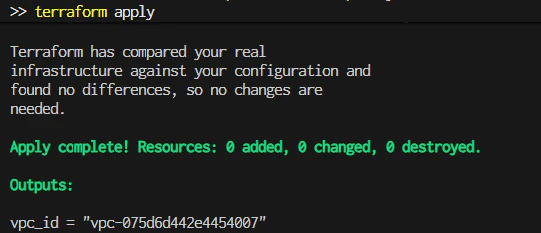
ターミナルAで以下を実行
terraform apply
差分なしのため、特に変更はないがコマンド実行は成功している
ターミナルA実行後、すかさずターミナルBで以下を実行
terraform plan -lock-timeout=0s
state lockにより、terraorm planの実行がエラーとなることを確認

S3上のstate fileがversionが増えていることを確認

3.10 ドリフトの検証
次に手動でリソースの変更を行い、意図的にドリフト(実機とterraformで宣言している状態との差分)を発生させ、挙動を確認する
VPCにタグを1つ追加

terraform planを実行して、ドリフトが検知されることを確認
terraform plan
追加したタグがドリフトとして検出されることを確認(stateと実機とのずれ)

terraform applyを実行すると、stateと差分のある手動追加のタグは削除された

マネコンから、タグが削除されていることを確認

3.11 検証用リソースの削除
以下を実行して、検証用のリソースを削除する
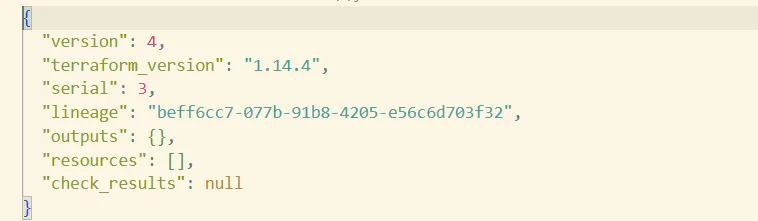
terraform destroy
S3上のstate fileのverが追加されている

state fileを見ると、リソースが何もない状態になっている
3.12 state fileの1つ前のverから復元を試みる
最後に削除された検証用リソースを、S3のstate fileの1つ前のverに戻し、リソースの復元を実験してみる
マネコンから過去verのIDを確認

以下を実行して、過去verを復元
$VERSION_ID="ここに戻したいVersionId"
aws s3api copy-object `
  --bucket $BUCKET `
  --key $KEY `
  --copy-source "${BUCKET}/${KEY}?versionId=${VERSION_ID}"
実行結果
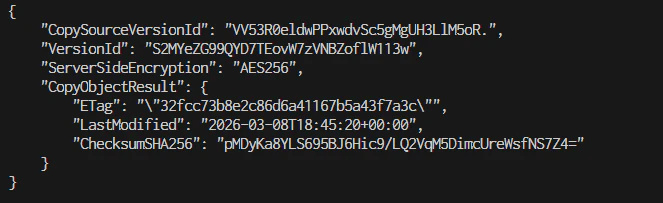
最新verが更新されている
ダウンロードして中身を見ると、VPC等のリソースが記載されたstate fileであることが分かる

以下を実行して、先ほど削除したリソースが表示されることを確認
terraform plan
applyを実行して、削除されたVPC等が再作成されることを確認
terraform apply
過去verのstate fileから削除し他リソースを復元したことを確認

※最後に再度terraform destroyで環境削除して下さい
4. まとめ
今回は実際に手を動かして、tfstateとlockの動作を確認しました
基本的なstateの役割やlockの挙動を確認して、理解を深めることができた一方で、
まだまだ実務で発生するようなstate管理の難しさであったり、運用上の注意点や障害発生時にどのように対応すべきかというところへの理解はできていないと感じています
次回以降はより、実際の現場で発生するterraformの運用保守上の難しいポイントを体験できるようなハンズオンを行いたいと思います。
ここまで読んで頂きありがとうございました
5. [参考]ハンズオン中に引いたエラー集
5.1 terraform plan実行時に発生したProvider Ver関連のエラー
Error: Unsupported argument
│
│   on .terraform\modules\network.vpc\main.tf line 35, in resource "aws_vpc" "this":
│   35:   enable_classiclink             = null # https://github.com/hashicorp/terraform/issues/31730
│
│ An argument named "enable_classiclink" is not expected here.
╵
╷
│ Error: Unsupported argument
│
│   on .terraform\modules\network.vpc\main.tf line 36, in resource "aws_vpc" "this":
│   36:   enable_classiclink_dns_support = null # https://github.com/hashicorp/terraform/issues/31730
│
│ An argument named "enable_classiclink_dns_support" is not expected here.
╵
╷
│ Error: Unsupported argument
│
│   on .terraform\modules\network.vpc\main.tf line 1013, in resource "aws_eip" "nat":
│ 1013:   vpc = true
│
│ An argument named "vpc" is not expected here.
╵
╷
│ Error: Unsupported argument
│
│   on .terraform\modules\network.vpc\main.tf line 1246, in resource "aws_default_vpc" "this":
│ 1246:   enable_classiclink   = null # https://github.com/hashicorp/terraform/issues/31730
│
│ An argument named "enable_classiclink" is not expected here.
ChatGpt5.4に上記を丸投げして、調査した結果が以下。
原因は AWS Provider と VPC module のバージョン不整合。
エラー文から次の2点を示唆。
- aws_eip の vpc = true がもう受け付けられていない
- aws_default_vpc の enable_classiclink がもう受け付けられていない
これは、AWS Provider 側で EC2-Classic 関連が v5.0.0 で削除 され、>enable_classiclink / enable_classiclink_dns_support などが消えたことと整合しま>す。さらに aws_eip では vpc ではなく domain を使う流れになっています。>HashiCorp/AWS Provider の v5.0.0 まわりの変更として公開されています。
しかもエラー箇所が コード本体ではなく .terraform/modules/network.vpc/main.tf なの>で、壊れているのは 取得済みの terraform-aws-modules/vpc/aws 側 です。つまり、古い >VPC module を新しい AWS Provider で動かしている のが本質です。VPC module の新しい>系統は AWS Provider >= 5.0 を前提にしています。
以下を実行して、verを確認
terraform providers
応答結果(moduleのAWS ProviderのVerは3.73.0)

.terraform.lock.hclを確認し、AWS ProvierのVerが6.35.1になっており、moduleのVerと不整合を起こしていることを確認
# This file is maintained automatically by "terraform init".
# Manual edits may be lost in future updates.

provider "registry.terraform.io/hashicorp/aws" {
  version     = "6.35.1"
対応したこと
①envs.dev配下にversions.tfを作成
ProviderのVer制約を明示化
terraform {
  required_version = ">= 1.14.0"

  required_providers {
    aws = {
      source  = "hashicorp/aws"
      version = "~> 6.0"
    }
  }
}
moduleのVer条件を修正
module "vpc" {
  source  = "terraform-aws-modules/vpc/aws"
  version = "~> 6.0" # 元は、"~> 3.0"

  name = var.name

  cidr = var.cidr

  public_subnets = var.public_subnets
}
②以下で再初期化
Terraform init -upgrade
③再度tf planを実行して、正常完了を確認
Terraform plan
6. 参考