パブリック関数
'現在選択されているアイテムを表示する
Public Function アイテム取得()
    Dim aITEM As AppointmentItem  '予定、アポ アイテム
    Dim nSelectCNT As Integer     '選択されている数、ctrl+クリックで複数選択可能なので
    nSelectCNT = Application.ActiveExplorer.Selection.Count '選択された件数

    If nSelectCNT = 1 Then
        Set aITEM = Application.ActiveExplorer.Selection.Item(1) 'n番目のitemをセットする
        If TypeName(aITEM) = "AppointmentItem" Then '予定、アポ
            件名 = "件名:" & aITEM.Subject     '件名
            開始 = "開始:" & aITEM.Start       '終了時間
            終了 = "終了:" & aITEM.End         '終了時間
            場所 = "場所:" & aITEM.Location    '場所
            本文 = "本文:" & aITEM.Body        '本文'↑他にも 値、プロパティがある
        End If
    Else
        件名 = "件名:"
        開始 = "開始:"
        終了 = "終了:"
        場所 = "場所:"
        本文 = "本文:"
    End If
End Function
パブリック変数
Public 件名 As String
Public 開始 As String
Public 終了 As String
Public 場所 As String
Public 本文 As String
メイン関数
Sub ユーザーフォーム表示()
    UserForm1.Show vbModeless
End Sub
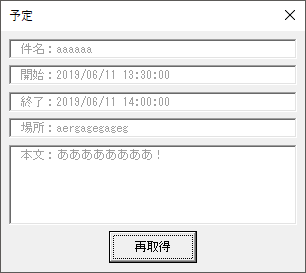
UserForm1
Private Sub CommandButton1_Click()
    Call 予定表示
End Sub

Private Sub UserForm_Initialize()
    Call 予定表示
End Sub

Private Function 予定表示()
    Call アイテム取得
    UserForm1.TextBox1.Value = 件名
    UserForm1.TextBox2.Value = 開始
    UserForm1.TextBox3.Value = 終了
    UserForm1.TextBox4.Value = 場所
    UserForm1.TextBox5.Value = 本文
End Function
■参考
Outlook VBA ActiveExplorer.Selection 選択されているアイテムを知りたい
