
私は「ツナギメエフエム」というPodcastを運営しています。
Podcastの音声ファイルは「Spotify for Creators」の機能によりエピソード毎に指定した日時に配信を行っているのですが、配信対象のエピソードに対応するwebサイトの公開は音声ファイルの配信後に手動で行っているため、以前から自動化したいと考えていました。
PodcastのwebサイトはGitHubでリポジトリ管理を行ない、Podcastの新しいエピソードを配信するタイミングでPull Requestを作成し、マージするとCloudflare Pagesに新しいエピソードのページがデプロイされるという仕組みになっています。
ということで、今回は「GitHub Actionsを使って指定した(だいたいの)日時にPull Requestをマージする」を実現したいと思います。
※GitHub Actionsが実行されるタイミングは保証されているわけではないので、「(だいたいの)日時」としています。
仕様としてはこんな感じ。
- Pull Requestのマージ対象ブランチは「master」、「main」のみとする。
- Draft状態のPull Reqeustはマージ対象外とする。
- GitHub Actionsの「schedule」を利用して5分毎に実行する。
- Pull Requestに「merge-at」というラベルを付与し、ラベルのDescriptionにマージ予定日時を「YYYY-MM-DD HH:mm」形式で入力する。
- 指定したマージ予定日時を過ぎたらPull Requestをマージする。
- マージ後に「merge-at」のラベルを削除する。
- ワークフローを利用する場合はGitHubが公式提供しているものに絞る。(Marketplaceのワークフローは利用しない)
上記の仕様を元に作成したワークフローがこちら。
name: Merge PRs at the specified datetime based on labels.

on:
  schedule:
    - cron: "*/5 * * * *"
  workflow_dispatch:

permissions:
  contents: write
  pull-requests: write

jobs:
  merge:
    runs-on: ubuntu-latest
    steps:
      - uses: actions/github-script@v7
        with:
          script: |
            const { owner, repo } = context.repo;

            // JST を基準に現在時刻を取得
            const nowJst = new Date(
              new Date().toLocaleString("en-US", { timeZone: "Asia/Tokyo" })
            );

            // Open 状態の Pull Request を取得
            const prs = await github.paginate(
              github.rest.pulls.list,
              { owner, repo, state: "open" }
            );

            const allowedBaseBranches = ["master", "main"];
            for (const pr of prs) {
              // マージ対象ブランチかを判定
              if (!allowedBaseBranches.includes(pr.base.ref)) {
                console.log(`PR #${pr.number}: base is ${pr.base.ref}, skip`);
                continue;
              }

              // Draftは除外
              if (pr.draft) {
                console.log(`PR #${pr.number}: draft, skip`);
                continue;
              }

              // PRのラベルを取得
              const label = pr.labels.find(l => l.name === "merge-at");
              if (!label || !label.description) {
                continue;
              }

              // ラベルのDescriptionからマージ予定日時を取得する("YYYY-MM-DD HH:mm" 形式)
              const match = label.description.match(
                /^(\d{4}-\d{2}-\d{2} \d{2}:\d{2})$/
              );
              if (!match) {
                console.log(`PR #${pr.number}: merge-at ラベルの形式が不正です`);
                continue;
              }

              // マージ予定日時はJSTを基準とする
              const mergeAtJst = new Date(
                match[1].replace(" ", "T") + ":00+09:00"
              );

              if (nowJst < mergeAtJst) {
                console.log(`PR #${pr.number}: 指定した日時を経過していません`);
                continue;
              }

              console.log(`PR #${pr.number}: 指定した日時を経過しているためマージを実行します`);

              try {
                // マージ実行
                await github.rest.pulls.merge({
                  owner,
                  repo,
                  pull_number: pr.number,
                  merge_method: "merge",
                });
                console.log(`PR #${pr.number}: マージ成功`);
              } catch (e) {
                console.log(`PR #${pr.number}: マージ失敗 ${e.message}`);
              }

              try {
                // マージ後にラベルを外す(再実行防止)
                await github.rest.issues.removeLabel({
                  owner,
                  repo,
                  issue_number: pr.number,
                  name: "merge-at",
                });
                console.log(`PR #${pr.number}: ラベル削除成功`);
              } catch (e) {
                console.log(`PR #${pr.number}: ラベル削除失敗 ${e.message}`);
              }
            }
それでは動作確認です。
まずは、以下のようなPull Requestを作成します。

以下のようなラベルを準備します。
- Name: merge-at
- Description: 2025-12-13 16:32
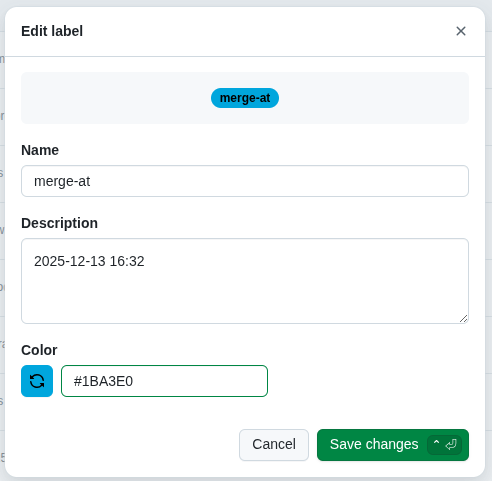
先ほどのPull Requestに作成したラベルを付与します。

ワークフローが「2025-12-13 16:38」に実行されています。

マージ予定日時に「2025-12-13 16:32」を指定していたので、実行日時と比較して過去になっているためPull Requestがマージされました。
※「(だいたいの)日時」と説明していたとおりの動作ですね。

また、マージ完了後に「merge-at」のラベルが削除されていることがわかります。

これまではPodcastのwebサイトの更新のたびに手動でPull Requestのマージを行っていたため、この自動化の対応で随分楽になりそうです。
この機能を実現する場合はワークフローを自前で実装しようと考えていたので、今回対応できてとても満足しています。