
はじめに
プレイヤーが歩いたとき、土埃のようなエフェクトを出します。
エフェクト用画像のインポート
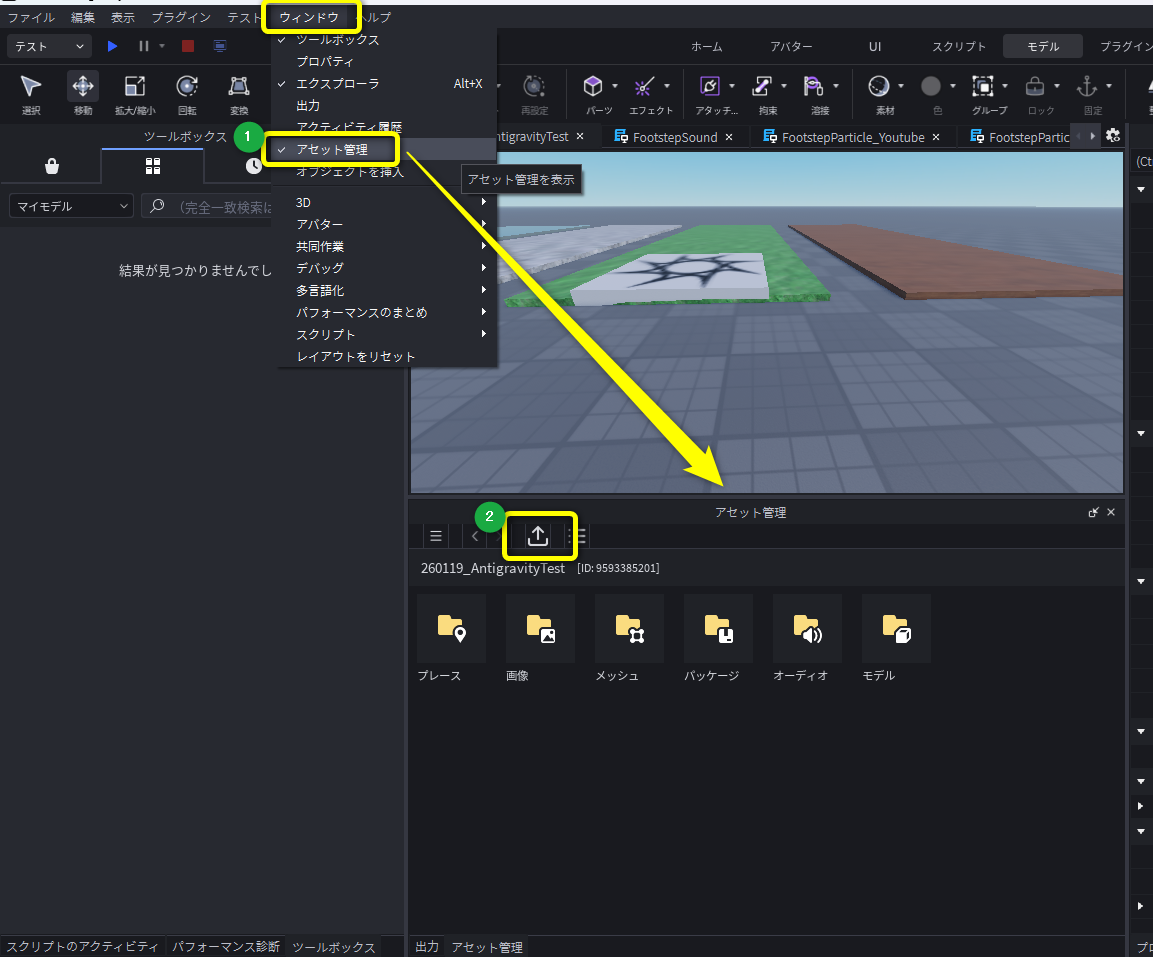
アセットマネージャーのウィンドウを開き、バルクインポートで画像をインポートする
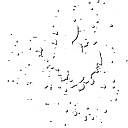
インポートした画像はこちらです。
土埃エフェクトの作成
1. Workspace に Part, Attachment, ParticleEmitter を追加
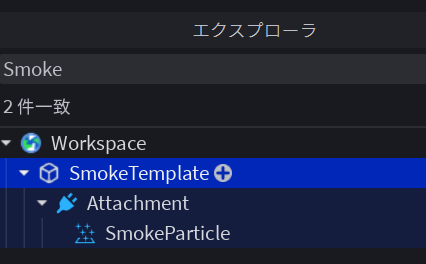
以下の名前に変更しています。
* Part ⇒ SmokeTemplate
* ParticleEmitter ⇒ SmokeParticle
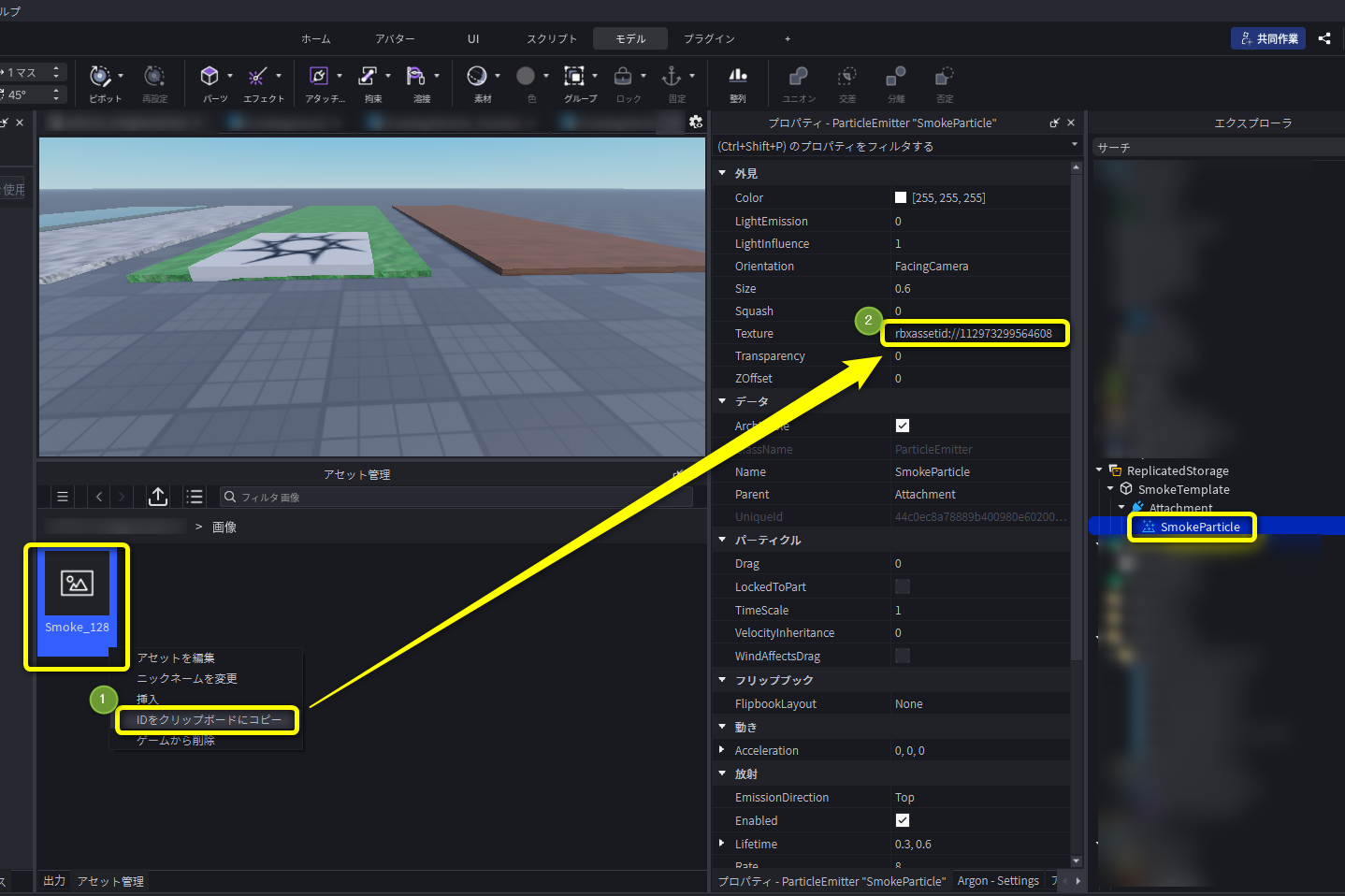
2. ParticleEmitter のテクスチャ設定
インポートした画像を選択し、右クリックでアセットIDをコピーします。
ParticleEmitter の Texture に貼り付けます。
3. エフェクトのプロパティ調整
-
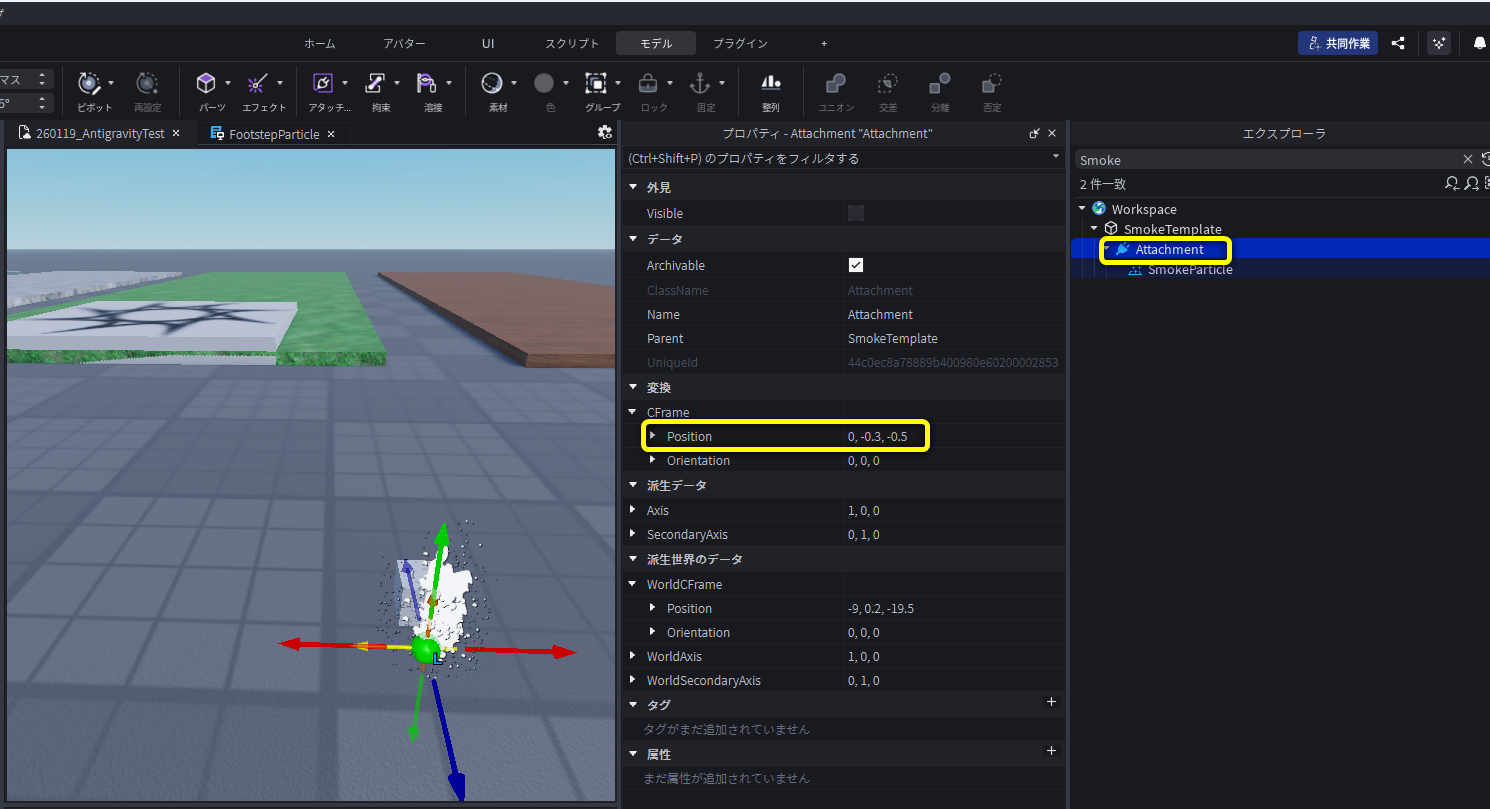
Attachment
プレイヤーの少し後ろからエフェクトが発生するようにPositionを設定します。
-
ParticleEmitter
パーティクルを調整します。
公式ドキュメント: Engine API - ParticleEmitter
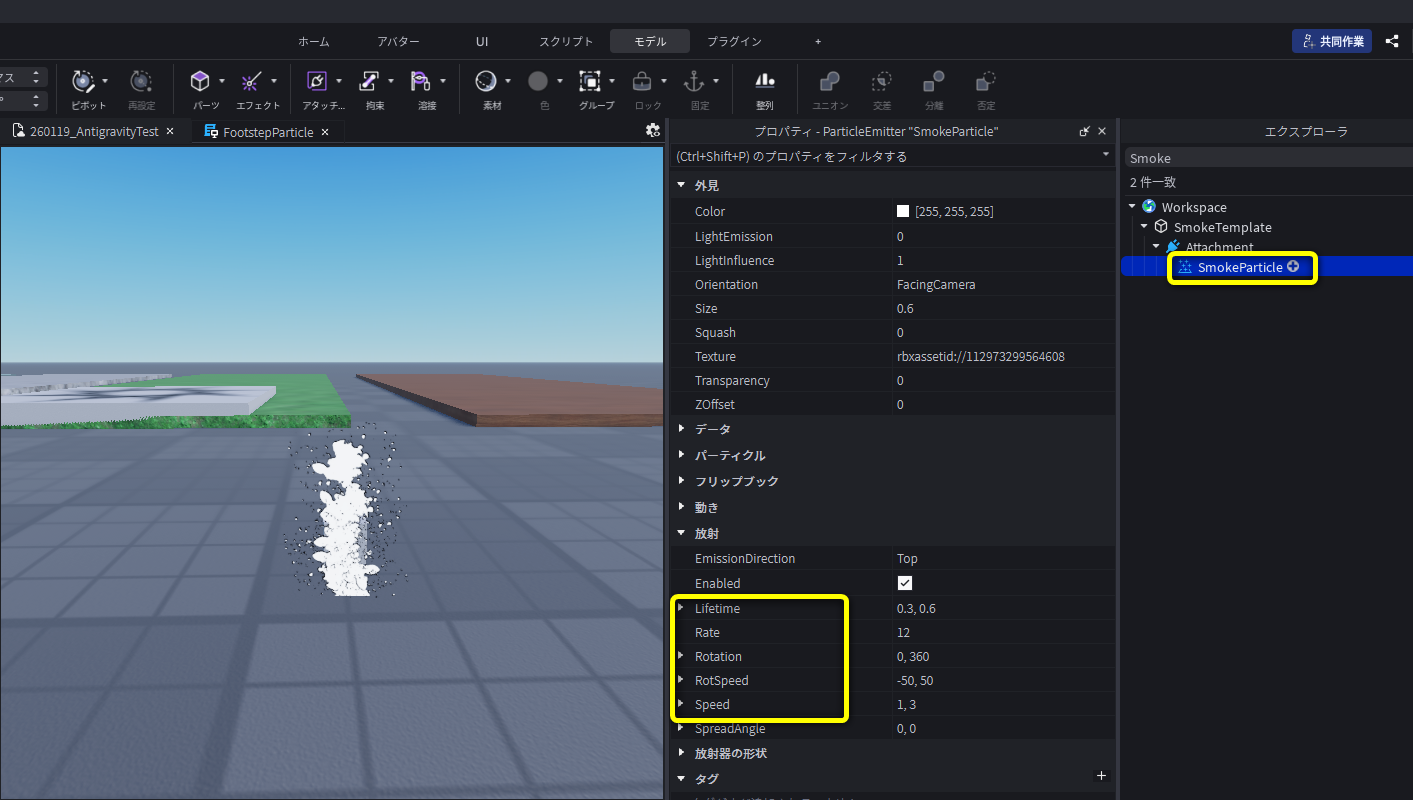
Size と Transparency は、のちほどスクリプトでアニメーションさせます。
4. Workspace から ReplicatedStorage に移動
エフェクト(SmokeTemplate)を ReplicatedStorage に移動します。
ReplicatedStorage に配置することで、
- Workspace 外にとなるため レンダリングされなくなります
- サーバーとクライアントの両方から利用できるようになります
のちのスクリプト作成では、このエフェクトをクローンして使います。
公式ドキュメント:
Engine API - Workspace
Engine API - ReplicatedStorage
スクリプトの作成
土埃エフェクトはプレイヤーごとに処理するので、LocalScript を作成します。
キャラクターの動作に関連しているため、以下のフォルダに配置します。
StarterPlayer > StarterCharacterScript
公式ドキュメント:
Engine API - StarterCharacterScript
FootstepParticle(LocalScript)
local player = game.Players.LocalPlayer
local chara = player.Character or player.CharacterAdded:Wait()
local hum : Humanoid = chara:WaitForChild("Humanoid")

local function waitForPart(name)
	return chara:WaitForChild(name)
end

local leftFoot = waitForPart("LeftFoot")
local rightFoot = waitForPart("RightFoot")

local function createSmoke(parent)
	-- SmokeTemplate.Attachment を複製して足につける
	local attachment = game.ReplicatedStorage.SmokeTemplate:
		FindFirstChildWhichIsA("Attachment"):Clone()
	attachment.Parent = parent

	local smoke : ParticleEmitter = attachment.SmokeParticle
	-- フェードイン・アウトのアニメーション
	smoke.Size = NumberSequence.new({
		NumberSequenceKeypoint.new(0, 0.6),
		NumberSequenceKeypoint.new(0.3, 1.5),
		NumberSequenceKeypoint.new(1, 0.6)
	})
	smoke.Transparency = NumberSequence.new({
		NumberSequenceKeypoint.new(0, 1),
		NumberSequenceKeypoint.new(0.3, 0),
		NumberSequenceKeypoint.new(1, 1)
	})

	smoke.Enabled = false
	return smoke
end

local leftSmoke = createSmoke(leftFoot)
local rightSmoke = createSmoke(rightFoot)

-- 毎フレーム、物理シミュレーション完了後の処理
game:GetService("RunService").Heartbeat:Connect(function(deltaTime: number)
	-- 移動中か。 空中ではないか。
	local isMoving = hum.MoveDirection.Magnitude > 0
	local isOnGround = hum.FloorMaterial ~= Enum.Material.Air

	-- キャラクターが移動中&空中ではない場合、エフェクトを発生
	leftSmoke.Enabled = isMoving and isOnGround
	rightSmoke.Enabled = isMoving and isOnGround
end)
補足
上記の毎フレーム処理(game:GetService("RunService").Heartbeat:Connect())の代わりに、Humanoidの動作の変化でトリガーする方法もあります。
-- 走る速度が変化したときの処理
hum.Running:Connect(function(speed)
	if speed > 0 then
		leftSmoke.Enabled = true
		rightSmoke.Enabled = true
	else
		leftSmoke.Enabled = false
		rightSmoke.Enabled = false
	end

end)

-- ジャンプ状態が切り替わったときの処理
hum.Jumping:Connect(function(isJumping)
	if isJumping then
		leftSmoke.Enabled = false
		rightSmoke.Enabled = false
	end
end)
付録: エフェクトをあらかじめ配置しない方法
createSmoke() の処理を書き替えます。
スクリプト内で Attachment, ParticleEmitter を作成してプロパティを設定し、エフェクトを両足につけます。
local function createSmoke(parent)
	--Attache, ParticleEmitter を作成して、エフェクトを足につける
	local attachment = Instance.new("Attachment")
	attachment.Position = Vector3.new(0, -0.3, -0.5)
	attachment.Parent = parent

	local smoke : ParticleEmitter = Instance.new("ParticleEmitter")
	smoke.Texture = "(エフェクト用画像のアセットID)" --(例)rbxassetid://112973299564608
	-- フェードイン・アウトのアニメーション
	smoke.Size = NumberSequence.new({
		NumberSequenceKeypoint.new(0, 0.6),
		NumberSequenceKeypoint.new(0.3, 1.5),
		NumberSequenceKeypoint.new(1, 0.6)
	})
	smoke.Transparency = NumberSequence.new({
		NumberSequenceKeypoint.new(0, 1),
		NumberSequenceKeypoint.new(0.3, 0),
		NumberSequenceKeypoint.new(1, 1)
	})

	smoke.Lifetime = NumberRange.new(0.3, 0.6)
	smoke.Rate = 12
	smoke.Rotation = NumberRange.new(0, 360)
	smoke.RotSpeed = NumberRange.new(-50, 50)
	smoke.Speed = NumberRange.new(1, 3)

	smoke.Parent = attachment
	smoke.Enabled = false
	return smoke
end
参考
💨 How to add footstep smoke effect in Roblox Studio! 🔥 | Glitch Games 🚀
How to make a dust effect when player walk Roblox Studio (2023)