
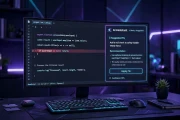
Every developer knows the feeling of staring at a failing build while the clock keeps moving. However, modern AI debugging tools now turn that slow hunt into a guided process, because they connect error logs, code history, and runtime context in one place. For example, a tool can trace a crash from a user report back to the exact function that caused it, and therefore it saves hours of manual searching. In addition, these tools explain their reasoning in plain language, so junior developers can learn while they fix problems. As a result, teams ship more reliable software without adding long review cycles. This guide explains how AI debugging works, which tools deserve a trial, and how to build a workflow that keeps humans in control.
Why Debugging Still Takes So Much Time
Debugging feels slow because the cause of a bug is rarely in the same place as its symptom. However, a crash in production may start with a bad input, a race condition, or a change made weeks earlier, and therefore a developer must reconstruct that chain by hand. For example, logs often show what failed but not why the code reached that state, so teams jump between dashboards, tickets, and source files. In addition, large codebases make it hard to know which recent change matters most, and as a result small teams lose entire afternoons to one stubborn issue. Therefore, the real goal of AI debugging is not to remove developers, but to shorten the path from symptom to root cause.
How AI Debugging Actually Works
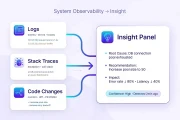
AI debugging tools work by combining several kinds of evidence instead of guessing from one error message. First, they collect stack traces, logs, and recent code changes, because that combination reveals patterns a single file cannot show. Second, they compare the failing code with similar patterns from past fixes, and therefore they can suggest a likely cause with supporting evidence. For example, Sentry uses AI assisted error grouping and root cause analysis, so related crashes cluster together instead of flooding a team with duplicates. In addition, some tools propose a patch and explain each change, so a developer can accept, edit, or reject it with confidence. However, the best tools always show their sources, because a suggestion without evidence is hard to trust in production code. As a result, developers should treat AI output as a strong lead, not as a final verdict.
Tools Worth Testing First
Sentry stands out for production debugging, because its Seer agent and error tracking link real user impact to code level detail. For example, teams can see which release introduced a fault, how many users it affected, and which fix resolved it, and therefore they can prioritize work by impact rather than by noise. In addition, GitHub Copilot Chat helps inside the editor, because it explains an error in context and suggests a focused fix for a small snippet. Moreover, Qodo adds value during review and testing, because it scans changes, flags risky patterns, and helps generate tests that catch regressions. For example, a recent roundup of developer productivity tools places Sentry, Copilot, and Qodo in a practical daily stack, and therefore it helps teams compare roles before buying. In addition, a separate guide to current developer tools confirms Sentry for error monitoring and Copilot for in editor help, so readers can cross check the claims in this article. Similarly, a team that already compares AI models carefully will benefit from reading a detailed comparison of two leading AI assistants, because model strengths change how well a tool explains code. Finally, the latest coding model research shows why context and reasoning matter, because a tool that understands a whole project finds deeper bugs than one that reads a single function.
A Practical Debugging Workflow That Stays Safe
A good workflow starts with reproduction, because an AI tool cannot fix a bug that a team cannot describe clearly. First, capture the failing input, the environment, and the exact error, and therefore give the tool clean evidence to work from. Second, ask the tool for a root cause and a minimal fix, rather than a large rewrite, because small changes are easier to test and safer to ship. For example, apply one suggested patch at a time, run the related tests, and then check whether the original failure disappears. In addition, keep the fix in version control with a clear commit message, so future developers can see what changed and why. Moreover, add a regression test for every serious bug, because that test turns a one time fix into lasting protection. As a result, the team builds a library of proven fixes instead of solving the same problem again. However, never merge an AI patch without a human review, because subtle logic errors can hide inside confident sounding suggestions.

Common Mistakes to Avoid
Teams often make debugging harder by trusting the first suggestion without checking it. However, AI tools can misread intent, especially when variable names are vague or when business rules live outside the code, and therefore a suggested fix may silence an error while leaving the real problem intact. For example, catching an exception without fixing its cause can make logs quieter while users still hit broken features. In addition, pasting sensitive production data into a public tool creates a security risk, so teams should use approved tools and redact secrets before sharing logs. Moreover, skipping tests after a fix is a costly shortcut, because untested patches often break a different feature. Therefore, treat speed as a benefit only when accuracy stays high. As a result, the strongest teams pair AI speed with disciplined review, clear tests, and honest notes about what still needs checking.
FAQ: Choosing the Right Tool
What should a small team try first? Start with an error tracking tool for production and an in editor assistant for daily work, because that pair covers both live crashes and local coding errors. However, a team should run a two week trial on real bugs, because marketing demos rarely show messy legacy code. For example, measure time to first useful clue, time to verified fix, and the number of false suggestions, and therefore choose based on evidence rather than excitement. As a result, the right choice is usually the tool your team actually uses every day, not the one with the longest feature list.
Written by Abdullah Xpert