
はじめに
こちらの記事は、JANOG57(大阪)で開催されたNETCONのLevel1-6問題の解説です。
問題文
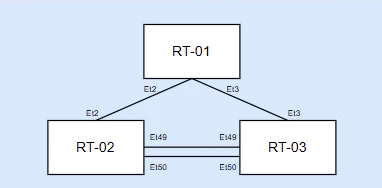
RT2 / RT3 を MLAG 構成とし、
RT1のデフォルトゲートウェイとして VARP を使用している。
しかし、
RT1からゲートウェイへの ARP が解決しない
ping が不安定
原因を特定し、RT3を設定変更し、正しい VARP 設定に修正せよ。
トポロジ
達成条件
show ip virtual-routerのStateがRT02とRT03の両方にてactiveになっていること
#show ip virtual-router
IP virtual router is configured with MAC address: fefe.fefe.0fef
IP virtual router address subnet routes not enabled
MAC address advertisement interval: 30 seconds

Protocol: U - Up, D - Down, T - Testing, UN - Unknown
NP - Not Present, LLD - Lower Layer Down

Interface Vrf Virtual IP Address Protocol State
--------------- ------------- ------------------------ -------------- ------
Vl10 default 10.0.10.1 U active
回答
show runを確認するとVARP 仮想 IP が両端で一致していないことがわかるので、訂正する。
今回はRT03を設定変更するという指示があるため、RT03側のip virtual-router addressを変更する。
RT3(config)#interface Vlan10
RT3(config)#ip virtual-router address 10.0.10.1
解説
VARP は、L3 スイッチ(ルータ)2台で 1つのデフォルトゲートウェイを Active‑Active で共有する仕組みです。
具体的には、2台のスイッチが以下を共有します。
-1つの 仮想IPアドレス(VARP IP)
-1つの 仮想MACアドレス
さいごに
本問題に挑戦していただいた皆さま、本当にありがとうございます。
VARP は両端が「同じ IP/同じ MAC」として応答することで Active‑Active 構成を実現しており、この前提が 1 つでもずれると、今回のように ARP 解決不良や疎通の不安定さとして現れます。
実機検証やトラブルシュートの際には、show run や show ip virtual-router などの基本的な確認コマンドから、「VARP の仮想 IP/MAC が両端で正しく一致しているか」を丁寧に追っていくことで問題解決につながるかもしれません。。。