

この記事は何か
月次で実施しているAWSサポートチームからの通知整理作業を、GitHub ActionsとAmazon Bedrock(Claude)を使って自動化した取り組みをまとめた記事です。
背景
元々の作業内容
弊チームでは毎月、AWSサポートチームからの定例資料(PDF)を元に以下の作業を行っていました:
- Slackに共有されたES定例PDFをダウンロード
- 自チーム関連アカウント(service-a系)の通知を抽出・分類
- 海外チーム関連アカウント(service-b系)の通知を抽出・分類
- 日本語でSlackに共有
- 英語でSlackに共有
※ 本記事では実際のサービス名を service-a、service-b として記載しています。
この作業は月1回とはいえ、PDF確認→分類→メッセージ作成の流れが地味に時間がかかっていました。
なぜ自動化しようと思ったか
- 毎月同じフォーマットで作業している
- 分類ルールが明確(アカウント名でフィルタリング)
- LLMが得意そうなタスク(テキスト分類・要約・翻訳)
これはGitHub Actions + LLMで自動化できるのでは?と考えました。
構成
全体アーキテクチャ
+-------------------------------------------------------------+
|                       GitHub Actions                        |
+-------------------------------------------------------------+
|                                                             |
|  +---------+   +-------------+   +----------------+         |
|  | Trigger |-->| Slack API   |-->| PDF Parse      |         |
|  | (Manual)|   | (Download)  |   | (pdfplumber)   |         |
|  +---------+   +-------------+   +----------------+         |
|                                          |                  |
|                                          v                  |
|                                 +---------------+           |
|                                 | Claude        |           |
|                                 | (Bedrock)     |           |
|                                 | Classify      |           |
|                                 +---------------+           |
|                                          |                  |
|                     +--------------------+----------+       |
|                     |                               |       |
|                     v                               v       |
|             +-------------+                 +-------------+ |
|             | Slack Post  |                 | Slack Post  | |
|             | (Japanese)  |                 | (English)   | |
|             +-------------+                 +-------------+ |
+-------------------------------------------------------------+
使用技術
| 項目 | 技術/サービス |
|---|---|
| CI/CD | GitHub Actions |
| ファイル取得 | Slack API (files.list) |
| PDF解析 | pdfplumber (Python) |
| LLM | Amazon Bedrock (Claude) |
| 認証 | AWS OIDC |
| 通知 | Slack Incoming Webhooks |
実装
1. GitHub Actions Workflow
# .github/workflows/es-report-automation.yml
name: Send AWS ES Report

on:
  workflow_dispatch:
    inputs:
      dry_run:
        description: 'Slack通知をスキップする(テスト用)'
        required: false
        type: boolean
        default: false

permissions:
  id-token: write
  contents: read

env:
  PYTHON_VERSION: '3.11'
  AWS_REGION: ap-northeast-1

jobs:
  generate-report:
    runs-on: ubuntu-latest
    environment:
      name: dev
    steps:
      - name: Checkout repository
        uses: actions/checkout@v4

      - name: Setup Python
        uses: actions/setup-python@v5
        with:
          python-version: ${{ env.PYTHON_VERSION }}
          cache: 'pip'

      - name: Install dependencies
        run: |
          pip install -r scripts/es_automation_report/requirements.txt

      - name: Configure AWS credentials
        uses: aws-actions/configure-aws-credentials@v4
        with:
          role-to-assume: ${{ secrets.CLAUDE_CODE_ACTION_AWS_ROLE_TO_ASSUME }}
          aws-region: ${{ env.AWS_REGION }}

      - name: Download PDF from Slack
        id: slack-download
        env:
          SLACK_AWS_ES_BOT_TOKEN: ${{ secrets.SLACK_AWS_ES_BOT_TOKEN }}
          SLACK_AWS_ES_CHANNEL_ID: ${{ secrets.SLACK_AWS_ES_CHANNEL_ID }}
          OUTPUT_DIR: ./downloads
        run: |
          echo "Downloading PDF from Slack channel..."
          python scripts/es_automation_report/slack_file_downloader.py

      - name: Run report automation
        env:
          PDF_PATH: ${{ steps.slack-download.outputs.pdf_path }}
          SLACK_AWS_ES_WEBHOOK_URL_JP: ${{ secrets.SLACK_AWS_ES_WEBHOOK_URL_JP }}
          SLACK_AWS_ES_WEBHOOK_URL_EN: ${{ secrets.SLACK_AWS_ES_WEBHOOK_URL_EN }}
          CLAUDE_CODE_ACTION_APPLICATION_INFERENCE_PROFILE: ${{ secrets.CLAUDE_CODE_ACTION_APPLICATION_INFERENCE_PROFILE }}
          DRY_RUN: ${{ inputs.dry_run }}
        run: |
          python scripts/es_automation_report/es_report_automation.py
2. Slackからファイル取得
Slack APIを使って、指定チャンネルから「ES定例_」で始まる最新のPDFを取得します。
slack_file_downloader.py(クリックで展開)
# scripts/es_automation_report/slack_file_downloader.py
import os
import re
from datetime import datetime
from pathlib import Path
import requests

# 定数
DEFAULT_FILENAME_PATTERN = r"ES定例_\d{6}.*\.pdf$"


class SlackFileDownloader:
    """Slack APIを使用してファイルをダウンロードするクラス"""

    def __init__(self, token: str):
        self.token = token
        self.base_url = "https://slack.com/api"
        self.headers = {
            "Authorization": f"Bearer {token}",
            "Content-Type": "application/json",
        }

    def list_files(self, channel_id: str, file_types: str = "pdfs", count: int = 100) -> list[dict]:
        """チャンネル内のファイル一覧を取得"""
        url = f"{self.base_url}/files.list"
        params = {"channel": channel_id, "types": file_types, "count": count}
        response = requests.get(url, headers=self.headers, params=params, timeout=30)
        response.raise_for_status()
        data = response.json()
        if not data.get("ok"):
            raise Exception(f"Slack API error: {data.get('error', 'Unknown error')}")
        return data.get("files", [])

    def find_latest_file(self, channel_id: str, filename_pattern: str, file_types: str = "pdfs") -> dict | None:
        """ファイル名パターンに一致する最新ファイルを検索"""
        files = self.list_files(channel_id, file_types)
        pattern = re.compile(filename_pattern)
        matching_files = [f for f in files if pattern.search(f.get("name", ""))]
        if not matching_files:
            return None
        matching_files.sort(key=lambda x: x.get("timestamp", 0), reverse=True)
        return matching_files[0]

    def download_file(self, file_info: dict, output_dir: str = ".") -> str:
        """ファイルをダウンロード"""
        url = file_info.get("url_private_download") or file_info.get("url_private")
        if not url:
            raise Exception("Download URL not found in file info")
        response = requests.get(url, headers={"Authorization": f"Bearer {self.token}"}, timeout=60)
        response.raise_for_status()
        output_path = Path(output_dir)
        output_path.mkdir(parents=True, exist_ok=True)
        filename = file_info.get("name", "downloaded_file.pdf")
        file_path = output_path / filename
        with open(file_path, "wb") as f:
            f.write(response.content)
        return str(file_path)


def download_es_report_pdf(
        slack_token: str,
        channel_id: str,
        output_dir: str = ".",
        filename_pattern: str | None = None,
) -> str | None:
    """ES定例PDFをSlackからダウンロード"""
    if filename_pattern is None:
        filename_pattern = DEFAULT_FILENAME_PATTERN

    downloader = SlackFileDownloader(slack_token)

    print(f"Searching for files in channel: {channel_id}")
    print(f"Filename pattern: {filename_pattern}")

    latest_file = downloader.find_latest_file(
        channel_id=channel_id,
        filename_pattern=filename_pattern,
        file_types="pdfs",
    )

    if not latest_file:
        print("No matching file found")
        return None

    filename = latest_file.get("name")
    timestamp = latest_file.get("timestamp", 0)
    upload_date = datetime.fromtimestamp(timestamp).strftime("%Y-%m-%d %H:%M:%S")

    print(f"Found file: {filename}")
    print(f"Uploaded at: {upload_date}")

    downloaded_path = downloader.download_file(latest_file, output_dir)
    print(f"Downloaded to: {downloaded_path}")

    return downloaded_path


def main():
    """CLIエントリーポイント"""
    slack_token = os.environ.get("SLACK_AWS_ES_BOT_TOKEN")
    channel_id = os.environ.get("SLACK_AWS_ES_CHANNEL_ID")
    output_dir = os.environ.get("OUTPUT_DIR", ".")
    filename_pattern = os.environ.get("FILENAME_PATTERN")  # Noneの場合はデフォルト値を使用

    if not slack_token:
        print("Error: SLACK_AWS_ES_BOT_TOKEN environment variable is not set")
        exit(1)

    if not channel_id:
        print("Error: SLACK_AWS_ES_CHANNEL_ID environment variable is not set")
        exit(1)

    result = download_es_report_pdf(
        slack_token=slack_token,
        channel_id=channel_id,
        output_dir=output_dir,
        filename_pattern=filename_pattern,
    )

    if result:
        github_output = os.environ.get("GITHUB_OUTPUT")
        if github_output:
            with open(github_output, "a") as f:
                f.write(f"pdf_path={result}\n")
        print(f"PDF_PATH={result}")
    else:
        exit(1)


if __name__ == "__main__":
    main()
3. PDF解析 & Claude分類 & Slack通知
es_report_automation.py(クリックで展開)
# scripts/es_automation_report/es_report_automation.py
import os
import json
import re
from pathlib import Path
import boto3
import pdfplumber
import requests

# 定数
MAX_PROMPT_CHARS = 50000  # Claudeプロンプトに含める最大文字数
MAX_TOKENS = 8192  # Claudeレスポンスの最大トークン数

# デフォルトの空の通知オブジェクト
DEFAULT_NOTIFICATIONS = {
    "service-a": {"action_required": [], "review_needed": [], "info_only": []},
    "service-b": {"action_required": [], "review_needed": [], "info_only": []},
}


def extract_text_from_pdf(pdf_path: str) -> str:
    """PDFからテキストを抽出"""
    text_parts = []
    with pdfplumber.open(pdf_path) as pdf:
        for i, page in enumerate(pdf.pages):
            page_text = page.extract_text() or ""
            text_parts.append(f"--- Page {i + 1} ---\n{page_text}")
            tables = page.extract_tables()
            for table in tables:
                if table:
                    table_text = "\n".join(
                        [" | ".join(str(cell) if cell else "" for cell in row) for row in table]
                    )
                    text_parts.append(f"[Table]\n{table_text}")
    return "\n\n".join(text_parts)


def classify_notifications_with_claude(text: str) -> dict:
    """Claudeを使って通知を分類"""
    bedrock = boto3.client("bedrock-runtime", region_name=os.environ.get("AWS_REGION", "ap-northeast-1"))

    prompt = f"""以下のAWS ES定例資料のテキストから、通知情報を抽出・分類してください。

## 分類対象アカウント
1. 「service-a」を含むアカウント名(service-a-prd, service-a-dev, service-a-sand など)
2. 「service-b」を含むアカウント名(service-b-prd など)

## 分類カテゴリ
各アカウントグループごとに以下の3カテゴリに分類してください:
- action_required(要対応): アクションが必要な通知、期限付きの対応が必要なもの
- review_needed(要確認): 確認が必要だが即座の対応は不要な通知
- info_only(対応不要なお知らせ): 情報共有のみの通知、利用状況レポートなど

## 出力言語
- service-a: 日本語で出力
- service-b: 英語で出力

## 重要
- 「複数アカウント向け」や「全アカウント共通」として記載されている通知についても、対象アカウントのリストに該当文字列が含まれる場合は抽出してください
- 各通知には[AWSアカウント名]と通知内容の要約を含めてください
- 参照ページ番号も可能な限り含めてください

## 出力形式
必ず以下のJSON形式で出力してください。他の説明文は不要です:
{{
  "service-a": {{
    "action_required": ["[AWSアカウント: xxx] 通知内容 - 参照: Xページ", ...],
    "review_needed": ["[AWSアカウント: xxx] 通知内容 - 参照: Xページ", ...],
    "info_only": ["[AWSアカウント: xxx] 通知内容 - 参照: Xページ", ...]
  }},
  "service-b": {{
    "action_required": [...],
    "review_needed": [...],
    "info_only": [...]
  }}
}}

## 資料テキスト
{text[:MAX_PROMPT_CHARS]}
"""

    model_id = os.environ.get("CLAUDE_CODE_ACTION_APPLICATION_INFERENCE_PROFILE")
    if not model_id:
        raise ValueError("CLAUDE_CODE_ACTION_APPLICATION_INFERENCE_PROFILE environment variable is required")

    response = bedrock.invoke_model(
        modelId=model_id,
        body=json.dumps({
            "anthropic_version": "bedrock-2023-05-31",
            "max_tokens": MAX_TOKENS,
            "messages": [{"role": "user", "content": prompt}],
        }),
    )

    try:
        result = json.loads(response["body"].read())
        response_text = result["content"][0]["text"]

        json_match = re.search(r"```json\s*(.*?)\s*```", response_text, re.DOTALL)
        if json_match:
            response_text = json_match.group(1)
        else:
            json_match = re.search(r"\{.*\}", response_text, re.DOTALL)
            if json_match:
                response_text = json_match.group(0)

        return json.loads(response_text)
    except (KeyError, IndexError) as e:
        print(f"Error: Unexpected response format from Claude: {e}")
        return DEFAULT_NOTIFICATIONS.copy()
    except json.JSONDecodeError as e:
        print(f"Error: Failed to parse Claude response as JSON: {e}")
        print(f"Response text: {response_text[:500]}...")  # 最初の500文字のみ出力
        return DEFAULT_NOTIFICATIONS.copy()


def generate_slack_message_jp(notifications: dict) -> str:
    """日本語Slackメッセージを生成"""
    lines = [
        "お疲れ様です。",
        "AWS Supportからの最新通知をまとめましたのでご確認ください。",
        "",
    ]

    service_a = notifications.get("service-a", {})

    if service_a.get("action_required"):
        lines.append("*【要対応】*")
        for item in service_a["action_required"]:
            lines.append(f"• {item}")
        lines.append("")

    if service_a.get("review_needed"):
        lines.append("*【要確認】*")
        for item in service_a["review_needed"]:
            lines.append(f"• {item}")
        lines.append("")

    if service_a.get("info_only"):
        lines.append("*【対応不要・お知らせのみ】*")
        for item in service_a["info_only"]:
            lines.append(f"• {item}")
        lines.append("")

    if not any([service_a.get("action_required"), service_a.get("review_needed"), service_a.get("info_only")]):
        lines.append("_今月はservice-aアカウント向けの通知はありませんでした。_")
        lines.append("")

    lines.append("ご不明点があればお知らせください。")

    return "\n".join(lines)


def generate_slack_message_en(notifications: dict) -> str:
    """英語Slackメッセージを生成"""
    lines = [
        "Hi team,",
        "",
        "Here are the latest notifications from AWS Support for our service-b accounts:",
        "",
    ]

    service_b = notifications.get("service-b", {})

    if service_b.get("action_required"):
        lines.append("*Action Required:*")
        for item in service_b["action_required"]:
            lines.append(f"• {item}")
        lines.append("")

    if service_b.get("review_needed"):
        lines.append("*Please Review:*")
        for item in service_b["review_needed"]:
            lines.append(f"• {item}")
        lines.append("")

    if service_b.get("info_only"):
        lines.append("*FYI - No Action Needed:*")
        for item in service_b["info_only"]:
            lines.append(f"• {item}")
        lines.append("")

    if not any([service_b.get("action_required"), service_b.get("review_needed"), service_b.get("info_only")]):
        lines.append("_No notifications for service-b accounts this month._")
        lines.append("")

    lines.append("Please let me know if you have any questions.")

    return "\n".join(lines)


def send_slack_notification(webhook_url: str, message: str) -> bool:
    """Slackに通知を送信"""
    try:
        response = requests.post(
            webhook_url,
            json={"text": message},
            headers={"Content-Type": "application/json"},
            timeout=30,
        )
        response.raise_for_status()
        print(f"Slack notification sent successfully")
        return True
    except requests.RequestException as e:
        print(f"Failed to send Slack notification: {e}")
        return False


def main():
    print("=== ES定例レポート自動化 ===")

    # 環境変数の取得
    pdf_path = os.environ.get("PDF_PATH")
    dry_run = os.environ.get("DRY_RUN", "false").lower() == "true"

    if not pdf_path:
        print("Error: PDF_PATH environment variable is not set")
        exit(1)

    if not Path(pdf_path).exists():
        print(f"Error: PDF file not found: {pdf_path}")
        exit(1)

    pdf_filename = Path(pdf_path).name
    print(f"Processing PDF: {pdf_filename}")

    # Step 1: PDF からテキスト抽出
    print("\n[Step 1] Extracting text from PDF...")
    text = extract_text_from_pdf(pdf_path)
    print(f"Extracted {len(text)} characters")

    # Step 2: Claude で通知分類
    print("\n[Step 2] Classifying notifications with Claude...")
    notifications = classify_notifications_with_claude(text)
    print(f"Classification result: {json.dumps(notifications, ensure_ascii=False, indent=2)}")

    # Step 3: Slack通知
    print("\n[Step 3] Sending Slack notifications...")

    if dry_run:
        print("DRY RUN: Skipping Slack notifications")
        print("\n--- Japanese Message ---")
        print(generate_slack_message_jp(notifications))
        print("\n--- English Message ---")
        print(generate_slack_message_en(notifications))
    else:
        webhook_jp = os.environ.get("SLACK_AWS_ES_WEBHOOK_URL_JP")
        webhook_en = os.environ.get("SLACK_AWS_ES_WEBHOOK_URL_EN")
        notification_failed = False

        if webhook_jp:
            msg_jp = generate_slack_message_jp(notifications)
            if not send_slack_notification(webhook_jp, msg_jp):
                notification_failed = True
        else:
            print("SLACK_AWS_ES_WEBHOOK_URL_JP not set, skipping Japanese notification")

        if webhook_en:
            msg_en = generate_slack_message_en(notifications)
            if not send_slack_notification(webhook_en, msg_en):
                notification_failed = True
        else:
            print("SLACK_AWS_ES_WEBHOOK_URL_EN not set, skipping English notification")

        if notification_failed:
            print("\nError: Some Slack notifications failed")
            exit(1)

    print("\n=== Complete ===")


if __name__ == "__main__":
    main()
4. 必要なSecrets
| Secret名 | 説明 |
|---|---|
SLACK_AWS_ES_BOT_TOKEN |
Slack Bot Token(xoxb-...) |
SLACK_AWS_ES_CHANNEL_ID |
PDFがアップロードされるチャンネルID |
SLACK_AWS_ES_WEBHOOK_URL_JP |
日本語通知用Webhook |
SLACK_AWS_ES_WEBHOOK_URL_EN |
英語通知用Webhook |
CLAUDE_CODE_ACTION_AWS_ROLE_TO_ASSUME |
AWS OIDC用IAMロールARN |
CLAUDE_CODE_ACTION_APPLICATION_INFERENCE_PROFILE |
Bedrock Inference Profile ARN |
実行結果サンプル
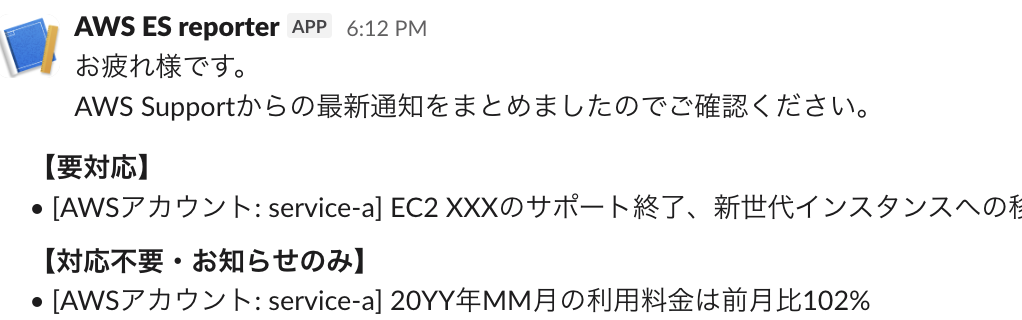
実際にSlackに送信されるメッセージの例です。
まとめ
月次作業をGitHub ActionsとClaudeで自動化することで、以下の効果がありました:
- 作業時間: 約30分 → ほぼ0分(確認のみ)
- ヒューマンエラー: 分類ミスやコピペミスがなくなった
- 即時性: PDF共有後すぐにSlack通知が可能に
LLMの活用により、従来は自動化が難しかった「テキストの分類・要約」も組み込めるようになりました。定型作業の自動化を検討している方の参考になれば幸いです。
裏話
この記事で紹介した自動化ですが、実装部分はほぼ Claude Code を使って作りました。
元々は手元でClaude Codeに指示書を読ませて半自動化していたので、今回は指示書で手動だった部分も含めて自動化してね、と指示するだけで対応が完了しました。
「こういう自動化がしたい」を文書化して、ワークフローの作成からPythonスクリプトの実装、Slack APIの調査まで一緒に進めてもらいました。自動化ツールを作るのにもLLMが使える、便利な時代になりましたね。
参考
採用情報
弊チームでは新しい技術を積極的に利用し、働く仲間達も楽に楽しく働ける形を日々目指しています。現在一緒に働く仲間を募集中です!