
概要
- 【参考】親記事
アプリに Supabase Auth(メール・パスワード + Google OAuth)を導入したときにハマったことを記事に残します。

- 【発生事象1】
Google OAuthでエラーになる(SupabaseプロバイダーとGoogle Cloud Consoleが未設定のため) - 【発生事象2】Supabase のサインアップはメール重複しててもエラーが返ってこない
背景
データのバックアップ・復元を実現するためのユーザー認証として、メール・パスワードとGoogle OAuthの2種類を実装することにしました。認証の際は以下のSupabaseクライアントを使うものとします。
Supabaseクライアント
JWT(JSON Web Token)は expo-secure-store に保管し(AsyncStorage は平文保存のため不使用)、detectSessionInUrl: false で自前のリダイレクト処理と干渉しないようにしています。
detectSessionInUrlはURL経由でログイン(OAuthやメールマジックリンクなど)を行う一般的なWebアプリケーションでは、trueに設定するものですが、今回はモバイルアプリ(iOS)で使用しているのでfalseにしています。
import { createClient } from '@supabase/supabase-js';
import * as SecureStore from 'expo-secure-store';
import Constants from 'expo-constants';

// Supabaseの認証情報
// ※環境変数で登録しているものとします
const supabaseUrl = process.env.SUPABASE_API_URL | undefined;
const supabaseAnonKey = process.env.SUPABASE_API_KEY as string | undefined;

const ExpoSecureStoreAdapter = {
  getItem:    (key: string) => SecureStore.getItemAsync(key),
  setItem:    (key: string, value: string) => SecureStore.setItemAsync(key, value),
  removeItem: (key: string) => SecureStore.deleteItemAsync(key),
};

/* 使用するSupabaseクライアント */
export const supabase = createClient(supabaseUrl ?? '', supabaseAnonKey ?? '', {
  auth: {
    storage: ExpoSecureStoreAdapter,
    autoRefreshToken: true,
    persistSession: true,
    detectSessionInUrl: false,
    flowType: "pkce", // 認証フロー
  },
});
ゴール: サインアップ・サインインが正常に動作し、Google OAuth の認証フローがアプリに戻ってきてセッションが確立される状態にすること。
【発生事象1】Google OAuthでエラーになる
Google サインインボタンをタップしてブラウザを開くと以下のエラーが出力されます。
{
  "code":400,
  "error_code":"validation_failed",
  "msg":"Unsupported provider: provider is not enabled"
}
Unsupported provider: provider is not enabled は、Supabase Dashboard で (Googleの)プロバイダーが有効化されていないことを意味します。SupabaseとGoogle Cloud Consoleの2つの外部サービスの設定情報が揃って初めて動作します。
【発生事象2】Supabase のサインアップはメール重複しててもエラーが返ってこない
メールアドレスが重複していてもエラーがなく、うまくサインアップ(登録完了)できているように見えてしまいます。実際はパスワードは更新されることもなく、登録はできていません。
// ❌ 重複メールでも error が null になる
export async function signUp(email: string, password: string): Promise<void> {
  const { error } = await supabase.auth.signUp({ email: email.trim(), password });
  if (error) throw error;
}
どうやって解決したのか
【発生事象1の解決】Google Cloud ConsoleとSupabaseの設定
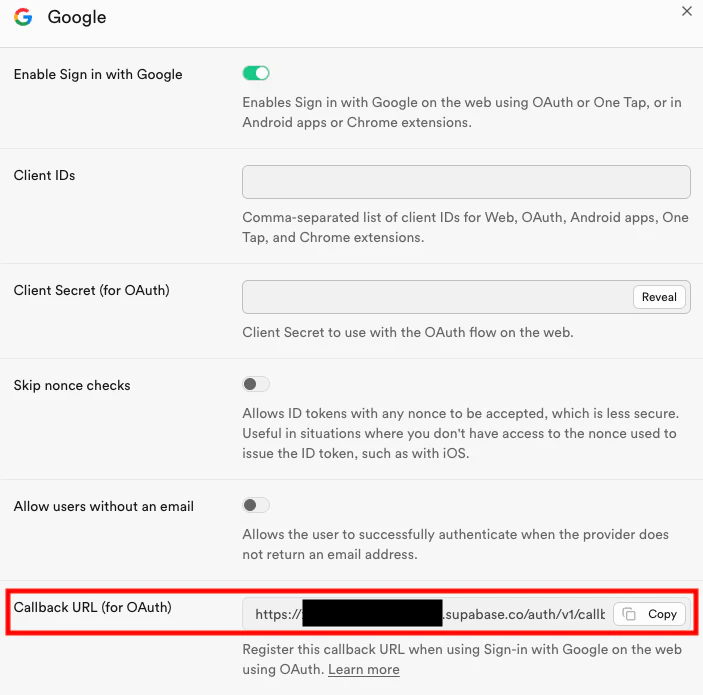
①【SupabaseのコールバックURL取得】Supabase Dashboard の「Authentication」→「Providers」→「Google」を開き、控えておく。(https://[project-ref].supabase.co/auth/v1/callbackの形式)
②【OAuth 同意画面の設定】Google Cloud Console でプロジェクトを選択し、「APIとサービス」→「OAuth 同意画面」を開く。
- アプリ名・サポートメールアドレスを入力
- User Type: 外部
- スコープに
email・profile・openidを追加
③【OAuth 2.0 クライアント ID の作成】「APIとサービス」→「認証情報」→「認証情報を作成」→「OAuth 2.0 クライアント ID」から Client ID と Client Secret を作成し、控える。
- アプリケーションの種類は ウェブアプリケーション を選ぶ。
- 「承認済みのリダイレクト URI」に Supabase のコールバック URL を追加する。
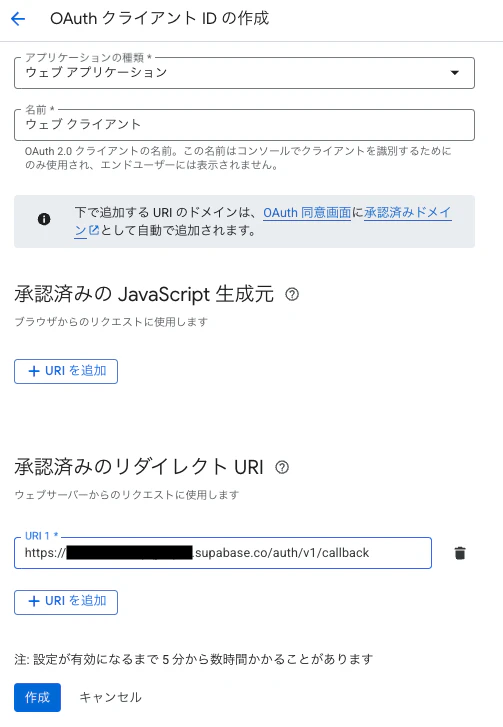
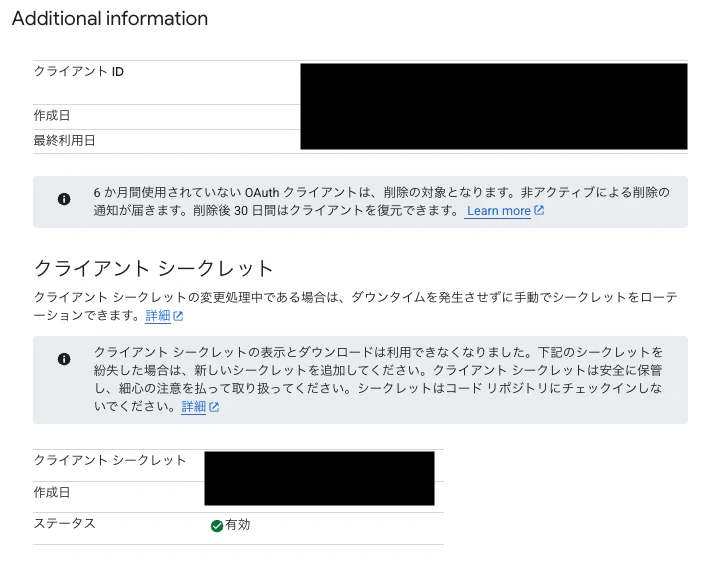
モバイルアプリ用の種類(iOS / Android)を選んでも動作しません。Supabase の OAuth フローはサーバーサイドでコード交換を行うため、ウェブアプリケーション型のクライアントが必要になります。
④【Google OAuthとSupabaseの連携】手順1のSupabase Dashboard の「Authentication」→「Providers」→「Google」を開き、手順3で取得したClient ID と Client Secret を入力し、設定情報を「保存(Save)」する
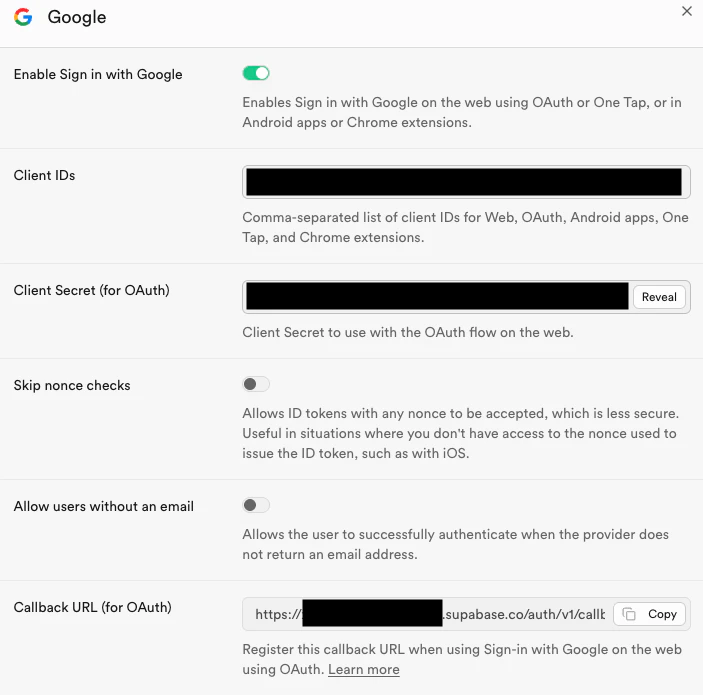
以上の手順を踏むと、端末側からGoogle OAuthを呼び出してもエラーが出ることは無くなりました。
【発生事象2の解決】メールアドレス重複判定処理を自前に実装
重複判定について、こちらの記事 を参考にしました。解決策としてはSupabase functionを使います。 まずは以下をSupabase SQL Editorで実行し、is_exist関数を定義します。
-- Supabase SQL Editor で実行
CREATE OR REPLACE FUNCTION is_exist(email_address TEXT)
RETURNS INT AS $$
  SELECT COUNT(*) FROM auth.users WHERE email = email_address;
$$ LANGUAGE SQL SECURITY DEFINER;
次に定義した関数is_existをアプリ側から実行(RPC)します。アプリ側では signUp の前に RPC を呼び、戻り値が 0 以外なら登録済みと判定します。
is_exist関数でSELECTしているauth.users テーブルは RLS で直接 SELECT できないため、上記のis_exist関数を定義し、アプリ側から実行(RPC)しています。
signUp.ts
// ❌ 重複メールでも error が null になる
export async function signUp(email: string, password: string): Promise<void> {
  const { error } = await supabase.auth.signUp({ email, password });
  if (error) throw error; // ← ここに到達しない
}

// ✅ 重複メールの場合はエラーを投げる
export async function signUp(email: string, password: string): Promise<void> {
  // RPCによりメールアドレスの重複チェック
  const { data: count, error: rpcError } = await supabase.rpc('is_exist', { email_address: email.trim() });
  if (rpcError) throw rpcError;
  if (count !== 0) throw new AlreadyRegisteredError(); // ← 専用エラー
  const { error } = await supabase.auth.signUp({ email: email.trim(), password });
  if (error) throw error;
}

// 専用エラー
export class AlreadyRegisteredError extends Error {
  constructor() {
    super('このメールアドレスはすでに登録されています');
    this.name = 'AlreadyRegisteredError';
  }
}
signIn.ts
Google OAuth のフローはアプリ → Supabase → Google → コールバックの流れで進みます。expo-web-browser の openAuthSessionAsync でブラウザを開き、コールバックで受け取った認証コードを Supabase に渡してセッションを確立します。
import * as Linking from 'expo-linking';
import * as WebBrowser from 'expo-web-browser';
import { supabase } from '@/shared/api'; // 前述の supabaseClient.ts からインポート

WebBrowser.maybeCompleteAuthSession();

export async function signInWithGoogle(): Promise<void> {
  const redirectTo = Linking.createURL(/* リダイレクト先 */);
  const { data, error } = await supabase.auth.signInWithOAuth({
    provider: 'google',
    options: { redirectTo, skipBrowserRedirect: true },
  });
  if (error) throw error;
  if (!data.url) throw new Error('URLの取得に失敗しました');
  await handleOAuthRedirect(data.url, redirectTo);
}

async function handleOAuthRedirect(url: string, redirectTo: string): Promise<void> {
  const result = await WebBrowser.openAuthSessionAsync(url, redirectTo);
  if (result.type !== 'success') return;

  const parsed = new URL(result.url);
  const code = parsed.searchParams.get('code');

  if (code) {
    const { error } = await supabase.auth.exchangeCodeForSession(code);
    if (error) throw error;
  } else {
    throw new Error('認証コードを取得できませんでした');
  }
}
感想
外部サービスを用いた実装は経験がなかったので苦戦しました。実際にしてみると意外と簡単だったので抵抗感は実装前より無くなりました。Supabase の signUp がメール重複でもエラーにならない仕様は完全に見落としていました。これらの対応はとても良い経験になりました。
※実際にアプリの機能として実現する際は「退会」機能も実装する必要があるかと思います。
最後までお読みいただきありがとうございました。