
はじめに
この記事では、Docker Compose で構築した Node.js / TypeScript / PostgreSQL 環境で、Prisma を使った CRUD 処理の実装手順について記載します。
開発環境
開発環境は以下の通りです。
- Windows11
- Docker Engine 27.0.3
- Docker Compose 2
- PostgreSQL 18.1
- Node.js 24.11.0
- npm 11.6.2
- TypeScript 5.9.3
- Express 5.1.0
- Prisma 6.19.0
前提条件
以下が完了していることを前提とします。
- Docker Compose 環境の構築
- Prisma の初期化とマイグレーション実行
-
Userテーブルの作成(id, email, name カラム)
詳細手順は以下の記事に記載があります。
Express のセットアップ
必要なパッケージのインストール
Express と関連パッケージをインストールします。
npm install express
npm install @types/express --save-dev
Express サーバーの基本実装
src/index.ts を以下のように書き換えます。
import express from "express";
import { PrismaClient } from "@prisma/client";

const app = express();
const prisma = new PrismaClient();
const PORT = process.env.PORT || 3000;

// JSONリクエストボディをパースするミドルウェア
app.use(express.json());

// ヘルスチェック用エンドポイント
app.get("/", (req, res) => {
  res.json({ message: "Server is running" });
});

// サーバー起動
app.listen(PORT, () => {
  console.log(`Server is running on port ${PORT}`);
});

// アプリケーション終了時にPrisma接続をクリーンアップ
process.on("SIGINT", async () => {
  await prisma.$disconnect();
  process.exit(0);
});
動作確認
一度ここまでの実装の動作確認をします。
docker compose up --build
ブラウザまたは curl で http://localhost:3000 にアクセスして、レスポンスが返ることを確認します。
curl http://localhost:3000
以下のレスポンスが返ります。
{"message":"Server is running"}
CRUD 処理の実装
Create(作成)
ユーザーを新規作成するエンドポイントを実装します。
src/index.ts に以下のコードを追加します。
// ユーザー作成
app.post("/users", async (req, res) => {
  try {
    const { email, name } = req.body;

    // バリデーション
    if (!email || !name) {
      return res.status(400).json({ error: "Email and name are required" });
    }

    const user = await prisma.user.create({
      data: {
        email,
        name,
      },
    });

    res.status(201).json(user);
  } catch (error) {
    console.error(error);
    res.status(500).json({ error: "Failed to create user" });
  }
});
Read(読み取り)
ユーザー情報を取得するエンドポイントを実装します。
// 全ユーザー取得
app.get("/users", async (req, res) => {
  try {
    const users = await prisma.user.findMany();
    res.json(users);
  } catch (error) {
    console.error(error);
    res.status(500).json({ error: "Failed to fetch users" });
  }
});

// 特定ユーザー取得
app.get("/users/:id", async (req, res) => {
  try {
    const { id } = req.params;
    const user = await prisma.user.findUnique({
      where: { id: Number(id) },
    });

    if (!user) {
      return res.status(404).json({ error: "User not found" });
    }

    res.json(user);
  } catch (error) {
    console.error(error);
    res.status(500).json({ error: "Failed to fetch user" });
  }
});
Update(更新)
ユーザー情報を更新するエンドポイントを実装します。
// ユーザー更新
app.put("/users/:id", async (req, res) => {
  try {
    const { id } = req.params;
    const { email, name } = req.body;

    const user = await prisma.user.update({
      where: { id: Number(id) },
      data: {
        ...(email && { email }),
        ...(name && { name }),
      },
    });

    res.json(user);
  } catch (error) {
    console.error(error);
    res.status(500).json({ error: "Failed to update user" });
  }
});
Delete(削除)
ユーザーを削除するエンドポイントを実装します。
// ユーザー削除
app.delete("/users/:id", async (req, res) => {
  try {
    const { id } = req.params;

    await prisma.user.delete({
      where: { id: Number(id) },
    });

    res.status(204).send();
  } catch (error) {
    console.error(error);
    res.status(500).json({ error: "Failed to delete user" });
  }
});
完成したコード
src/index.ts の完成形は以下の通りです。
import express from "express";
import { PrismaClient } from "@prisma/client";

const app = express();
const prisma = new PrismaClient();
const PORT = process.env.PORT || 3000;

app.use(express.json());

// ヘルスチェック
app.get("/", (req, res) => {
  res.json({ message: "Server is running" });
});

// ユーザー作成
app.post("/users", async (req, res) => {
  try {
    const { email, name } = req.body;

    if (!email || !name) {
      return res.status(400).json({ error: "Email and name are required" });
    }

    const user = await prisma.user.create({
      data: { email, name },
    });

    res.status(201).json(user);
  } catch (error) {
    console.error(error);
    res.status(500).json({ error: "Failed to create user" });
  }
});

// 全ユーザー取得
app.get("/users", async (req, res) => {
  try {
    const users = await prisma.user.findMany();
    res.json(users);
  } catch (error) {
    console.error(error);
    res.status(500).json({ error: "Failed to fetch users" });
  }
});

// 特定ユーザー取得
app.get("/users/:id", async (req, res) => {
  try {
    const { id } = req.params;
    const user = await prisma.user.findUnique({
      where: { id: Number(id) },
    });

    if (!user) {
      return res.status(404).json({ error: "User not found" });
    }

    res.json(user);
  } catch (error) {
    console.error(error);
    res.status(500).json({ error: "Failed to fetch user" });
  }
});

// ユーザー更新
app.put("/users/:id", async (req, res) => {
  try {
    const { id } = req.params;
    const { email, name } = req.body;

    const user = await prisma.user.update({
      where: { id: Number(id) },
      data: {
        ...(email && { email }),
        ...(name && { name }),
      },
    });

    res.json(user);
  } catch (error) {
    console.error(error);
    res.status(500).json({ error: "Failed to update user" });
  }
});

// ユーザー削除
app.delete("/users/:id", async (req, res) => {
  try {
    const { id } = req.params;

    await prisma.user.delete({
      where: { id: Number(id) },
    });

    res.status(204).send();
  } catch (error) {
    console.error(error);
    res.status(500).json({ error: "Failed to delete user" });
  }
});

app.listen(PORT, () => {
  console.log(`Server is running on port ${PORT}`);
});

process.on("SIGINT", async () => {
  await prisma.$disconnect();
  process.exit(0);
});
動作確認
コンテナを再起動して動作確認をします。
docker compose down
docker compose up --build
Create(ユーザー作成)
まず1人ユーザーを作成します。
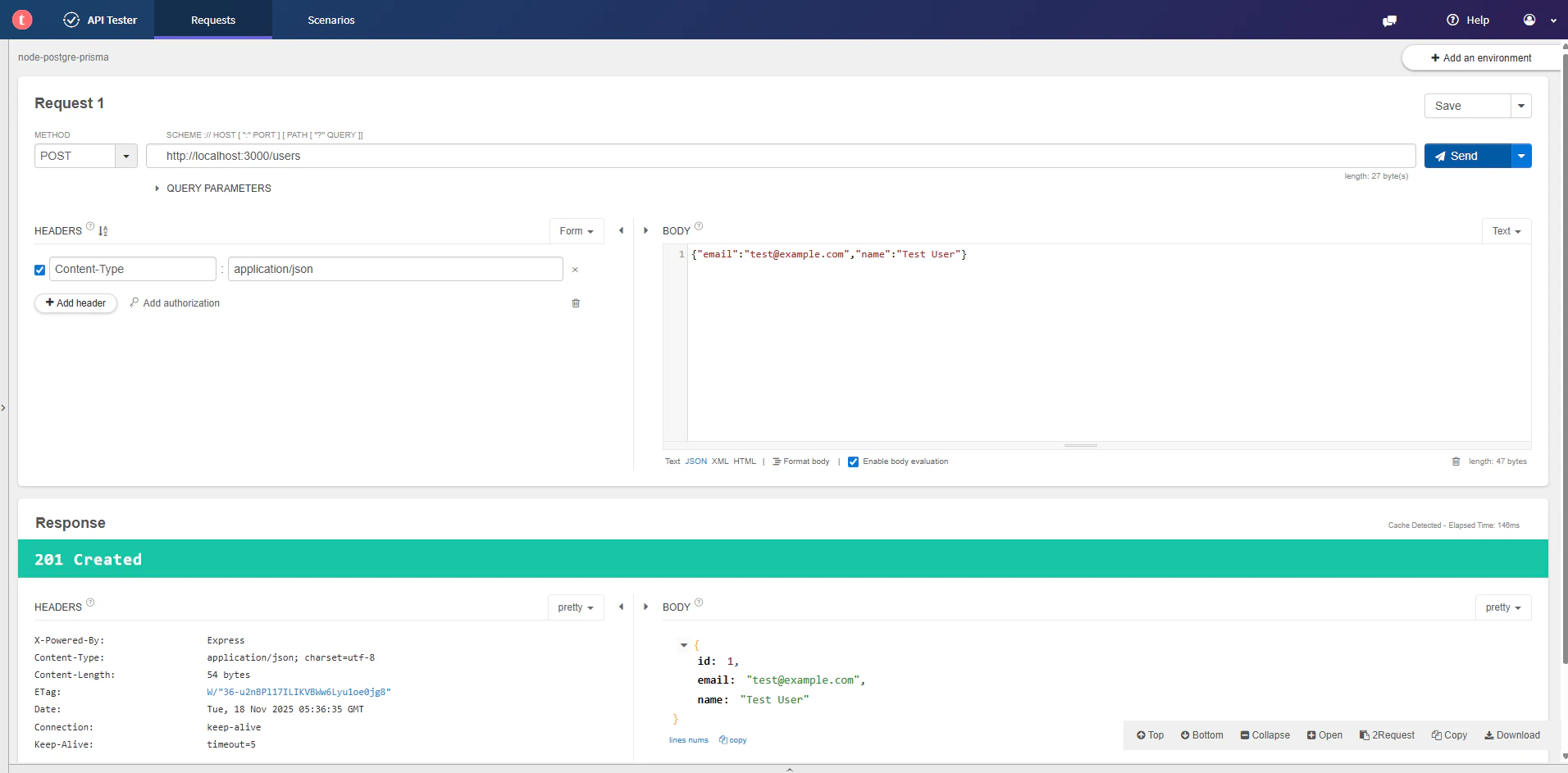
もう1人ユーザーを作成します。

Read(ユーザー取得)
全ユーザーを取得します。

特定ユーザーを取得します。

Update(ユーザー更新)
name を更新します。

Delete(ユーザー削除)
ユーザーを削除すると、ステータスコード 204 No Content が返ります。

削除されたことを確認します。

コンテナ内からデータベースに接続して、データを直接確認することもできます。
docker compose exec db psql -U user -d sampledb
ユーザーテーブルの内容を確認します。
SELECT * FROM "User";
結果
 id |      email       |   name
----+------------------+-----------
  2 | hoge@example.com | Hoge User
(1 row)
まとめ
Docker Compose 環境での Prisma を使った CRUD 処理の実装について説明しました。
ポイントは以下の通りです。
-
PrismaClientを使ってデータベース操作を実行 -
createでデータ作成、findMany/findUniqueでデータ取得 -
updateでデータ更新、deleteでデータ削除 - Express のルーティングと組み合わせた RESTful API の実装
- エラーハンドリングとバリデーションの実装
Prisma の型安全な API により、TypeScript の恩恵を最大限に受けながら、安全かつ効率的にデータベース操作を行うことができます。