
2026 年 5 月 14 日、現在 CLI で提供されているコーディングエージェント兼 「Grok Build」の早期ベータ版がリリースされ、AI / Vibe Coding 界隈の SNS が沸き立ちました。
エージェントをオープンソースで公開するなど多くのニュースと仕様変更が物議を醸しています。

インストール:
curl -fsSL https://x.ai/cli/install.sh | bash
使い方は作業ディレクトリーで grok コマンドでエージェントを呼び出し、プロンプトを投げるだけです。
有料プランにアップグレードすると MCP や Skills などが使えるようです。
今回は以下の場面を想定して、実際にエージェント開発して使用感を体験してみたいと思います。
ケーススタディ
案件:とあるヘルスケアのクライアントに会話型のAIエージェント(Voice,メッセージ)を導入します
利用場面:例えば、電話でお客さんがある先生を探している場面で、ネットワーク内の先生の情報(名前、専門、その他の情報)をから最適な先生を探して提供する
前提:
- 内部検索システムAPIなどがないレガシーな環境
- 現状全ての医者データは一個のJSONに入っている
全体のフロー
-
業務理解・ヒアリング(成功指標・業務フロー・データ更新・制約)
まずはお客さんと成功の定義を合意するところまで持っていく - ボトルネック整理(データ品質、検索性能、AIの誤回答、セキュリティ)
- MVP設計(まずは限定範囲でPoC)
- 技術構成(データ基盤 → 検索 → AIエージェント → 音声)
- 運用・改善(ログ分析、評価指標、継続的改善)
まず考えること
- このプロジェクトは何のためなのか
- 何を改善したいのか
- KPI/Goal は何なのか
作ればいいってもんじゃない
最重要:本当に解決すべき課題なのか、ゴールの定義の合意
結局何を改善・達成したいのか
例)
- 通話時間短縮なのか
- オペレーター教育なのか
- 医師紹介精度なのか
- コールセンター人員削減なのか
なので、まずヒヤリングをします。
ヒヤリング
Goal
- 通話時間を30%短縮したい
- オペレーター教育を減らしたい
- 一次回答率を90%以上にしたい
業務詳細
- 誰が検索するか(オペレーター?ユーザー)
- オペレーター/ユーザーは今何に困っていますか?
- 問い合わせのエントリーは何か(SMS、電話、WhatsApp)
- 一日何件お問合せを受けるか
- 電話を受ける人は何人
- 平均通話時間
- 通常のフロー
- 緊急の場合のフロー
- 検索に必要なキーワードと重要度ランキング
- 最終的に提供するものは?医者の情報?予約可能時間?電話番号?
- 予約はどこで行われますか?別システムがあるんですか?
- 一番時間が掛かる業務は?
- 新人とベテランで何が違いますか?
システムを作るなら
- 現場の人はシステムの状態をどこまで把握したいのか(更新ジョブが実行されたかなど通知が欲しいのか)
- オフラインタイムはあるのか
- 1処理のリトライは何秒くらいがいいのか
- 該当結果がない場合はどうするか、リトライは何回までか、類似で可能な限り探すのか、それとも他のナレッジを参照して案内するか
- エスカレーションが起きる基準は?
- 使いたいモデルシリーズなどはあるか、検証段階と実運用でモデルを変更してもいいのか
- 今後他に自動化・DXしたい業務はあるか、あるならついでにAPIサーバーなどをも作っておくと便利
データ
- JSONは何件ありますか?
- 更新頻度は?
- 自動更新?手動更新?
- 更新反映のタイミング
- 更新後のデータを取得するには
- 画面上から追加・変更できるようにするかどうか
- 処理中に外部にデータを出してもいいのか
- 他に今後追加したいデータはあるか(評判など)
制約
- データを外に出していいのか
- ユーザーごとのアクセス制御を行いたいか
- どのデーターをEncryptする必要があるか
Query
これらでいいのか
- 保険適用
- 地域
- 夜間対応
- 英語対応
- 小児対応
理想はお客さんと確認できればいいけど、実際お客さんもわからないことがほとんどです。
今回は仮なので、一旦
- 対応時間の削減 -> 30% 以上
- CSAT 改善 -> 4.85 以上を維持
- 精度を高める -> 一度で適切な医者を提供率 95%
ボトルネック
さて、実際に開発するぞとなった場合のボトルネックを考えます。
JSON データ
- 直接検索できない
- 遅くなりがち
- 更新しにくい
- バージョン管理
- リアルタイム性
AI
- 幻覚を起こす
入力
- メッセージ:誤字脱字
- 音声 :聞き間違え、名前のスペルなど
- 言語の不自由
- 表現がわかりずらい
セキュリティ
- 情報保護法律
- 施設特有のルールなど
検索
- ユーザーや営業所などによって同じ固有名詞でも呼び方が違う可能性がある、その場合はどのように理解すべきか
- 複数条件の場合どのように検索するか
設計例
上記を考慮すると、できる限り疎結合にし、エージェントがところどころでループをし、精度が確保された状態で利用者の同意を得てから次のステップに進むのがいいかと思います。
SMS text message / Voice Call-in, start the process
    ↓
Twilio
    ↓
Speech to Text
    ↓                                            If no match/hard to understand
Input Validation   -----------------|-----|-----|-----> Escalation
・Confidence Score                  |     |     |
・Medical term                      |     |     |
・Fuzzy Matching                  loop   loop   |
・Confirmation flow                 |     |     |
    ↓                               |     |     |
Ask questions and confirmation  ----|     |     |
    ↓                                     |     |
Final Confirmation -----------------------|     |
    ↓                                           |
Intent / Planner                                |
    ↓                                         loop
Doctor Search Tool                              |
        ├─ Structured Search                    |
        └─ Semantic Search                      |
    ↓                                           |
LLM Re-ranking and Response                     |
    ↓                                           |
Text to Speech / SMS Response                   |
    ↓                                   Retry   | If still not satisfied
Confirm with patient to reserve or not  --------|---->  Escalation
    ↓ If yes            ↓ Finish the call or message session timeout
Reserve Doctor          ↓
        ↓               ↓
         End the process
MVP
まず 2 - 10 施設 100 - 1000 医者対象だけで KPI を確認
- 通話時間
- 成約率
- 回答精度
運用・改善
- 実際のKPI達成率
- CSAT の変化
- エスカレーション率
- システムの安定性モニター
- DB、ネットワークの時間/負荷遷移図
- 高頻度プロセス
- 監査ログ
- DB Index
- 費用
- Token 消費量
- LLM 選択
- 可用性
- コンカレンシー
設計書作成
これらを踏まえて、以下のような設計書を作成しました。
初めて Grok Build を使うので、言語理解性能による影響を排除するために一旦英語で作成しおります。
# Health Care call center AI agent

## Why building this?

Currently our call center is peforming low efficent on dealing with phone calls and text contact from patients
They were supposed to provide best fit doctor according to the patient description
This project is to reduce human process on the workflow and reduce the time from call-in to suggestion provided

## Business Workflow

1. The patient will contact us with SMS text message or phone call
2. The operator will check the rquest and understand situation of the patient
3. Ask for questions if more information required
4. Final confirmation with the patient
5. Search in the database
6. Find most matched doctor and provide reservation

## Goal

- Reduce the time between call-in starts and suggestion provided
- Higher CSAT
- Higher accuracy%

## Inpurt

- SMS text message or Voice call
- Keywords: Gender, Illness, Region, Personality, Available datetime

## Output

- Provied correct doctor information including: Name, Expertise, Region, Gender, Hoispital, Personality

## Keywords

- Doctor name
- Expertise
- Gender
- Region
- Available date and time slots
- Personality(kind, humor, professional...)

## System Workflow

    ```
    SMS text message / Voice Call-in, start the process
        ↓
    Twilio
        ↓
    Speech to Text
        ↓                                            If no match/hard to understand
    Input Validation   -----------------|-----|-----|-----> Escalation
    ・Confidence Score                  |     |     |
    ・Medical term                      |     |     |
    ・Fuzzy Matching                  loop   loop   |
    ・Confirmation flow                 |     |     |
        ↓                               |     |     |
    Ask questions and confirmation  ----|     |     |
        ↓                                     |     |
    Final Confirmation -----------------------|     |
        ↓                                           |
    Intent / Planner                                |
        ↓                                         loop
    Doctor Search Tool                              |
            ├─ Structured Search                    |
            └─ Semantic Search                      |
        ↓                                           |
    LLM Re-ranking and Response                     |
        ↓                                           |
    Text to Speech / SMS Response                   |
        ↓                                   Retry   | If still not satisfied
    Confirm with patient to reserve or not  --------|---->  Escalation
        ↓ If yes            ↓ Finish the call or message session timeout
    Reserve Doctor          ↓
            ↓               ↓
             End the process
    ```

## Technologies

### Requirements

- Docker
- Python
- MongoDB/PostgreSQL
- Twilio API
- LLM API

### Components

1. Call

    - Options: Twilio/Amazon Connect/Azure Communication Services/Others based on existing system
    - For PoC, we can use Twilio, good supported APIs and functions
    - For prod, depend on client existing environment

2. Text/Speech to text

    - LLM
    - quality:
        -  `Confidence` > 0.95 or confirm with the patient
        - Levenshtein Distance → Alias value
            ```
            ENT
            ↓
            Otolaryngology

            Pedia
            ↓
            Pediatrics
            ```

3. Data Ingestion

    ```
    JSON
    ↓
    Validation
    ↓
    Normalizer
    ↓
    DB
    ↓
    Set Index
    ```

4. DB
    - SQLite - POC
    - PostgreSQL - Production
        - Full Text Search
        - JSONB
        - pgvector

    #### Tables

    - Audit log table
        - Id, Audit Datetime, Process name, Table name, Value before, Value after, operator name

    - Doctor information table
        - Id, Name, Gender, Age, Expertise, Hospital, Region, Language, Internal number, Rating, Score, Personality, Register date, Leave date

    - Hospital information table
        - Id, Name, Region, Rating, Address, Internal number

    - Keywords and Alias list table
        - Keywords, Alias

    - Operator information table
        - Name, Gender, Role, Employee Id, Phone Number, Join date, Leave date, role

    - Contact log table
        - Id, Start time, End time, Phone number, Keywords, Doctor name, IsAccurate, CSAT, TokenCost

    #### Roles(Not required in Poc Phase)

    - Admin/Agent
        - Can read, create and update all table
        - Can delete data in Operator information table, Keywords and Alias list table, Hospital table and Doctor information table

    - Manager
        - Can read, create, update and delete data in Operator information table, Keywords and Alias list table, Hospital table and Doctor information table
        - Can read all tables

    - Operator
        - Can read and update Doctor information table and keywords data table
        - Can only access personal Operator information row

    #### CURD
    - Create
        - When a new operator joined, create new row on Operator auth table and Operator information table
        - When a new doctor registered, create new row on Doctor information table
        - When a new keyword includes in Doctor information table after updated or created, create new keyword in Keywords and Alias list table
        - When an process started, create a new row in Audit log table and Contact log table

    - Update
        - When an process finished, update Contact log table with udpating End time
        - When an operator has left, update Leave date in Operator information table
        - When a new Alias been detected in an process, update Keywords and Alias list table to add it to where key = the keyword
        - When the process finsihed, update TokenCost and IsAccurate with the patient's reaction
            - If the reservation has been confirmed, log IsAccurate as `1`
            - If been rejected, log IsAccurate as `0`
        - When a CSAT has been answered, update the score to Contact log table
        - When a Manager or an Admin role wants to modify operator information, update Operator information table
        - When a Manager or an Admin role wants to modify Doctor information, update Doctor information table
        - When a doctor wants to leave the network, update Leave date in Doctor information table

    - Read
        - When a Manager or an Admin role wants to check Audit, read Audit log table
        - When an any-role user wants to check Operator information, read Operator information table
        - When the Agent is doing Input Validation phase, read Keywords and Alias list table
        - When the Agent is calling Doctor Search Tool, read Doctor information table
        - When The patient wants to reserve a doctor, read the Doctor information table

    - Delete
        - When an Admin role wants to delete an operator, delete Operator information row
        - When an Admin role wants to delete an Doctor, delete Doctor information row
        - When an Admin role wants to delete a Keyword or an Alias, delete Keywords and Alias list row

5. Search and AI Agent

    #### Search

    - Hybrid Search
        - If the order is Structured Query, just do a normal sql search by the keywords
        - If the order is more verbal, the Agent will convert the request into related keywords in keywords table

    #### Agent

    ```
    Voice
    ↓
    STT
    ↓
    Intent Detection
    ↓
    Planner
    ↓
    Tool Calling
    ↓
    FindDoctor() (Region, gender, expertise)
    ↓
    Re-ranking (Region, available time, )
    ↓
    Response
    ```

6. Operator login(Not required in Poc Phase)

    - Auth on Congnito/Azure AD/ Custom user pool auth

7. Logging Queue

    ```
             Doctor Search
                    │
     ┌──────────────┴──────────────┐
     │                             │
     ▼                             ▼
    PostgreSQL                  Audit Queue(SQS)
     │                             │
     ▼                             ▼
    LLM Response               Log Worker
     │                             │
     ▼                             ▼
    Text to Speech             Audit Log
    ```

8. Security

    - Access level control
    - Audit Log
    - DB Encrypt
    - Avoid prompt injection
    - Law limitation

9. Network and Infra

    - Since it does not allowed to transfer data to cloud, we will need to use an on-promise server or a private cloud
    - For PoC phase just provide docker images

10. Jobs and Batches

    - New JSON data ingestion Job
    - Auto-updating database
    - Email/Application notify Job
    - App/network health check Job
    - Performance reporting Job

11. Variables

    Manage at `.env` file
    - LLM API key:
    - Twilio API key:
    - Response time out: 120s
    - Retry attempt: 1
    - Max Search time: 60s
    - Log level: info

## Farther optimization in the future
- Agent Skills
- `Agent.md` optimization
- Architecture modification
- Cache: monitor availability and concurrency, design cache storing if required.
- Multi language support
これを Description.md として作業ディレクトリーに保存します。
作業開始
作業ディレクトリーで以下のプロンプトを投げておまかせモードで開始
Please create a cli agent tool and related batch sripts descriped in Description.md in current directory. Please make sure the agent could run by setting up .env file and running `docker compose up` command, ingestion batch and database updating batch when JSON data updated
作業内容をリアルタイムで表示してくれます。

大体 10 分くらいで完成品が表示されました。
Worked for 10m5s

サンプル JSON データ
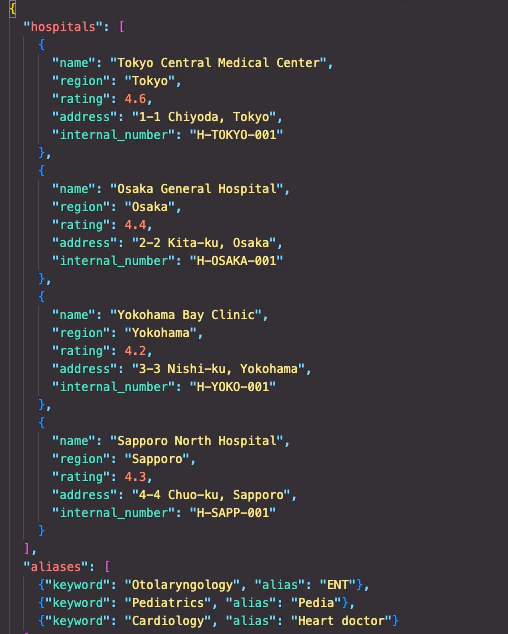
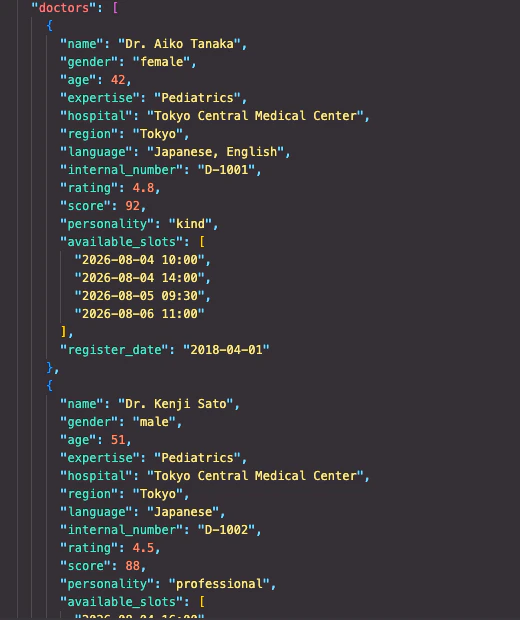
実際に動かしてみる
.env.sample から .env ファイルを複製し、各種 API トークン等を設定
cp .env.example .env
# LLM (SpaceXAI / xAI)
XAI_API_KEY=your_xai_api_key_here
LLM_MODEL=grok-4.5
LLM_BASE_URL=https://api.x.ai/v1

# Twilio (optional for PoC CLI mode)
TWILIO_ACCOUNT_SID=
TWILIO_AUTH_TOKEN=
TWILIO_PHONE_NUMBER=

# Agent behavior
RESPONSE_TIMEOUT_SEC=120
RETRY_ATTEMPT=1
MAX_SEARCH_TIME_SEC=60
CONFIDENCE_THRESHOLD=0.95

# Logging
LOG_LEVEL=info

# Database
DATABASE_URL=sqlite:////app/data/healthcare.db

# Data paths
JSON_DATA_DIR=/app/data/json
JSON_WATCH_DIR=/app/data/json/incoming
SAMPLE_DATA_PATH=/app/data/json/sample_doctors.json
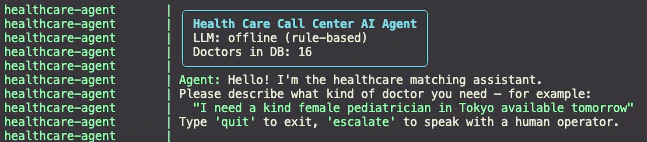
docker compose up
一回でエラーなく起動できました!
予約テスト
$ docker attach healthcare-agent
> I need a male doctor who can help on my fever

Agent: I understood (confidence 100%): General Practice, male.
I need a bit more information:
- Which region or city?
- Preferred personality? (kind, professional, humor…) (optional)
- When would you like the appointment? (optional)

> Tokyo, tomorrow

Agent: Based on your needs for a General Practice doctor (preferably male in Tokyo, available tomorrow), none of the
candidates are a perfect match—but the closest is **Dr. Emi Kato** (General Practice, female, Yokohama Bay Clinic,
rating 4.3). She's the only GP option and has nearby availability (e.g., 2026-08-04 slots), with the highest match
score.

The others are male but in unmatched specialties (Cardiology, Gastroenterology, etc.) and locations (Osaka), with
lower scores.

Reply with **1** to reserve a slot with Dr. Kato, or **no** for other options.

(Options: 1=Dr. Emi Kato, 2=Dr. Hiroshi Yamamoto, 3=Dr. Naoki Ishikawa, 4=Dr. Takeshi Mori, 5=Dr. Misaki Inoue. Reply
with a number to reserve, or 'no' / 'escalate'.)

> 1

Agent: Reservation confirmed!
  Doctor:    Dr. Emi Kato
  Expertise: General Practice
  Hospital:  Yokohama Bay Clinic
  Region:    Yokohama
  Slots:     2026-08-04 08:30, 2026-08-04 12:00, 2026-08-05 08:30
You will receive a confirmation SMS shortly.
Optional: rate this session with 'csat 5' (1-5). Type 'quit' to exit.
まとめ
今回は Grok Build を模擬プロジェクトベースで体験してみました。
細かいところはまだみてないんですが、無料プランでも応答時間、コーディングスピード、品質など全体的に悪くない感じでした。
実際の対応内容もよくあるサポートやヘルプデスクに近い感じで悪くないと思います。
特に作成中に作業が確認できることと、一回で docker がエラーなく実行できたことに感動を覚えました。
トークン消費:
60K

どうやら 500K まで無料で使えそうなので、今月は色々使い倒して試してみようと思います。
面白い発見あったら報告いたします。
宣伝
千住Meetup!にて多くのエンジニア、デザイナー、PM が集まっており、日々最新の AI トレンドについて討論されております。
是非とも皆さんと交流できたらと思います。
お気軽にご参加ください。