
2026年10月17日からTikTok上で、ライブ映像の主役を1枚の写真の人物へ差し替えたTalk Dirty dance AIと呼ばれる動画が拡散しました。2026年10月21日に収集した92本のトレンド動画のうち82本には2種類のCapCutテンプレートへのリンクがあり、それらの出力は主役以外のステージ、ダンサー、カメラの動き、炎や照明が一致する同じ元映像で構成されています。
動画を自動処理する上では、次の4点を判別する必要があります。
- どの動画が同じ元映像から作られたものか
- 映像と音のそれぞれが元映像から何秒ずれているか
- 途中でスキップや繰り返しがない1本の連続したテイクか
- 主役の差し替え版が1秒ごとの見た目で破綻していないか
本記事ではPython、OpenCV、NumPy、ffmpegによる4本の短いスクリプトでこれらを順に判別します。
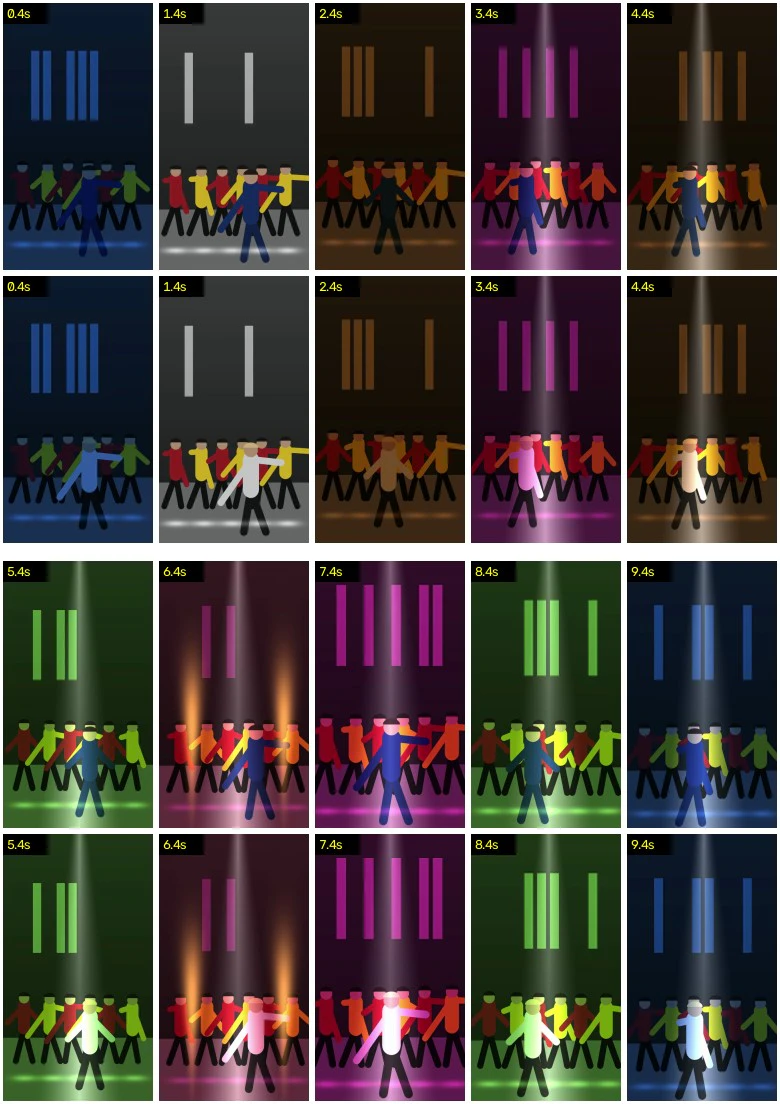
図1 練習用データの1秒ごとの一覧画像(ずれを0.40秒補正して同一時刻を揃えたstage.mp4とswap_a.mp4、主役のみ相違)
図1〜図4および表Aは、最後の節で生成する5本の練習用データで出力したものであり正解の値が確定しています。表B〜表Dには実際のトレンド投稿動画と筆者の差し替え版で計測した数値を掲載しますが、元動画のフレーム画像は表示せず数値のみを扱います。
動作環境の確認
本記事の計測と検証は以下の環境で行いました。
- Apple M2
- macOS 26.6
- Python 3.14.7(uv経由で実行)
- opencv-python-headless 5.0.0
- numpy 2.5.4
- ffmpeg 8.1.2
uvを使えば仮想環境を手動構築せずに各スクリプトを実行できます。
ffmpeg -version | head -n 1
uv run --with opencv-python-headless --with numpy python -c "import sys, cv2, numpy; print(sys.version.split()[0], cv2.__version__, numpy.__version__)"
ffmpeg version 8.1.2 Copyright (c) 2000-2026 the FFmpeg developers
3.14.7 5.0.0 2.5.4
手順1:同じ元映像から作られた動画を見分ける
差し替え版は主役が描き直され解像度やフレームレート、開始位置が異なるため、ずれが判明するまで同じ時刻でフレームを直接比較できません。しかし同じ元映像から作られた動画であれば、主役が誰であってもフラッシュや炎、暗転といった照明の切り替わりが画面全体へ同一のタイミングで生じます。
samefootage.py では以下の4段階で判定します。
- 周辺部のロゴや字幕、黒帯を除外するため画面中央の縦横3分の2のみを抽出し、B、G、Rそれぞれの平均値を計算します。
- 0.02秒刻み(毎秒50値)にリサンプリングし、隣接フレーム間における色の変化量を求めます。
- 基準動画の先頭8秒間と対象動画の間で−3秒から+3秒の範囲でずれを動かし、B、G、R各チャンネルの相関の平均値を算出します。
- 最も相関が高くなったずれの位置で、フレーム中央を9×8画素の灰色画像に縮小して各画素と右隣を比較した64ビットの差分ハッシュ(dHash)を求め、同一時刻のフレーム間で一致しないビット数の中央値(0なら同一画像構造)を計算します。
ずれ(shift)は、対象動画のt秒が基準動画のt + ずれ秒に当たることを意味します。
# samefootage.py ref.mp4 other.mp4 [...]: is each video built on the same footage as ref.mp4?
# shift: the video at t shows ref at t + shift / corr: picture correlation / hash: differing bits (of 64)
import sys
import numpy as np, cv2

STEP = 0.02                                       # 50 Hz grid: finer than one frame at 24-60 fps


def features(path):
    """Mean colour of the frame centre and a 64-bit difference hash, for every frame."""
    cap = cv2.VideoCapture(path)
    fps, means, hashes = cap.get(cv2.CAP_PROP_FPS), [], []
    while True:
        ok, f = cap.read()
        if not ok:
            break
        h, w = f.shape[:2]
        c = f[h // 6:h - h // 6, w // 6:w - w // 6]               # skip the edges: logos, captions, bars
        means.append(c.reshape(-1, 3).mean(0))
        g = cv2.resize(cv2.cvtColor(c, cv2.COLOR_BGR2GRAY), (9, 8), interpolation=cv2.INTER_AREA)
        hashes.append((g[:, 1:] > g[:, :-1]).ravel())
    return np.arange(len(means)) / fps, np.array(means), np.array(hashes)


def change(t, means):
    """Frame-to-frame change of the mean colour, resampled to the 50 Hz grid."""
    grid = np.arange(0, t[-1], STEP)
    return np.diff(np.stack([np.interp(grid, t, means[:, k]) for k in range(3)], 1), axis=0)


def corr(a, b, k, i0, i1):
    """Correlation of a[i] with b[i - k] over i0 <= i < i1 (mean of the B, G, R correlations)."""
    i0, i1 = max(i0, k, 0), min(i1, len(a), len(b) + k)
    if i1 - i0 < 50:                                               # less than 1 s of overlap
        return -1.0
    x, y = a[i0:i1], b[i0 - k:i1 - k]
    x, y = (x - x.mean(0)) / (x.std(0) + 1e-9), (y - y.mean(0)) / (y.std(0) + 1e-9)
    return float((x * y).mean())


def best_shift(a, b, seconds=8.0, max_shift=3.0):
    """Shift (s) that lines b up best with the first `seconds` of a, and its correlation."""
    n, m = int(seconds / STEP), int(max_shift / STEP)
    r, k = max((corr(a, b, k, 0, n), k) for k in range(-m, m + 1))
    return k * STEP, r


def hash_bits(ta, ha, tb, hb, shift, seconds=8.0):
    """Median number of differing hash bits between frames that show the same moment."""
    j = np.round((ta - shift) / (tb[1] - tb[0])).astype(int)
    ok = (ta < seconds) & (j >= 0) & (j < len(hb))
    return float(np.median((ha[ok] != hb[j[ok]]).sum(1)))


if __name__ == '__main__':
    ta, ma, ha = features(sys.argv[1])
    a = change(ta, ma)
    for path in sys.argv[2:]:
        tb, mb, hb = features(path)
        shift, r = best_shift(a, change(tb, mb))
        verdict = 'same footage' if r >= 0.5 else 'different'
        print(f'{path:16s} shift {shift:+.2f} s  corr {r:.2f}  hash {hash_bits(ta, ha, tb, hb, shift):4.1f}  {verdict}')
以下で実行します。
uv run --with opencv-python-headless --with numpy python samefootage.py stage.mp4 swap_a.mp4 swap_b.mp4 remix.mp4 other_take.mp4
swap_a.mp4       shift +0.40 s  corr 0.83  hash  5.0  same footage
swap_b.mp4       shift +0.00 s  corr 1.00  hash  2.0  same footage
remix.mp4        shift +0.00 s  corr 1.00  hash  0.0  same footage
other_take.mp4   shift +1.84 s  corr 0.26  hash 24.0  different
| ファイル | 内容 | 正解のずれ | 検出されたずれ | 相関 | 不一致ハッシュビット数(64ビット中) |
|---|---|---|---|---|---|
swap_a.mp4 |
主役描き直し、576×1024、24 fps、元映像の0.40秒地点から開始 | +0.40 s | +0.40 s | 0.83 | 5.0 |
swap_b.mp4 |
主役描き直し、1080×1920、ロゴあり、末尾に3秒の広告 | 0.00 s | +0.00 s | 1.00 | 2.0 |
remix.mp4 |
stage.mp4の9.0秒地点にカットを挿入 | 0.00 s(カット前) | +0.00 s | 1.00 | 0.0 |
other_take.mp4 |
同一楽曲の別テイク | なし(別映像) | (+1.84 s) | 0.26 | 24.0 |
表A 練習用データにおける手順1の判定結果
表Aの通り、主役の外見や解像度、フレームレートが異なる swap_a.mp4 でも、色のコマ間変化により正解値通りの +0.40 秒のずれと 0.83 の相関が検出されました。これに対して同一楽曲の別テイク(other_take.mp4)は最大でも相関 0.26 にとどまり、ハッシュ不一致も24ビットに達して別映像と判定されます。
同じ元映像と判定する閾値を相関 0.5 とすることで、練習用データ(0.83〜1.00 対 0.26)と実際の投稿動画(0.58〜0.73 対 0.17)の双方で明確に判別できます。
| 動画 | 解像度、フレームレート、長さ | ずれ | 相関 | 不一致ハッシュビット数 | 判定 |
|---|---|---|---|---|---|
| テンプレートAのプレビュー(主役差し替え済み) | 576×1024, 24 fps, 10.08 s | +0.00 s | 0.67 | 16.5 | 同じ元映像 |
| 別のアプリのチュートリアル動画(先頭10秒が出力) | 576×1024, 30 fps, 24.8 s | −0.02 s | 0.58 | 13.0 | 同じ元映像 |
| 筆者による差し替え版 | 480×854, 30 fps, 15.00 s | +0.00 s | 0.73 | 13.0 | 同じ元映像 |
| テンプレートBのプレビュー(別テイク) | 720×1280, 30 fps, 13.81 s | +0.60 s | 0.17 | 30.0 | 別の映像 |
表B 実際の投稿動画と15秒の元テイク(480×854、30 fps、15.02秒)との比較
表Bの通り、テンプレートAのプレビュー、別のアプリの出力、筆者による差し替え版の3本は相関 0.58〜0.73、ハッシュ不一致 13〜16.5 ビットで同じ元映像と判定されました。一方、別テイクのテンプレートBは相関 0.17、ハッシュ不一致 30 ビットにとどまり、別映像であることが確認できます。
手順2:音の相互相関で音声のずれを測定する
映像は0.02秒グリッドで照合しフレーム間隔も24〜30 fpsで33〜42ミリ秒ですが、音声は8000分の1秒の精度で位置合わせが可能です。後述の表Cのように、同一の映像であってもテンプレート出力の音声は15秒の元テイクより0.138秒遅れて再生され、別のアプリの出力も0.114秒遅れるため、映像と音声は個別に測定します。
audiolag.py では各音声の先頭10秒をffmpegで8 kHzモノラル化し、周波数領域での1回の掛け算により各ずれを個別に試すことなく全オフセットの相互相関を一括計算する高速フーリエ変換(FFT)を用います。波形のエネルギーで正規化するため、完全一致時のピーク値は 1.000 になります。
# audiolag.py a.mp4 b.mp4: how far b's sound is shifted against a's (cross-correlation via FFT)
# shift: b at t sounds like a at t + shift / peak: normalised peak / next: best peak more than 0.1 s away
import subprocess, sys
import numpy as np

SR = 8000                                             # 8 kHz mono is enough to line up music


def load(path, seconds=10):
    cmd = ['ffmpeg', '-v', 'error', '-i', path, '-vn', '-ac', '1', '-ar', str(SR), '-t', str(seconds), '-f', 's16le', '-']
    x = np.frombuffer(subprocess.run(cmd, capture_output=True, check=True).stdout, np.int16) / 32768
    return x - x.mean()


a, b = load(sys.argv[1]), load(sys.argv[2])
n = 1 << (len(a) + len(b)).bit_length()
c = np.fft.irfft(np.fft.rfft(a, n) * np.conj(np.fft.rfft(b, n)), n)   # c[k] = sum of a[i + k] * b[i]
c = np.concatenate([c[-(len(b) - 1):], c[:len(a)]]) / np.sqrt((a ** 2).sum() * (b ** 2).sum())
lags = np.arange(-(len(b) - 1), len(a)) / SR
i = int(np.argmax(c))
j = int(np.argmax(np.where(np.abs(lags - lags[i]) > 0.1, c, -1)))
print(f'{sys.argv[2]:16s} shift {lags[i]:+.3f} s  peak {c[i]:.3f}  next {c[j]:.3f} at {lags[j]:+.3f} s')
以下で実行します。
for f in swap_a.mp4 swap_b.mp4 remix.mp4 other_take.mp4; do
  uv run --with numpy python audiolag.py stage.mp4 "$f"
done
swap_a.mp4       shift +0.260 s  peak 0.959  next 0.382 at -1.540 s
swap_b.mp4       shift +0.000 s  peak 1.000  next 0.364 at -1.800 s
remix.mp4        shift +0.000 s  peak 0.880  next 0.366 at +1.800 s
other_take.mp4   shift +2.000 s  peak 0.787  next 0.421 at -0.400 s
練習用データの swap_a.mp4 は映像が +0.40 秒、音声が +0.260 秒で検出され、音声が映像より 0.14 秒遅れて再生されていることが分かります(正解値も音声 +0.26 秒、映像 +0.40 秒)。また other_take.mp4 は手順1の映像相関が 0.26 であったにもかかわらず、同一楽曲であるため +2.000 秒の位置で音のピークが 0.787 に達しており、同一音源であっても同じ元映像とは限らないことを示しています。
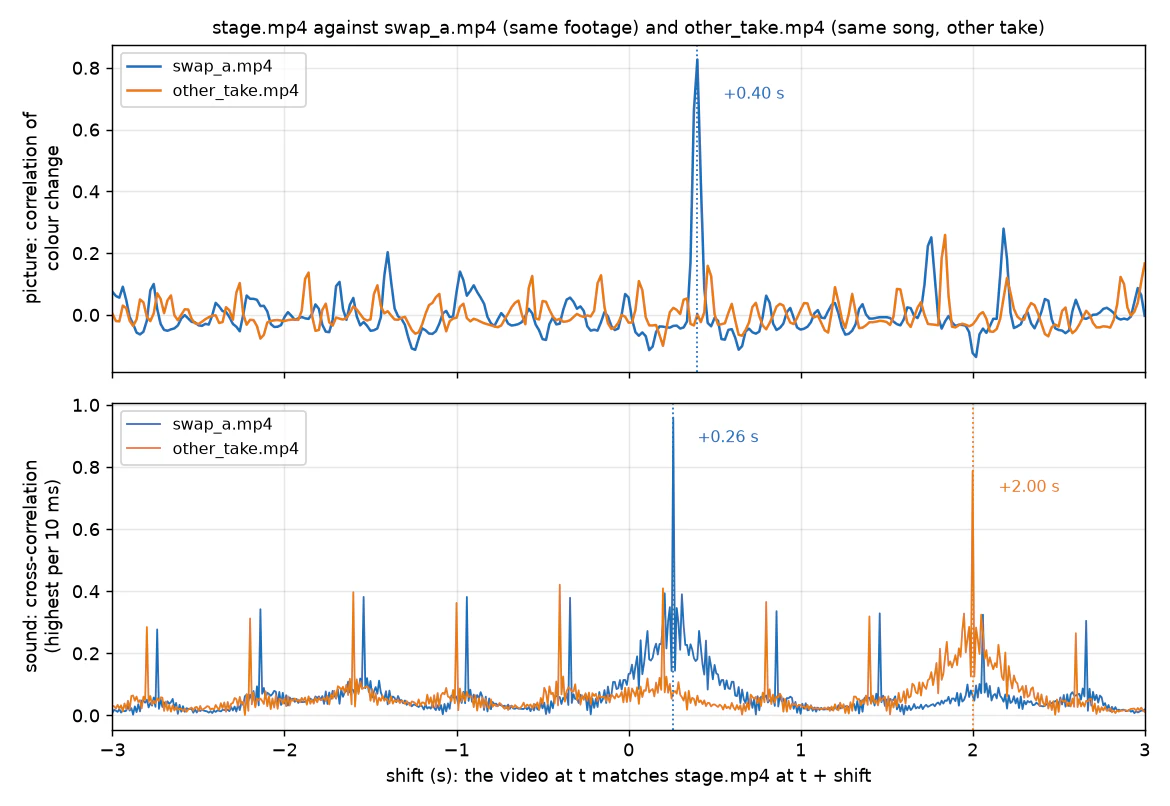
図2 オフセットに対する相関(上段:色の変化による映像相関、下段:FFTによる音の相互相関)
next 列には検出ピークから0.1秒以上離れた最大値が示され、正解のずれから楽曲の拍(100 BPM、1拍0.6秒)の整数倍だけ離れた位置に副ピークが現れます(例えば swap_a.mp4 の −1.540 秒は +0.260 秒より3拍手前の位置です)。練習用データではピーク値 0.79〜1.00 に対して next の値が 0.36〜0.42 と大幅に低く、正解のずれが際立っていることが分かります。
| 動画 | 映像のずれ | 音のずれ(ピーク値) | 映像に対する音の遅れ | トレンド音源(18.29秒)内での開始位置(ピーク値) |
|---|---|---|---|---|
| 15秒の元テイク | — | — | — | 0.236 s (0.891) |
| テンプレートAのプレビュー | +0.00 s | −0.138 s (0.835) | 0.138秒遅れ | 0.098 s (0.915) |
| 別のアプリの出力 | −0.02 s | −0.134 s (0.872) | 0.114秒遅れ | 0.102 s (0.954) |
| 筆者による差し替え版 | +0.00 s | +0.000 s (0.999) | 一致 | 0.236 s (0.890) |
| テンプレートBのプレビュー(別テイク) | (別映像) | −0.160 s (0.906) | — | 0.076 s (0.973) |
表C 実際の投稿動画における映像と音のずれ、およびトレンド音源内の開始位置
表Cの通り、テンプレートAの出力は映像のずれが +0.00 秒であるのに対し、音声は元テイクより 0.138 秒(30 fps換算で約4フレーム)遅れて再生されます。筆者の差し替え版は元テイクの音声を保持しているため +0.000 秒で完全に一致します。
手順3:scdetでカット候補を抽出し区間ごとのずれで確認する
ffmpegのscdetフィルタは、輝度(Y面)の前フレーム差分の平均絶対値と、その差分の変化量のうち小さい方を0〜100のスコアとして算出します。scdet フィルタの説明によると適切な閾値は8.0〜14.0で、既定値は10です。
ffmpeg -v error -i remix.mp4 -vf "scdet=threshold=10:sc_pass=1,metadata=mode=print:file=-" -an -f null - \
  | awk -F= '/scd.score/ {s = $2} /scd.time/ {printf "%6.2f s  score %s\n", $2, s}'
  1.27 s  score 26.114
  2.63 s  score 20.593
  3.47 s  score 10.187
  4.43 s  score 18.246
  7.77 s  score 21.360
  9.00 s  score 15.995
 11.13 s  score 15.776
 12.60 s  score 10.493
 13.30 s  score 15.696
remix.mp4 では9フレームが閾値10を超えましたが、9.00秒の実際のカット(スコア16.0)は5番目のスコアでした。照明の切り替わりもカットと同様に閾値に達することがあり、remix.mp4 では1.27秒の暗転からの点灯が最高スコア(26.1)となり、実際のカット(16.0)を上回るスコアを記録しました。
編集カットがない連続テイクは同一のずれを維持しますが、カットで映像が飛ぶとずれが変化します。そこで lagtrack.py を使い、対象動画を2秒区間に区切って0.5秒刻みでずれを追跡します。
# lagtrack.py a.mp4 b.mp4: the shift of b against a, measured again in every 2 s window of b
# one continuous copy keeps one shift; a hard cut that skips or repeats footage makes it jump
import sys
from samefootage import STEP, features, change, corr

a = change(*features(sys.argv[1])[:2])
b = change(*features(sys.argv[2])[:2])
win, hop, m = int(2 / STEP), int(0.5 / STEP), int(3 / STEP)
for s in range(0, len(b) - win + 1, hop):
    ks = range(max(-m, -s), min(m, len(a) - s - win) + 1)            # the whole window must exist in a
    if not ks:                                                       # b runs past the end of a
        break
    r, k = max((corr(a, b, k, s + k, s + win + k), k) for k in ks)
    print(f'b {s * STEP:4.1f} - {(s + win) * STEP:4.1f} s  shift {k * STEP:+.2f} s  corr {r:.2f}')
以下で実行します。
uv run --with opencv-python-headless --with numpy python lagtrack.py stage.mp4 remix.mp4
b  0.0 -  2.0 s  shift +0.00 s  corr 1.00
b  0.5 -  2.5 s  shift +0.00 s  corr 1.00
b  1.0 -  3.0 s  shift +0.00 s  corr 1.00
b  1.5 -  3.5 s  shift +0.00 s  corr 1.00
b  2.0 -  4.0 s  shift +0.00 s  corr 1.00
b  2.5 -  4.5 s  shift +0.00 s  corr 1.00
b  3.0 -  5.0 s  shift +0.00 s  corr 1.00
b  3.5 -  5.5 s  shift +0.00 s  corr 1.00
b  4.0 -  6.0 s  shift +0.00 s  corr 1.00
b  4.5 -  6.5 s  shift +0.00 s  corr 1.00
b  5.0 -  7.0 s  shift +0.00 s  corr 1.00
b  5.5 -  7.5 s  shift +0.00 s  corr 1.00
b  6.0 -  8.0 s  shift +0.00 s  corr 1.00
b  6.5 -  8.5 s  shift +0.00 s  corr 1.00
b  7.0 -  9.0 s  shift +0.00 s  corr 0.83
b  7.5 -  9.5 s  shift +0.00 s  corr 0.68
b  8.0 - 10.0 s  shift -1.24 s  corr 0.55
b  8.5 - 10.5 s  shift +0.86 s  corr 0.65
b  9.0 - 11.0 s  shift +1.00 s  corr 1.00
b  9.5 - 11.5 s  shift +1.00 s  corr 1.00
b 10.0 - 12.0 s  shift +1.00 s  corr 1.00
b 10.5 - 12.5 s  shift +1.00 s  corr 1.00
b 11.0 - 13.0 s  shift +1.00 s  corr 1.00
b 11.5 - 13.5 s  shift +1.00 s  corr 1.00
9.0秒以前に終わる区間はずれが +0.00 秒で一定であり、9.0秒以降に始まる区間は +1.00 秒(相関 1.00)へ跳び、元映像が1.00秒スキップされたことを示しています。9.00秒を跨ぐ3区間のうち、7.5〜9.5秒は大半がカット前のため +0.00 秒(相関 0.68)を維持しますが、8.0〜10.0秒と8.5〜10.5秒は無意味な値(−1.24秒、+0.86秒)を示します。1.27秒の点灯ではずれが変わらないためカットではありません。
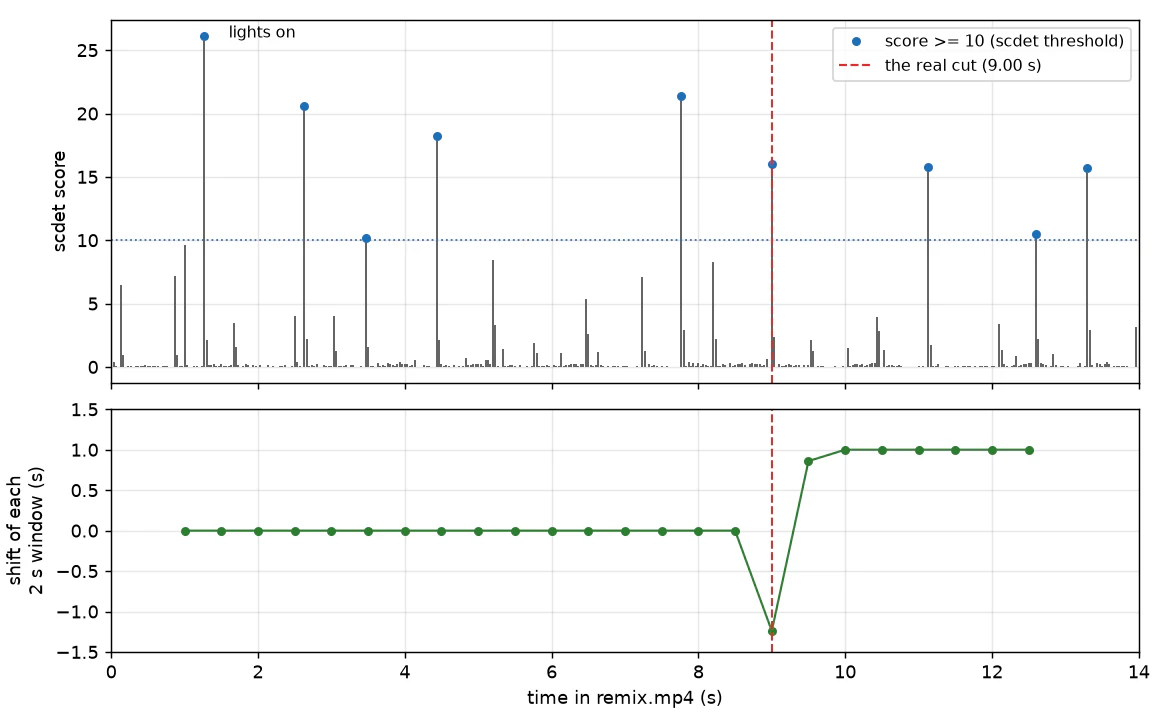
図3 remix.mp4のscdetスコア(上段)と2秒区間ごとのずれ(下段)
| 検査内容 | 結果 |
|---|---|
| 15秒の元テイクに対するscdet(全450フレーム) | 閾値10超は1フレームのみ(1.17秒で16.52)、次点は1.83秒の7.95、残り448フレームはすべて4.73以下 |
元テイクの1.07〜1.90秒における全フレーム目視確認(sheet.py 使用) |
1.17秒でステージ照明が一斉点灯、1.83秒で背景スクリーンが点灯、構図と人物配置は維持され滑らかなパンとズームのみでカットなし |
元テイクに対するテンプレートAのプレビューの lagtrack.py 計測(0〜10秒の全17区間) |
全区間でずれが−0.08〜+0.04秒の範囲内に収まり、相関は0.66〜0.85 |
表D 実際の投稿動画におけるカットおよび連続テイクの検証結果
表Dの通り、実動画の元テイクで10を超えた1.17秒は照明の点灯であり、テンプレートAの出力は全10秒間でずれが2フレーム以内に収まる連続テイクと確認できました。
ただし区間ごとの計測で検出できるのは片方の動画のみにあるカットに限られ、双方が共通して持つカットや、元映像の同一時刻における別バージョンへの切り替わりではずれが変化しないため、scdetの候補点を手順4の一覧画像で目視確認します。
手順4:1秒ごとの一覧画像で差し替え結果を確認する
sheet.py は指定時刻のフレームを動画ごとに行を分け、横5枚のタイルとして並べた一覧画像を生成します。手順1のずれを swap_a.mp4@0.40 のように渡すことで補正され、各列に元映像の同一時刻のフレームが並びます。シークせず先頭から順に読み出すため、正確なフレームが抽出されます。
# sheet.py out.jpg TIMES video[@shift] [...]: contact sheet, one row per video, 5 tiles per line
# TIMES: start:end:step, several joined by commas (0.4:9.4:1 = every second)
# video@0.40 is shown at t - 0.40 (the shift from samefootage.py), so each column is one moment of the footage
import sys
import numpy as np, cv2

TW, COLS = 150, 5                                       # tile width, tiles per line
spans = [[float(v) for v in s.split(':')] for s in sys.argv[2].split(',')]
times = [round(t, 4) for a, b, step in spans for t in np.arange(a, b + 1e-6, step)]
fine = min(step for _, _, step in spans) < 0.1


def tiles(arg):
    path, shift = (arg.split('@') + ['0'])[:2]
    cap = cv2.VideoCapture(path)
    fps = cap.get(cv2.CAP_PROP_FPS)
    want = {int(round((t - float(shift)) * fps)): t for t in times}
    got, i = {}, 0
    while i <= max(want):                               # read in order: exact frames, no seeking
        ok, f = cap.read()
        if not ok:
            break
        if i in want:
            got[want[i]] = f
        i += 1
    th, res = TW * 16 // 9, []
    if got:                                             # keep the video's own aspect ratio
        h, w = next(iter(got.values())).shape[:2]
        th = round(TW * h / w)
    for t in times:
        im = cv2.resize(got[t], (TW, th), interpolation=cv2.INTER_AREA) if t in got else np.zeros((th, TW, 3), np.uint8)
        label = f'{t:.2f}s' if fine else f'{t:.1f}s'
        cv2.rectangle(im, (0, 0), (8 + 9 * len(label), 20), (0, 0, 0), -1)
        cv2.putText(im, label, (4, 15), cv2.FONT_HERSHEY_SIMPLEX, 0.45, (0, 255, 255), 1, cv2.LINE_AA)
        res.append(np.pad(im, ((3, 3), (3, 3), (0, 0)), constant_values=255))
    return res


rows = [tiles(a) for a in sys.argv[3:]]
blank = np.full_like(rows[0][0], 255)
lines = []
for c in range(0, len(times), COLS):
    for r in rows:
        lines.append(np.hstack((r[c:c + COLS] + [blank] * COLS)[:COLS]))
    lines.append(np.full((12, lines[-1].shape[1], 3), 255, np.uint8))
cv2.imwrite(sys.argv[1], np.vstack(lines[:-1]), [cv2.IMWRITE_JPEG_QUALITY, 90])
print(sys.argv[1], f'{len(times)} moments x {len(rows)} videos')
以下で実行します。
uv run --with opencv-python-headless --with numpy python sheet.py qa.jpg 0.4:9.4:1 stage.mp4 swap_a.mp4@0.40
uv run --with opencv-python-headless --with numpy python sheet.py frames.jpg 1.1667:1.3:0.0333,8.9:9.0333:0.0333 remix.mp4
qa.jpg 10 moments x 2 videos
frames.jpg 10 moments x 1 videos
1つ目のコマンドの出力が冒頭の図1です。2つ目のコマンドでは remix.mp4 でscdetスコアが高かった2箇所の全フレームを出力しています。
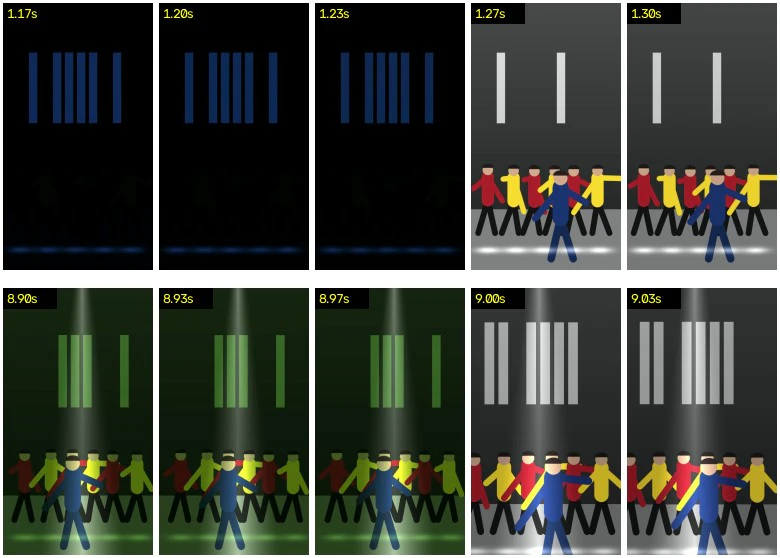
図4 remix.mp4の全フレーム確認(上段:1.17〜1.30秒の照明変化、下段:8.90〜9.03秒のカット)
図4の上段では点灯前後で構図やダンサー位置が保たれて照明変化と確認でき、下段では9.00秒で構図と配置が不連続に跳びカットと分かります。
時刻は双方が実フレームを持つ点を選びます。24 fpsと30 fpsは6分の1秒ごとに一致するため、ずれ0.40秒なら 0.4, 1.4, 2.4 秒とすれば実フレームを正確に並べられます。
筆者の15秒の差し替え版では元テイクと差し替え版を1秒刻みで並べ、照明変化が激しい4区間(0.9〜1.3秒、2.2〜2.8秒、6.4〜7.3秒、10.7〜11.6秒)の全フレームを目視確認しました。
各列では次の4点を確認します。
- 差し替え対象の人物が全秒で欠損せず1人のみ存在しているか
- マイクなどの小物が手元に維持されているか
- 炎や照明の点灯タイミングが元映像の秒数と一致しているか
- 新たな字幕やテキストが出現していないか
練習用データの自動生成
練習用データは以下のスクリプトで線と円の描画のみから生成でき、入力画像や実在の人物は含みません。
# make_practice_set.py: five practice videos with known answers (no input files needed)
#   stage.mp4       the "original footage": 720x1280, 30 fps, 15 s, with its own live sound
#   swap_a.mp4      the same footage, lead redrawn, 576x1024, 24 fps, starts 0.40 s in, sound 0.14 s late
#   swap_b.mp4      the same footage, lead redrawn, 1080x1920, a logo in the corner, 12 s + a 3 s ad
#   remix.mp4       stage.mp4 re-edited: a hard cut at 9.0 s that skips 1.0 s
#   other_take.mp4  another take of the same song: other lights, camera and dancer places
# usage: python make_practice_set.py
import itertools, os, subprocess, wave
import numpy as np, cv2

SR, W, H, BEAT = 48000, 720, 1280, 0.6          # sound rate, stage size before the camera, 100 BPM


def song(seconds=21.0):
    rng = np.random.default_rng(7)
    s = np.zeros(int(seconds * SR), np.float32)
    def put(t, x):
        i = int(t * SR); m = min(len(x), len(s) - i)
        s[i:i + m] += x[:m]
    u = np.arange(int(0.5 * SR)) / SR
    noise = rng.standard_normal(len(u))
    kick = np.sin(2 * np.pi * (45 * u + 3.6 * (1 - np.exp(-u / 0.03)))) * np.exp(-u / 0.12)
    snare = 0.25 * np.diff(noise, prepend=0) * np.exp(-u / 0.08)
    hat = 0.06 * np.diff(noise, 2, prepend=[0, 0]) * np.exp(-u / 0.012)
    for k in range(int(seconds / BEAT)):
        t = k * BEAT
        put(t, kick); put(t, hat); put(t + BEAT / 2, hat)
        if k % 2: put(t, snare)
        put(t, 0.35 * np.sin(2 * np.pi * rng.choice([55, 65.4, 73.4, 82.4, 98]) * u) * np.exp(-u / 0.15))
    t = 0.0
    while t < seconds:                                        # an irregular melody on top
        d = rng.choice([0.15, 0.3, 0.45, 0.6]); f = rng.choice([220, 262, 294, 330, 392, 440, 523, 587])
        v = np.arange(int(d * SR)) / SR
        env = np.minimum(1, np.minimum(v / 0.02, (d - v) / 0.03))
        put(t, 0.4 * np.sin(2 * np.pi * f * v + 0.3 * np.sin(2 * np.pi * 5 * v)) * env)
        t += d
    return 0.7 * s / np.abs(s).max()


def crowd(seconds, seed):
    rng = np.random.default_rng(seed)
    swell = np.interp(np.arange(seconds * SR) / SR, np.arange(seconds + 1), rng.uniform(0.3, 1, seconds + 1))
    return (0.04 * rng.standard_normal(seconds * SR) * swell).astype(np.float32)


def take(seed, blackout, spot_on, flames):
    rng = np.random.default_rng(seed)
    cues = np.cumsum(rng.uniform(0.35, 1.0, 40)) - 1.0                # when the stage light changes
    cues = np.sort(np.append(cues[(cues < blackout[0]) | (cues > blackout[1])], blackout[1]))
    pal = np.float32([[255, 120, 40], [255, 255, 255], [40, 140, 255], [200, 60, 255], [90, 255, 140]]) / 255
    cols = pal[rng.integers(0, 5, len(cues))]
    cols[np.searchsorted(cues, blackout[1])] = 1.0                    # after the blackout: white
    cam = rng.uniform([1.0, 310, 600], [1.25, 410, 690], (16, 3))     # every 1.5 s: zoom, centre x, centre y
    bars = rng.random((len(cues), 8)) < 0.5                           # which screen bars are lit
    return dict(cues=cues, cols=cols, cam=cam, bars=bars, xs=np.linspace(110, 610, 6) + rng.uniform(-30, 30, 6),
                blackout=blackout, spot_on=spot_on, flames=flames)


STAGE = take(11, (1.0, 1.25), 2.5, [3.6, 4.8, 6.1, 8.4, 11.0, 13.3])
OTHER = take(23, (0.6, 0.8), 1.9, [2.7, 5.2, 7.9, 9.6, 12.4])
LOOKS = {'original': [(110, 50, 25), (80, 40, 20), (30, 30, 40)],      # top, trousers, hair (BGR)
         'white_tee': [(230, 230, 230), (25, 25, 25), (140, 200, 235)],
         'red_hoodie': [(40, 40, 190), (140, 90, 40), (20, 20, 20)]}

yy, xx = np.mgrid[0:H, 0:W].astype(np.float32)
BASE = np.dstack([np.linspace(70, 30, H)[:, None].repeat(W, 1)] * 3).astype(np.uint8)
BASE[960:] = 120                                                      # the stage floor
SPOT = (np.clip(1 - np.abs(xx - 360) / (40 + 0.13 * yy), 0, 1) ** 1.5)[..., None]
FLOOR = sum(np.exp(-((xx - x) / 55) ** 2 - ((yy - 1150) / 14) ** 2) for x in (100, 230, 360, 490, 620))[..., None]
FLAME = sum(np.exp(-((xx - x) / (18 + 0.06 * np.clip(1060 - yy, 0, None))) ** 2 - ((yy - 780) / 260) ** 2)
            for x in (150, 570))[..., None]
BARS = np.stack([(xx > 140 + 56 * k) & (xx < 180 + 56 * k) & (yy > 230) & (yy < 560)
                 for k in range(8)], -1).astype(np.float32)          # the screen's eight light bars


def dancer(img, x, y, h, ts, ph, top, legs, hair):
    sw = np.sin(2 * np.pi * (ts / (2 * BEAT) + ph))                   # one move every two beats
    b = abs(np.sin(np.pi * (ts / BEAT + ph))) * 0.03 * h              # a bounce on every beat
    pt = lambda px, py: (int(round(px)), int(round(py)))
    hip, neck, lw = (x, y - 0.47 * h + b), (x, y - 0.8 * h + b), max(3, int(0.07 * h))
    for side in (-1, 1):
        cv2.line(img, pt(*hip), pt(x + side * (0.12 + 0.05 * sw * side) * h, y), legs, lw + 3, cv2.LINE_AA)
        cv2.line(img, pt(*neck), pt(x + side * (0.24 + 0.1 * sw) * h, y - (0.55 + 0.25 * sw * side) * h + b),
                 top, lw, cv2.LINE_AA)
    cv2.line(img, pt(*neck), pt(*hip), top, int(0.17 * h), cv2.LINE_AA)
    cv2.circle(img, pt(x, y - 0.9 * h + b), int(0.075 * h), (130, 160, 200), -1, cv2.LINE_AA)
    cv2.ellipse(img, pt(x, y - 0.93 * h + b), (int(0.08 * h), int(0.055 * h)), 0, 180, 360, hair, -1, cv2.LINE_AA)


def frame(t, tk, look, size, song_start):
    img = BASE.copy()
    ts = song_start + t                                               # the moves follow the song's beat
    for i, x in enumerate(tk['xs']):
        dancer(img, x, 1070, 330, ts, i * 0.13, (40, 200, 240) if i % 2 else (40, 40, 170), (20, 20, 20), (25, 25, 30))
    dancer(img, 360 + 70 * np.sin(2 * np.pi * t / 4.8) + 25 * np.sin(2 * np.pi * t / 1.2), 1190, 430, ts, 0.5, *LOOKS[look])
    c = np.searchsorted(tk['cues'], t, 'right') - 1
    k = float(0.35 + 0.65 * np.exp(-(t - tk['cues'][c]) / 0.3))       # each change flashes, then settles
    light = (0.12 + tk['cols'][c] * k) * (0.06 if tk['blackout'][0] <= t < tk['blackout'][1] else 1)
    fl = float(sum(np.sin(np.pi * (t - f) / 0.5) for f in tk['flames'] if 0 <= t - f < 0.5))
    on = float(t >= tk['spot_on'])
    lit = img * (light + 0.3 * fl * np.float32([0.2, 0.6, 1.0]) + 0.9 * on * SPOT) + 25 * on * SPOT
    lit += k * (150 * FLOOR + 160 * BARS[..., tk['bars'][c]].sum(-1, keepdims=True)) * tk['cols'][c]
    lit += 255 * fl * FLAME * np.float32([0.25, 0.65, 1.0])
    s = t / 1.5; i = int(s); a = (s - i) ** 2 * (3 - 2 * (s - i))      # the camera eases between key points
    z, cx, cy = tk['cam'][i] * (1 - a) + tk['cam'][i + 1] * a
    cw, ch = W / z, H / z
    x0, y0, sc = np.clip(cx - cw / 2, 0, W - cw), np.clip(cy - ch / 2, 0, H - ch), size[0] / cw
    m = np.float32([[sc, 0, -x0 * sc], [0, sc, -y0 * sc]])
    return cv2.warpAffine(np.clip(lit, 0, 255).astype(np.uint8), m, size, flags=cv2.INTER_LINEAR)


def logo(f):
    s = f.shape[1] / 1080
    r = lambda v: int(v * s)
    f[r(40):r(130), r(40):r(300)] = f[r(40):r(130), r(40):r(300)] * 0.15 + 255 * 0.85
    cv2.circle(f, (r(85), r(85)), r(28), (160, 140, 0), -1, cv2.LINE_AA)
    cv2.rectangle(f, (r(130), r(68)), (r(280), r(80)), (90, 90, 90), -1)
    cv2.rectangle(f, (r(130), r(92)), (r(230), r(102)), (150, 150, 150), -1)
    return f


def ad(i, size):
    g = np.linspace(0, 1, size[1], dtype=np.float32)[:, None, None]
    f = (np.float32([180, 150, 255]) * (1 - g) + np.float32([230, 210, 255]) * g).repeat(size[0], 1).astype(np.uint8)
    cv2.circle(f, (int(size[0] * (0.2 + 0.6 * i / 90)), size[1] // 2), size[0] // 6, (255, 255, 255), -1, cv2.LINE_AA)
    return f


def write(name, frames, size, fps, sound):
    with wave.open('tmp.wav', 'wb') as wf:
        wf.setnchannels(1); wf.setsampwidth(2); wf.setframerate(SR)
        wf.writeframes((np.clip(sound, -1, 1) * 32767).astype(np.int16).tobytes())
    enc = subprocess.Popen(['ffmpeg', '-v', 'error', '-y', '-f', 'rawvideo', '-pix_fmt', 'bgr24',
                            '-s', f'{size[0]}x{size[1]}', '-framerate', str(fps), '-i', '-', '-i', 'tmp.wav',
                            '-vf', 'scale=out_color_matrix=bt709:out_range=tv,format=yuv420p,'
                                   'setparams=colorspace=bt709:color_primaries=bt709:color_trc=bt709:range=tv',
                            '-c:v', 'libx264', '-crf', '20', '-c:a', 'aac', '-b:a', '160k', name], stdin=subprocess.PIPE)
    n = 0
    for f in frames:
        enc.stdin.write(f.tobytes()); n += 1
    enc.stdin.close(); enc.wait(); os.remove('tmp.wav')
    print(f'{name}: {size[0]}x{size[1]}, {fps} fps, {n} frames, {n / fps:.2f} s')


SONG = song()
live = SONG[3 * SR:18 * SR] + crowd(15, 5)                            # the stage take: song 3-18 s + its crowd
cut = lambda a, b: live[int(a * SR):int(b * SR)]
jingle = np.concatenate([0.3 * np.sin(2 * np.pi * f * np.arange(SR // 4) / SR) for f in [523, 659, 784, 1047] * 3])
S, A, B = (720, 1280), (576, 1024), (1080, 1920)
write('stage.mp4', (frame(i / 30, STAGE, 'original', S, 3) for i in range(450)), S, 30, live)
write('swap_a.mp4', (frame(0.4 + i / 24, STAGE, 'white_tee', A, 3) for i in range(240)), A, 24, cut(0.26, 10.26))
write('swap_b.mp4', itertools.chain((logo(frame(i / 30, STAGE, 'red_hoodie', B, 3)) for i in range(360)),
                                    (ad(i, B) for i in range(90))), B, 30, np.concatenate([cut(0, 12), jingle]))
write('remix.mp4', itertools.chain((frame(i / 30, STAGE, 'original', S, 3) for i in range(270)),
                                   (frame(10 + i / 30, STAGE, 'original', S, 3) for i in range(150))),
      S, 30, np.concatenate([cut(0, 9), cut(10, 15)]))
write('other_take.mp4', (frame(i / 30, OTHER, 'original', S, 5) for i in range(450)), S, 30,
      SONG[5 * SR:20 * SR] + crowd(15, 6))
以下で実行します。
uv run --with opencv-python-headless --with numpy python make_practice_set.py
stage.mp4: 720x1280, 30 fps, 450 frames, 15.00 s
swap_a.mp4: 576x1024, 24 fps, 240 frames, 10.00 s
swap_b.mp4: 1080x1920, 30 fps, 450 frames, 15.00 s
remix.mp4: 720x1280, 30 fps, 420 frames, 14.00 s
other_take.mp4: 720x1280, 30 fps, 450 frames, 15.00 s
乱数シードを固定しており、動作環境に記載した本機と各バージョンにおいて、3回の実行ですべてバイト一致するファイルが生成されることを確認しました。音声は100 BPMのドラム、ベースライン、メロディを合成したもので、other_take.mp4 には同一楽曲の2.0秒後からの音声と別の歓声ノイズを組み合わせています。stage.mp4 の映像は0.35〜1.0秒ごとの照明変化、1.00〜1.25秒の暗転、2.5秒からのスポットライト、6箇所の火柱を含みます。Apple M2での生成処理時間は2回の試行で112秒および76秒でした。
まとめ
各手順の要点は以下の通りです。
- 色のコマ間変化の相関: 練習用データでは同映像が0.83以上、別テイクが0.26となり閾値0.5で分離できます。
- 音の相互相関: FFTを用いて8000分の1秒の分解能で音声のずれを測定します。
- scdet と区間ごとのずれ: 練習用データでは区間ごとのずれの跳びから9秒地点のカットを検出できます。
- 1秒ごとの一覧画像: オフセットを補正した一覧画像で全秒の破綻の有無を目視確認します。
※ 筆者は写真1枚の人物をTalk Dirtyダンスの15秒ライブ映像の主役に差し替えるWebサービス、Talk Dirty Dance AI の開発に携わっています。本記事の検証手法は同サービスのベース映像選定および品質確認の過程で実施したものであり、記事内の練習用データはスクリプト描画によるもので実在の人物は含みません。