
今回の主な話題:Texture Streamingの使用に関する質問、Unity3DシーンUIのバッチ処理が中断される理由、Asset ProviderとAsset Bundle Providerの意味、Addressablesがアセットを更新するときに最初のアセットのみをロードします、ストロークアルゴリズムの表示問題。
Editor
Unity 2019.2 Texture StreamingはEditorで有効になりませんか?Unityの公式紹介によると、SceneViewでTexture StreamingをDebugできます。しかし、実際に切り替え後に青/紺色に変わり、他の変化はありません。誰かが同じ状況にあったことがありますか?
1、スクリプトをテストすると、どれだけのメモリが節約されているかを確認できます。シーンでは確認できません。
using System;
using UnityEditor;
using UnityEngine;
public class ShowTextureStreamingSummary : MonoBehaviour
{
    public float X = 10;
    public float Y = 20;
    public int MemoryBudgetPercentThreshold = 80;
    public int TextureStreamingPercentThreshold = 50;
    private ulong HighestDesiredTextureMemory;
    private Rect TextRect;
    public void Start()
    {
        HighestDesiredTextureMemory = 0;
        Texture.streamingTextureDiscardUnusedMips = false;
      QualitySettings.masterTextureLimit = 2;//次のテストスクリプトと連携するために、レベルを2に強制する
    }
    public string HumanReadableSize(ulong size)
    {
        return string.Format("{0:0.0}M", (float)size / (float)(1024 * 1024));
    }
    void ShowText(string text)
    {
        float yInc = GUI.skin.font.lineHeight;
        GUI.Label(TextRect, text);
        TextRect.y += yInc;
    }
    public void OnGUI()
    {
        TextRect = new Rect(X, Y, Screen.width - X, Screen.height - Y);
        GUI.color = Color.red;
        if (!SystemInfo.supportsMipStreaming)
            ShowText("Texture streaming unsupported");
        if (!QualitySettings.streamingMipmapsActive)
            ShowText("Texture streaming disabled");
        else if (QualitySettings.streamingMipmapsMemoryBudget == 0)
            ShowText("No texture streaming budget");
        else if (Texture.totalTextureMemory == 0)
            ShowText("No texture memory needed");
        else
        {
            // Reduced highest memory usage
            if (Texture.desiredTextureMemory > HighestDesiredTextureMemory)
                HighestDesiredTextureMemory = Texture.desiredTextureMemory;
            // Show stats
            ulong budget = (ulong)(1024 * 1024 * QualitySettings.streamingMipmapsMemoryBudget);
            float percentUsed = (float)(100 * Texture.desiredTextureMemory) / (float)budget;
            ShowText(string.Format("Memory budget utilisation {0:0.0}% of {1} texture budget", percentUsed, HumanReadableSize(budget)));
            if (HighestDesiredTextureMemory > budget)
            {
                ulong memoryExcess = HighestDesiredTextureMemory - budget;
                ShowText(string.Format("Memory exceeds budget by {0}", HumanReadableSize(memoryExcess)));
            }
            else
            {
                ulong memorySaving = Texture.totalTextureMemory - HighestDesiredTextureMemory;
                float percentReduction = (float)(100 * HighestDesiredTextureMemory) / (float)Texture.totalTextureMemory;
                ShowText(string.Format("Memory saving at least {0} with streaming enabled ( at {1:0.0}% of original {2}) - ignoring caching", HumanReadableSize(memorySaving), percentReduction, HumanReadableSize(Texture.totalTextureMemory)));
            }
            // Advice section
# if UNITY_EDITOR
            ShowText("Run in standalone app for accurate figures. When run in Play Mode the stats are biased by editor textures");
# endif
            if (percentUsed < (float)MemoryBudgetPercentThreshold)
                ShowText(string.Format("Reduce the Memory Budget closer to {0}", HumanReadableSize(Texture.desiredTextureMemory)));
            else if (Texture.desiredTextureMemory > budget)
                ShowText(string.Format("Raise Memory Budget above {0}", HumanReadableSize(Texture.desiredTextureMemory)));
            float percentStreaming = (float)(100 * (Texture.totalTextureMemory - Texture.nonStreamingTextureMemory)) / (float)Texture.totalTextureMemory;
            if (percentStreaming < (float)TextureStreamingPercentThreshold)
                ShowText(string.Format("Mark more textures streaming to improve savings ({0:0.0}% texture memory marked as streaming)", percentStreaming));
            if (!Texture.streamingTextureDiscardUnusedMips)
                ShowText("Consider turning on Texture.streamingTextureDiscardUnusedMips to analyse without cached textures");
            ShowText(string.Format("desiredTextureMemory {0}", HumanReadableSize(Texture.desiredTextureMemory)));
            ShowText(string.Format("nonStreamingTextureMemory {0}", HumanReadableSize(Texture.nonStreamingTextureMemory)));
            ShowText(string.Format("totalTextureMemory {0}", HumanReadableSize(Texture.totalTextureMemory)));
        }
    }
}
2、Gameウィンドウで、Streamingを使用しているテクスチャを確認します。緑はStreamingを使用しています。青はStreamingを使用していません。赤はStreamingを使用していません。
using UnityEngine;
public class TextureStreamingDebug : MonoBehaviour
{
    public Camera m_MainCamera;
    public Shader m_ReplacementShader;
    public bool m_ActivateDebugShader;
    private bool m_DebugShaderActive = false;
    private RenderingPath originalRenderingPath;
    void Start()
    {
        // Grab camera from self if none set
        if (!m_MainCamera)
            m_MainCamera = GetComponent<Camera>();
        if (m_MainCamera)
            originalRenderingPath = m_MainCamera.renderingPath;
    }
    void Update()
    {
        if (!m_MainCamera || !m_ReplacementShader)
            return;
# if UNITY_STANDALONE_WIN || UNITY_EDITOR
        if (Input.GetKeyDown(KeyCode.Space))
            m_ActivateDebugShader ^= true;
# else
        if (Input.GetButtonDown("Fire1"))
            m_ActivateDebugShader ^= true;
# endif
        if (m_ActivateDebugShader != m_DebugShaderActive)
        {
            if (m_ActivateDebugShader)
            {
                m_MainCamera.renderingPath = RenderingPath.Forward;
                m_MainCamera.SetReplacementShader(m_ReplacementShader, "RenderType");
            }
            else
            {
                m_MainCamera.renderingPath = originalRenderingPath;
                m_MainCamera.ResetReplacementShader();
            }
            m_DebugShaderActive = m_ActivateDebugShader;
        }
        if (m_DebugShaderActive)
            Texture.SetStreamingTextureMaterialDebugProperties();
    }
}
対応Shader
Shader "Hidden/Scene View Show Texture Streaming"
{
    Properties
    {
        _MainTex ("", 2D) = "white" {}
        _Control ("Control (RGBA)", 2D) = "red" {}
        _Splat3 ("Layer 3 (A)", 2D) = "white" {}
        _Splat2 ("Layer 2 (B)", 2D) = "white" {}
        _Splat1 ("Layer 1 (G)", 2D) = "white" {}
        _Splat0 ("Layer 0 (R)", 2D) = "white" {}
        _BaseMap ("", 2D) = "white" {}
        _Cutoff ("Cutoff", float) = 0.5
    }
CGINCLUDE
// Common code used by most of the things below
# include "UnityCG.cginc"
struct v2f
{
    float4 pos : SV_POSITION;
    float2 uv : TEXCOORD0;
};
uniform float4 _MainTex_ST;
uniform float4 _MainTex_TexelSize;
uniform float4 _MainTex_MipInfo;
UNITY_DECLARE_TEX2D(_MainTex);
UNITY_DECLARE_TEX2D(_SceneViewMipcolorsTexture);
uint GetMipCount(Texture2D tex)
{
# if defined(SHADER_API_D3D11) || defined(SHADER_API_D3D12) || defined(SHADER_API_D3D11_9X) || defined(SHADER_API_XBOXONE) || defined(SHADER_API_PSSL)
    #define MIP_COUNT_SUPPORTED 1
# endif
# if (defined(SHADER_API_OPENGL) || defined(SHADER_API_VULKAN)) && !defined(SHADER_STAGE_COMPUTE)
    // OpenGL only supports textureSize for width, height, depth
    // textureQueryLevels (GL_ARB_texture_query_levels) needs OpenGL 4.3 or above and doesn't compile in compute shaders
    // tex.GetDimensions converted to textureQueryLevels
    #define MIP_COUNT_SUPPORTED 1
# endif
    // Metal doesn't support high enough OpenGL version
# if defined(MIP_COUNT_SUPPORTED)
    uint mipLevel, width, height, mipCount;
    mipLevel = width = height = mipCount = 0;
    tex.GetDimensions(mipLevel, width, height, mipCount);
    return mipCount;
# else
    return 0;
# endif
}
float4 GetStreamingMipColor(uint mipCount, float4 mipInfo)
{
    // alpha is amount to blend with source color (0.0 = use original, 1.0 = use new color)
    // mipInfo :
    // x = quality setings minStreamingMipLevel
    // y = original mip count for texture
    // z = desired on screen mip level
    // w = loaded mip level
    uint originalTextureMipCount = uint(mipInfo.y);
    // If material/shader mip info (original mip level) has not been set it’s either not a streamed texture
    // or no renderer is updating it
    if (originalTextureMipCount == 0)
        return float4(0.0, 0.0, 1.0, 0.5);
    uint desiredMipLevel = uint(mipInfo.z);
    uint mipCountDesired = uint(originalTextureMipCount)-uint(desiredMipLevel);
    if (mipCount == 0)
    {
        // Can't calculate, use the passed value
        mipCount = originalTextureMipCount - uint(mipInfo.w);
    }
    if (mipCount < mipCountDesired)
    {
        // red tones when not at the desired mip level (reduction due to budget). Brighter is further from original, alpha 0 when at desired
        float ratioToDesired = float(mipCount) / float(mipCountDesired);
            return float4(1.0, 0.0, 0.0, 1.0 - ratioToDesired);
    }
    else if (mipCount >= originalTextureMipCount)
    {
        // original color when at (or beyond) original mip count
        return float4(1.0, 1.0, 1.0, 0.0);
    }
    else
    {
        // green tones when not at the original mip level. Brighter is closer to original, alpha 0 when at original
        float ratioToOriginal = float(mipCount) / float(originalTextureMipCount);
        return float4(0.0, 1.0, 0.0, 1.0 - ratioToOriginal);
    }
}
float3 GetDebugStreamingMipColorBlended(float3 originalColor, Texture2D tex, float4 mipInfo)
{
    uint mipCount = GetMipCount(tex);
    float4 mipColor = GetStreamingMipColor(mipCount, mipInfo);
    return lerp(originalColor, mipColor.rgb, mipColor.a);
}
v2f vert( appdata_base v )
{
    v2f o;
    o.pos = UnityObjectToClipPos(v.vertex);
    o.uv = TRANSFORM_TEX(v.texcoord,_MainTex);
    return o;
}
fixed4 frag(v2f i) : COLOR
{
    fixed4 col = UNITY_SAMPLE_TEX2D(_MainTex, i.uv);
    half4 res;
    res.rgb = GetDebugStreamingMipColorBlended(col.rgb, _MainTex, _MainTex_MipInfo);
    res.a = col.a;
    return res;
}
struct v2fGrass
{
    float4 pos : SV_POSITION;
    fixed4 color : COLOR;
    float2 uv : TEXCOORD0;
};
fixed4 fragGrass(v2fGrass i) : COLOR
{
    fixed4 col = UNITY_SAMPLE_TEX2D(_MainTex, i.uv);
    half4 res;
    res.rgb = GetDebugStreamingMipColorBlended(col.rgb, _MainTex, _MainTex_MipInfo);
    res.a = col.a * i.color.a;
    return res;
}
ENDCG
SubShader
{
    Tags { "ForceSupported" = "True" "RenderType"="Opaque" }
    Pass
    {
CGPROGRAM
// As both normal opaque shaders and terrain splat shaders
// have "Opaque" render type, we need to do some voodoo
// to make both work.
# pragma vertex vertWTerrain
# pragma fragment fragWTerrain
# pragma target 2.0
# pragma exclude_renderers gles
struct v2fterr
{
    float4 pos : SV_POSITION;
    float2 uvnormal : TEXCOORD0;
    float4 uv[3] : TEXCOORD2;
    float nonterrain  : TEXCOORD5;
};
uniform float4 _Splat0_ST,_Splat1_ST,_Splat2_ST,_Splat3_ST,_Splat4_ST;
uniform float4 _Splat0_TexelSize,_Splat1_TexelSize,_Splat2_TexelSize,_Splat3_TexelSize,_Splat4_TexelSize;
uniform float4 _BaseMap_TexelSize;
v2fterr vertWTerrain( appdata_base v )
{
    v2fterr o;
    o.pos = UnityObjectToClipPos(v.vertex);
    // assume it's not a terrain if _Splat0_TexelSize is not set up.
    float nonterrain = _Splat0_TexelSize.z==0.0 ? 1:0;
    // collapse/don't draw terrain's add pass in this mode, since it looks really bad if first pass
    // and add pass blink depending on which gets drawn first with this replacement shader
    // TODO: make it display mips properly even for two-pass terrains.
    o.pos *= _MainTex_TexelSize.z==0.0 && _Splat0_TexelSize.z!=0.0 ? 0 : 1;
    // normal texture UV
    o.uvnormal = TRANSFORM_TEX(v.texcoord,_MainTex);
    // terrain splat UVs
    float2 baseUV = v.texcoord.xy;
    o.uv[0].xy = baseUV;
    o.uv[0].zw = half2(0,0);
    o.uv[1].xy = TRANSFORM_TEX (baseUV, _Splat0);
    o.uv[1].zw = TRANSFORM_TEX (baseUV, _Splat1);
    o.uv[2].xy = TRANSFORM_TEX (baseUV, _Splat2);
    o.uv[2].zw = TRANSFORM_TEX (baseUV, _Splat3);
    o.nonterrain = nonterrain;
    return o;
}
UNITY_DECLARE_TEX2D(_Control);
UNITY_DECLARE_TEX2D(_Splat0);
UNITY_DECLARE_TEX2D(_Splat1);
UNITY_DECLARE_TEX2D(_Splat2);
UNITY_DECLARE_TEX2D(_Splat3);
UNITY_DECLARE_TEX2D(_BaseMap);
fixed4 fragWTerrain(v2fterr i) : COLOR
{
    // sample regular texture
    fixed4 colnormal = UNITY_SAMPLE_TEX2D(_MainTex, i.uvnormal);
    // sample splatmaps
    half4 splat_control = UNITY_SAMPLE_TEX2D(_Control, i.uv[0].xy);
    half3 splat_color = splat_control.r * UNITY_SAMPLE_TEX2D(_Splat0, i.uv[1].xy).rgb;
    splat_color += splat_control.g * UNITY_SAMPLE_TEX2D(_Splat1, i.uv[1].zw).rgb;
    splat_color += splat_control.b * UNITY_SAMPLE_TEX2D(_Splat2, i.uv[2].xy).rgb;
    splat_color += splat_control.a * UNITY_SAMPLE_TEX2D(_Splat3, i.uv[2].zw).rgb;
    // lerp between normal and splatmaps
    half3 col = lerp(splat_color, colnormal.rgb, (half)i.nonterrain);
    half4 res;
    // TODO: Take splat mips into account
    res.rgb = GetDebugStreamingMipColorBlended(col.rgb, _MainTex, _MainTex_MipInfo);
    res.a = colnormal.a;
    return res;
}
ENDCG
    }
}
SubShader
{
    Tags { "ForceSupported" = "True" "RenderType"="Transparent" }
    Pass
    {
        Cull Off
CGPROGRAM
# pragma vertex vert
# pragma fragment frag
# pragma target 2.0
# pragma exclude_renderers gles
ENDCG
    }
}
SubShader
{
    Tags { "ForceSupported" = "True" "RenderType"="TransparentCutout" }
    Pass
    {
        AlphaTest Greater [_Cutoff]
CGPROGRAM
# pragma vertex vert
# pragma fragment frag
# pragma target 2.0
# pragma exclude_renderers gles
ENDCG
    }
}
SubShader
{
    Tags { "ForceSupported" = "True" "RenderType"="TreeBark" }
    Pass
    {
CGPROGRAM
# pragma vertex vertTreeBark
# pragma fragment frag
# pragma target 2.0
# pragma exclude_renderers gles
# include "UnityCG.cginc"
# include "UnityBuiltin3xTreeLibrary.cginc"
v2f vertTreeBark (appdata_full v)
{
    v2f o;
    TreeVertBark(v);
    o.pos = UnityObjectToClipPos(v.vertex);
    o.uv = v.texcoord;
    return o;
}
ENDCG
  }
}
SubShader
{
    Tags { "ForceSupported" = "True" "RenderType"="TreeLeaf" }
    Pass
    {
CGPROGRAM
# pragma vertex vertTreeLeaf
# pragma fragment frag
# pragma target 2.0
# pragma exclude_renderers gles
# include "UnityCG.cginc"
# include "UnityBuiltin3xTreeLibrary.cginc"
v2f vertTreeLeaf (appdata_full v)
{
    v2f o;
    TreeVertLeaf (v);
    o.pos = UnityObjectToClipPos(v.vertex);
    o.uv = v.texcoord;
    return o;
}
ENDCG
        AlphaTest GEqual [_Cutoff]
    }
}
SubShader
{
    Tags { "ForceSupported" = "True" "RenderType"="TreeOpaque" }
    Pass
    {
CGPROGRAM
# pragma vertex vertTree
# pragma fragment frag
# pragma target 2.0
# pragma exclude_renderers gles
# include "TerrainEngine.cginc"
struct appdata
{
    float4 vertex : POSITION;
    fixed4 color : COLOR;
    float2 texcoord : TEXCOORD0;
};
v2f vertTree( appdata v )
{
    v2f o;
    TerrainAnimateTree(v.vertex, v.color.w);
    o.pos = UnityObjectToClipPos(v.vertex);
    o.uv = v.texcoord;
    return o;
}
ENDCG
    }
}
SubShader
{
    Tags { "ForceSupported" = "True" "RenderType"="TreeTransparentCutout" }
    Pass
    {
        Cull Off
CGPROGRAM
# pragma vertex vertTree
# pragma fragment frag
# pragma target 2.0
# pragma exclude_renderers gles
# include "TerrainEngine.cginc"
struct appdata
{
    float4 vertex : POSITION;
    fixed4 color : COLOR;
    float4 texcoord : TEXCOORD0;
};
v2f vertTree( appdata v )
{
    v2f o;
    TerrainAnimateTree(v.vertex, v.color.w);
    o.pos = UnityObjectToClipPos(v.vertex);
    o.uv = v.texcoord;
    return o;
}
ENDCG
        AlphaTest GEqual [_Cutoff]
    }
}
SubShader
{
    Tags { "ForceSupported" = "True" "RenderType"="TreeBillboard" }
    Pass
    {
        Cull Off
        ZWrite Off
CGPROGRAM
# pragma vertex vertTree
# pragma fragment frag
# pragma target 2.0
# pragma exclude_renderers gles
# include "TerrainEngine.cginc"
v2f vertTree (appdata_tree_billboard v)
{
    v2f o;
    TerrainBillboardTree(v.vertex, v.texcoord1.xy, v.texcoord.y);
    o.pos = UnityObjectToClipPos(v.vertex);
    o.uv.x = v.texcoord.x;
    o.uv.y = v.texcoord.y > 0;
    return o;
}
ENDCG
        SetTexture [_MainTex] { combine primary, texture }
    }
}
SubShader
{
    Tags { "ForceSupported" = "True" "RenderType"="GrassBillboard" }
    Pass
    {
        Cull Off
CGPROGRAM
# pragma vertex vertGrass
# pragma fragment fragGrass
# pragma target 2.0
# pragma exclude_renderers gles
# include "TerrainEngine.cginc"
v2fGrass vertGrass (appdata_full v)
{
    v2fGrass o;
    WavingGrassBillboardVert (v);
    o.color = v.color;
    o.pos = UnityObjectToClipPos(v.vertex);
    o.uv = v.texcoord;
    return o;
}
ENDCG
        AlphaTest Greater [_Cutoff]
    }
}
SubShader
{
    Tags { "ForceSupported" = "True" "RenderType"="Grass" }
    Pass
    {
        Cull Off
CGPROGRAM
# pragma vertex vertGrass
# pragma fragment fragGrass
# pragma target 2.0
# pragma exclude_renderers gles
# include "TerrainEngine.cginc"
v2fGrass vertGrass (appdata_full v)
{
    v2fGrass o;
    WavingGrassVert (v);
    o.color = v.color;
    o.pos = UnityObjectToClipPos(v.vertex);
    o.uv = v.texcoord;
    return o;
}
ENDCG
        AlphaTest Greater [_Cutoff]
    }
}
Fallback Off
}
Rending
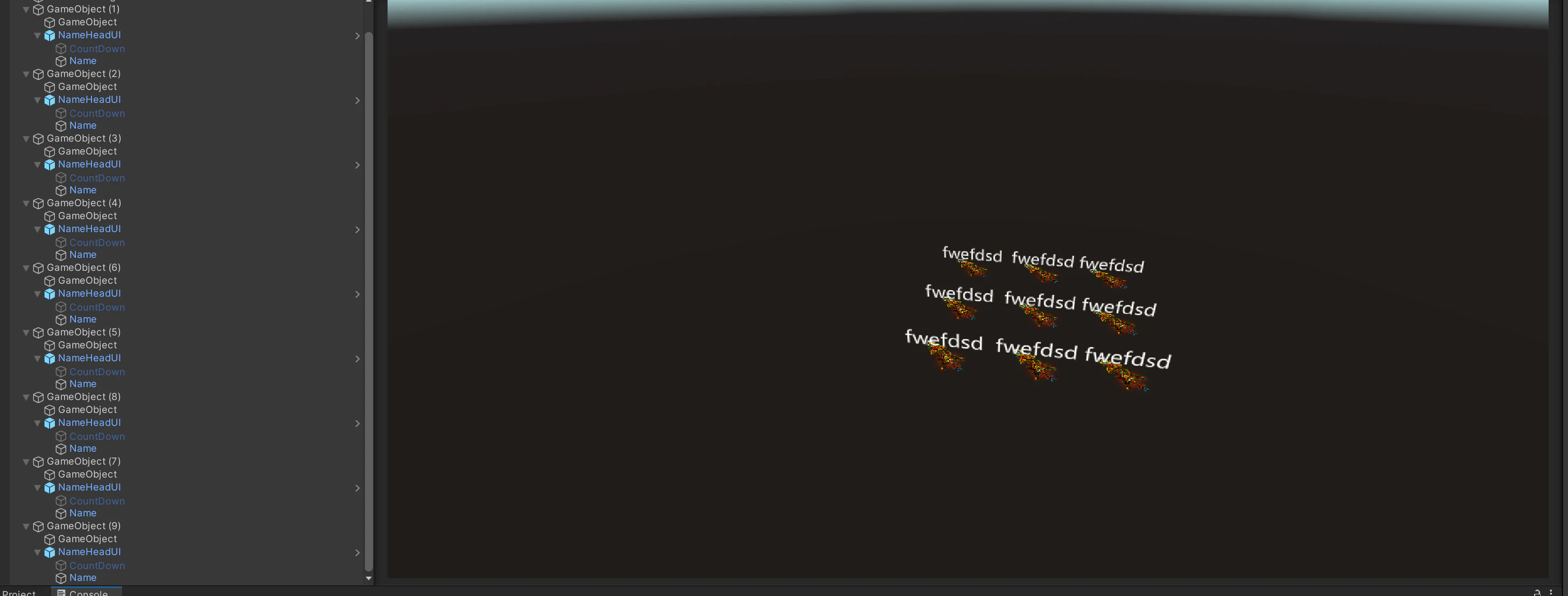
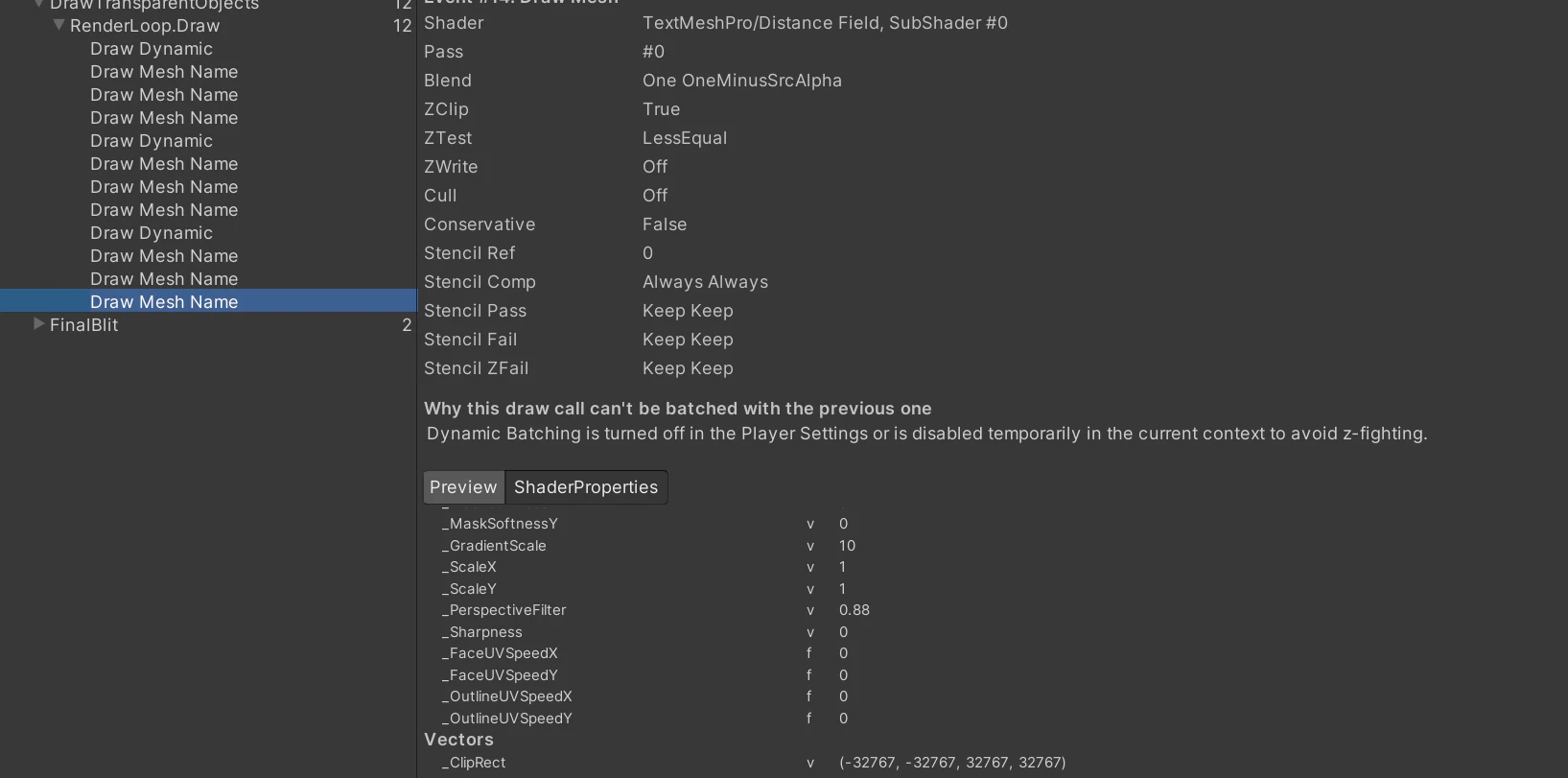
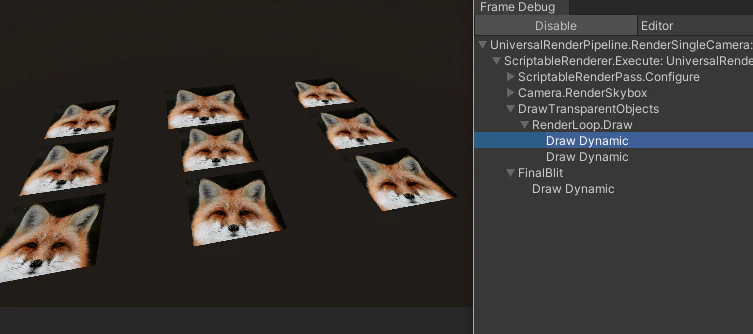
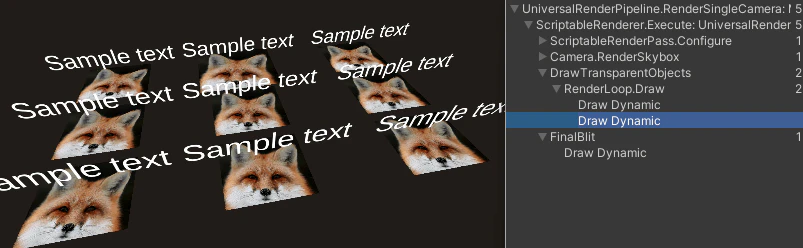
下図のように、画像にSprite Rendererを使用し、テキストにTextMeshProを使用し、Unityフレームデバッガーを使用して確認すると、最初の行の3つの画像が動的にバッチ処理され、2番目の行の3つの画像が動的にバッチ処理され、3番目の行の3つの画像が動的にバッチ処理されることがわかります。しかし、テキストはバッチ処理できません。その理由は、Z-Fightingを回避するために、動的バッチ処理はPlayer Settingsでオフになっているか、現在の環境で一時的に無効になっているためです。何かすべての画像を一回にバッチし、すべてのテキストを一回にバッチすることができますか?
①
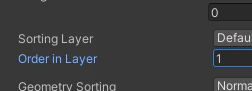
私の方法は、Sorting LayerとOrder in Layerを設置することです。
SpriteRenderer → Additional Settings;
TextMeshPro Text → Extra Settings。
ただし、これの欠点は、文字が常に画像の上に表示され、重なると表示に問題が発生することです。
②
1.一般的なMeshオブジェクトの描画、つまりMesh Rendererによって描画するMeshに対しては、動的バッチ処理がオンになっている場合、同じMaterialを使用している2つのオブジェクトが隣接する順序で描画されると、他の動的バッチ処理要件が満たされたら、バッチ処理できます。
問題主のテキスト部分はバッチ処理されていない原因は、動的バッチ処理がオンになっていないためです。Frame Debuggerを確認すると、問題主のレンダリングパイプラインはSRPを使用しています。動的バッチ処理をオンにする方法はRenderPipelineAssetのInspectorパネルのAdvancedでDynamic Batchingをオンにすることです。
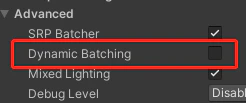
画像にバッチ処理が発生する理由は、画像がSprite Rendererを使用して描画され、メッシュはUnityによって動的に生成されるためです。バッチ処理の動作もUnityによって内部的に処理され、Dynamic Batchingがオンになっているかどうかには影響されません。
2.次にはレンダリング順序を制御して、バッチ処理する必要のあるオブジェクトが隣接する順序でレンダリングされるようにすることです。最初にすべての画像を描画し、次にすべてのテキストを描画します。
方法一:上記に従って、Order in Layerを設置します。画像のOrder in Layerを0に設置し、文字を1に設置します。
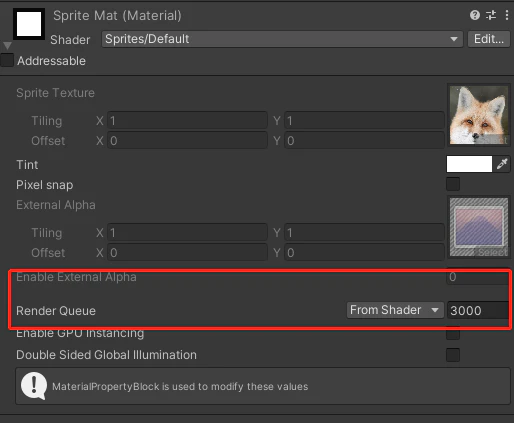
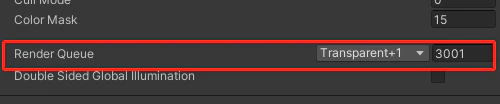
方法二:すべての画像のRender Queueを3000に設置し、すべての文字のRender Queueを3001に設置します。
効果は下記のように、
Addressable
Addressable1.17.13のAssetProviderとAssetBundle Providerの2つのオプションの意味を知っている人はいますか?

①
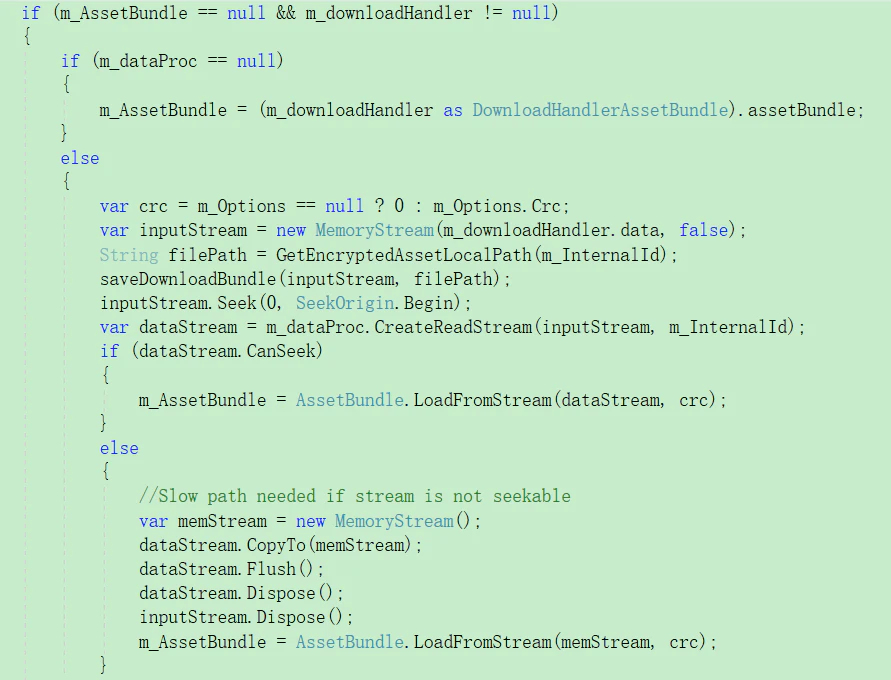
Addressablesのソースコードを検索できます。デフォルトの実現を拡張して、独自のダウンロードおよびロードプロセスをカスタマイズできます。
[DisplayName(“Assets from Bundles Provider”)]
public class BundledAssetProvider : ResourceProviderBase
[DisplayName(“AssetBundle Provider”)]
public class AssetBundleProvider : ResourceProviderBase
②
これは、AssetBundleとAssetBundleをロードする方法をカスタマイズするための方法です。問題主は、Addressables.CNバージョンのAssetBundleProvider.csの実現を確認できます。このバージョンでは、AssetBundleをロードする別の方法であるAssetBundleを復号化する方法が追加されています。
Addressable
問題の説明は下記のように、
使用シーン:Addressablesを介して再起動せずにゲームのホットアップデートを実現したいです。
問題の再現:
Part1:今リリースされているアセットはバージョンAです。
Part2:次に、バージョンBのアセットをリリースしました。ゲームを起動し、今はアップデートしていないために、ロードされたアセットはバージョンAです。Catalogとアセットの更新を確認し始めました。更新の必要性を検出した後、先がロードしたすべてのHandleを解放してホットアップデートを開始しました。アセットを再びロードし、現時点ではバージョンBです。ゲームを再起動し、ロードされるのもバージョンBです。(ここまでは一切正常です。)
Part3:バージョンCのアセットをリリースしました。この時ゲームを起動すると問題が発生します。ロードされたのはバージョンBではなく、バージョンAのアセットです。(この一歩には問題があると思います。)次にロードされたすべてのHandleを解放してホットアップデートを開始します。再びアセットをロードして、バージョンCのアセットも使えされます。
Part4:その後、Addressableがインターネットに接続されたときにCatalogを自動的に要求するかどうか疑問に思い始めました(Disable Catalog Update on Startupはもうチェックされています。)。アセットアップデートがあると検出すれば、ホットアップデート後のバージョンではなく、最初期バージョンを使用します。実験を行いしました。アセットサーバーをオフにすると、使用されたアセットはホットアップデート後のバージョンになりましたが、アセットサーバーをオンにすれば、ロードされたアセットは最初期バージョンのもので、ホットアップデートの後に正常になります。
望みの効果:アセットを更新したので、状況に関係なく最新のものである必要があります。不可解に最初期バージョンが表示されるのではないです。
Unityバージョン:2020.1.9f1c1
プラットフォーム:Windows
関連コード:Addressablesプロジェクトのテスト
https://gitee.com/dreamCirno/addressable-hotfix-test/tree/master
①
コールの順序に問題があるかどうかを確認してください。私はこの順序でコールしています。
InitializeAsync→CheckForCatalogUpdates→UpdateCatalogs→GetDownloadSizeAsync→DownloadDependenciesAsync
②
述べたものから判断すると、BバージョンのCatalogにアップデートしていなかったようです。
③
下記のコードを参照してください。
using System;
using System.Collections;
using System.Collections.Generic;
using UnityEngine;
using UnityEngine.AddressableAssets;
using UnityEngine.ResourceManagement.AsyncOperations;
using UnityEngine.ResourceManagement.ResourceProviders;
using UnityEngine.UI;
using static UnityEngine.AddressableAssets.Addressables;
public class GameLaunch : MonoBehaviour
{
    public Action<string> OnStatusTipHasChanged;
    public Action<float> OnDownloadPercentHasChanged;
    public Action<bool> OnDownloadHasResult;
    AsyncOperationHandle<GameObject> handle;
    GameObject obj;
    /// <summary>
    /// カスタマイズで更新検出を待っているLabelコレクションを指定する
    /// </summary>
    private List<string> mKeys = new List<string>() { "default" };
    public IEnumerator CheckUpdate()
    {
        bool isNeedUpdateCatalog = false;
        bool isNeedUpdateResources = false;
        // Addressableを初期化する
        var initHandle = Addressables.InitializeAsync();
        yield return initHandle;
        OnStatusTipHasChanged?.Invoke("更新検出を開始する");
        Debug.LogError("更新検出を開始する");
        // ローカルCatalogが最新バージョンであるかどうかを検出する
        var checkHandle = Addressables.CheckForCatalogUpdates(false);
        yield return checkHandle;
        if (checkHandle.Status == AsyncOperationStatus.Succeeded) {
            OnDownloadPercentHasChanged?.Invoke(1);
            OnStatusTipHasChanged?.Invoke("Catalog検出完了");
            Debug.LogError("Catalog検出完了");
        }
        List<string> catalogs = checkHandle.Result;
        if (catalogs != null && catalogs.Count > 0)
        {
            OnStatusTipHasChanged?.Invoke("Catalogの更新が必要と検出した");
            Debug.LogError("Catalogsの更新が必要と検出した");
            isNeedUpdateCatalog = true;
        }
        else
        {
            OnStatusTipHasChanged?.Invoke("Catalogが最新であると検出した");
            Debug.LogError("Catalogsが最新であると検出した");
        }
        var sizeHandle = Addressables.GetDownloadSizeAsync(mKeys);
        if (sizeHandle.Result > 0)
        {
            Debug.LogError("アセットパックの更新があると検出した");
            OnStatusTipHasChanged?.Invoke("アセットパックの更新があると検出した");
            isNeedUpdateResources = true;
        }
        else
        {
            Debug.LogError("アセットパックの更新がないと検出した");
            OnStatusTipHasChanged?.Invoke("アセットパックの更新がないと検出した");
        }
        OnStatusTipHasChanged?.Invoke("次への準備ができた");
        if (isNeedUpdateCatalog || isNeedUpdateResources)
        {
            if (isNeedUpdateCatalog)
            {
                yield return UpdateCatalog(catalogs);
            }
            if (isNeedUpdateResources)
            {
                yield return UpdateResources();
            }
            OnDownloadHasResult?.Invoke(true);
        }
        else
        {
            //StartGame();
            Debug.LogError("ゲームスタート");
        }
    }
    private void Update()
    {
        if (Input.GetKeyDown(KeyCode.C))
        {
            StartCoroutine(CheckUpdate());
        }
        if (Input.GetKeyDown(KeyCode.L))
        {
            handle = Addressables.LoadAssetAsync<GameObject>("Image");
            handle.Completed += param =>
            {
                if (param.Status == AsyncOperationStatus.Succeeded)
                {
                    Debug.LogError("プリロード成功");
                }
                else
                {
                    Debug.LogError("プリロード失敗");
                }
                obj = param.Result;
            };
        }
        if (Input.GetKeyDown(KeyCode.R))
        {
            ReleaseCache();
        }
        if (Input.GetKeyDown(KeyCode.Space))
        {
            Instantiate(obj, new Vector2(UnityEngine.Random.Range(0, 400), UnityEngine.Random.Range(0, 400)), Quaternion.identity, GameObject.Find("Canvas").transform);
        }
    }
    private IEnumerator UpdateCatalog(List<string> catalogs)
    {
        var updateHandle = Addressables.UpdateCatalogs(catalogs, false);
        Debug.LogError("Catalogsの更新が始まる");
        yield return updateHandle;
        Addressables.Release(updateHandle);
    }
    private IEnumerator UpdateResources()
    {
        ReleaseCache();
        // 更新する必要な内容>0、ダウンロードおよび更新する必要があると意味する
        // 既有アセットをクリーンアップする
        //var clearHandle = Addressables.ClearDependencyCacheAsync(mKeys, false);
        //yield return clearHandle;
        // 更新アセットをダウンロードする
        var downloadHandle = Addressables.DownloadDependenciesAsync(mKeys, MergeMode.Union, false);
        Debug.LogError("アセットの更新が始まる");
        while (!downloadHandle.IsDone)
        {
            DownloadStatus downloadStatus = downloadHandle.GetDownloadStatus();
            OnDownloadPercentHasChanged?.Invoke(downloadStatus.Percent);
            OnStatusTipHasChanged?.Invoke($"ダウンロード状況: {downloadStatus.Percent * 100} %");
            Debug.LogError($"下载进度: {downloadStatus.Percent * 100} %");
            yield return null;
        }
        if (downloadHandle.Status == AsyncOperationStatus.Succeeded)
        {
            OnStatusTipHasChanged?.Invoke($"ダウンロード状況:{(downloadHandle.IsDone ? "完了" : "未完成")}");
            Debug.LogError($"ダウンロード状況:{(downloadHandle.IsDone ? "完了" : "未完成")}");
        }
        else
        {
            OnStatusTipHasChanged?.Invoke($"更新パックのダウンロードに失敗した");
            Debug.LogError($"更新パックのダウンロードに失敗した,エラー:{downloadHandle.OperationException.Message}");
        }
        Addressables.Release(downloadHandle);
    }
    private void ReleaseCache()
    {
        try
        {
            Addressables.Release(handle);
            Debug.LogError("アセット解放成功");
        }
        catch (Exception)
        {
            Debug.LogError("アセット解放失敗");
        }
    }
}
Rendering
法線ストロークアルゴリズムを使用すると、いくつかの薄いメッシュでモデルが透過する現象があります。これはアルゴリズムの問題ですか、それともメッシュの問題ですか?どのように解決できますか?
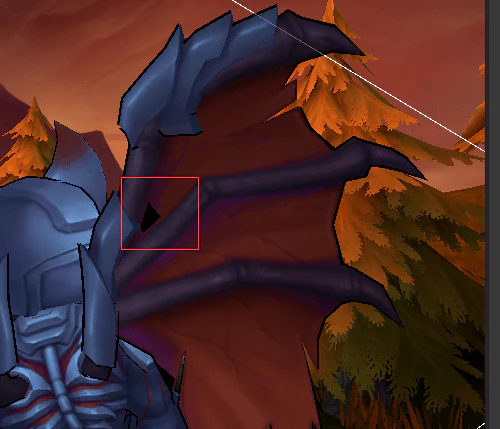
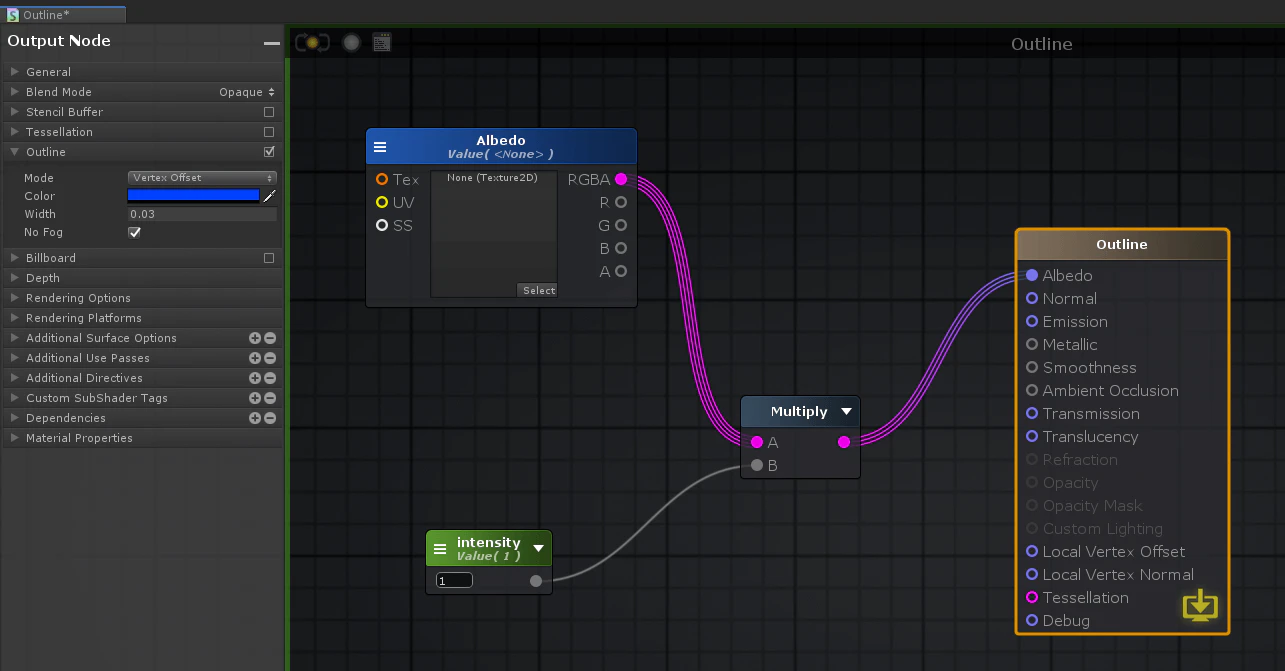
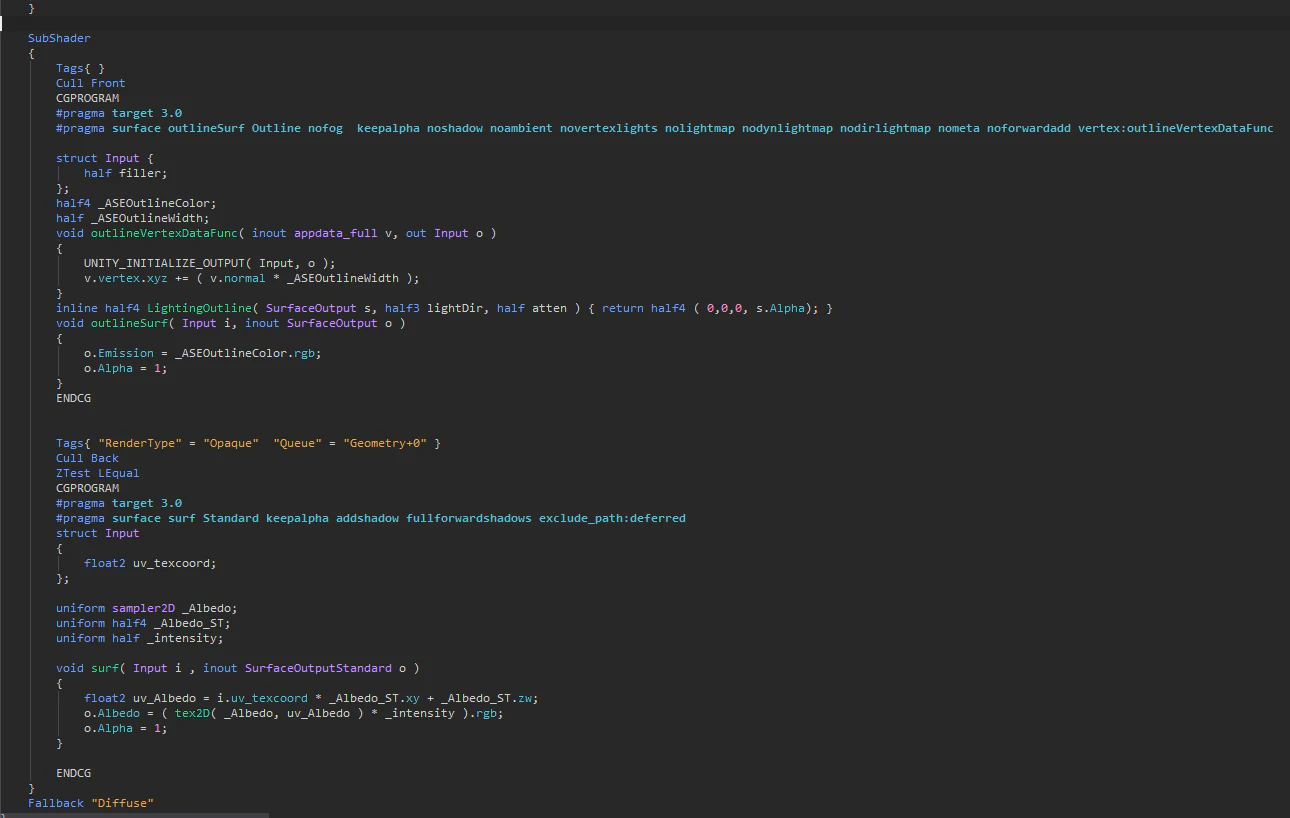
Shaderは下記のように、
①
2つの疑問があります。
1、Cull BackではなくCull Frontする必要ありますか?
2、自分がレンダリングしたRenderTextureを使用する場合には、深さの精度が不十分ですか?
②
この方法を使用する場合によく発生する固有の問題です。レンダリング されたBackfacesと元のモデルに深さ衝突があって、モデルを遮って透過問題を引き起こします。
解決法:1つの方法は、cにZ-offsetを設定し、輪郭線を隣接するサーフェスに埋め込まれるようにすることです。もう1つの方法は、Backfacesが拡張する法線を変更して、輪郭線(Backfaces)を平坦化することです。
UWA Technologyは、モバイル/VRなど様々なゲーム開発者向け、パフォーマンス分析と最適化ソリューション及びコンサルティングサービスを提供している会社でございます。
今なら、UWA GOTローカルツールが15日間に無償試用できます!!
よければ、ぜひ!
UWA公式サイト:https://jp.uwa4d.com
UWA GOT OnlineレポートDemo:https://jp.uwa4d.com/u/got/demo.html
UWA公式ブログ:https://blog.jp.uwa4d.com