
■ はじめに
本記事では、Terraformを用いてAWS上にS3 + CloudFrontによる静的Webサイト配信環境を構築した手順について解説します。
■ 構成
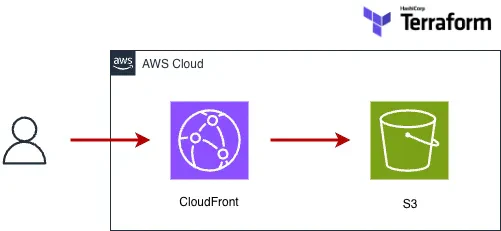
■ 構成のポイント
- S3はパブリック非公開
- CloudFront経由のみアクセス可能
- OAC(Origin Access Control)を利用
■ Terraformコード
■ S3
resource "aws_s3_bucket" "site" {
  bucket = "your-bucket-name"
}
■ パブリックアクセスブロック
resource "aws_s3_bucket_public_access_block" "site" {
  bucket = aws_s3_bucket.site.id

  block_public_acls       = true
  block_public_policy     = true
  ignore_public_acls      = true
  restrict_public_buckets = true
}
■CloudFront OAC
resource "aws_cloudfront_origin_access_control" "oac" {
  name                              = "s3-oac"
  origin_access_control_origin_type = "s3"
  signing_behavior                  = "always"
  signing_protocol                  = "sigv4"
}
■ CloudFront
resource "aws_cloudfront_distribution" "cdn" {
  origin {
    domain_name = aws_s3_bucket.site.bucket_regional_domain_name
    origin_id   = "s3-origin"

    origin_access_control_id = aws_cloudfront_origin_access_control.oac.id
  }

  enabled             = true
  default_root_object = "index.html"

  default_cache_behavior {
    target_origin_id       = "s3-origin"
    viewer_protocol_policy = "redirect-to-https"

    allowed_methods = ["GET", "HEAD"]
    cached_methods  = ["GET", "HEAD"]

    forwarded_values {
      query_string = false
      cookies {
        forward = "none"
      }
    }
  }

  restrictions {
    geo_restriction {
      restriction_type = "none"
    }
  }

  viewer_certificate {
    cloudfront_default_certificate = true
  }
}
■ 工夫した点
- S3を非公開とし、セキュリティを強化
- OACを利用し、CloudFront経由のみアクセス可能に設定
- TerraformによるIaCで再現性を確保
■ 苦労した点
CloudFrontからS3にアクセスできず、「AccessDenied」エラーが発生しました。
原因は以下の通りでした。
- バケットポリシー未設定
- エンドポイント設定ミス
■ 学び
- CloudFrontとS3のアクセス制御の重要性
- Terraformでの依存関係の理解
- エラーからの原因特定力
■ まとめ
Terraformを用いることで、AWSインフラをコードとして管理でき、再現性の高い環境構築が可能になります。
今回の構築を通じて、インフラ設計から実装までの理解を深めることができました。