
PDFが開けない
ひとつ前の記事で「PDFのページ数を取得する」アクションを作成したのですが
実際に運用してみたら
「OutOfMemoryで落ちる」
という事象が発生しました。
使用者が500ページとかあるPDFを投げたようで……。
そういえばWindowsの制限で、テキストは2GB超が扱えないのでしたっけ。
だったらこの500ページのPDFはどう読んだらいいのかな……。
じゃあちょっとずつ読めばいいのでは
前回作成したアクションは、Read All Text From File アクションで、全部いちどに読もうとするからメモリ不足になる。
ということはちょっとずつ読んで順に見ていけば、メモリを圧迫しないのでは?
やってみた
Read All Text From File ではなく、頭から1行ずつ順番に読みます。
「/Count 99」を含む行が出現したら、その行の文字列を取得して処理終了。
フローはこうです。

コードステージの中身はこう。
入力引数:PDFFilePath(データ形式はテキスト、PDFファイル格納場所のフルパス)
出力引数:ResultLine(データ形式はテキスト、「/Count 99」が含まれる行の文字列)
string resultLine = null;
using (StreamReader reader = new StreamReader(InputFilePath))
{
    string line;
    while ((line = reader.ReadLine()) != null)
    {
        if (line.Contains("/Count"))
        {
            resultLine = line;
            break; // 「/Count」は必ず1回しか出現しない」前提で最初の1回で終了
        }
    }
}

ResultLine = resultLine;
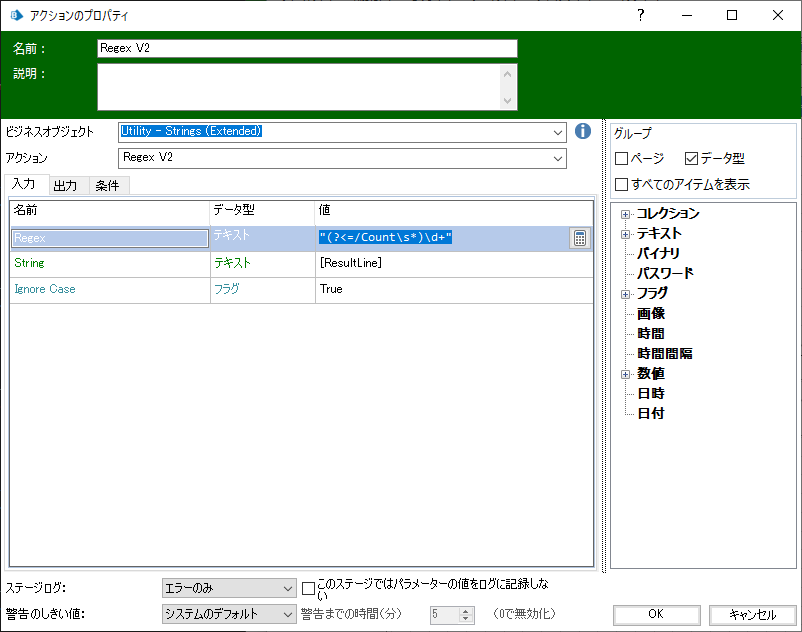
取得したResultLineからページ数の数値だけを抽出するのは、まえの記事でも使用した「Utility - Strings(Extended)」VBOの「Regex V2」を使います。
正規表現はこうです。
(?<=/Count\s*)\d+
| 正規表現 | 意味 |
|---|---|
| /(?<=...) | 肯定の後読み(抽出したい対象の前に特定のパターンがある場合。今回はページ数の前に「/Count」) |
| /Count\s* | 「/Count」 の後に空白(0文字以上) |
| \d+ | 1桁以上の数字(ここが抽出対象) |
終わりです
テキストを扱うときのサイズ制限について頭から抜けておりました……。
時間がかかるといってもそんなにじゃないです。300ページで数秒くらい。